ColorMatch
ColorMatch
Another nice minigame!
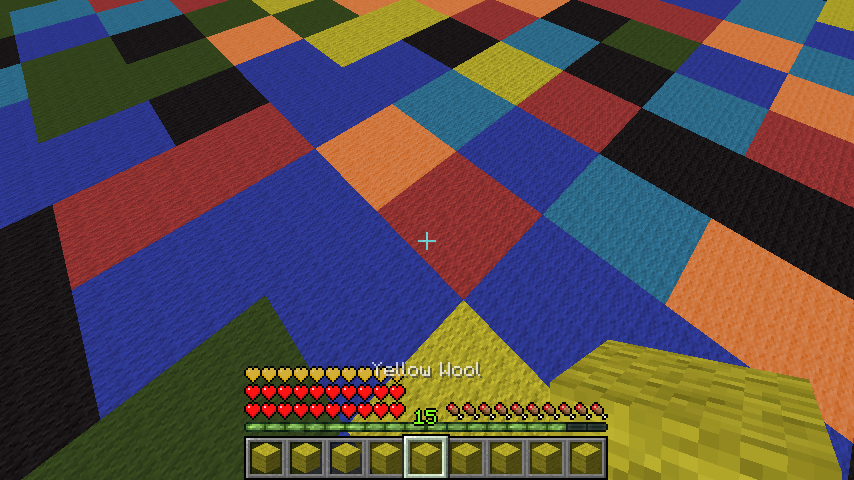
You get a colored wool in your Inventory and you have to jump onto the corresponding color! Multiple arenas can be set up that are joinable via signs/commands. As of now the last man standing wins, which can't be changed. See further information and configuration options down below.
Setup
Pex doesn't care about OP, you need to give yourself the permissions!
- Set the main lobby where all join signs will be: /cm setmainlobby
For each new arena:
- /cm createarena [name]
- Set the waiting lobby (different than the main lobby!): /cm setlobby [name]
- Setup the minigame (will create a 64x64 area full with wool, be aware of that!): /cm setup [name]
To create a join sign:
1st line: colormatch; 3rd line: arenaname
Creating a join sign requires the permission cm.sign or colormatch.sign.

Smaller Arenas
As of v1.5 you can also create smaller arenas. The setup is the same except for one command, /cm setup is now /cm setupsmall. It will create an 32x32 arena and not the default 64x64 arena, which is good for small servers with less ram.
Glass/Clay mode
As of v1.5.3 you can also create glass arenas. The setup is the same except for one command, /cm setup is now /cm setupglass. This will generate a normal arena but with stained glass in different colors. As of v1.5.5 clay arenas are possible, too.
Commands/Permissions
| Command | Description | Permission |
|---|---|---|
| /cm createarena [name] | creates a new arena | colormatch.setup |
| /cm setlobby [name] | sets the waiting lobby for a new arena | colormatch.setup |
| /cm setup [name] | sets the new arena up | colormatch.setup |
| /cm setupsmall [name] | sets the new arena up (32x32 mode) | colormatch.setup |
| /cm setupsmallclay [name] | sets the new arena up (32x32 clay mode) | colormatch.setup |
| /cm setupglass [name] | sets the new arena up (glass mode) | colormatch.setup |
| /cm setupsmallglass [name] | sets the new arena up (32x32 glass mode) | colormatch.setup |
| /cm setupclay [name] | sets the new arena up (clay mode) | colormatch.setup |
| /cm setmainlobby | sets the main lobby | colormatch.setup |
| /cm removearena [name] | removes a arena | colormatch.setup |
| /cm join [name] | joins a game per command | |
| /cm leave | leaves the game | |
| /cm kitgui | shows all kits in a gui | |
| /cm changekit [kit] | changes the kit and lists all, if unknown kit provided | |
| /cm start [name] | forces an arena to start | colormatch.start |
| /cm reload | reloads the config | colormatch.reload |
| /cm list | lists all arenas | colormatch.list |
| /cm endall | ends all running colormatch tasks, if something bad happens | colormatch.end |
| /cm setdifficulty [arena] [difficulty] | sets the difficulty of an arena | colormatch.setup |
| /cm setmaxplayers [arena] [count] | sets max players of an arena | colormatch.setup |
| /cm setminplayers [arena] [count] | sets min players of an arena | colormatch.setup |
Creating a join sign requires the permission cm.sign or colormatch.sign.
Config
config:
  auto_updating: true # I recommend you to set that to true for bugfix releases etc.
  rounds_per_game: 10 # how many times the color will change per game
  start_countdown: 5 # seconds to wait before starting a game
  default_max_players: 4 # max amount of players that can join and will be used as a default
  default_min_players: 3 # amount of players required to start a game and min amount of players that will be used as a default
  use_economy_reward: true # if set to true, the winner get the money reward, if false, the item reward
  money_reward_per_game: 30
  itemid: 264
  itemamount: 1
  use_command_reward: false # will execute the following command as a reward, if set to true
  command_reward: pex user [user] group set ColorPro
  start_anouncement: true # enables server broadcasts
  game_on_join: false # autostart (for bungee servers)
  bling_sounds: false # turn this on if you want to get 3 blings played before the wool disappears
  kits:
    default:
      name: default
      potioneffect: SPEED
      amplifier: 1
      lore: The default class.
strings:
  saved:
    arena: '&aSuccessfully saved arena.'
    lobby: '&aSuccessfully saved lobby.'
    setup: '&6Successfully saved spawn. Now setting up, might &2lag&6 a little bit.'
  not_in_arena: '&cYou don''t seem to be in an arena right now.'
  config_reloaded: '&6Successfully reloaded config.'
  arena_is_ingame: '&cThe arena appears to be ingame.'
  arena_invalid: '&cThe arena appears to be invalid.'
  arena_invalid_sign: '&cThe arena appears to be invalid, because a join sign is missing.'
  arena_invalid_component: '&2The arena appears to be invalid (missing components
    or misstyped arena)!'
  you_fell: '&3You fell! Type &6/cm leave &3to leave.'
  you_won: '&aYou won this round, awesome man! Here, enjoy your reward.'
  starting_in: '&aStarting in &6'
  starting_in2: '&a seconds.'
  arena_full: '&cThis arena is full!'
  starting_anouncement: '&aStarting a new ColorMatch Game in &6'
  started_anouncement: '&aA new ColorMatch Round has started!'
Kits
Every kit besides the default one requires a permission, colormatch.kit.[kitname]. You can select a kit ingame by typing /cm changekit [name].
You can also add unlimited kits, but be aware that errors might appear, if the potioneffect is not valid. You can find a list of Potioneffects here.
    default:
      name: default
      potioneffect: SPEED
      amplifier: 1
      lore: The default class.
Arena Difficulty
You can set the difficulty for each arena as of v1.4. Simply do /cm setdifficulty [arenaname] [difficulty] to change it.
Possible difficulties are:
| Difficulty | Description |
|---|---|
| 0 | Easy |
| 1 | Default |
| 2 | Hard |
The Logarithm:
On each round, the following time is calculated for the next round. d is the difficulty, which can be 0, 1 or 2. 80L can be seen as 4 seconds (20L = 1 second). You can use the following function to determine the seconds in ticks for a round, if you're a big mathematician:
f(x) = 80 - (d * 20) - (4 * x)
Preview

Youtube
Thanks to Wukkit for creating this video like 3 hours after the first release! (a bit outdated as of now)
German tutorial video:
Other reviews:
[GERMAN] My german plugin tutorial: link.
[GERMAN] Another nice german review: link.
[SPANISH] Here's a spanish review for the plugin: link.
[ENGLISH] Another english quick tutorial: link.
[ENGLISH] Plugin review: link.
[POLISH] Plugin review: link.
[GAMEPLAY] Here's a quick gameplay video on Kamoworld by Cam: link.
[PORTUEGESE] Here's a nice portuguese tutorial + gameplay video: link
[ITAILIAN] link
Todo
- add auto-rejoin
- add leaderboards
- add bungee signs support
Additional Information
You can find the source code here.
You can try this plugin out at server.kamoworld.com. ColorMatch is also included in MinigamesParty.
This plugin uses hidendra's Metrics system to send server related information like player count, java/bukkit/plugin version etc. to the official MCStats servers. You can disable this in the config.yml in plugins/PluginMetrics/.
The plugin also uses an autoupdater which can be turned off in the config (see above in the config section).
Have fun :)

Comments

-

Forge_User_59823561 Owner
-
View User Profile
-
Send Message
Posted Mar 4, 2014When you'll release new version with scoreboard fixed?
-
View User Profile
-
Send Message
Posted Mar 4, 2014such a great plugin! players love it- keep up the good work!
if anyone is wanting to try this out- just join our server and type /warp color
epic job!!
-
View User Profile
-
Send Message
Posted Mar 1, 2014Check Out my vid 4 ur plugin!
Its AWSOME!
My Youtube Video
-
View User Profile
-
Send Message
Posted Mar 1, 2014@instancelabs
Thanks!1
-
View User Profile
-
Send Message
Posted Feb 28, 2014@HighEndDevelopment
Will do as soon as I find the time. :)
-
View User Profile
-
Send Message
Posted Feb 28, 2014@JebananyPL
Thank you!
-
View User Profile
-
Send Message
Posted Feb 28, 2014Please add BungeeCord soon as possible.
-
View User Profile
-
Send Message
Posted Feb 27, 2014Hi! I shot a video about your plugin in polish language. If you want you can post the video in the description.
http://www.youtube.com/watch?v=bquw9aN1kPA Hi! I shot a video about your plugin in polish language. If you want you can post the video in the description:
-
View User Profile
-
Send Message
Posted Feb 25, 2014This game is so fun! working great on our server!
server.kamoworld.com :)
-
View User Profile
-
Send Message
Posted Feb 23, 2014@xInfamouZChannel
Scoreboard bug will be fixed asap :)
@DarthRiddle
Code differs 100% and is written by me and the only similar thing is, that you need to jump on the color you have in your inventory. Already talked to tux2 a month ago and he told me everything's fine and we're going in different directions.
@BenFiger
I'll try out the cobweb idea, thanks!
-
View User Profile
-
Send Message
Posted Feb 23, 2014This is very similar to color shuffle by Tux2 rewritten. Although I appreciate new games this is very similar with chages like CM instead of CS. I do think this has some fixed bugs that the other programmer would not have fixed. One major issue is arenas not auto starting up after server reset. That was a code issue in Color Shuffle as well.
Darth
-
View User Profile
-
Send Message
Posted Feb 23, 2014You should add the same function of glassmode but with clay! Also need to fix some bugs like the scoreboard disappearing
-
View User Profile
-
Send Message
Posted Feb 22, 2014When players close their minecraft client it freezes the current game
-
View User Profile
-
Send Message
Posted Feb 22, 2014Another future idea is to change the air to cobwebs. I heard on another server that they changed the air (when the blocks dissapear) to cobwebs which will reduce the lag. I think you should try this out too, because people do not like lag. So actually the blocks will dissapear, but there will be cobwebs instead of air.
-
View User Profile
-
Send Message
Posted Feb 22, 2014Add Wool Heads! For fun :D
With Block Hat
-
View User Profile
-
Send Message
Posted Feb 22, 2014Nice Plugin! :D
Can you make the Plugin as to dans-arcade.com ?
If you could do that, that would be awesome! <3
-
View User Profile
-
Send Message
Posted Feb 21, 2014THANK YOU!!! Its would really help a lot! And if you didn't see my comment before, you should give the option in the configuration
THANKS AGAIN!
-
View User Profile
-
Send Message
Posted Feb 21, 2014@RandomSteveHeads
Alright, I'll think about it :)
-
View User Profile
-
Send Message
Posted Feb 21, 2014@dagurucraft: I need one join sign in my minigame hub and another in the colormatch lobby so they can join again after 1 match because the players dont stay in the match after 1 match ends so i need a join sign in the colormatch lobby as well.
@instancelabs: can you please look into that idea i posted about not having to join every match - you stay in until you type /cm leave. It would make it a lot easier
THANKS
-
View User Profile
-
Send Message
Posted Feb 21, 2014@micromcrpt
Do another /cm setup :)