ColorMatch
ColorMatch
Another nice minigame!
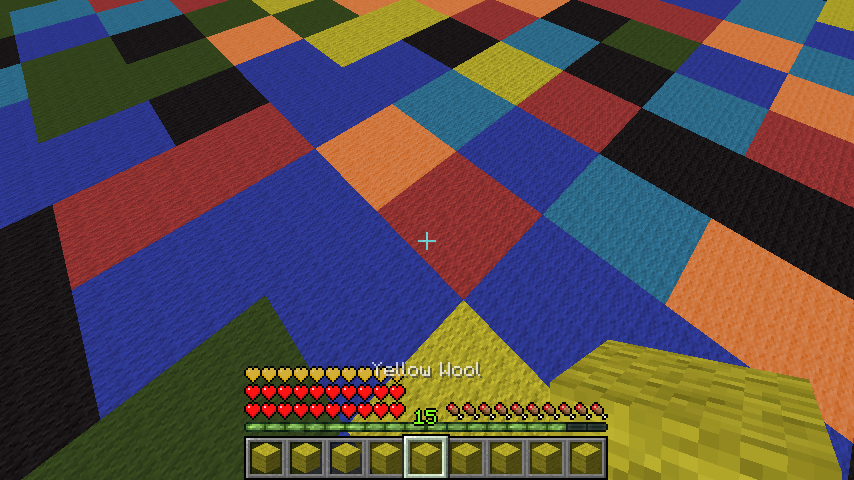
You get a colored wool in your Inventory and you have to jump onto the corresponding color! Multiple arenas can be set up that are joinable via signs/commands. As of now the last man standing wins, which can't be changed. See further information and configuration options down below.
Setup
Pex doesn't care about OP, you need to give yourself the permissions!
- Set the main lobby where all join signs will be: /cm setmainlobby
For each new arena:
- /cm createarena [name]
- Set the waiting lobby (different than the main lobby!): /cm setlobby [name]
- Setup the minigame (will create a 64x64 area full with wool, be aware of that!): /cm setup [name]
To create a join sign:
1st line: colormatch; 3rd line: arenaname
Creating a join sign requires the permission cm.sign or colormatch.sign.

Smaller Arenas
As of v1.5 you can also create smaller arenas. The setup is the same except for one command, /cm setup is now /cm setupsmall. It will create an 32x32 arena and not the default 64x64 arena, which is good for small servers with less ram.
Glass/Clay mode
As of v1.5.3 you can also create glass arenas. The setup is the same except for one command, /cm setup is now /cm setupglass. This will generate a normal arena but with stained glass in different colors. As of v1.5.5 clay arenas are possible, too.
Commands/Permissions
| Command | Description | Permission |
|---|---|---|
| /cm createarena [name] | creates a new arena | colormatch.setup |
| /cm setlobby [name] | sets the waiting lobby for a new arena | colormatch.setup |
| /cm setup [name] | sets the new arena up | colormatch.setup |
| /cm setupsmall [name] | sets the new arena up (32x32 mode) | colormatch.setup |
| /cm setupsmallclay [name] | sets the new arena up (32x32 clay mode) | colormatch.setup |
| /cm setupglass [name] | sets the new arena up (glass mode) | colormatch.setup |
| /cm setupsmallglass [name] | sets the new arena up (32x32 glass mode) | colormatch.setup |
| /cm setupclay [name] | sets the new arena up (clay mode) | colormatch.setup |
| /cm setmainlobby | sets the main lobby | colormatch.setup |
| /cm removearena [name] | removes a arena | colormatch.setup |
| /cm join [name] | joins a game per command | |
| /cm leave | leaves the game | |
| /cm kitgui | shows all kits in a gui | |
| /cm changekit [kit] | changes the kit and lists all, if unknown kit provided | |
| /cm start [name] | forces an arena to start | colormatch.start |
| /cm reload | reloads the config | colormatch.reload |
| /cm list | lists all arenas | colormatch.list |
| /cm endall | ends all running colormatch tasks, if something bad happens | colormatch.end |
| /cm setdifficulty [arena] [difficulty] | sets the difficulty of an arena | colormatch.setup |
| /cm setmaxplayers [arena] [count] | sets max players of an arena | colormatch.setup |
| /cm setminplayers [arena] [count] | sets min players of an arena | colormatch.setup |
Creating a join sign requires the permission cm.sign or colormatch.sign.
Config
config:
  auto_updating: true # I recommend you to set that to true for bugfix releases etc.
  rounds_per_game: 10 # how many times the color will change per game
  start_countdown: 5 # seconds to wait before starting a game
  default_max_players: 4 # max amount of players that can join and will be used as a default
  default_min_players: 3 # amount of players required to start a game and min amount of players that will be used as a default
  use_economy_reward: true # if set to true, the winner get the money reward, if false, the item reward
  money_reward_per_game: 30
  itemid: 264
  itemamount: 1
  use_command_reward: false # will execute the following command as a reward, if set to true
  command_reward: pex user [user] group set ColorPro
  start_anouncement: true # enables server broadcasts
  game_on_join: false # autostart (for bungee servers)
  bling_sounds: false # turn this on if you want to get 3 blings played before the wool disappears
  kits:
    default:
      name: default
      potioneffect: SPEED
      amplifier: 1
      lore: The default class.
strings:
  saved:
    arena: '&aSuccessfully saved arena.'
    lobby: '&aSuccessfully saved lobby.'
    setup: '&6Successfully saved spawn. Now setting up, might &2lag&6 a little bit.'
  not_in_arena: '&cYou don''t seem to be in an arena right now.'
  config_reloaded: '&6Successfully reloaded config.'
  arena_is_ingame: '&cThe arena appears to be ingame.'
  arena_invalid: '&cThe arena appears to be invalid.'
  arena_invalid_sign: '&cThe arena appears to be invalid, because a join sign is missing.'
  arena_invalid_component: '&2The arena appears to be invalid (missing components
    or misstyped arena)!'
  you_fell: '&3You fell! Type &6/cm leave &3to leave.'
  you_won: '&aYou won this round, awesome man! Here, enjoy your reward.'
  starting_in: '&aStarting in &6'
  starting_in2: '&a seconds.'
  arena_full: '&cThis arena is full!'
  starting_anouncement: '&aStarting a new ColorMatch Game in &6'
  started_anouncement: '&aA new ColorMatch Round has started!'
Kits
Every kit besides the default one requires a permission, colormatch.kit.[kitname]. You can select a kit ingame by typing /cm changekit [name].
You can also add unlimited kits, but be aware that errors might appear, if the potioneffect is not valid. You can find a list of Potioneffects here.
    default:
      name: default
      potioneffect: SPEED
      amplifier: 1
      lore: The default class.
Arena Difficulty
You can set the difficulty for each arena as of v1.4. Simply do /cm setdifficulty [arenaname] [difficulty] to change it.
Possible difficulties are:
| Difficulty | Description |
|---|---|
| 0 | Easy |
| 1 | Default |
| 2 | Hard |
The Logarithm:
On each round, the following time is calculated for the next round. d is the difficulty, which can be 0, 1 or 2. 80L can be seen as 4 seconds (20L = 1 second). You can use the following function to determine the seconds in ticks for a round, if you're a big mathematician:
f(x) = 80 - (d * 20) - (4 * x)
Preview

Youtube
Thanks to Wukkit for creating this video like 3 hours after the first release! (a bit outdated as of now)
German tutorial video:
Other reviews:
[GERMAN] My german plugin tutorial: link.
[GERMAN] Another nice german review: link.
[SPANISH] Here's a spanish review for the plugin: link.
[ENGLISH] Another english quick tutorial: link.
[ENGLISH] Plugin review: link.
[POLISH] Plugin review: link.
[GAMEPLAY] Here's a quick gameplay video on Kamoworld by Cam: link.
[PORTUEGESE] Here's a nice portuguese tutorial + gameplay video: link
[ITAILIAN] link
Todo
- add auto-rejoin
- add leaderboards
- add bungee signs support
Additional Information
You can find the source code here.
You can try this plugin out at server.kamoworld.com. ColorMatch is also included in MinigamesParty.
This plugin uses hidendra's Metrics system to send server related information like player count, java/bukkit/plugin version etc. to the official MCStats servers. You can disable this in the config.yml in plugins/PluginMetrics/.
The plugin also uses an autoupdater which can be turned off in the config (see above in the config section).
Have fun :)

Comments

-

Forge_User_59823561 Owner
-
View User Profile
-
Send Message
Posted Mar 27, 2014@ClockWorkMod
Alright, I'll add that in the next version.
@LegendSmile
Thanks :)
-
View User Profile
-
Send Message
Posted Mar 26, 2014We made a german tutorial at the latest version :) https://www.youtube.com/watch?v=w-pWeMXFWDw&list=PLZitkHkYlW4pULyaO_Zcl-qdPuIjyFWdJ&index=2
-
View User Profile
-
Send Message
Posted Mar 25, 2014@Instancelabs i kinda need something that would make it able to place the signs in Server a ( lobby ) which would connect to server b ( all the colormatch servers ). Just as the normal signs as they are now but then over a bungee network in seperated servers.
-
View User Profile
-
Send Message
Posted Mar 24, 2014@ClockWorkMod
Well, there is an auto-start function, so that you can use it on a seperate minigame server in a bungee network. Or do you want the signs to be updated and stuff over the network?
-
View User Profile
-
Send Message
Posted Mar 24, 2014Would you be able to add bungeecord support to CM and ME ?
-
View User Profile
-
Send Message
Posted Mar 15, 2014@NeonRemco
Try generating a new arena and changing the desired blocks before playing, it shouldn't overwrite your changes.
-
View User Profile
-
Send Message
Posted Mar 15, 2014Can you maybe add an option that you can make a custom arena, not with the default generating but that you can place blocks by yourself that will change form color every round
-
View User Profile
-
Send Message
Posted Mar 15, 2014Uploaded v1.6, which adds bungee support (autostart) and basic potioneffect kits (as of now commands-only).
@BucketConfigured
Thanks, glad you like it. :)
-
View User Profile
-
Send Message
Posted Mar 14, 2014No suggestions, because you've got your hands full, but just want to say this is an excellent plugin and I hope you do not stop updating and working on it. I want to see this plugin go far because it's really great! Thanks so much for it Mr. Instance!
-
View User Profile
-
Send Message
Posted Mar 14, 2014@TechNoBukkit
Yep, that's planned, and scoreboard should be working as of the latest version.
@RustyDagger
It's not about the falling, it's about the disappearing blocks.
-
View User Profile
-
Send Message
Posted Mar 14, 2014Add Kits it will would be very nice and Fix The scoreboard Players will receive coins at the end of each Round and when they win, and then they can buy the kits you can create in the config. Do item for Choose kit and to buy kits And the type of The item we can chacnge in the config too.
Your plugin wil be the best that way. :)
-
View User Profile
-
Send Message
Posted Mar 10, 2014I don't see how falling adds that much to the game. seems like wasted time to me.
-
View User Profile
-
Send Message
Posted Mar 10, 2014@RustyDagger
Nope, lighting calculations create lag (which is fixed with the glowstone), and how would a loop checking the blocks under the player help in any way? Edit: Ah, gotcha, you want the blocks to stay, but only check if the player is on the right block? That'd be pretty boring, but sure, if you want that, I can add that as an option.
-
View User Profile
-
Send Message
Posted Mar 10, 2014Cool Idea, poor Execution a lot of lag is created by changing all those blocks a simple loop checking the block under the player would be 10x more effective.
-
View User Profile
-
Send Message
Posted Mar 9, 2014@CrazymanJR
Yeah I can add that.
-
View User Profile
-
Send Message
Posted Mar 9, 2014@73u38
Escape the Mob is still awaiting approval, 5 days now..
Uploaded a new version with clay and the fixed command rewards.
-
View User Profile
-
Send Message
Posted Mar 8, 2014@instancelabs
can u add join sign configuration? and a permission for people to join full games
-
View User Profile
-
Send Message
Posted Mar 8, 2014@instancelabs
umm... version with fix command price already uploaded or still need to approve with bukkit? and how about escape the mob? already released?
-
View User Profile
-
Send Message
Posted Mar 5, 2014Great!! Now.. some last thing: Possibility to translate the wool blocks in inventory; Remove lag; Create the claymode feature that makes the arena in coloured clay blocks. It will be beautiful.
-
View User Profile
-
Send Message
Posted Mar 5, 2014@xInfamouZChannel
Uploaded a version that fixes that :)