ColorMatch
ColorMatch
Another nice minigame!
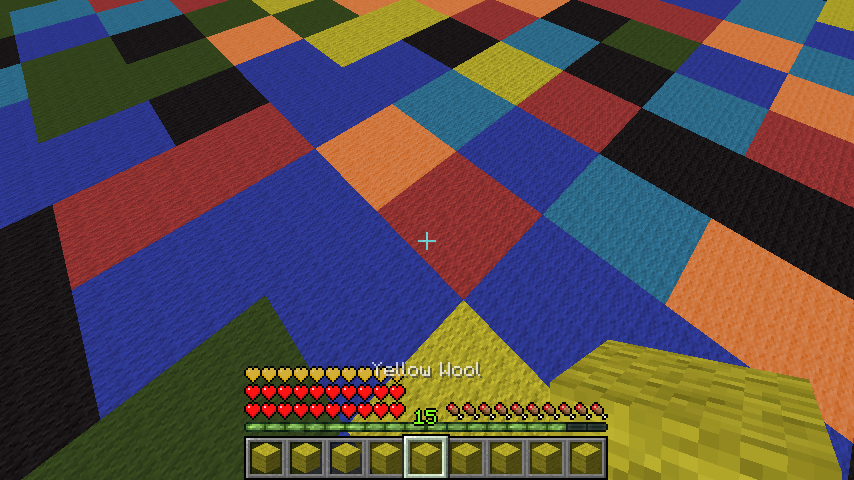
You get a colored wool in your Inventory and you have to jump onto the corresponding color! Multiple arenas can be set up that are joinable via signs/commands. As of now the last man standing wins, which can't be changed. See further information and configuration options down below.
Setup
Pex doesn't care about OP, you need to give yourself the permissions!
- Set the main lobby where all join signs will be: /cm setmainlobby
For each new arena:
- /cm createarena [name]
- Set the waiting lobby (different than the main lobby!): /cm setlobby [name]
- Setup the minigame (will create a 64x64 area full with wool, be aware of that!): /cm setup [name]
To create a join sign:
1st line: colormatch; 3rd line: arenaname
Creating a join sign requires the permission cm.sign or colormatch.sign.

Smaller Arenas
As of v1.5 you can also create smaller arenas. The setup is the same except for one command, /cm setup is now /cm setupsmall. It will create an 32x32 arena and not the default 64x64 arena, which is good for small servers with less ram.
Glass/Clay mode
As of v1.5.3 you can also create glass arenas. The setup is the same except for one command, /cm setup is now /cm setupglass. This will generate a normal arena but with stained glass in different colors. As of v1.5.5 clay arenas are possible, too.
Commands/Permissions
| Command | Description | Permission |
|---|---|---|
| /cm createarena [name] | creates a new arena | colormatch.setup |
| /cm setlobby [name] | sets the waiting lobby for a new arena | colormatch.setup |
| /cm setup [name] | sets the new arena up | colormatch.setup |
| /cm setupsmall [name] | sets the new arena up (32x32 mode) | colormatch.setup |
| /cm setupsmallclay [name] | sets the new arena up (32x32 clay mode) | colormatch.setup |
| /cm setupglass [name] | sets the new arena up (glass mode) | colormatch.setup |
| /cm setupsmallglass [name] | sets the new arena up (32x32 glass mode) | colormatch.setup |
| /cm setupclay [name] | sets the new arena up (clay mode) | colormatch.setup |
| /cm setmainlobby | sets the main lobby | colormatch.setup |
| /cm removearena [name] | removes a arena | colormatch.setup |
| /cm join [name] | joins a game per command | |
| /cm leave | leaves the game | |
| /cm kitgui | shows all kits in a gui | |
| /cm changekit [kit] | changes the kit and lists all, if unknown kit provided | |
| /cm start [name] | forces an arena to start | colormatch.start |
| /cm reload | reloads the config | colormatch.reload |
| /cm list | lists all arenas | colormatch.list |
| /cm endall | ends all running colormatch tasks, if something bad happens | colormatch.end |
| /cm setdifficulty [arena] [difficulty] | sets the difficulty of an arena | colormatch.setup |
| /cm setmaxplayers [arena] [count] | sets max players of an arena | colormatch.setup |
| /cm setminplayers [arena] [count] | sets min players of an arena | colormatch.setup |
Creating a join sign requires the permission cm.sign or colormatch.sign.
Config
config:
  auto_updating: true # I recommend you to set that to true for bugfix releases etc.
  rounds_per_game: 10 # how many times the color will change per game
  start_countdown: 5 # seconds to wait before starting a game
  default_max_players: 4 # max amount of players that can join and will be used as a default
  default_min_players: 3 # amount of players required to start a game and min amount of players that will be used as a default
  use_economy_reward: true # if set to true, the winner get the money reward, if false, the item reward
  money_reward_per_game: 30
  itemid: 264
  itemamount: 1
  use_command_reward: false # will execute the following command as a reward, if set to true
  command_reward: pex user [user] group set ColorPro
  start_anouncement: true # enables server broadcasts
  game_on_join: false # autostart (for bungee servers)
  bling_sounds: false # turn this on if you want to get 3 blings played before the wool disappears
  kits:
    default:
      name: default
      potioneffect: SPEED
      amplifier: 1
      lore: The default class.
strings:
  saved:
    arena: '&aSuccessfully saved arena.'
    lobby: '&aSuccessfully saved lobby.'
    setup: '&6Successfully saved spawn. Now setting up, might &2lag&6 a little bit.'
  not_in_arena: '&cYou don''t seem to be in an arena right now.'
  config_reloaded: '&6Successfully reloaded config.'
  arena_is_ingame: '&cThe arena appears to be ingame.'
  arena_invalid: '&cThe arena appears to be invalid.'
  arena_invalid_sign: '&cThe arena appears to be invalid, because a join sign is missing.'
  arena_invalid_component: '&2The arena appears to be invalid (missing components
    or misstyped arena)!'
  you_fell: '&3You fell! Type &6/cm leave &3to leave.'
  you_won: '&aYou won this round, awesome man! Here, enjoy your reward.'
  starting_in: '&aStarting in &6'
  starting_in2: '&a seconds.'
  arena_full: '&cThis arena is full!'
  starting_anouncement: '&aStarting a new ColorMatch Game in &6'
  started_anouncement: '&aA new ColorMatch Round has started!'
Kits
Every kit besides the default one requires a permission, colormatch.kit.[kitname]. You can select a kit ingame by typing /cm changekit [name].
You can also add unlimited kits, but be aware that errors might appear, if the potioneffect is not valid. You can find a list of Potioneffects here.
    default:
      name: default
      potioneffect: SPEED
      amplifier: 1
      lore: The default class.
Arena Difficulty
You can set the difficulty for each arena as of v1.4. Simply do /cm setdifficulty [arenaname] [difficulty] to change it.
Possible difficulties are:
| Difficulty | Description |
|---|---|
| 0 | Easy |
| 1 | Default |
| 2 | Hard |
The Logarithm:
On each round, the following time is calculated for the next round. d is the difficulty, which can be 0, 1 or 2. 80L can be seen as 4 seconds (20L = 1 second). You can use the following function to determine the seconds in ticks for a round, if you're a big mathematician:
f(x) = 80 - (d * 20) - (4 * x)
Preview

Youtube
Thanks to Wukkit for creating this video like 3 hours after the first release! (a bit outdated as of now)
German tutorial video:
Other reviews:
[GERMAN] My german plugin tutorial: link.
[GERMAN] Another nice german review: link.
[SPANISH] Here's a spanish review for the plugin: link.
[ENGLISH] Another english quick tutorial: link.
[ENGLISH] Plugin review: link.
[POLISH] Plugin review: link.
[GAMEPLAY] Here's a quick gameplay video on Kamoworld by Cam: link.
[PORTUEGESE] Here's a nice portuguese tutorial + gameplay video: link
[ITAILIAN] link
Todo
- add auto-rejoin
- add leaderboards
- add bungee signs support
Additional Information
You can find the source code here.
You can try this plugin out at server.kamoworld.com. ColorMatch is also included in MinigamesParty.
This plugin uses hidendra's Metrics system to send server related information like player count, java/bukkit/plugin version etc. to the official MCStats servers. You can disable this in the config.yml in plugins/PluginMetrics/.
The plugin also uses an autoupdater which can be turned off in the config (see above in the config section).
Have fun :)

Comments

-

Forge_User_59823561 Owner
-
View User Profile
-
Send Message
Posted Feb 21, 2014Hi! I found a bug in this plugin.
Sometimes, during the game, appears in my and "Lime Wool", but there's no Lime Wool in the Arena!
Sorry for my english, its because im portuguese
-
View User Profile
-
Send Message
Posted Feb 21, 2014@RandomSteveHeads
Did you saved the config and reloaded/restarted the server? If not, do that first. WIthout doing this it won't work.
-
View User Profile
-
Send Message
Posted Feb 20, 2014@RandomSteveHeads
Why not just have 1 join sign per arena?
-
View User Profile
-
Send Message
Posted Feb 20, 2014I was talking about that with only 1 joining sign changed. Since you aren't going to change that, can you change it so that once a match is over, the same players that played in that previous match could stay joined into that match and not have to type /cm join 1 every game. Like they will stay in until they type /cm leave. This way, i wont need the extra join signs in the color match lobby. Or you could make an option for that in the configuration.
THANKS!
-
View User Profile
-
Send Message
Posted Feb 20, 2014@instancelabs Its all sorted now, turns out the person who was testing it for me was doing it wrong XD. Thx anyway
-
View User Profile
-
Send Message
Posted Feb 20, 2014No i have economy set to false, but the winner still recieves the rewards and stays on the arena
-
View User Profile
-
Send Message
Posted Feb 20, 2014@kinghall22
There are no permission nodes for using signs or joining via command. Maybe the arena is set up wrong? Any errors in console?
-
View User Profile
-
Send Message
Posted Feb 20, 2014Hi Default players can't do /cm join or use signs, i notice the permission is not listed above. May i ask what the permission is.
Thanks
-
View User Profile
-
Send Message
Posted Feb 20, 2014If you have a cash economy, you might want to prevent certain commands while in the arena such as "/sell hand" to prevent players from selling the wool that shows up in their quickslots.
You can do this by creating a region with WorldGuard and setting allowed commands to only be something like /home, /spawn, /cm. This will prevent all commands except those specified.
Example:
LHammonds
-
View User Profile
-
Send Message
Posted Feb 20, 2014@dagurucraft
Ah yeah, it's because there can only be one sign registered at once. That won't be changed, would lead to a big config size increase if people set too many of those join signs.
-
View User Profile
-
Send Message
Posted Feb 20, 2014@instancelabs
The join sign issue has been tested - it happens if you have multiple (more than 1) join sign per arena- it will show player count by how many joined via that sign - NOT total in arena
I believe this is what @RandomSteveHeads is talking about :)
-
View User Profile
-
Send Message
Posted Feb 20, 2014@RandomSteveHeads
Actually, this is not normal behaviour, the winners should also be teleported back.. Do you have economy turned on?
You can already set the max/min player amount ;)
You can change the countdown time in the config.
Thanks for these ideas, but all of them are already included.
Regarding the join sign, I'll look into that issue ;)
@LHammonds
Thanks for the suggestions! I'll add the permission and change the fall message. :) Also, Leaderboards are a good idea, but I'll add a global one. Regarding the teleportation bug, I'll look into it.
-
View User Profile
-
Send Message
Posted Feb 19, 2014ALSO, just a small bug (its not a big deal, but im just letting you know) I have a join sign at my minigame hub and join signs in my ColorMatch lobby - Some of the signs didn't change to 1/4 players when someone joined. The ones in the colormatch lobby stayed at 0 the entire time, but the one in my minigame hub changed. This is a very small bug and it really doesn't matter all that much, but i just wanted to let you know because I want this plugin to be the best it could be because its a really great plugin and one of my favorite minigames.
THANKS!
-
View User Profile
-
Send Message
Posted Feb 19, 2014There are no errors in console. This plugin is great - I was just making a suggestion to have everybody spawn back in the lobby (including the winner of the match) This would make it a lot easier for the next match to start without the winner on the arena. It would also make it easier for the winner to play in the next match by just clicking the join sign in the lobby instead of typing the command before the next match starts.
Another suggestion is to allow to have more than 4 players in a game. This would make it easier to run fewer matches at once on the server and have better matches.
One more suggestion would be to give players at least 15 seconds to join once the minimum amount of players is reached. For example - I set the minimum players to 2 and once two people join the match, that only gives anyone else that wants to join 5 seconds to join. Most of the time, they won't join the match because of the time (5 seconds)
It would be GREAT if you take some of these suggestions into consideration for the plugin. THIS IS A REALLY GREAT PLUGIN!!!!! I RECOMMEND ALL TO ALL OWNERS OF SERVERS AS A GOOD MINIGAME!!!!
-
View User Profile
-
Send Message
Posted Feb 19, 2014Thanks for creating and sharing Color Match. Version 1.5 works on Spigot 1.7.2-R0.3 Build 1308 with Java 1.7.0_51 (64-bit) on Ubuntu Server 12.04.4 LTS (64-bit)
I have created 6 arenas to test on my server in 32x32 and 64x64 sizes with Easy, Medium and Hard difficulty settings.
Potential issues:
> /cm setdifficultyChange requests:
Thanks,
LHammonds
-
View User Profile
-
Send Message
Posted Feb 19, 2014@RandomSteveHeads
Any errors in console?
@brian163b
Thanks, I'll fix economy :)
Which version of Minecraft and Vault do you have installed?
This is a very nice idea! I'll implement a new generation mechanism. :)
Regarding your feature suggestions:
1) 2) Will add both.
3) There's also announcements implemented (not arena specific though, so I'll need to alter that a bit) :)
4) 5) You're right, 8 colors are better for a 64x64 arena style, I'll either add the possiblity to change the colors in config or remove lime again (if the generation is good by then).
Thanks again for all your work (writing this long text!) and your suggestions, I really appreciate that. :)
-
View User Profile
-
Send Message
Posted Feb 18, 2014Good and fun game! but....
- when the match is over, the winner stays on the game while the losers go back to the lobby. Everyone should go back to the lobby so when a new game starts, the winner of the last game isnt there! THIS IS THE ONLY PROBLEM WITH THIS MINIGAME PLEASE FIX IN NEXT PLUGIN UPDATE
THANKS!
-
View User Profile
-
Send Message
Posted Feb 18, 2014Me again.
I had an error occur when another player and I attempted to start a match:
[18:38:30 WARN]: [ColorMatch] Task #39145 for ColorMatch v1.5.1 generated an exception java.lang.NoClassDefFoundError: net/milkbowl/vault/economy/Economy at com.comze_instancelabs.colormatch.Main.leaveArena(Main.java:817) [?:?] at com.comze_instancelabs.colormatch.Main$15.run(Main.java:1355) [?:?] ...
Not sure if it's related but I did have the "use_economy_reward" option disabled before 1.5 upgrade and after I received this error I checked the config file and it was "true" again.
Anyhow, the join sign for the arena was stuck saying two players were in the match. I tried clearing the state with /cm endall but nothing happened. I tried to /stop & /start the server but it didn't clear. I had to remove and recreate the sign...
-
View User Profile
-
Send Message
Posted Feb 18, 2014In addition, I offer one of my infamous ;-) "feature suggestion" lists:
1) Add countdown timer/start sounds (like in SeaBattle).
2) Announce (to all match participants) which player won the round/prize by being "last standing".
3) If it is possible to detect players in the main lobby area, announce to all players in the lobby when a particular arena's match start (min. players) has been triggered so they know which arena to join in. For example:
"Match starting in <Arena name> in X seconds. Click the arena's sign to join."
4) Allow a per arena config option to change the list of colors included in the arena's match "color call list".
<Arena name>: name: <Arena name> difficulty: 1 ... colors: black, blue, cyan, <all 8, er, 9 colors> ;-)
Not only would this allow me to remove "lime" from my favorite arena <wink> but would allow the manual creation ( via modification) of some interesting arenas that vary in design and difficulty level. For example, "checker board" would be for beginners. "Concentric squares" would cause a player's decision to turn one way or another a matter of "life or death". Etc. (It would be up to the admin to create and test the variations play well, of course.)
5) In support of #4, as opposed to having to generate a random arena and than manually modifying it, allow the ability to generate a clear (or grey?) glass arena (possibly with corner markers for each 8x8 square if possible) that one could use as a template to create other arena designs. (As long as they use the defined list of colors.)
-
View User Profile
-
Send Message
Posted Feb 18, 2014Egads! Was the color lime added in 1.5? Or did 1.4 actually generate an entire 64x64 arena for me without that color? (I also don't recall it coming up during the matches.)
Either way, it's appearance has caused me a bit of a problem. :-/ What I had done under 1.4 is used /cmsetup to create the 64x64 block (16x16 by color) arena. To "improve" on the color distribution of the resulting playing field I logically divided the arena into 4 rows and columns. Then I made sure that each 4x4 (by color) section had at least one (if not two) of each of the eight colors by manually (painstakingly! ;-) ) editing the arena as necessary to improve color balance. It worked and the players seemed to think the arena was less frustrating to play. (If you recall from past conversations I have pre-teen players so I'm sure that is a factor in difficulty level.)
I know the 1.5 release notes say you would have to "use /cmsetup for the new wool generation". But I didn't realize that implied we MUST re-generate (or in my case re-edit) to account for a new (again, I'm assuming) color.
FYI, I actually created a new small arena to test the 1.5 generation further and it created an 8x8 (by color) arena with only two red squares. On the one hand I suspect it can be said that adds to the challenge. If a player runs in one direction or another they could be out of luck. But I think it may also have the negative effect of encouraging players to memorize the arena layout, causing them to bunch up in one area instead of spreading out all over an arena that has a more even distribution.
Perhaps the idea ("math" as it were) behind my manual method might be used to improve the generator's distribution of colors across an arena?