AdvenTour
This is a BETA plugin. Please use with caution
AdvenTour
This plugin is a multi world management plugin!
Latest version of AdvenTour works with 1.5 and can be downloaded here: http://www.mediafire.com/?n7xv765dxxu3l0r!
It will simply allow you to manage a lobby world, from where you can place "self designed" portals to other worlds! But not just to other worlds! It will allow you to have Adventure Maps on your server!
When a player enters a portal with a sign above that describes the adventure map, he will not only be teleported to the adventuremap
but to his OWN COPY of the adventure map! This will allow him to destroy everything as he wishes, or play the adventure map as it is intended!
Installation and configuration guide
Portals
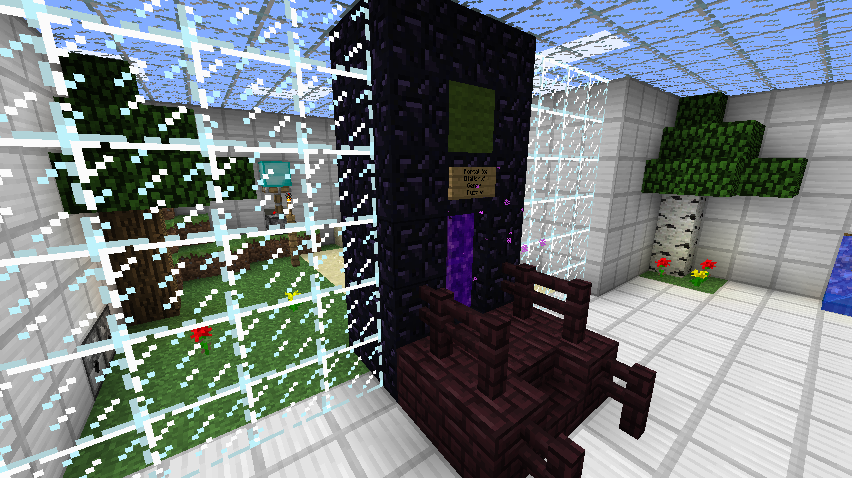
The portals used for teleporting is just the "center of a normal nether portal" with whatever design around it you like!
The ID of the "center of normal nether portals" is '90', so you can spawn it and design your own portals! You can use whatever materials
around it you like, as long as the player stands in the "block id 90" to get teleported, and the sign is placed on the block directly above the player!
When placing the sign above the portal block, be sure to add the name of the map that portal will lead to in line #2 anywhere on the sign like this [MapName]. This also applies for the Multiplayer portal, just by typing [Friends] instead of the map name as seen in this example:

Anti-cheat
To prevent players from cheating, a few settings can be made individually for each adventuremap.
It is possible to decide which blocks CAN be broken, and which CANNOT.
And which blocks CAN be placed, and which CANNOT.
It is also possible for an admin to play through an adventure map of his own copy in "admin mode". This will, if enabled on the specific map, only allow players in the future, to place blocks on the exact same spot that the admin placed them on. This way players cannot cheat by placing water places they are not allowed to get over fences and so on.
Additional features
Apart from all of this, the plugin also have a lot of other features!
When a player leaves a copy world (his own world) to the lobby, or exit the server, he will be able to spawn on the exact same location next time he/she enters his/her map!
Players will loose all items when joining a copy world, so they cannot cheat with items from other worlds!
Individual "chat rooms" for each world, so the players can only see the messages they wanna see.
And again, a lot more features!
Pages
- To view commands and features, click here
- To view permissions, click here
- To view bugs and future features click here
Please comment this plugin, and if you have any ideas for new features, please sugest them to me!
It is also recommended to set allow-nether to false in server.properties, and allow-end to false in bukkit.yml!
Bug reporting
Please see the bugs page before posting a commect concerning a bug you found. Also please add information such as:
Comments


-

Forge_User_75357323 Owner
-
_ForgeUser3287249 Maintainer
-
View User Profile
-
Send Message
Posted Feb 20, 2012@Madsens90
Exactly. People get kicked, server frezzes until its done. Server does not completely crash, its still up. I assume that this will be the case any time a new copy is generated. Will test that later.
So since you brought up the point of the first copy I was just wondering if there is any difference in handling the first copy of an adventure world compared to further copies :)
-
View User Profile
-
Send Message
Posted Feb 20, 2012@Raikar
I'm not sure were understanding each other correct. When you first enter a world you have never been to before, it copies the requested main world to a folder with "main world name" _ "your player name". This process only takes about 3 sec on my server, and yes, it does take some power from the server, but i have never experienced it to crash. And as far as i can understand, it is this process that crashes your server?
-
View User Profile
-
Send Message
Posted Feb 20, 2012@Madsens90
Glad I can help.
I think you got me wrong with the first time copy thing. After getting kicked I think the copy process is just done. Then I can enter the world that took so long to copy. Will test it later and let another player create another copy, I am more than sure that again everything freezes and we all will be kicked. So its the general copy thingy, not only the first time, or is that one handled diffrent by your plugin than any further copies?
-
View User Profile
-
Send Message
Posted Feb 20, 2012@Raikar
Thx for your reply :)
Well, it looks like i have to spend some time optimizing the copy & load feature. As far as i can understand, its only the first time a copy world has to be made? If this is the case, i will look into why its only the first time, so that i can maybe remove the load completely.
-
View User Profile
-
Send Message
Posted Feb 20, 2012People should, if they get disconnected or log in back, return to the position they were when the lost connection / quit. Atm they will always spawn at the spawnpoint of the lobby world. So if your home is far away from spawn and you log out for lunch itll be a long way back to where you were.
As for the map copy thing I made a suggestion in my last post. Will be @ home in like 4 hours and can test some diffrent things, like: smaller map, tested it with Fallout Minecraft yesterday. Maybe it helps if I decribe what I did:
As for the server its virtual dedi server in datacenter, 4x2.5Ghz (i know that doesnt help) and 8GB Ram with 6 for MC. IO is at 32MB/s during copy process. We will be moving to a much faster CPU soon as we have a nice friendship to the hoster, so I could report back then, but this may take 2 more weeks :(
-
View User Profile
-
Send Message
Posted Feb 19, 2012@Raikar
To 'ur respawn issue: Do you wan't people to spawn in the world they left from?
High load issue: I don't really know what i can do? When i'm done fixing bugs, and added the most wanted features, i will improve my code to make it faster, but it won't make it that must faster. So? What did you have in mind?
Fasten up idea: Well, i don't really know what CPU your server have, but on my server it only take a few seconds to copy a new map, and teleport the player to that map? So theres almost no waiting. I think the biggest issue with this plugin is RAM like any other multi world plugin, and not really CPU.
@Galexrt
I'm not really sure what you mean by that? I have read your comments 10 time, but don't really understand how it would fasten up anything?
-
View User Profile
-
Send Message
Posted Feb 19, 2012@Galexrt
While I think this wouldn't work I just have another idea for making the transition smoother: Always keep one of every map copied. If a player enters a new copy start copying another spare version in the background. To prevent that during this another player demands the same map just do a cooldown like "another map is created, please wait..."
I am german aswell, hope my idea helps and this can reduce the creation bottleneck somehow...
-
View User Profile
-
Send Message
Posted Feb 19, 2012@Madsens90
Thank you for the new version! Tested it on our server and world management is working, ignoring the specified worlds. However: When I enter a new world aka creating a copy all players on the server including me get kicked due to high loads on the system. Are there any ways to improve on this or am I doing something wrong?
Edit: Can I somehow make players NOT respawn at the same location in lobby world? Since the maps are played normal players realy do not like to be reset with each login ;)
Thanks again!
-
View User Profile
-
Send Message
Posted Feb 19, 2012@travman11
Hi. I'm glad you like it! Have you disabled spawn protection? Think you can disable it in bukkit.yml or server.properties. :)
-
View User Profile
-
Send Message
Posted Feb 18, 2012First off, great plugin. But Im encountering a very annoying bug. I run around 6 adventure maps right now and two of them are Survival Island and SkyBlock. Both of these require block placing. Now all of my users are able to break blocks but not place them. I have looked at the settings.yml and changed the blockplace from true to false and added items to the list. No matter what I do they are still unable to place any blocks.
-
View User Profile
-
Send Message
Posted Feb 18, 2012@Madsens90
This is why I love all those great plugin devs. Will test it in all detail when its done :) hole its not causing to much effort and derailing from what you originaly planned... Thank you!
-
View User Profile
-
Send Message
Posted Feb 18, 2012@Raikar
Hi!I will create a feature to exclude worlds from being unloaded when leaving a world. Will properly be there in the next update!
-
View User Profile
-
Send Message
Posted Feb 18, 2012@Madsens90
MyWorlds tells them to load when starting the server, but they won't. Also I think it's the other way around: Your plugin should not unload worlds NOT defined as adventure maps. Will have to look tino MyWorlds again and talk to the Dev but I feel that you could solve this by just taking this into account :) Thanks again!
-
View User Profile
-
Send Message
Posted Feb 18, 2012@Raikar
Oh sry, i misunderstood. I haven't really "build" it to work together with My Worlds, so my plugin automatically unloads worlds you leave, so that they don't use up RAM. Can My Worlds not automatically load worlds if they are not loaded already when entering a portal?
-
View User Profile
-
Send Message
Posted Feb 18, 2012@Madsens90
Thats the problem: Its not working that way. What I tried was:
Your plugin will unload world1 and world2 when starting the server. If I load them manually via MyWorld and, for example go to world1 via MyWorld Portal, then world3 stays, as it is the lobby. When I then leave world1, it is unloaded by the plugin. There lies the only issue I seem to have :)
-
View User Profile
-
Send Message
Posted Feb 18, 2012@GmK1
Np! I'm without a doubt the most exited one!
-
View User Profile
-
Send Message
Posted Feb 18, 2012@Madsens90
Thanks for trying to add those features / fixes, we are excited! :)
-
View User Profile
-
Send Message
Posted Feb 18, 2012@Raikar
Then add world3 as the lobby world in the config.yml file, and add advent1 and avent2 as main worlds (adventure maps), and then just add portals for advent1, avent2, world1 and world2.
Then only advent1 and avent2 will be played as adventure maps, and the other 2 worlds (world1, world2) will be normal worlds that all can join together.. Or.. this is how it is inteded to be like! Please tell me if you can't get it to work!
-
View User Profile
-
Send Message
Posted Feb 18, 2012@Madsens90
Well, a single lobby world would be great, if your plugin would only touch worlds that I state in the config. I could for example say: world3 ONLY is my "lobby" world, leave world1 and world2 completely untouched and, say, advent1 and avent2 are your adventure worlds.
Thanks for the reply, I'll watch this one closely :)
-
View User Profile
-
Send Message
Posted Feb 18, 2012@Raikar
Hi. I'm sorry, but GmK1 is correct. The plugin is only intended for the use of a single lobby world. The entire plugin relies on this.
Will think of adding the feature of multiple lobby worlds in the future! Really hope you can use my plugin with just a single lobby world!
@GmK1 I will look into all 3 cases and hopefully add it all in the next update!