AdvenTour
This is a BETA plugin. Please use with caution
AdvenTour
This plugin is a multi world management plugin!
Latest version of AdvenTour works with 1.5 and can be downloaded here: http://www.mediafire.com/?n7xv765dxxu3l0r!
It will simply allow you to manage a lobby world, from where you can place "self designed" portals to other worlds! But not just to other worlds! It will allow you to have Adventure Maps on your server!
When a player enters a portal with a sign above that describes the adventure map, he will not only be teleported to the adventuremap
but to his OWN COPY of the adventure map! This will allow him to destroy everything as he wishes, or play the adventure map as it is intended!
Installation and configuration guide
Portals
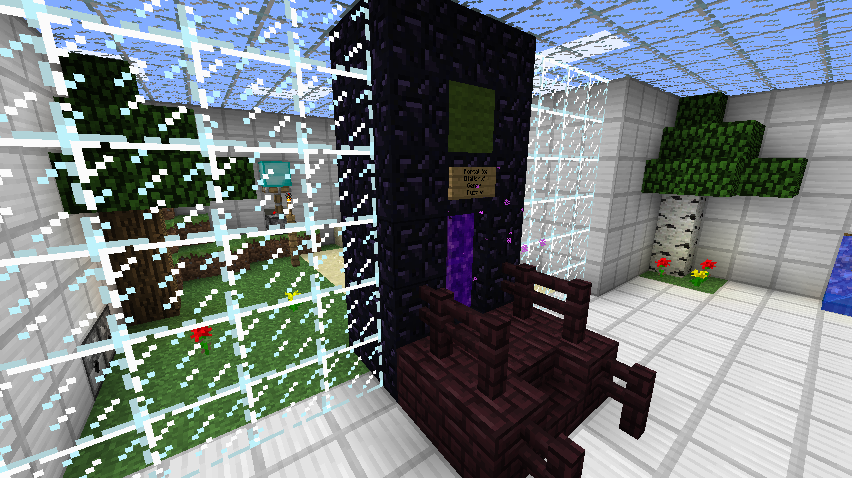
The portals used for teleporting is just the "center of a normal nether portal" with whatever design around it you like!
The ID of the "center of normal nether portals" is '90', so you can spawn it and design your own portals! You can use whatever materials
around it you like, as long as the player stands in the "block id 90" to get teleported, and the sign is placed on the block directly above the player!
When placing the sign above the portal block, be sure to add the name of the map that portal will lead to in line #2 anywhere on the sign like this [MapName]. This also applies for the Multiplayer portal, just by typing [Friends] instead of the map name as seen in this example:

Anti-cheat
To prevent players from cheating, a few settings can be made individually for each adventuremap.
It is possible to decide which blocks CAN be broken, and which CANNOT.
And which blocks CAN be placed, and which CANNOT.
It is also possible for an admin to play through an adventure map of his own copy in "admin mode". This will, if enabled on the specific map, only allow players in the future, to place blocks on the exact same spot that the admin placed them on. This way players cannot cheat by placing water places they are not allowed to get over fences and so on.
Additional features
Apart from all of this, the plugin also have a lot of other features!
When a player leaves a copy world (his own world) to the lobby, or exit the server, he will be able to spawn on the exact same location next time he/she enters his/her map!
Players will loose all items when joining a copy world, so they cannot cheat with items from other worlds!
Individual "chat rooms" for each world, so the players can only see the messages they wanna see.
And again, a lot more features!
Pages
- To view commands and features, click here
- To view permissions, click here
- To view bugs and future features click here
Please comment this plugin, and if you have any ideas for new features, please sugest them to me!
It is also recommended to set allow-nether to false in server.properties, and allow-end to false in bukkit.yml!
Bug reporting
Please see the bugs page before posting a commect concerning a bug you found. Also please add information such as:
Comments


-

Forge_User_75357323 Owner
-
_ForgeUser3287249 Maintainer
-
View User Profile
-
Send Message
Posted Apr 17, 2012@Madsens90
Ok. *gets out Raid* :) So thats how to get to the template to modify and copy world to play. But how do i make a portal for the players to get to the adventure map copy(s) without them having to use the /at tpworld command?
EDIT* got it working. But...how do you make a 2x1 netherportal? I have it made but the portal blocks are rotated the wrong direction. lol. I LOVE THIS PLUGIN!!
p.s. Sent a pm with errors regarding the multiverse. :)
-
View User Profile
-
Send Message
Posted Apr 17, 2012@Kurusca
I will look into your problem right away! ;) I haven't tested my plugin together with multiverse, and i don't know if that is giving any problems. I'm sorry for the missing tutorial video, but i agreed with myself that i would first make a tutorial video when the plugin went out of "beta" which i have planned for it to do within 30 days or so, but that might be a bit too soon. But an update with a lot of fixes and new feature will come very soon!
Edit: I found the error, and you found a bug ;) There was once a feature to create your own portals with sticks, where you didn't actually need the "nether-portal" stuff itself. And the command you're trying to use is actually no longer in use, and that's why it won't work!
Instead i made a feature where you no longer have to load the world to tp to it. It's called template.
/at template <world> <player (optional)>
That will tp you to the selected world! If you wanna tp to another world that is not a mainworld, but a world you have loaded, you will have to se the "tpworld" instead:
/at tpworld <world> <player (optional)> <mode (optional)>
always use "false" as mode, unless you know what you're doing :)
I'm sorry for the really bad help my plugin gives, and i will try to update the "/at help" as soon as possible. Also i will update the help here on the plugin page :)
-
View User Profile
-
Send Message
Posted Apr 17, 2012This may be a dumb question but I am having a difficult time setting everything up ingame. I have loaded the TestWorld1 with the /at command. I can even use Multiverse to tp to it. But, everytime i try to use the /at portal TestPortal Testworld1 false command, it just says to type /at help. What am i doing wrong? I LOOOVE the idea of this plugin but having problems. Possibly a video or txt tutorial on in-game setup? Appreciate any quick advice as my server goes live in a couple days and i REALLY!!! want to incorporate this plugin. Oh, using Bukkit 1.2.5 on webhost. I DO have root access and ftp as well as sql.
Kurusca
-
View User Profile
-
Send Message
Posted Apr 10, 2012@PsychoFad
Hi again :) I'm a bit sick, so sry for my short message: As i understand it, you want to be able to disable "exact spawn". This will do so when the player is not in "his own world", but in the lobby world he will not start at spawn when doing a re-login? I can add that feature yes. :)
I have currently added a new feature for new the version that allow players within a time to spawn the same place they logged out, if they where in a copy world. Default it's set to 5 minutes in the config file, which means that within 5 minutes after logout, if the same player re-login, he will spawn in the same world at the same location. But after the 5 min, he will spawn at the lobby.
-
View User Profile
-
Send Message
Posted Apr 10, 2012@Madsens90
Thank You! A PM would be great! Will the update also address the forced Spawn point? It's a minor annoyance but I would like to be able to turn that "feature" off so that my members can resume where they logged out when they aren't using the plugin. Maybe a flag in the config?
As for the Dynmap issue, I have fixed it on my own by only allowing it to map the worlds I want it to map. Now by default it won't map a new world unless it is listed specifically for it to map it in the Dynmap config. This allowed Adventour to unload the worlds and resolved the issues I was having from it so there's really no need for you to do anything anyways! It just took me to not be lazy and actually take the time to read Dynmaps documentation and apply it to my custom needs! :)
I am in the USA in Atlanta, Georgia since you asked!
-
View User Profile
-
Send Message
Posted Apr 6, 2012@OriginalMadman
:D :D I love hearing people love my plugin :) More and more people is using this plugin, so i'm also putting more and more of my time into it. Thx a lot! :D
-
View User Profile
-
Send Message
Posted Apr 6, 2012Really looking forward to see this maturing. Just playing a bit with it in test, but nice work guys!
Sweden here ;)
-
View User Profile
-
Send Message
Posted Apr 1, 2012@PsychoFad
Hi ! :D
Well first of all, thx for telling me about the bugs! Usually people don't "have the time" to tell me about it :)
I will keep on updating the plugin as more and more people starts to like it, and that's really what i want. I will try to fix the nether portal problem as soon as possible. I had some stuff i had to figure out how to do in order for everything to work perfectly, but i think i now found a way, so i will fix that bug soon! :) I hope on having that bug fixed for the next release, and if i remember, i might send you a PM with the file before release public.
As you guessed yourself the plugin can't move the folder if it's still being used. My plugin only does a simple check on if anyone is in the world at the moment of "trying to move the folder" to inactive, and if not, it will move it. So if dynmap is still using the map, i don't really know what i can do. Maybe i will add a feature later on to check if the world file is being used, and then create a schedule to move the file when other plugins is done using that folder. I'm happy that you found a way to fix that bug yourself! :)
The reason why i love this community is because it's so simple! It's really for everyone! :D I'm from Denmark in europe. How about you? :)
-
View User Profile
-
Send Message
Posted Mar 31, 2012@Madsens90
Yes we will continue to use this plugin. I hope to see it grow and flourish....it's pretty awesome! I'm also looking forward to Nether portals working as my members love playing the skyblock world (I don't get it personally) and they can't finish without it.
A new bug just popped up that you might want to know about...not sure what the conditions are that started it though. Sometimes when a player goes into their world it takes them to a random world or perhaps a random spot in the world that is loaded...not sure which. I have noticed that when they left their world, Adventour will display "Adventour 0.5: File was not moved!" in the console and the world isn't moved to the inactive folder like it usually is. The only plugins i have started using recently are WorldGuard and Dynmap. Worldguard protection is OFF for the Adventour maps but i Think dynmap may be trying to map the worlds by default and this is hard to disable because of the dynamic world naming. You have to specify the world name to disable it in Dynmap to hide it from the plugins mapping feature.
I'm new to Dynmap so I haven't looked through all the settings yet to see if I may be able to specify for it to ONLY map the worlds I want it to. This might just be a problem I have created for myself! :)
BTW: your English is fine...where are you from? I love the fact that the minecraft community is so diverse. You meet so many different people from so many different countries!
Again, thank you so much for this plugin we look forward to seeing it grow!
!!UPDATE!!: I went into the dynmap templates folder and edited all the templates and changed "enable: true" to "enabled: false" and then I just added the worlds I wanted it to map in the "worlds.txt" file with the "enabled: true" line and it now only maps the regular worlds and ignores all the rest! It was trying to map the Adventour maps and this was causing a BIG problem because when a player left the world it was still trying to map them and that was making it so the plugin wasn't able to move the folder since it was "in use" at the time. Maybe this will help others if they try to use Dynmap on their Adventour enabled server!
-
View User Profile
-
Send Message
Posted Mar 31, 2012@eternia16
Thank you very much! :D Keep me happy, and i will keep updating :D
-
View User Profile
-
Send Message
Posted Mar 30, 2012madsen90 and lykkepillen you guys are a genius. ;)
-
View User Profile
-
Send Message
Posted Mar 30, 2012@hkminegod
BTW! A "let's play" on youtube using my plugin would be soo awesome!! :D
-
View User Profile
-
Send Message
Posted Mar 30, 2012@hkminegod
God damn adventure maps that use nether ! :D hehe I will try to get a fix as quickly as possible, and if i remember, i will pm you, but i can't promise that i will remember! :)
-
View User Profile
-
Send Message
Posted Mar 30, 2012@Madsens90
I can't live without it :/ I'll use it later on :/ when you fix that bug.... wanted to do a let's play series of Skyblock.... so easy reset :P
-
View User Profile
-
Send Message
Posted Mar 29, 2012@hkminegod
Ah okay, that way.
Well, as you see here: http://dev.bukkit.org/server-mods/adventour/pages/bugs-future-features-and-next-file-changes/ there is right now a bug, not allowing you to place nether portals from copy worlds. They will all send you back to the lobby world.
But i'm working on a way for the portals to send you to the nether belonging to a specific main world. And it would work like this: If your main world is called "skyblock", any normal nether portals in that main world (without any signs above it), would send you to "skyblock_nether" if that world exist. And if not, the portal will send you to the lobby.
I don't know if that feature/bug fix will be in the next update, but it will most certainly be in the update after that, because i'm planning for that update to be a full release (the plugin will leave the beta state!)
Hope you can live with my plugin not working with nether for each main world right now!
-
View User Profile
-
Send Message
Posted Mar 29, 2012@madsens90 i mean a normal world, building a nether portal off it, and teleport in the normal world's nether.
-
View User Profile
-
Send Message
Posted Mar 29, 2012@hkminegod
I'm not quite sure what skyblock is. But yes, seperate netherworlds would work. A nether world is just simply a world with nether terrain, and some different properties.
-
View User Profile
-
Send Message
Posted Mar 29, 2012Can seperate netherworlds work? I can't seem to make skyblock's nether thingy work :/
-
View User Profile
-
Send Message
Posted Mar 29, 2012@PsychoFad
Hi. First of all, i'm glad you like the plugin except for the bugs!
Inventory bug: Yes, that is a bug in my plugin. I'm currently working on a feature that saves a players inventory for each world, and this feature will also eleminate that bug, which is not really a bug, but just something i haven't done. The plugin is still in beta, so these kind of thing still appears. But i do plan to take it out of beta, not on the next update, but the one after that. So after the next update i will only concentrate on bugs for the first full release. So right now, it's up to the players to play fair. No one really enjoys an adventure map if they cheat.
Spawning bug: Yes, where you spawn when you log out, and bag in, is also a thing i'm currently working on. But as this plugin is currently only inteded to be used on servers that focus on this plugin, i haven't really made it "friendly" to server where it's also possible to play normally in the main world. But this is a feature that will come! The only reason why it's not already there, is because that i want to make it in a way that it still works like it does now, for those who want it that way.
I hope i explained it well enough for you too understand my bad english. If you would like to follow which updates is already made for the next update, and what i plan to include in the plugin, check this page: http://dev.bukkit.org/server-mods/adventour/pages/bugs-future-features-and-next-file-changes/
Hope you will continue to use my plugin :)
- Madsens
-
View User Profile
-
Send Message
Posted Mar 28, 2012Found a small bug..not sure if it is with your plugin or WorldInventories plugin.
When players join a friends world then go back to their own world they carry over items from their friends world.
Example...I have some adventure maps...One player enters and invites his friend....Then the friend leaves and rejoins their SkyBlock map and have all the items from the adventure map in their inventory. I have to specify world names in WorldInventories plugin to classify them in groups but since the world name changes based on the players name they all fall in the default WorldInventories class.
Also..I am using this plugin on my Regular 1.2.4 server and it is forcing everyone to login at Spawn no matter where they were when they logged off the server. This can be slightly annoying if your were mining deep in a cave on the other side of the main world and logoff hoping to pick up where you left off when you log back in. Can you possibly add a flag in the config to disable this feature and maybe allow admin to set where they are dumped to with a /AdvenTour setLeave command that will put the desired coordinates in the config file? This could just affect the /leave command and not every login from every player.
Other than these minor annoyances, I have to say that this is a great plugin! I was looking for something just like this for a puzzle world i had created when we were on 1.1! I had resorted to resetting the puzzle world everytime a player had played through and left to reset all the switches and chests so everyone got a fair shake at the items in the chests!
Thank You for your hard work....and sorry such a large post!