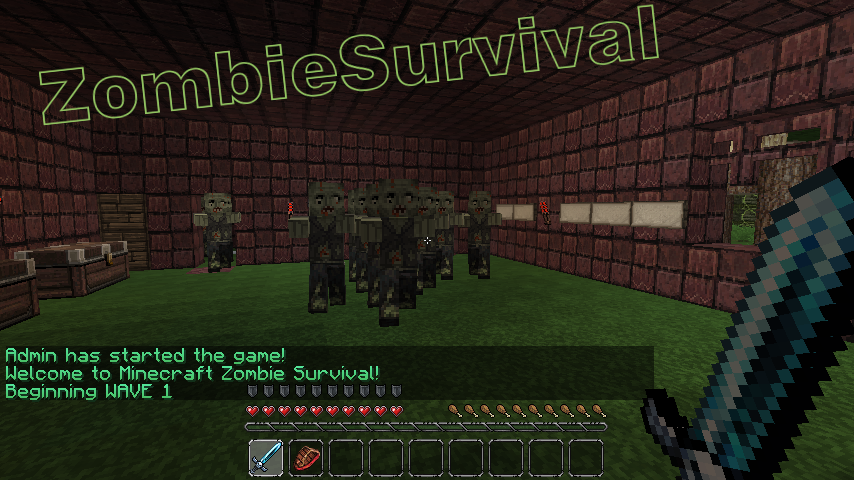
ZombieSurvival

Survive endless waves of zombie attacks!
Based on the COD gamemode Nazi-Zombies
Official Website: www.bjornke.com
Donate
Information:
Now you can play Call Of Duty® style Nazi Zombies in Minecraft! Includes all of the familiar features of the gamemode and more! These zombies can sniff you out from over a mile away and run faster (or slower) then you with our custom AI! Barricades, doors, mystery boxes, wolf waves, and more! Play with your friends or by yourself, it's easy to setup and easy to use!
Features:
- Multiple Games Per World (as many different games as you like in a single world file)
- Multi-World Support (Can have games in any world/nether)
- Custom Zombie AI (Zombies have infinite find/aggro radius, limited only by how many chunks loaded)
- Runner Zombies (Faster than normal)
- Zombie Spawns (set by using operator, spawns are enabled when wave number is reached)
- Zombie Difficulty Multiplier ( defined in config, controls how much health zombies get per wave)
- Zombie Damage Multiplier (defined in config, controls how much damage zombies deal per wave)
- Revive (A sign will appear where a dead comrade has fallen! Break the sign to revive him! You have 30 seconds)
- Random Skelly Waves (can be configured or disabled in config. Default 1/5 chance)
- Perks (Godmode, Instant Kill, and Fire. All last for 60 seconds)
- Random BITE Effect (Random potions applied to player on zombie attack, chance defined in config)
- Stat/Join Signs (Signs that can display player count / zombie count and if RIGHT clicked, allow player to join via sign click)
- Purchase Door Signs (can buy doors with points/economy t open)
- Death Waiting Lobbies (players go here once dead if spectating is turned off)
- Custom Limits (min/max players, max zombies at one time, max waves, allowed break/place of specific blocks during game)
- Inventory Save (Inventory is saved and replaced after a game)
- Automatically Start Game (When enough players have joined the game with /join command, start-player-count definable in config)
- Doors (set by operator, doors open once wave number is reached)
- Door to Spawn Link (Link spawns to doors so they activate when the door is purchased regardless of wave)
- Signs (can either give you item for expense of point, or heal you)
- Point System (10 points for every zombie killed)
- Economy Support (uses vault to link to most economy systems)
- Death Tax (% of bank, defined in config)
- Money per Kill (added to player account after kill, defined in config)
- Game Over or /leave Account Zeroing (defined in config)
- Spectate System (dead players can spectate the game)
- Friendly Fire Deductions (Players who strike or fire upon other players are deducted points)
- Friendly Fire Alerts (Sound is played on client side when player strikes or fire upon other players)
- Player Death Alerts (Sound is played at death location of player, white wool block flashes) Note this feature experimental
- Internal Anti-grief (if automated server, use this feature to prevent blocks from being broken)
- Items on Join (When a player joins a game, they receive items defined in the config)
- Optional Automation Feature (Defined in config, includes cooldown time between new game starts, in seconds)
- Included /vote feature (gets 2 random maps of all maps and puts them up for vote)
- Custom Zombie Drops (defined in config, includes chance for drop)
- 10th round Fire (Netherrack set on fire every 10th round, use /zsa-fire <name>)
- Version Checking (Displays in console and alerts ops that are in-game if out of date, also include /zs-version command)
- Special Action Blocks (Must be added to game with command /zsa-special)
- Yellow Wool: Double Player Velocity
- Blue Wool: Super Jump
- Light Blue Wool: Super+ Jump (Higher jump than Blue Wool)
- Orange Wool: Light's player on fire for 10 seconds
- Black Wool: Kills player
- Light Gray Wool: Sets player invisible
- Gray Wool: Invisible players back to visible
- Green Wool: Slows player slightly
Useful Pages For Admins
Video Tutorials
- Terms and Backend Configuration: http://youtu.be/U8RmAO9wqzc
- Spawn Point and Sign Config: http://youtu.be/4W0r5iJ5rGo
- Classes: http://youtu.be/JtzjfNmAVHE
Credit: stadvert
Permissions:
You do not need to define permissions for this plugin to work.
- zs.start
- zs.end
- zs.create
- zs.edit
- zs.remove
- zs.reload
- zs.version
- zs.tp
- zs.stats
- zs.help
- zs.join
- zs.leave
- zs.whisper
- zs.signs
Metrics
This plugin utilises Hidendra's plugin metrics system, which means that the following information is collected and sent to mcstats.org: A unique identifier, the server's version of Java, whether the server is in offline or online mode, the plugin's version, the server's version, the OS version/name and architecture, the core count for the CPU, the number of players online, the Metrics version,
Opting out of this service can be done by editing plugins/Plugin Metrics/config.yml and changing opt-out to true.
Read before posting comments
Completely new and rewritten version will come out as soon as possible, I am already working on it.
Donations:
If this plugin helps you please feel free to donate and keep this project updated. I am coding this plugin in my free time.

Click here to donate.
Comments

-

_ForgeUser7052630 Owner
-
Forge_User_74967307 Author
-
View User Profile
-
Send Message
Posted Apr 14, 2013@binxce
What do you put on the signs? Did you kill the zombies with guns from Crackshot or PVPgunPlus?
-
View User Profile
-
Send Message
Posted Apr 13, 2013@Disolia
yes i did it for verruckt when creating the game create a 5 x 5 x 6 with a hollow 3x3 area inside and no top with pressure plates on the bottom thwn when creating ur game set the spawn 3 blocks above the middle preassur plate, then put redstone under all the preasure plates then create a track about 6 blocks away from one of the sides(BTW make sure this hollow square is reasnoble far away) and have the track have booster rales on each side which have detector rails right next to them have theese detector rales at each side goto a command block tih the command tp@p[r=((number of blocks the far wall of the square is (the command block is 1 so if its 6 blocks away its r=7)))] (co-ords of 1st spawn on one side and 2nd spawn on seccond side) then put on a cart if u want i could do a quick tutorial but itll be a while becuase my proper computers chargers gonna take 3 days to get here
-
View User Profile
-
Send Message
Posted Apr 12, 2013@Bjornke Is there any chance your available for custom work regarding the compatibility of this plugin with another? We're willing to pay you for your time.
Thanks, Matt
-
View User Profile
-
Send Message
Posted Apr 12, 2013If i may ask. Currently is there any possible way to make it so that when a game starts you can have two groups of people spawn on different sides of the map?
-
View User Profile
-
Send Message
Posted Apr 12, 2013@PatThaGod
do what i did set the door to open past the max round and set the spawns one above the doors so that they never activate until purchase 0 makes spawners always spawn but doors never open
-
View User Profile
-
Send Message
Posted Apr 12, 2013Would you ever consider creating a custom wave function for this plugin. So players can control how many zombies/wolfs spawn (each wave) for each arena? Possible even allowing them to control how many zombies spawn each wave depending on how many players are currently in the game. Lastly would be rather nice if players could also create grenade based equipment, and have the ability to use a pack-a-punch enchantment system. Just fodder for thought. I know that making a plugin can be rather tedious.
-
View User Profile
-
Send Message
Posted Apr 12, 2013@Bjornke
I read this, and did exactly what this said... set doors and spawns to 0, yet the spawns are still spawning even at 0 and the door isnt open yet.
-
View User Profile
-
Send Message
Posted Apr 12, 2013@Bjornke
didnt i set them both to zero in the video and it didnt work also as a request make it so reviving peapole keeps there inventory and points but respawning makes u losse them and add perks/potion effects and random locaton random boxes also thx again u have no idea how much i can do now tht i couldnt before
-
View User Profile
-
Send Message
Posted Apr 12, 2013@TobyDutch1
Thanks a lot! No where could I find out how to do this
-
View User Profile
-
Send Message
Posted Apr 12, 2013Please add so you can turn off the messages of points you get in game in the config, I always have to play with F1 enabled, because the chat is spamming like hell..
-
View User Profile
-
Send Message
Posted Apr 12, 2013@PatThaGod
Correct me if I'm wrong, but I believe it is with:
/zsa-bar <Name of arena>
After which you can left click the blocks you want as a barricade, but beware. It sometimes kinda responds weirdly, and might exit /zsa-bar mode. Just type /zsa-bar <Name of arena> again to continue editing the barricades. Barricades will look like wool in editing mode.
As to how to remove barricades, you'll have to type:
/zsr-bar
After which you can left click any unwanted barricades.
-
View User Profile
-
Send Message
Posted Apr 11, 2013How do I set barricades?
-
View User Profile
-
Send Message
Posted Apr 11, 2013@Bjornke: Hey, i am interested in doing some tutorials. 500 subs and willing to do it :)
When some players join the game, it keeps their sword throughout the game. Any idea on fixing it?
-
View User Profile
-
Send Message
Posted Apr 11, 2013@Bjornke
Oh my god, so THAT'S how to make them purchasable... It has to be a 0... I've been trying to figure that out for a while. Thank you.
-
View User Profile
-
Send Message
Posted Apr 10, 2013@baconcheese18
you try putting a sign that saves the game like
zombie stats <zombie game name>
-
View User Profile
-
Send Message
Posted Apr 10, 2013@lewis2
That's the whole point of the system:
Here's an example, I create a spawnspoint set to wave 0 (wave 0 means it NEVER turns on) and then a door that can be PURCHASED or activated at another wave (or both) and when that door is PURCHASED it activates our spawnpoint that would never turn on before, or if nobody purchases the door it can open automatically at a set wave, but someone can purchase the door before then.
So basically: doors can be purchased or open automatically and will activate all linked spawns at purchase or opening.
to make spawns never turn on set the wave to 0. To make doors never open automatically set the door wave to 0. When a door is purchased it will activate all spawns linked to it even if they're set to 0.
So what you want the system to do lewis, it already does.
-
View User Profile
-
Send Message
Posted Apr 10, 2013@Bjornke THANK YOu for helping me understand why it wouldnt work btw at least i know now i didnt think tht i thought tht u had to purchase the door to activate spawns whats the point in this whole thing if u can just set the spawns to be activated at round 2 can u do something like set the wave for a door to 51 (Max waves 50) and a sawn to 52 so tht if u Purchase a door it will activate if not can u please add that becuase i want my spawns activating when ppl purchase a door not at a wave at all EDIT: IT DOES! please refar other ppl who are having the same problem as me becuase from my point of you it does seem like the other way wouldve worked for those who dont want wave activated spawns at all GREAT PLUGIN Awesome maker thx for the help
-
View User Profile
-
Send Message
Posted Apr 10, 2013@lewis2
Oh geez, lewis, you understanding of it how it works is backwards! It does not work by waiting for the spawns to activate. Instead, in your video you set the door wave to "0" however, what that means is that the door will never open unless you PURCHASE IT! Let me give you an example of how this really works:
/zsaspawn Test 4 (this spawn-point is set to activate at wave 4, and is LINKED to the door below)
/zsadoor Test 2 (door opens on wave 2)
/zs-doorlink Test (we go through that process, and select our spawnpoint)
We join game, wave 2 starts, the door opens. The door is configured to open at wave 2 and is LINKED to the spawnpoint which is configured for wave 4. Because the door has opened at wave 2 and is linked to the wave 4 spawnpoint, the spawnpoint is activated at wave 2, instead of wave 4.
Basically, doors activate spawnpoints. Spawnpoints do NOT activate doors. You seem to have thought spawnpoints activate doors, when it is actually opposite.
-
View User Profile
-
Send Message
Posted Apr 10, 2013@Bjornke
no what i ment was did u have todo zsa-door specfically instead of zsadoor becuase ive don this 50 times on my recreation of verruct and im going to upload a video of me doing it so you can explain what im doing wrong In 20-30 mins itll be uploaded also i wanna say the way i made pvpguns+ work was used signs for the guns then signs ontop of tht for ammo sure they cost a bit more that way but it works and you can buy ammo for assault rifles pistols and everrything else at random box and for power i made u allowed to break redstone torches EDIT : Its now uploading 12 mins left EDIT: HERE http://www.youtube.com/watch?v=W2VtdZrL7e4&feature=youtu.be
-
View User Profile
-
Send Message
Posted Apr 10, 2013@lewis2
Yes, you have to make the doors with commands and link the doors.