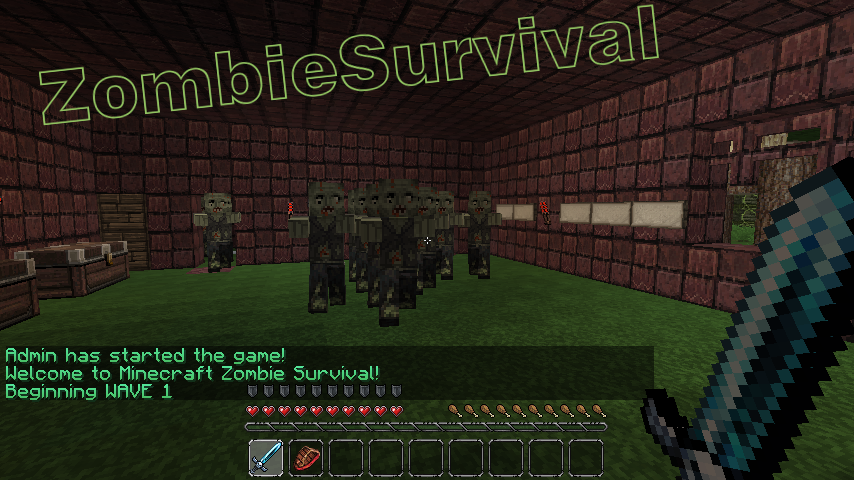
ZombieSurvival

Survive endless waves of zombie attacks!
Based on the COD gamemode Nazi-Zombies
Official Website: www.bjornke.com
Donate
Information:
Now you can play Call Of Duty® style Nazi Zombies in Minecraft! Includes all of the familiar features of the gamemode and more! These zombies can sniff you out from over a mile away and run faster (or slower) then you with our custom AI! Barricades, doors, mystery boxes, wolf waves, and more! Play with your friends or by yourself, it's easy to setup and easy to use!
Features:
- Multiple Games Per World (as many different games as you like in a single world file)
- Multi-World Support (Can have games in any world/nether)
- Custom Zombie AI (Zombies have infinite find/aggro radius, limited only by how many chunks loaded)
- Runner Zombies (Faster than normal)
- Zombie Spawns (set by using operator, spawns are enabled when wave number is reached)
- Zombie Difficulty Multiplier ( defined in config, controls how much health zombies get per wave)
- Zombie Damage Multiplier (defined in config, controls how much damage zombies deal per wave)
- Revive (A sign will appear where a dead comrade has fallen! Break the sign to revive him! You have 30 seconds)
- Random Skelly Waves (can be configured or disabled in config. Default 1/5 chance)
- Perks (Godmode, Instant Kill, and Fire. All last for 60 seconds)
- Random BITE Effect (Random potions applied to player on zombie attack, chance defined in config)
- Stat/Join Signs (Signs that can display player count / zombie count and if RIGHT clicked, allow player to join via sign click)
- Purchase Door Signs (can buy doors with points/economy t open)
- Death Waiting Lobbies (players go here once dead if spectating is turned off)
- Custom Limits (min/max players, max zombies at one time, max waves, allowed break/place of specific blocks during game)
- Inventory Save (Inventory is saved and replaced after a game)
- Automatically Start Game (When enough players have joined the game with /join command, start-player-count definable in config)
- Doors (set by operator, doors open once wave number is reached)
- Door to Spawn Link (Link spawns to doors so they activate when the door is purchased regardless of wave)
- Signs (can either give you item for expense of point, or heal you)
- Point System (10 points for every zombie killed)
- Economy Support (uses vault to link to most economy systems)
- Death Tax (% of bank, defined in config)
- Money per Kill (added to player account after kill, defined in config)
- Game Over or /leave Account Zeroing (defined in config)
- Spectate System (dead players can spectate the game)
- Friendly Fire Deductions (Players who strike or fire upon other players are deducted points)
- Friendly Fire Alerts (Sound is played on client side when player strikes or fire upon other players)
- Player Death Alerts (Sound is played at death location of player, white wool block flashes) Note this feature experimental
- Internal Anti-grief (if automated server, use this feature to prevent blocks from being broken)
- Items on Join (When a player joins a game, they receive items defined in the config)
- Optional Automation Feature (Defined in config, includes cooldown time between new game starts, in seconds)
- Included /vote feature (gets 2 random maps of all maps and puts them up for vote)
- Custom Zombie Drops (defined in config, includes chance for drop)
- 10th round Fire (Netherrack set on fire every 10th round, use /zsa-fire <name>)
- Version Checking (Displays in console and alerts ops that are in-game if out of date, also include /zs-version command)
- Special Action Blocks (Must be added to game with command /zsa-special)
- Yellow Wool: Double Player Velocity
- Blue Wool: Super Jump
- Light Blue Wool: Super+ Jump (Higher jump than Blue Wool)
- Orange Wool: Light's player on fire for 10 seconds
- Black Wool: Kills player
- Light Gray Wool: Sets player invisible
- Gray Wool: Invisible players back to visible
- Green Wool: Slows player slightly
Useful Pages For Admins
Video Tutorials
- Terms and Backend Configuration: http://youtu.be/U8RmAO9wqzc
- Spawn Point and Sign Config: http://youtu.be/4W0r5iJ5rGo
- Classes: http://youtu.be/JtzjfNmAVHE
Credit: stadvert
Permissions:
You do not need to define permissions for this plugin to work.
- zs.start
- zs.end
- zs.create
- zs.edit
- zs.remove
- zs.reload
- zs.version
- zs.tp
- zs.stats
- zs.help
- zs.join
- zs.leave
- zs.whisper
- zs.signs
Metrics
This plugin utilises Hidendra's plugin metrics system, which means that the following information is collected and sent to mcstats.org: A unique identifier, the server's version of Java, whether the server is in offline or online mode, the plugin's version, the server's version, the OS version/name and architecture, the core count for the CPU, the number of players online, the Metrics version,
Opting out of this service can be done by editing plugins/Plugin Metrics/config.yml and changing opt-out to true.
Read before posting comments
Completely new and rewritten version will come out as soon as possible, I am already working on it.
Donations:
If this plugin helps you please feel free to donate and keep this project updated. I am coding this plugin in my free time.

Click here to donate.
Comments

-

_ForgeUser7052630 Owner
-
Forge_User_74967307 Author
-
View User Profile
-
Send Message
Posted Apr 10, 2013Suggestions:
Block cmds while in zs:
Block_cmds: true
Whielistcmds:
- msg
- zs-leave
also on disconnect tp to spawn or last spot when using join command/sign maybe?
-
View User Profile
-
Send Message
Posted Apr 10, 2013@DolphinPVP
If you have WorldGuard on your server, you could create a regions.
1. Protect your hole ZS arena 2. Set it's priority to 1 3. Put ZS Spawns where ever you like 4. Create a region to each ZS Spawn about 3 blocks high. 5. Set all their priorities to 2 6. Type "/region flag <regionname> mob-spawning allow" - Do this to all ZSS regions 7. Type /region flag <zsarenaregionname> mob-spawning deny
This should decrease number of other monsters spawning. At least this worked for me :)
-
View User Profile
-
Send Message
Posted Apr 10, 2013@Bjornke
for doorlinks do u have to create both doors and spawns with zs- is tht why it dosnt work
-
View User Profile
-
Send Message
Posted Apr 10, 2013@Bjornke
your plugin mostly works with pvpguns anyway its the rackshot fact tht u have to use a command
-
View User Profile
-
Send Message
Posted Apr 10, 2013when are you going to fix doorlink feature
-
View User Profile
-
Send Message
Posted Apr 10, 2013Like when it comes up as this
> zombiesurvival-R3.4.jar Do i need to delete anything in the name of it to make it work in the server? I have try'ed this plugin before and it didn't work so i want to make it work because i have played this on a different server. So i want it on my server :D-
View User Profile
-
Send Message
Posted Apr 10, 2013Do i need to delete anything of the plugin name when i download it?
-
View User Profile
-
Send Message
Posted Apr 10, 2013i have a suggestion if you can add perk drops instead of spawn?? And Cod zombies original perk drops like nuke, fire sale carpenter? if you can't its ok but still BADA plugin! Thanks BJornke! :)
-
View User Profile
-
Send Message
Posted Apr 9, 2013@DolphinPVP
i believe if you can, you can stop spawn in a world or find a plugin to prevent mobs spawning ina certain area... EX: World edit extended plugins..?
-
View User Profile
-
Send Message
Posted Apr 9, 2013@wukaboy
thanks wukaboy xD
-
View User Profile
-
Send Message
Posted Apr 9, 2013@baconcheese18
Yeah that's correct. You download this plugin, and delete all older versions and put it into your plugins folder. This plugin does not require any others to run. Must use Bukkit Server of version 1.5.1 or greater.
-
View User Profile
-
Send Message
Posted Apr 9, 2013When i download the plugin this comes up... zombiesurvival-R3.4.jar and i have downloaded it before so.... and Do i need a plugin to make THIS plugin work?
-
View User Profile
-
Send Message
Posted Apr 9, 2013Okay, so other mobs still spawn. so creepers etc will kill the other players. How do i stop that without making the room all bright? (want to keep a scary scene)
-
View User Profile
-
Send Message
Posted Apr 9, 2013@Bjornke
THANK YOU SO MUCH. All I need now is some of your hair to finish my shrine.
-
View User Profile
-
Send Message
Posted Apr 9, 2013@Bjornke
So, if I want to give 64 sticks, I just have to pur "ITEM ID" there 64 times?
-
View User Profile
-
Send Message
Posted Apr 9, 2013@TobyDutch1
At this time there is no way to specify amount of items, just the item.
-
View User Profile
-
Send Message
Posted Apr 9, 2013Everyone Using PvPGuns or CrackShot
I'll consider adding compatibility to Crackshot and maybe PvPGuns :)
Also, the way most servers turn off PvP damage is to turn it off globally. Though I will re-add that config option next update. :)
-
View User Profile
-
Send Message
Posted Apr 9, 2013How do you stop deduction points when hitting another survivor?
-
View User Profile
-
Send Message
Posted Apr 9, 2013@Bjornke
I changed from PVPgunPlus to CrackShot, and I will also be using ZombieSurvival. Add someone else to that list of people who use it.
Also, I asked multiple times how to specify the amount of items you can recieve in one stack when you start a game but I didn't recieve an answer. So I'll do it again.
How do I specify the amount of items I get in a stack when I start a game? I know how to add items to the item start list in the config, but I want to know how to get an X amount of items in a stack.
-
View User Profile
-
Send Message
Posted Apr 9, 2013theres a big problem tht i think needs to be adressed the barrir system can only be broken if sombies can path find past it making it usless for games becuase either the zombie will find another way round it or not agro UNLESS u use doors but now with half doors there in visible so can u please fine a way to fix this