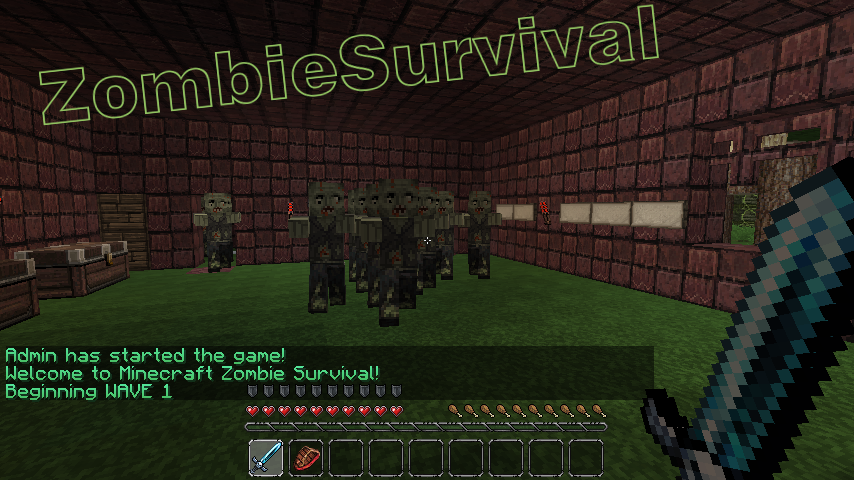
ZombieSurvival

Survive endless waves of zombie attacks!
Based on the COD gamemode Nazi-Zombies
Official Website: www.bjornke.com
Donate
Information:
Now you can play Call Of Duty® style Nazi Zombies in Minecraft! Includes all of the familiar features of the gamemode and more! These zombies can sniff you out from over a mile away and run faster (or slower) then you with our custom AI! Barricades, doors, mystery boxes, wolf waves, and more! Play with your friends or by yourself, it's easy to setup and easy to use!
Features:
- Multiple Games Per World (as many different games as you like in a single world file)
- Multi-World Support (Can have games in any world/nether)
- Custom Zombie AI (Zombies have infinite find/aggro radius, limited only by how many chunks loaded)
- Runner Zombies (Faster than normal)
- Zombie Spawns (set by using operator, spawns are enabled when wave number is reached)
- Zombie Difficulty Multiplier ( defined in config, controls how much health zombies get per wave)
- Zombie Damage Multiplier (defined in config, controls how much damage zombies deal per wave)
- Revive (A sign will appear where a dead comrade has fallen! Break the sign to revive him! You have 30 seconds)
- Random Skelly Waves (can be configured or disabled in config. Default 1/5 chance)
- Perks (Godmode, Instant Kill, and Fire. All last for 60 seconds)
- Random BITE Effect (Random potions applied to player on zombie attack, chance defined in config)
- Stat/Join Signs (Signs that can display player count / zombie count and if RIGHT clicked, allow player to join via sign click)
- Purchase Door Signs (can buy doors with points/economy t open)
- Death Waiting Lobbies (players go here once dead if spectating is turned off)
- Custom Limits (min/max players, max zombies at one time, max waves, allowed break/place of specific blocks during game)
- Inventory Save (Inventory is saved and replaced after a game)
- Automatically Start Game (When enough players have joined the game with /join command, start-player-count definable in config)
- Doors (set by operator, doors open once wave number is reached)
- Door to Spawn Link (Link spawns to doors so they activate when the door is purchased regardless of wave)
- Signs (can either give you item for expense of point, or heal you)
- Point System (10 points for every zombie killed)
- Economy Support (uses vault to link to most economy systems)
- Death Tax (% of bank, defined in config)
- Money per Kill (added to player account after kill, defined in config)
- Game Over or /leave Account Zeroing (defined in config)
- Spectate System (dead players can spectate the game)
- Friendly Fire Deductions (Players who strike or fire upon other players are deducted points)
- Friendly Fire Alerts (Sound is played on client side when player strikes or fire upon other players)
- Player Death Alerts (Sound is played at death location of player, white wool block flashes) Note this feature experimental
- Internal Anti-grief (if automated server, use this feature to prevent blocks from being broken)
- Items on Join (When a player joins a game, they receive items defined in the config)
- Optional Automation Feature (Defined in config, includes cooldown time between new game starts, in seconds)
- Included /vote feature (gets 2 random maps of all maps and puts them up for vote)
- Custom Zombie Drops (defined in config, includes chance for drop)
- 10th round Fire (Netherrack set on fire every 10th round, use /zsa-fire <name>)
- Version Checking (Displays in console and alerts ops that are in-game if out of date, also include /zs-version command)
- Special Action Blocks (Must be added to game with command /zsa-special)
- Yellow Wool: Double Player Velocity
- Blue Wool: Super Jump
- Light Blue Wool: Super+ Jump (Higher jump than Blue Wool)
- Orange Wool: Light's player on fire for 10 seconds
- Black Wool: Kills player
- Light Gray Wool: Sets player invisible
- Gray Wool: Invisible players back to visible
- Green Wool: Slows player slightly
Useful Pages For Admins
Video Tutorials
- Terms and Backend Configuration: http://youtu.be/U8RmAO9wqzc
- Spawn Point and Sign Config: http://youtu.be/4W0r5iJ5rGo
- Classes: http://youtu.be/JtzjfNmAVHE
Credit: stadvert
Permissions:
You do not need to define permissions for this plugin to work.
- zs.start
- zs.end
- zs.create
- zs.edit
- zs.remove
- zs.reload
- zs.version
- zs.tp
- zs.stats
- zs.help
- zs.join
- zs.leave
- zs.whisper
- zs.signs
Metrics
This plugin utilises Hidendra's plugin metrics system, which means that the following information is collected and sent to mcstats.org: A unique identifier, the server's version of Java, whether the server is in offline or online mode, the plugin's version, the server's version, the OS version/name and architecture, the core count for the CPU, the number of players online, the Metrics version,
Opting out of this service can be done by editing plugins/Plugin Metrics/config.yml and changing opt-out to true.
Read before posting comments
Completely new and rewritten version will come out as soon as possible, I am already working on it.
Donations:
If this plugin helps you please feel free to donate and keep this project updated. I am coding this plugin in my free time.

Click here to donate.
Comments

-

_ForgeUser7052630 Owner
-
Forge_User_74967307 Author
-
View User Profile
-
Send Message
Posted Mar 17, 2013Guys, 1.5 update will be available within 48 hours with some minor bug fixes and tweaks. I'll try and improve some of the documentation since 90% of the problems posted here are because of lack of documentation and others not able to figure out how to make something work that works just fine. :)
-
View User Profile
-
Send Message
Posted Mar 17, 2013It wont load on my 1.5 server. Please update.
-
View User Profile
-
Send Message
Posted Mar 17, 2013@jesse131 Working fine on my server....
-
View User Profile
-
Send Message
Posted Mar 16, 2013@Tromania
idea 2 exists :) use the doorlink command and hook a door to a spawner. anxiously waiting for the update; my server reallyyyyyyy needs this plugin :)
-
View User Profile
-
Send Message
Posted Mar 16, 2013I had 2 ideas that I thought would be really cool to see from this plugin as it is such a fun and amazing plugin. 1. Leaderboards - total zombie kills and highest round ect when typing /zs-leaderboard or something... Just thought it would add a cool aspect to the plugin and make people want to get on top. 2. Zombie spawns that only activate when a certain door has been opened. This way the door wont have to be opened before the zombies can be killed and the round can end.
-
View User Profile
-
Send Message
Posted Mar 16, 2013Broken with 1.5.
-
View User Profile
-
Send Message
Posted Mar 13, 2013I thought it would be a cool idea if you made a config option so that the map resets after the zombie game finishes because I have like 1 zombie map per world and people take items out of the chests in the map so if the world reset after every game it would stop the chests from needing to be manually refilled. Just a thought :)
p.s I don't think item buy signs or zombie box signs work :( or at least I can't get them to work after trying both the format that it says on the sign page and the format that the person said in the tutorial video.
Great plugin though btw :)
-
View User Profile
-
Send Message
Posted Mar 12, 2013Hi,
I have a problem every time i do /zsa-door Mygame 0 my door turns into wool and when the game start my door is wool and i want a iron door as door not wool :( How can i get a door as door?
Kevin
-
View User Profile
-
Send Message
Posted Mar 11, 2013Ok now the buy sign works but the zombie box wont
-
View User Profile
-
Send Message
Posted Mar 11, 2013How do you link spawns to a door so when the door is opened those spawns are activated? All of the guides you have are really out dated and some have incorrect information.
-
View User Profile
-
Send Message
Posted Mar 10, 2013Im having the same problem with the buy signs
-
View User Profile
-
Send Message
Posted Mar 10, 2013@balcas
Nevermind fixed -_-
-
View User Profile
-
Send Message
Posted Mar 10, 2013I work on the same server as balcas, Is there a chance we can meet you on your server or you can meet us on ours?
It seems that it would probably easier to see first hand the issues we are facing with this plugin.
-
View User Profile
-
Send Message
Posted Mar 10, 2013@Bjornke
Tryed -_- same just gives me an error.
The worst part is that Console has no errors T_T
-
View User Profile
-
Send Message
Posted Mar 10, 2013@balcas
Use the format from this website, not the one in the video.
-
View User Profile
-
Send Message
Posted Mar 10, 2013Every sign works except the item one.
-
View User Profile
-
Send Message
Posted Mar 10, 2013I get that my signs are configed bad. -_- for Buy ones i tryed like 20 ways like in the vids like in Examples still the same bullshit. And im useing Economy plugin but i forced on poins. I Get no errors in console, No errors on the signs. just keeps bugging out.
-
View User Profile
-
Send Message
Posted Mar 9, 2013hey i was wondering how to make the zombie box and the class give out multiples of 1 item
for example:
having and archer class or the box give out 64 arrows as 1 reward
-
View User Profile
-
Send Message
Posted Mar 9, 2013plz help
-
View User Profile
-
Send Message
Posted Mar 9, 2013My server keeps crashing and I was wondering if it had anything to do with Zombie Survival (one of the newer plugins I installed). Here is the crash log thingy. http://pastebin.com/A4vuWh5S Thanks!