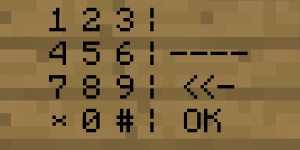
SignCodePad
SignCodePad
This is a plugin to create a codepad on a wallsign. It works without any client modification.
This Plugin adds a codepad to minecraft based on minecraft wallsigns. If you've entered the correct code, a redstonetorch is powered and you can activate any sort of mechanism for example open an door or pushing some piston. If you've entered the wrong code an other redstonetorch can be powered and you can for example remove the floor with pistons to let the player fall in lava or something like that. The positions of the redstone torches are configurable when creating the sign. The time how long the redstonetorch should be activate is also configurable. When the redstonetorchs aren't powered there are normal torchs in there position to simply helping you to build your redstone mechanism. A SignCodePad can only be destroyed by the owner or by admins with the required permission.
Features:
- Full functional CodePad
- No file configuration needed
- Positions of torchs configurable
- Codes are saved as MD5
- Powers RedStone Mechanism
- SuperPermis support
- Calibration for different types of Texturepacks (Please read Texturepacks and Calibration)
Download:
Instalation:
To install the plugin simply download and move the jar file into your plugins folder.
Permissions: Changed in verion 2.0.3
- signcodepad.use (Permission to use a SignCodePad an the SignCodePad Calibration)[User]
- signcodepad.create (Permission to create a SignCodePad)[User]
- signcodepad.replaceblock (Permission to replace a not air block with a torch)[Admin]
- signcodepad.masterdestroy (Permission to destroy SignCodePads without being the owner)[Admin]
HowTo:
Calibration
HowTo Normal
HowTo Advanced
Known issues:
- None known
Changelog:
V2.2.0
- Updated To 1.6.2
V2.1.0
- Updated To 1.1-R6 and 1.2.3-R0.2
- Added block locking. Enter B in the second line and The Code to The third Line Of a sign Above the block that should be locked.
V2.0.3
- Finally fixed NoLagg bug
- Fixed Permissions
- You need to write the permission nodes to lower case: signcodepad
V2.0.2
- Fixed version 2.0.1
V2.0.1
- Fixed noLag Bug
- Added permissions in lower case
- Fixed blockbreaking behind signs
- Improved getWorld by string
V2.0
- Added advanced calibration by CalA
- Block break behind SignCodePad is now blocked
- Fixed NPE with deleted world
- Fixed NPE with the wrong code
- Checks if a SignCodePad exists while loading. If not the entry is removed.
- Torch "generation" is fixed. Only modify not create a torch
- Corrected enable and disable Message
- Changed version in plugin.yml (forgot that the last versions)
- Using default calibration values if user has not calibrated
V1.2.1
- Fixed player can't destroy own sign
V1.2
- Added message if a player created the wrong sign.
- Added * and # to use in Codes.
- Language fix
V1.1
- Added shortcut [SCP] (Thanks to isikerkan for the hint)
- Removed the possibility to create Normal signs as SignCodePad which aren't usable
V1.0.1
- CB 1337
- Bug while saving fixed
V1.0
- Publishing
Comments


-

davboecki Owner
-
View User Profile
-
Send Message
Posted Nov 21, 2011You need to make it so creative mode doesn't destroy the signs somehow.
-
View User Profile
-
Send Message
Posted Nov 6, 2011I wish there was some easier way to configure the redstone torchs, like a command or a sign you place with certain text...
-
View User Profile
-
Send Message
Posted Nov 2, 2011I will try to make a full calibration. But this can take a some time. I can't promise that it will work but i will give my best.
The bugfix for "StringIndexOutOfBoundsException" will be in the next version.
Also the default calibration will be in it.
davboecki
-
View User Profile
-
Send Message
Posted Nov 1, 2011Is it too much to request a version with a full calibration? so it displays the codepad and lets click every number or something? Or maybe it would be enough to display the actual codepad, adding crosses left/right or you have to click on first or last entry or something
Because with the normal calculation & calibration it relies on the font being default, that has problems with some HD Fonts since its not quite that nicely aligned
Also little bug: if you create a sign with just [SignCodePad] on it, you get
14:06:35 [SCHWERWIEGEND] Could not pass event SIGN_CHANGE to SignCodePad java.lang.StringIndexOutOfBoundsException: String index out of range: 0 at java.lang.String.charAt(Unknown Source) at me.boecki.SignCodePad.event.SignCreate.onSignChange(SignCreate.java:126) at org.bukkit.plugin.java.JavaPluginLoader$36.execute(JavaPluginLoader.java:506) at org.bukkit.plugin.RegisteredListener.callEvent(RegisteredListener.java:58) at org.bukkit.plugin.SimplePluginManager.callEvent(SimplePluginManager.java:339) at net.minecraft.server.NetServerHandler.a(NetServerHandler.java:1046) at net.minecraft.server.Packet130UpdateSign.a(SourceFile:41) at net.minecraft.server.NetworkManager.b(NetworkManager.java:226) at net.minecraft.server.NetServerHandler.a(NetServerHandler.java:92) at net.minecraft.server.NetworkListenThread.a(SourceFile:108) at net.minecraft.server.MinecraftServer.h(MinecraftServer.java:471) at net.minecraft.server.MinecraftServer.run(MinecraftServer.java:374) at net.minecraft.server.ThreadServerApplication.run(SourceFile:417)
-
View User Profile
-
Send Message
Posted Oct 31, 2011I have an idea!
If an uncalibrated user attempts to use a SignCodePad, use a set of default values that work with the default Minecraft textures, but still show them a warning.
-
View User Profile
-
Send Message
Posted Oct 31, 2011Keep getting nullpointers :( (Bukkit 1337 and 1.2.1 of SCP)
-
View User Profile
-
Send Message
Posted Oct 30, 2011nice plugin
-
View User Profile
-
Send Message
Posted Oct 27, 2011Ok thanks
-
View User Profile
-
Send Message
Posted Oct 26, 2011You need to create a wallsign a normal sign doesn't work
davboecki
-
View User Profile
-
Send Message
Posted Oct 25, 2011yes i writet on the 2. Line. And i made a german Plugin review http://www.youtube.com/watch?v=6QlGIzvVOtk ;)
-
View User Profile
-
Send Message
Posted Oct 24, 2011Thank you.
And no i havn't forgotten the [SCP] Cal for me it's working.
Do you've written the "Cal" in the 2. line???
-
View User Profile
-
Send Message
Posted Oct 24, 2011Very Nice man, i make later a Present Video for you, beacuase i loved this Plugin <3 :D Have you forgot the [SCP] Cal? For Calibration?
-
View User Profile
-
Send Message
Posted Oct 23, 2011Nice job this plugin has inspired me to go on and create new plugins! After EffectiveArrows and DarkBrotherhood I had ran out of ideas. Now I have plenty thanks.
-
View User Profile
-
Send Message
Posted Oct 22, 2011Sorry Bro for the trouble, i have written [SignCodPad] ;). I have a idee for you Plugin: add a shortcut; [SCP] ;)
-
View User Profile
-
Send Message
Posted Oct 22, 2011I've uploaded the fixed version for CB 1337 to GitHub ,too.
-
View User Profile
-
Send Message
Posted Oct 22, 2011Hmm please Update it to 1337, isn't working. And no error log??
-
View User Profile
-
Send Message
Posted Oct 21, 2011Please see Calibration for mofe information.
davboecki
-
View User Profile
-
Send Message
Posted Oct 20, 2011Hey man, question. I have the SignCodePad plugin going and i can easily create the signs and set my Code, but when i go to use it it says "Please Calibrate First" No matter what i do i cannot get the sign working. Any Ideas?