SignCodePad
SignCodePad
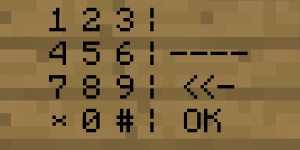
This is a plugin to create a codepad on a wallsign. It works without any client modification.
This Plugin adds a codepad to minecraft based on minecraft wallsigns. If you've entered the correct code, a redstonetorch is powered and you can activate any sort of mechanism for example open an door or pushing some piston. If you've entered the wrong code an other redstonetorch can be powered and you can for example remove the floor with pistons to let the player fall in lava or something like that. The positions of the redstone torches are configurable when creating the sign. The time how long the redstonetorch should be activate is also configurable. When the redstonetorchs aren't powered there are normal torchs in there position to simply helping you to build your redstone mechanism. A SignCodePad can only be destroyed by the owner or by admins with the required permission.
Features:
- Full functional CodePad
- No file configuration needed
- Positions of torchs configurable
- Codes are saved as MD5
- Powers RedStone Mechanism
- SuperPermis support
- Calibration for different types of Texturepacks (Please read Texturepacks and Calibration)
Download:
Instalation:
To install the plugin simply download and move the jar file into your plugins folder.
Permissions: Changed in verion 2.0.3
- signcodepad.use (Permission to use a SignCodePad an the SignCodePad Calibration)[User]
- signcodepad.create (Permission to create a SignCodePad)[User]
- signcodepad.replaceblock (Permission to replace a not air block with a torch)[Admin]
- signcodepad.masterdestroy (Permission to destroy SignCodePads without being the owner)[Admin]
HowTo:
Calibration
HowTo Normal
HowTo Advanced
Known issues:
- None known
Changelog:
V2.2.0
- Updated To 1.6.2
V2.1.0
- Updated To 1.1-R6 and 1.2.3-R0.2
- Added block locking. Enter B in the second line and The Code to The third Line Of a sign Above the block that should be locked.
V2.0.3
- Finally fixed NoLagg bug
- Fixed Permissions
- You need to write the permission nodes to lower case: signcodepad
V2.0.2
- Fixed version 2.0.1
V2.0.1
- Fixed noLag Bug
- Added permissions in lower case
- Fixed blockbreaking behind signs
- Improved getWorld by string
V2.0
- Added advanced calibration by CalA
- Block break behind SignCodePad is now blocked
- Fixed NPE with deleted world
- Fixed NPE with the wrong code
- Checks if a SignCodePad exists while loading. If not the entry is removed.
- Torch "generation" is fixed. Only modify not create a torch
- Corrected enable and disable Message
- Changed version in plugin.yml (forgot that the last versions)
- Using default calibration values if user has not calibrated
V1.2.1
- Fixed player can't destroy own sign
V1.2
- Added message if a player created the wrong sign.
- Added * and # to use in Codes.
- Language fix
V1.1
- Added shortcut [SCP] (Thanks to isikerkan for the hint)
- Removed the possibility to create Normal signs as SignCodePad which aren't usable
V1.0.1
- CB 1337
- Bug while saving fixed
V1.0
- Publishing
Comments


-

davboecki Owner
-
View User Profile
-
Send Message
Posted Mar 12, 2012I know it says it's for MC1.1, but here's what I'm with 1.2.3 so far, if you plan on updating officially. When I do the normal calibration, the whole thing is just completely jacked up. Rather impossible to know what you're pressing. Advanced calibration worked wonderfully, and after that, it's perfect. I don't know if you're planning to make a 1.2.3 release, but I'm using CB2060 right now. Everything else works perfectly as far as I can tell short of normal calibration (default TP). And just a suggestion, the plugin produces a SEVERE error on first run (not finding the config files), would be nice to give a warning that it's normal for first run.
Thanks for this plugin at any rate, it highly amuses me @.@ Kudos.
-
View User Profile
-
Send Message
Posted Mar 11, 2012I have updated the plugin to 1.1-R6. This should also work with 1.2.3-R0.2.
Also I have added The ability to lock blocks like a chest, a doublechest, a furnance, a workbench and a leaver. Just place a sign ablove the block that should be locked and enter "[SCP]" in the first line, "B" in the second line and your code to the third line. Now your Block should be protected.
@kozzy68
I will lock what i can do with your ideas. Thank you for your ideas.
1. and 3. should be no big deal and finished soon.
@ChuanEn14
Your users are trying to place an output-torch to a position which is not air. They must destroy the block before they can create a sign with the selected target. Or you must give your users the permission to replace any block with a torch but this can be a way to bypass worldguard and comparable things.
@deathnote1029
Thanks and
Updated ;-)
davboecki
-
View User Profile
-
Send Message
Posted Mar 2, 2012Hey there
I was just wondering if this was going to be updated to 1.1 R6 and above?
I really like using this plugin as it adds a lot of privacy, i really hope that you are able to do that for us ;D
Great work so far! keep it up! and thank you :)
deathnote1029
-
View User Profile
-
Send Message
Posted Feb 19, 2012Some people on my server aren't been able to use the pads, even with proper permissions. Some users can, but for other users it says OK-Target not air. They can type in the code, but it always says its wrong. They've already calibrated it many times too. Any suggestions of how i can make it work?
-
View User Profile
-
Send Message
Posted Jan 24, 2012Hi I got few sugestions.
1) option to disable that calibration message when players join.
2) option for server admin to set server wide default calibration as 80% of people on server are using same textures. Or even better ... command for users to select predefined sets. It might be bit of a waste to store 200 calibrations for larger server. Instead you just strore few and let users to chose.
3) option to place permanent calibration signs for others (used in cases when people are in area where they cant construct)
Thanks.
-
View User Profile
-
Send Message
Posted Jan 22, 2012No. Every player has his own calibration so everybody can use another texturepack.
-
View User Profile
-
Send Message
Posted Jan 22, 2012IF there are people on servers using diffrent textures it might be isse for this plugin I assume. You can have only one calibration for one texture pack at the time I gues. So whole server should use same textures Correct ?
-
View User Profile
-
Send Message
Posted Jan 20, 2012<3 GOOD IDEAR!
-
View User Profile
-
Send Message
Posted Jan 19, 2012@theask
do a sign that says
[SCP] CalA
and follow instructions :)
-
View User Profile
-
Send Message
Posted Jan 18, 2012In 1.1 its look very bad with Spoutcraft...
Have you any Idea how to fix that?
-
View User Profile
-
Send Message
Posted Jan 15, 2012@sliderjon
its really simple and i think the text on the page is enough :)
first number is the axle that goes in the direction you look when you set the sign up (through the wall) second number is the axle that goes upwards meaning negative numbers are below the level of the sign third number is the axle going to the right of where the sign is placed so negative numbers means that the torch should be placed to the left
the coordinates you specify here should be on a "block of air" meaning where you would otherwise put the torch manually
normal calibration was off for me too (using default texturepack with spout) but using the advanced one it works really good again
-
View User Profile
-
Send Message
Posted Jan 15, 2012@PachirisuxD
Nice idea!
-
View User Profile
-
Send Message
Posted Jan 15, 2012Plugin works, but needs a few tweaks. The calibration is off. When calibrating, I put my cursor's crosshairs directly over the + on the sign. I made the sign and in order to click the code, I had to find the number pad in the blank area on the left of the sign. I am using the Misa400 texture pack.
On advanced signs (lines 3 and 4) we know that the first number is the amount of seconds you want the redstone torch powered (nice feature).
The second number is the direction you are facing to read the sign. It gets to be a nuisance to hit f3 to find the direction you are facing every time you make a sign.
The third number is said to be up and down. I would assume that 1 is up, 0 is middle and -1 is down? And does this value indicate where the torch is placed or where the power will be sent?
The last number is really vague. "the way the Redstonetorch should be positioned right from the normal position". Huh? Wha? After using several signs, I still can't figure this value out.
All-in-all it is a handy little plugin. I used it on my creative world for a bank vault that was originally using the 5 lever combination lock. The signs are much more aesthetically pleasing and takes far less room than the 5 lever lock.
Nice work!
-
View User Profile
-
Send Message
Posted Jan 14, 2012Is there any way you could make it so the singcode pads can be attached to chests? That way they would be protected until someone uses a code to open it
-
View User Profile
-
Send Message
Posted Jan 13, 2012Nice Plugin!
I do it instantly at my Server!
-
View User Profile
-
Send Message
Posted Jan 12, 2012Version 2.0.3
@Cederstrom96
There must be another copy of my plugin somewhere. You only need to remove the jar to remove my plugin.
-
View User Profile
-
Send Message
Posted Jan 11, 2012I cant Remove the plugin. it just recreates a folder. even when i don't have the .jar file. and the signs still work. and it gives an Error when new players join. that they need to calibrate with their texture pack.
How do i remove the plugin completely ?
Thanks!
-
View User Profile
-
Send Message
Posted Jan 11, 2012Permissions not work in new version with PEX...
-
View User Profile
-
Send Message
Posted Jan 11, 2012still not working with new version (2.0.2) :( pad works well and saves to file when created, when shutting down server the file is intact but during launch of server it purges the Signs.yml
before startup:
and after:
-
View User Profile
-
Send Message
Posted Jan 11, 2012@NODeeJay
Thanks for help. I know where the bug is. It was an really idiotic bug. If fixed it and hopefully fixed the nolagg bug ,too (hopefully). Version 2.0.2 is on the way. Will be out in a couple of minutes.