
Ships
Ships
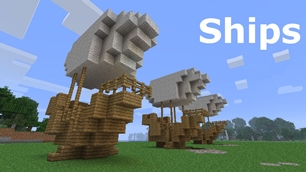
|
|
|
|
|
|
|
Source Code - Github |
JavaDocs |
Sponge version |
Discord channel |
Translate Core |
|---|




Looking for Dev builds?
Dev builds give off new features and bug fixes before they are officially released, however these features and bug fixes may not have been tested as much as a release on here
Old page:
I am testing this new page out. I am aware of some parts that are missing such as ship types, but please say if there is anything that you wish to see. I plan on making a FAQ's that includes common questions such as how to change ship requirements.
If you want to see the old page, it is here
Video tutorial
Ships 6 changes
Ships has gone through many changes, Ships 6 is the latest rewrite of the plugin. The latest rewrite fixes multiple bugs found in the root of previous versions of Ships.
Features
Moving ships
As the name of the plugin suggests, you can create your own ship and move it with just a single click.
Works with all blocks
There is a fully-fledged list where you can configure every block to react differently for the ships, including being able to add a block type to interact with Ships, detect it as a collide, and even not react at all.
Teleport to ships
There have been many requests to be able to teleport to ships for not only this plugin but others like it. This feature has been added to Ships, however, if it is something you do not wish, then you can disable to command by not adding the command.
Falling Ships
Ships will fall/sink if requirements are not met, this could be done through your own interaction such as running out of fuel, or by something else such as a TNT explosion.
Ship types
| Airship | Link |
| Ship | Link |
| Marsship | Link |
| Submarine | Link |
| Plane | Link |
| Hybridship | Coming soon |
Move the ship:
In Ships, movement is done by signs. You can see all signs here
Collide types:
| Name | ID | Description |
|---|---|---|
| Detect collide | DETECT_COLLIDE | If Ships detects this block in the way of a ship moving then the ship will not move with the error of this block being in the way |
| Material | MATERIAL | Material means that you can build a ship out of this block and the Ships block detection system will detect it as part of your ship |
| Ignore | IGNORE | If Ships detects this block in the way of a ship moving then the block will break and the ship will take its place |
Permissions
| Permission node | Description |
|---|---|
|
ships.cmd.info |
Allows the player to use the command '/ships info' |
|
ships.cmd.blockinfo |
Allows the player to use the command '/ships blockinfo' |
|
ships.cmd.shiptype.create |
Allows the player to use the command '/ships shiptype create' |
|
ships.cmd.config.set |
Allows the player to use the command '/ships config set' |
|
ships.cmd.config.view |
Allows the player to use the command '/ships config view' |
|
ships.cmd.blocklist.set |
Allows the player to use the command '/ships blocklist set' |
|
ships.cmd.blocklist.view |
Allows the player to use the command '/ships blocklist view' |
|
ships.cmd.ship.track |
Allows the player to use the command '/ships ship track' |
|
ships.cmd.ship.eot |
Allows the player to use the command '/ships ship eot' |
|
ships.cmd.ship.crew |
Allows the player to use the command '/ships ship crew' |
| ships.move.own.ships.airship | Allows a player to move own airship |
| ships.move.own.ships.watership | Allows a player to move own ship |
| ships.move.own.ships.marsship | Allows a player to move own marsship |
| ships.move.other.ships.airship | Allows a player to move anyones airship |
| ships.make.ships.airship | Allows a player to make a airship |
| ships.remove.other |
Allows a player to destroy anyones ships sign |
Developers:
Looking for a development wiki? maven/gradle dependencies? or something else relating to ships or translate core? Take a look at the getting started wiki
Comments


-

mosemister Owner
-

_ForgeUser7695435 Former Author
-
View User Profile
-
Send Message
Posted Mar 5, 2016-
View User Profile
-
Send Message
Posted Mar 5, 2016@Voidminer60
could you also send me your config file?
-
View User Profile
-
Send Message
Posted Mar 5, 2016its happening for me too but its happening with all the signs eccept for ship sign
-
View User Profile
-
Send Message
Posted Mar 5, 2016@GuysImTristan
Hmmm. Does it just happen with the altitude sign? Also can you send me your configuration.yml file (found in 'plugins/Ships/Configuration'). To stop bukkit form formatting it, you can use this line before your code
<<code yml>>-
View User Profile
-
Send Message
Posted Mar 4, 2016to the player.
-
View User Profile
-
Send Message
Posted Mar 3, 2016@GuysImTristan
I tried it with that version too. I am looking into what could cause that. Does the "null" message appear to the player or console?
-
View User Profile
-
Send Message
Posted Mar 3, 2016Im using the spigotbuild the latest one that supports 1.9.
-
View User Profile
-
Send Message
Posted Mar 3, 2016Charity event
Hey everyone, I am going to be doing a charity walk to help those who suffer with autism and their families. I would really appreciate any donations that can be done. If you have any money you can spare I’m sure another family could benefit from it. I am aiming to get a total donation amount of £100 (may show up differently based on currency). Thank you.
Ships 5.0.2.0 cancelled
In Ships news, I announced Ships 5.0.2.0 and the very small update it brought. After building it I found the bug of the wrong % was still there, and the fuel was not work correctly. This is due to how quickly the VesselType part of ShipsAPI was programmed.
Due to the fact creating vessels is complex as ShipsAPI goes and its buggy, I have desided to remake the VesselType section of the API. This will be released in Ships 5.1.0.0.
What does this mean for developers?
So the whole of the VesselType section is going to be changed, this includes the classes VesselType, Airship, Marsship, etc. The old VesselTypeAPI will be still included in Ships for the next 2 months worth of Ships updates starting from 5.1.0.0. In those 2 months your plugin will still work (the loading of old custom vessel data will not work though the VesselLoader).
Due to the fact this is a complete rewrite, if your plugin touches the classes stated before, you will be told by your IDE (and me) to update your plugin to the new code.
The new way it will work is actually very simple. You will need 2 classes to create custom vessels. One being called a staticVesselData, this will include all the default data your vessel type will have, such as requirements, fuel, etc. The other one is a variable class that will hold all the data that is linked to the vessel is it connected to, data such as the independent vessel data that was introduced in Ships 4 (requirements for a single vessel)
I will also be slightly updating the Vessel section of ShipsAPI, again the old class file will still be there for 2 months. This update to the Vessel section just renames everything to the modern version of ships.
what this means for server admins
if you have a plugin that hooks into Ships in any way shape or form, they are more then likely going to need to be updated, thats the only thing you will see .... and less bugs
what this means for server users
but fixes ... thats it :)
-
View User Profile
-
Send Message
Posted Mar 3, 2016@GuysImTristan
I will take a look that that bug when i get back. It didnt come up in testing.
Edit
I am failing to replicate the bug you have, I am using git-Bukkit-c194444 (craftbukkit 1.9). If there is any more of a error then "null" please can you provide that information
@789101112
Yep. They are both the same version. The only difference is the one that came out yesterday has full support for mc 1.9 and the one that came out last month has 1.8.0-1.8.9 support with a little of 1.9
-
View User Profile
-
Send Message
Posted Mar 3, 2016Which version if we stay at MC 1.8.8? - The Feb 22, 2016 v5.0.1.5 ?
-
View User Profile
-
Send Message
Posted Mar 3, 2016The Altitude sign doesn't work for 1.9!
It keeps saying "null".
PLEASE FIX!!!!!!!!!!!!! TY
-
View User Profile
-
Send Message
Posted Mar 2, 2016@ThunderRaikou
Just so you know. You dont need movecraft at all. Never have never will.
As for the issue your having, this is normally caused by either one of the following.
Either you have made a ship out of non active materials.
Or you have modified your config file to have the track limit too small for the two signs to locate eachother (default is 5000)
To fix the first issue, just go into the materials list in the configuration folder in the ships folder. And enable what you would like in the file (enable is marked with 1)
To fix the other issue, either lower or rase your track limit. If you have a error in your console that has the words prototype2 then you need to lower (probably to 3000) if not, raise it
If you are still stuggling, send me your server details on a pm and ill take a look myself
-
View User Profile
-
Send Message
Posted Mar 2, 2016When I try to click the signs, it both says that it cant locate the [ships] sign and it also says "unknown command type /help for help"..
I have the Movecraft and Ships plugins downloaded.
-
View User Profile
-
Send Message
Posted Feb 29, 2016Ships 5.0.2.0
Ships 5.0.2.0 is in the works with the following plans.
Vessels that take fuel will now be calculated on a decimal value. If all goes to plan your config file will be updated to take decimal numbers and whole numbers.
A bug fix where the too big message would display the wrong percentage
100% support for minecraft and spigot 1.9. I have already looked at the api changes and very little needs to be changed. The new blocks will need to be added but thats not hard at all
-
View User Profile
-
Send Message
Posted Feb 28, 2016@charlza
Ships runs on the standard BukkitAPI, so versioning should not matter with compatibility unless its a new minecraft version that forces the Bukkit API to change, such as 1.8 to 1.9. The only reason why it says 1.8.1 is because this page doesnt have a option for 1.8.8 ... or at least last time i checked it didnt.
-
View User Profile
-
Send Message
Posted Feb 28, 2016@MoseMister
I'm using the just released version of Ships 5.0.1.5
I think I see the problem now. I am actually using 1.8.8.R0.1-SNAPSHOT and Ships says 1.8.1. I had some other plugin issues that forced me to update to 1.8.8 a while back.
So, that's my fault :)
-
View User Profile
-
Send Message
Posted Feb 27, 2016@charlza
Slow? Depends on how large your ship is. And it also depends on what version your comparing it to
-
View User Profile
-
Send Message
Posted Feb 27, 2016I haven't used Ships in a while, but should the ships be moving extremely slowly? It can take 3 to 4 seconds between each move, turn, or up/down movement.
I disabled nearly all of my plugins to rule out a conflict with another plugin, but still see the same slow movement.
-
View User Profile
-
Send Message
Posted Feb 25, 2016@WindUnwaken
Just the sign? as in the ships sign?
Make sure your building your ship out of blocks that are enabled on the materials list. You can find out what is enabled by looking in the file labelled as Materials.yml that can be found in
and then searching for materials you made your ship out of, then under that material you will find the "datavalue_X: 0", if the 0 is a 1 then it is enabled.
sorry if that is confusing, but its either that or me taking a look myself. If you want me to take a look then private message me your IP and ill take a look
-
View User Profile
-
Send Message
Posted Feb 25, 2016Yes,the sign location turns into bedrock for 10 seconds. What should I need to set up