OldMain
This is an outdated version of plugin's page in case you want to use an older version.
Player Count Message
By: flyguy23ndm
Description:
Thanks for 10k+ downloads
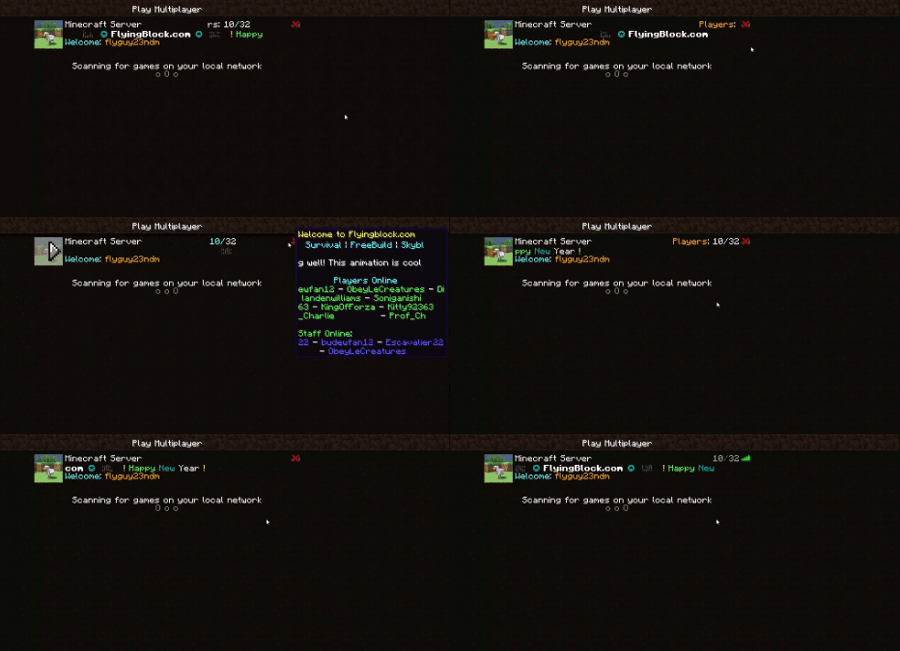
This plugin will, when you hover over your player count (next to ping), display lines that you have set. You could do as I did with the server name and stuff or whatever you want. It also has the ability to control the MotD with versions 3.0 or greater
IT WILL SAY THE COMMAND TO EDIT THE MOTD IS /MOTD HELP; THAT IS WRONG, IT IS /PCM MOTD HELP. PLEASE DON'T BE CONFUSED AND IGNORE MY SPELLING ERROR THAT I SHOULD HAVE CAUGHT.
example usage on my server

Config for that : http://dev.bukkit.org/bukkit-plugins/player-count-message/pages/configs/my-config/
Config with more features: http://dev.bukkit.org/bukkit-plugins/player-count-message/pages/configs/my-config-updated/
Dependencies:
- ProtocolLib: Needed 3.2.0 version or newer to run (name is a link to their page)
- Craftbukkit 1.7.2-R0.3 or newer
How to use:
Just plop the plugin in your config. When you run the server it should auto-generate a folder and config. Then in the config it will have a, "&4Hello this is line 1". You can add more lines directly from the config or by using commands in game to add or edit the lines.
To add formatting and colors just do the formatting codes that are normally in minecraft (FormattingCodes) and use a & instead of the weird §. You can use that and it won't make a difference. You can only edit it from the config and to update it just do /pcm load
You can also display players online in the server with this plugin. If you include in a line "%player%", it will check the server to see if a player is online and add his/her name to the line in place of %player%. If it encounters more lines it will repeat the same process but if there aren't enough players on the server to fill the x'th line, then it will skip that line. In my example on my server, I actually have 10 lines set up to show players but since only four are online it only shows for players
| Commands__ | Perms_ | Description____ | |
|---|---|---|---|
| /pcm add [text] | pcm.pcm | adds a new line composed of text to the message which you can view with /pcm view. Also, you can include spaces with the text | |
| /pcm delete [lines#] | pcm.pcm | deletes a line specified by the number. Don't put something else instead of a number, I don't know what it will do. It will remove the line but it can't be undone, so make sure you select the line from /pcm view (the indexing starts at 1) | |
| /pcm set [line#] [text] | pcm.pcm | changes a specific line to text with the same mechanics as add. | |
| /pcm insert [line#] [text] | pcm.pcm | inserts [text] after the line specified | |
| /pcm load | pcm.pcm | loads Message from the config | |
| /pcm view | pcm.pcm | views the current message on the server (but doesn't substitute the players or remove lines for players) | |
| /pcm help | pcm.pcm | help command (the information here) | |
| /pcm motd view | pcm.motd | views the current message | |
| /pcm motd set [message] | pcm.motd | sets the MotD (can include spaces) | |
| /pcm motd enable | pcm.motd | enables the MotD to be displayed with this plugin | |
| /pcm motd disable | pcm.motd | disables the MotD for this plugin (it will default to the regular motd supplied in the server.properties files) | |
| /pcm motd state | pcm.motd | Returns if the MotD is enabled or not | |
| /pcm motd load | pcm.motd | Loads the MotD from the text file MotD.txt in the PlayerCountMessage foler | |
| /pcm motd save | pcm.motd | saves the current message to the MotD.txt file | |
| /pcm motd help | pcm.motd | This information here |
| Special Tags__ | Description____ | |
|---|---|---|
| %player% | Will show an online player or be skipped if no player is online to fill the spot, can be used multiple times per line | |
| %player%## | Same as above but will size a player's name to characters. If it was "%player%8" or "%player%08" a player's name would be sized to 8 characters long. can at most by 99 and least 0 (but why would you use 0?) | |
| %online% | Will show the online number of players | |
| %more% | Will show the number of players who haven't been shown by %player%, if there were 10 players online, and only 5 %player%'s in the message, it would be 5 | |
| %cent% | Will roughly center the line compared to others | |
| \u0000 | if you replace "0000" with a hexadecimal number, you can add unicode characters with little effort. Table of unicode characters : http://unicode-table.com/en/#control-character . ex: \u2745 will be ❅ |
Note, not all the tags will work for MotD. MotD will only work for versions 3.0 and higher
And if you're looking for a text to Unicode converter, this site is fairly good http://www.branah.com/unicode-converter
Config
Some people have been complaining about the config and stuff. The way to fix the config is by resetting it. When you reboot the server it will generate a default config. If for some reason you can't get a default config go to http://dev.bukkit.org/bukkit-plugins/player-count-message/pages/configs/default-config/.
Tutorial videos http://dev.bukkit.org/bukkit-plugins/player-count-message/pages/tutorials/
Future features Possibly?
- Staff showing on the Message
Comments