a/usage/Tutorial
How to Use Player Count Message
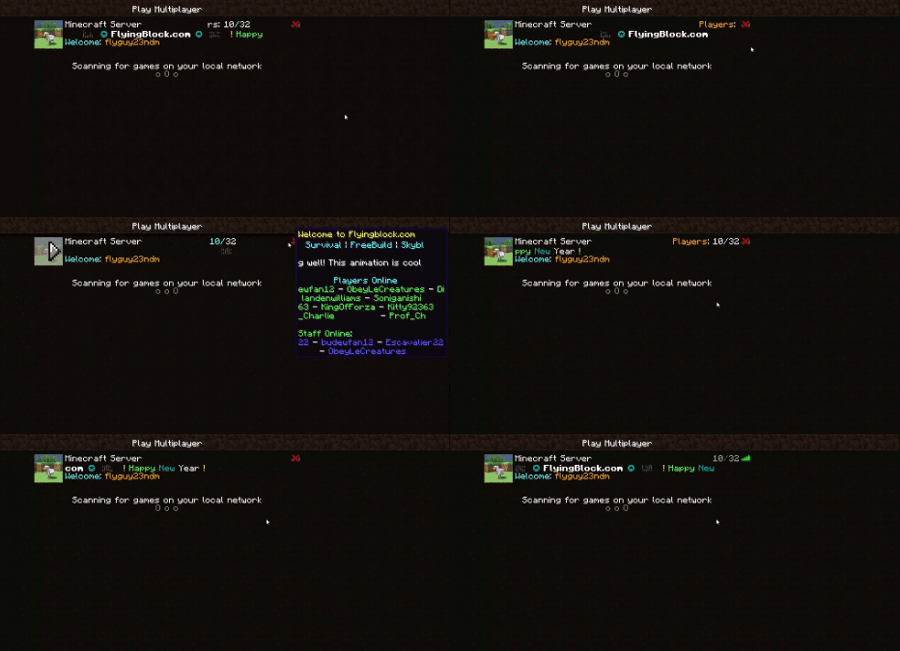
So, you want to have an animated server ping that looks nice. Well you came to the right place. If not, get outta' here.
Please read this whole page before asking for help.
Download the plugin
The newest version of the plugin can be found on the main page, it will be at the top of the page on the right, click the link and download the file, to see all downloads, go here. To get the animation, download Player Count Message v4.0 or newer. If you're using version 4.2 or newer, you will download a zip file. Select the file that aligns with your version of java (if you don't know try one, if it doesn't work, try the other) and keep it in a safe place for now. If you are using version 4.3 or newer, you will have a choice between PlayerCountMessage and PlayerCountMessageBungee. If you are using the BungeeCord platform, use PlayerCountMessageBungee with whichever version of Java that you are using. If you are using CraftBukkit, use PlayerCountMessage with whichever version of Java that you are using.
Download Protocol Lib
If you're using bungee cord, skip this step.
Protocol lib is a dependency for this plugin and you need it to have the plugin work. Protocol lib's plugin page is here. Try using a new version of the plugin. It has been tested and works with the more recent versions. Protocl lib and this plugin do not work with bukkit 1.8.3, only 1.8.1.
Download AnimatedMOTD
If you're using bukkit, skip this step.
AnimatedMOTD allows the plugin to work with bungee. AnimatedMOTD's page is here. Try using version 1.1.1.
Load the plugin
Follow this stop whether you're using Bungee or Bukkit
Put the jar files (protocol lib or AnimatedMOTD and player count message) into your plugins directory (folder) in your server and then reboot the server. If you're using Bungee, put the plugin in your Bungee Server plugin's directory and NOT in the CraftBukkit plugins directory.
Customize your message
Now that you have finished the arduous, multi-step task of installing PlayerCountMessage, you can fit your player count message to your custom server. The config and all it's values are explained on the Default Config Page, or, if you don't like text files, you can edit it in game with commands. You could even make a player count message like mine.
Hope you like the plugin and if you have any questions on how this works, ask it in a comment, someone could answer.
Note, to add a new image, put the image file in the player count message plugin directory (it only works there) and when you put the name in the config or type out it's name in the command, make sure it is the same as the image file and includes the file extension, such as ".png" or ".gif".
Do not edit the serverinfo.yml file while the server is running. Only edit it while the server is turned off. If you wish to edit the PlayerCountMessage while the server is running, you can use the complementary commands for this plugin, no extra charge.
Some features do not work for BungeeCord ( :( ) but it's ok, it still can be animated an used with this plugin. I believe that permission on whatever server you have a proxy to will carry over to this plugin so you do not have to edit the permission for the Bungee config (I know that pcm.staff does that at least) don't quote me on this w/o testing it for yourself.
Videos
These are videos that some kind YouTubers made for my plugin. They are mostly outdated, but still work.
Comments