
LorinthsRpgMobs

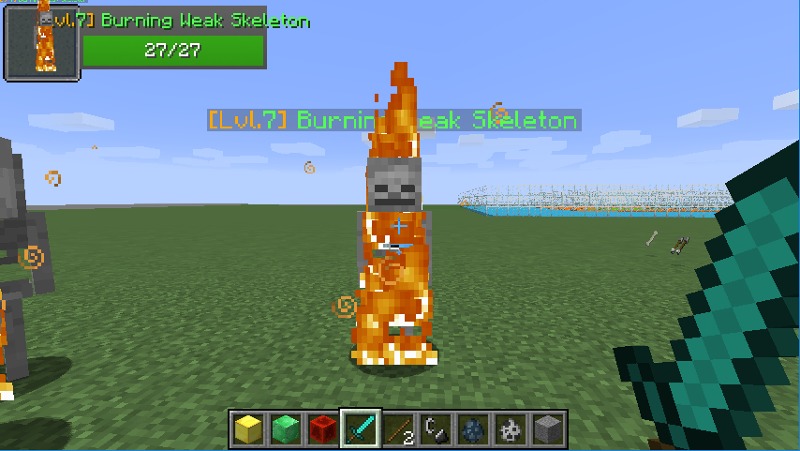
This is a simple 'plug and play' plugin that adds a difficulty to creatures, and a Level Indication based on their distance from Spawn. The current formula to get the mobs level is by default as follows....
(((Distance from closest spawnpoint) - CenterBuffer) / Distance) + 1 = Mob Level
-
This gives the result of creatures 0 - 49 blocks from spawn = Level 1. 50-99 = Level 2, etc
-
The distance value of, 50, can be modified by your own choice
What these levels change and add...
-
Increases Damage / Health a monster has (these levels play into configurable formulas that increase damage and health)
-
Adds armor to creatures at specific increments (configurable)
-
Gives different loot drops based on level
Level Regions
Level regions can be created (in conjunction with World Guard) to create zones of stronger/weaker mobs!
You simply create a level region with the worldguard id and give it a level!
From there you can customize mob names based on regions!
Mob Variants
Commands
- /lrm - displays all available commands of the ones listed below (if not listed check permissions)
- /lrm butcher [radius] - kills all entities loaded in world that aren't tamed
- /lrm region - access to all region commands
- /lrm reload - saves/reloads config files
- /lrm spawnpoint - access to all spawnpoint commands
- /lrm update - updates the plugin, takes effect after server restart
Permissions
- lrm.admin - gives access to most the commands above
- lrm.butcher - gives access to the butcher command
- lrm.update - gives access to /lrm update - uses auto updater to allow for automatic updates!
Videos
- Mob Hunting
- Battlelevels
- Heroes
- Skill API
- EnchantmentApi
- MythicMobs
- Health Bar
- Mob Health
- Elite Mobs
- Quests
- DungeonsXL
- MMOCore
- MMOItems
- RedProtect
- GriefPrevention (and GriefPreventionFlags)
- TardisWeepingAngels
- WorldGuard


- bukkit version
- LRM version
- links to a Pastebin including your config files and the error
Comments


-

Lorinthios Owner
-
View User Profile
-
Send Message
Posted Aug 25, 2014Since Bukkit is closing up, when is the full spigot support going to be released?
-
View User Profile
-
Send Message
Posted Aug 24, 2014@killerwars2000
Looking at TagAPI, it is possible for players. I'm gonna try to use tagAPI for mobs and see if I can add the feature in!
EDIT: I'm extremely stupid and it is possible! in Beta 2.1 this will be available!
-
View User Profile
-
Send Message
Posted Aug 24, 2014@Toxxic3D
Its because you're using 1.7.10, this version only works with 1.7.9.
Once i finish Beta 2.1, I'll upload a 1.7.9 and a 1.7.10 version
-
View User Profile
-
Send Message
Posted Aug 24, 20141. (1.7.10-R0.1 build #3115) 2. [Beta 2.0.2] Lorinths Rpg Mobs 3. http://gyazo.com/aaeeb17d45856fc7c77ea2c04a3f528e 4. I deleted the config, but i never touched it anyway, and the error was just huge. The top of the error said what I pasted below.
-
View User Profile
-
Send Message
Posted Aug 24, 2014@Hoolean
thank you!
@Toxxic3D
The plugin works specifically with 1.7.9. If you're using something else then let me know and I can port it to a different version!
Otherwise if you could provide the following information, I can try to fix it!
-
View User Profile
-
Send Message
Posted Aug 24, 2014So many errors on my console from this plugin. It looks like a great idea too! Could not pass event EntityCombustEvent to lorinthsrpgmobs vdev-2.0.1 org.bukkit.event.eventexception
-
View User Profile
-
Send Message
Posted Aug 24, 2014I have a question is it possible to make mob's nametags in color or not ? and also it a great plugin I use it for my server ModernCraft-War.V.30 if you want to check the server but it is not finished yet well bro here is the ip : mcw-3.ddns.net ! Thank you !
-
View User Profile
-
Send Message
Posted Aug 24, 2014Nice plugin idea :)
-
View User Profile
-
Send Message
Posted Aug 23, 2014I'm writing it right now to generate a configuration for the world in the worlds.yml file. If it doesn't exist prior, that is
ALSO fixing it to where you can ID the location as a string instead of just a number. I wrote this code back when I was BSing a lot of this plugin XD
-
View User Profile
-
Send Message
Posted Aug 23, 2014@lorinthios
yes because people change the name of that config section if they're world isn't called world :P use a separate default/global section. and hardcoded defaults if that isn't available. using world as default would also work against you if "world" is the 1 world that should be different. another good idea is names like "example_world" instead of world2.
i do it like this, i don't think you need help but as i have this lying around i might as well post it.
http://pastebin.com/ErLPSiMS
that variable will always have a valid value no matter what happens to the config.
-
View User Profile
-
Send Message
Posted Aug 23, 2014@HimName
Usually people use the default "world", i thought i made it normally inherit from world but i guess its having issues now
-
View User Profile
-
Send Message
Posted Aug 23, 2014this is why i like to use defaults :)
-
View User Profile
-
Send Message
Posted Aug 23, 2014@lorinthios
It appears to be working properly now.
Does this mean that your mod has only been plug-and-play for people with a world named "world" this whole time?
Even if you don't make it automatic you can just include the need to do this manually somewhere in the installation instructions.
-
View User Profile
-
Send Message
Posted Aug 23, 2014@HimName
Also I'll be making a video tonight on the worlds.yml and quickly go over the regions
-
View User Profile
-
Send Message
Posted Aug 23, 2014@HimName
alrighty, so thats my fault not setting it up to automatically get worlds and put them in.
BUT, glad to have remembered/found that. So everything is working as it should now?
-
View User Profile
-
Send Message
Posted Aug 23, 2014@lorinthios
I just went into the worlds config file and made the following change...
Worlds: NAME OF MY WORLD: initlevel: 1 distance: 50 enabled: true '1':
and now it works......
Edit - This is the problem. I changed words and it stopped working. I change the name of the world in your world config file to me new world name and it started working again.
-
View User Profile
-
Send Message
Posted Aug 23, 2014@lorinthios
Nope, not using world2.
-
View User Profile
-
Send Message
Posted Aug 23, 2014@Servertigo
Good to hear =)
-
View User Profile
-
Send Message
Posted Aug 23, 2014@lorinthios
Oh good to know! This plugin is going to integrate nicely into my server then once the maxHealth bug is fixed :D
-
View User Profile
-
Send Message
Posted Aug 23, 2014@HimName
Also you wouldn't happen to be testing on a world called "world2" would you? Thats in worlds.yml. The default is set to deny my plugin in that world as an example (silly I wrote that so long ago I forgot about it)