
LorinthsRpgMobs

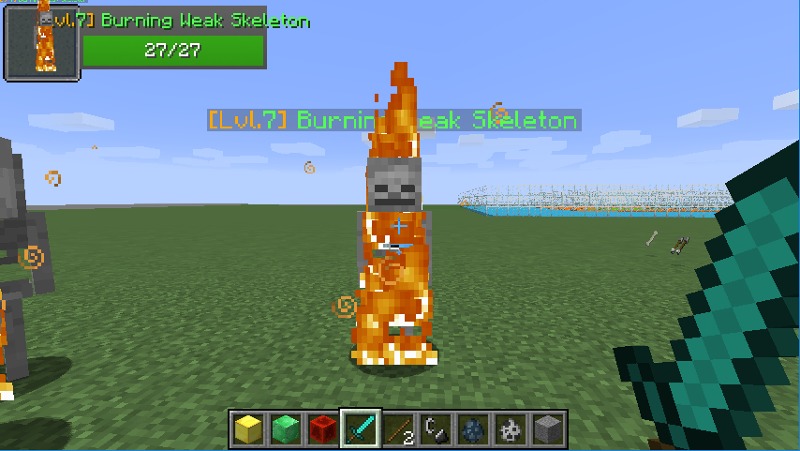
This is a simple 'plug and play' plugin that adds a difficulty to creatures, and a Level Indication based on their distance from Spawn. The current formula to get the mobs level is by default as follows....
(((Distance from closest spawnpoint) - CenterBuffer) / Distance) + 1 = Mob Level
-
This gives the result of creatures 0 - 49 blocks from spawn = Level 1. 50-99 = Level 2, etc
-
The distance value of, 50, can be modified by your own choice
What these levels change and add...
-
Increases Damage / Health a monster has (these levels play into configurable formulas that increase damage and health)
-
Adds armor to creatures at specific increments (configurable)
-
Gives different loot drops based on level
Level Regions
Level regions can be created (in conjunction with World Guard) to create zones of stronger/weaker mobs!
You simply create a level region with the worldguard id and give it a level!
From there you can customize mob names based on regions!
Mob Variants
Commands
- /lrm - displays all available commands of the ones listed below (if not listed check permissions)
- /lrm butcher [radius] - kills all entities loaded in world that aren't tamed
- /lrm region - access to all region commands
- /lrm reload - saves/reloads config files
- /lrm spawnpoint - access to all spawnpoint commands
- /lrm update - updates the plugin, takes effect after server restart
Permissions
- lrm.admin - gives access to most the commands above
- lrm.butcher - gives access to the butcher command
- lrm.update - gives access to /lrm update - uses auto updater to allow for automatic updates!
Videos
- Mob Hunting
- Battlelevels
- Heroes
- Skill API
- EnchantmentApi
- MythicMobs
- Health Bar
- Mob Health
- Elite Mobs
- Quests
- DungeonsXL
- MMOCore
- MMOItems
- RedProtect
- GriefPrevention (and GriefPreventionFlags)
- TardisWeepingAngels
- WorldGuard


- bukkit version
- LRM version
- links to a Pastebin including your config files and the error
Comments


-

Lorinthios Owner
-
View User Profile
-
Send Message
Posted Aug 23, 2014@Servertigo
YES THIS IS A FEATURE!!! =) (happy not angry, figured I'd clear up since text is hard to portray emotion).
This was actually one of the first features added to this plugin when it was just a child. But in the worlds.yml file, you can see that "world", has multiple spawn locations called "1", and "2." You can add as many as you'd like. When a creature is spawned it picks the closest "start point" and calculates the level based on the closest spawn. So you can have multiple start points in a world, just configure it in worlds.yml!
-
View User Profile
-
Send Message
Posted Aug 23, 2014@lorinthios
Oh, good to know. I have another question about the spawns. I want to have several spawns over my world, but the monsters scale up the further away from the main spawn. Is it possible to set multiple spawns in your plugin, so that low level mobs will spawn in more than 1 location? Or is that something that I need to configure with the regions?
-
View User Profile
-
Send Message
Posted Aug 22, 2014@HimName
We dont have an official site as of yet, but my tech partner is setting up the servers and networking. It uses McMyAdmin, and the host point is in Kentucky. If you need more details on pricing or hardware i'd be happy to talk in a pm =).
-
View User Profile
-
Send Message
Posted Aug 22, 2014@lorinthios
Link me to your hosting site please.
Also, the fact that I can type /lrm and get the command list ingame but nothing else works doesn't give any hints as to what is wrong?
-
View User Profile
-
Send Message
Posted Aug 22, 2014@HimName
Its possible i suppose. But ive never used them or know much about them. I have a private server hosting company if you'd like to test elsewhere. We have a free trial period so it wouldnt cost you anything to try =)
-
View User Profile
-
Send Message
Posted Aug 22, 2014@lorinthios
I just wiped my server clean (I am using MC Pro Hosting) and installed LRM only (on 1.7.9), restarted the server twice, butchered, and still it doesn't work. Is it possible the problem is with MC Pro Hosting?
-
View User Profile
-
Send Message
Posted Aug 22, 2014@Servertigo
OverrideHeroes: true, does that. It takes the formulas you set in the monsters.yml for experience, and uses those for heroes exp
-
View User Profile
-
Send Message
Posted Aug 22, 2014@lorinthios
That's great to know! This plugin is going to be a fundamental part to my server :)
@firesofhades
So setting that option to false would normally allow the EXP gained from Heroes to be bigger if the mob was a higher level?
-
View User Profile
-
Send Message
Posted Aug 22, 2014@Servertigo
Alright well, when i get 2.1 put out it will probably fix this =) shouldnt be long!
-
View User Profile
-
Send Message
Posted Aug 22, 2014@firesofhades
Haha, yeah i set everything low on my computer so i can go crazy with graphics in my game. Windows uses too much background crap. But thanks for the compliments!
-
View User Profile
-
Send Message
Posted Aug 22, 2014@Servertigo
about the off-topic subject.
there already are experience formula's, and the overrideHeroesExp option uses those for your heroes exp i assume. but because of the error you're getting this won't be applied. when lorinthios fixes your first problem, the second will disapear :)
if thats not the case, it wouldn't take me long to rewrite LRMoney to do this, same plugin, different context. but i'd rather wait till lorinthios responds.
-
View User Profile
-
Send Message
Posted Aug 22, 2014@lorinthios
I was using Heroes, yes. I changed the OverrideHeroesEXP optin in your config to false, but I still get the same error.
I guess this is slightly off topic, but do you know if there is a way to get the Heroes plugin to give more experience if they kill a higher level mob from your plugin?
-
View User Profile
-
Send Message
Posted Aug 22, 2014@lorinthios
haha yeah i have fun doing things like that :) never worked with metadata, vault or customisable formula's before so i gained from it as well :D
and aside from the vault code, which was stolen from the vault tutorial, its mostly your code/ideas, so its not really stealing :P
i tried to make it as easy as possible to copy/paste, which is why i went for a seperate yml. its just the creating and loading config part that should change to match your conventions.
also great vid, high res, clear voice and good explanations. i was kind of surprised by the combination of oldskool windows visualization, and hd mc textures :P
-
View User Profile
-
Send Message
Posted Aug 22, 2014@HimName
Uploading Part I of the tutorial series I'm making for my plugin! It goes over basic setup and just the config.yml
Part II will include fine tuning in the monsters.yml file, and Part III will deal with Custom Mob Spawners / region changing
-
View User Profile
-
Send Message
Posted Aug 21, 2014@firesofhades
God its awesome to have you essentially supporting this plugin haha. Ill probably steal this and put it in =) thanks for the code!
This is essentially how i was gonna configure it, in a seperate economy.yml
-
View User Profile
-
Send Message
Posted Aug 21, 2014@lorinthios
meet LRMoney,
requirments: LRM, Vault, configuration
compiled jar: http://www.fileswap.com/dl/W8z63MnVvF/
here's a source in case someone wants to change it up. or add it to their plugin ;) there's no comments, but it should be comprehensible. if you take out the part that's checking the mob types, it shouldn't be more then 50-60 lines.
source: http://www.fileswap.com/dl/bdQvvIllCn/
the config is similar to LRM's. so it should speak for itself. keep in mind that i did not take the effort to come up with useful or sensable defaults. so without configuration it might mess with your economy. and enderdragons "drop" just as much as every other mob.
edit-
btw, all mobs that don't "give" their level are mobs that are still around from when the server restarted, metadata is not saved. solution, kill all hostile mobs on disable. ;) i also assume this happens when they unload tho.
edit-
you could check the custom name to get the level, if its no longer in the metadata.
-
View User Profile
-
Send Message
Posted Aug 21, 2014@HimName
Yeah I sure will! Got my headset yesterday!
Just need time to record which I can probably do tomorrow =)
-
View User Profile
-
Send Message
Posted Aug 21, 2014@lorinthios
I just removed every single mod on the server (1.7.9) and then installed LRM. As usual I can type /lrm and see the commands list but that's all. This is madness!
Its clearly installed correctly since I can type /lrm in game and see the commands but that appears to be all it does....
-
View User Profile
-
Send Message
Posted Aug 21, 2014@lorinthios
I'm back to 1.7.9
Also, can you get a working video back up? That might be a help for people in my situation. Thanks.
-
View User Profile
-
Send Message
Posted Aug 21, 2014@HimName
Well the latest file and 1.7.9 will work, it wont work with 1.7.10
Otherwise im not really sure what you would be doing wrong. It should simply just be...