ItemSlotMachine
What is it?
ItemSlotMachine adds realistic slot machines with item frames as reels to your server. Each slot machine has its own jackpot (money and/or items) which increases with every spin.
Features
- Create and manage multiple slot machines
- Create and manage your own slot machine designs (default design is built-in)
- Customize each slot machine individually
- Display statistics of slot machines and players
- Create coin shops for players
- Customize all plugin messages
All listed features above are always referring to the newest version of ItemSlotMachine!
Metrics
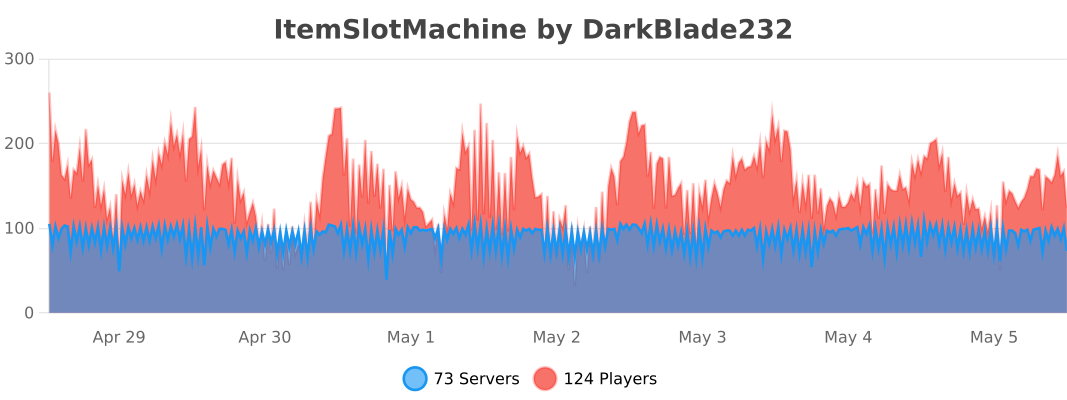
This plugin uses Metrics by BtoBastian to collect various data from servers.
If you don't want Metrics to collect your data you can disable it easily by setting enabled to false in the config file at plugins/bStats/
Upcoming features
- Support for larger numbers on signs
- Customizeable sign layout and with more placeholders (for example <player>)
Commands & Permissions:
| Command | Description | Permission |
| /design wand | Gives the player a design wand | itemslotmachine.command.design.wand |
| /design create [name] | Creates a new design from your selection | itemslotmachine.command.design.create |
| /design remove <name> | Removes an existing design | itemslotmachine.command.design.remove |
| /design list | Displays a list of all available designs | itemslotmachine.command.design.list |
| /design invert <name> | Inverts the item frame order of a design | itemslotmachine.command.design.invert |
| /design reload [name] | Reloads all designs or a single design | itemslotmachine.command.design.reload |
| /design help [page] | Displays help pages for the design command | - |
| /coin buy <amount> | Gives the player coins in exchange for money | itemslotmachine.command.coin.buy |
| /coin give <player> <amount> | Gives an amount of coins to a player | itemslotmachine.command.coin.give |
| /coin help [page] | Displays help pages for the coin command | - |
| /slot build <design> [name] | Builds a new slot machine | itemslotmachine.command.slot.build |
| /slot remove <name> | Removes an existing slot machine | itemslotmachine.command.slot.remove |
| /slot list | Displays a list of all available slot machines | itemslotmachine.command.slot.list |
| /slot tp <name> | Teleports the player to a slot machine | itemslotmachine.command.slot.tp |
| /slot rebuild <name> | Rebuilds a broken slot machine | itemslotmachine.command.slot.rebuild |
| /slot move <name> <amount> | Moves a slot machine in your view direction | itemslotmachine.command.slot.move |
| /slot stop <name> | Stops a slot machine instantly without paying out | itemslotmachine.command.slot.stop |
| /slot money <name> <clear/deposit/withdraw/set> [default/amount] | Modifies the money pot of a slot machine | itemslotmachine.command.slot.money |
| /slot item <name> <clear/add/set> [default/hand/items] | Modifies the item pot of a slot machine | itemslotmachine.command.slot.item |
| /slot reload [name] | Reloads the plugin or a single slot machine | itemslotmachine.command.slot.reload |
| /slot help [page] | Displays help pages for the slot command | - |
| /statistic show <slot/player> <name> | Displays the statistic of a slot machine or player | itemslotmachine.command.statistic.show |
| /statistic top <slot/player> <category> | Displays the top ten of slot machines or players for a category | ItemSlotMachine.command.statistic.top |
| /statistic reset <slot/player> <name> | Resets the statistic of a slot machine or player | ItemSlotMachine.command.statistic.reset |
| /statistic help [page] | Displays help pages for the statistic command | - |
| - | All plugin permissions | itemslotmachine.* |
| - | All command permissions | itemslotmachine.command.* |
| - | All design command permissions | itemslotmachine.command.design.* |
| - | All coin command permissions | itemslotmachine.command.coin.* |
| - | All slot machine command permissions | itemslotmachine.command.slot.* |
| - | All statistic command permissions | itemslotmachine.statistic.* |
| - | Modify a specific slot machine | itemslotmachine.slot.modify.<name> |
| - | Modify all slot machines | itemslotmachine.slot.modify.* |
| - | Inspect a slot machine by right clicking it | itemslotmachine.slot.inspect |
| - | Use a slot machine | itemslotmachine.slot.use |
| - | Use all slot machines | itemslotmachine.slot.use.* |
| - | Create a coin shop | itemslotmachine.shop.create |
All listed commands and permissions above are always referring to the newest version of ItemSlotMachine!
How to: Coin Shop
You have to write [CoinShop] in the first line of a new sign and click done in order to create a coin shop sign automatically. You can change the amount of coins you want to buy by pointing your cursor at the sign and scrolling up or down. (if you hold shift while scrolling, the amount will increase/decrease by 10) Simply right click the sign after you've chosen the amount of coins you want to buy to make a purchase.
Source
The source code can be found in my repository on GitHub!
Contribute
If you find a bug or encounter an error, please open a new ticket on CurseForge or GitHub, send me a private message or comment down below! Suggestions and ideas for new features are always welcome and can be submitted via the previously mentioned ways.
Videos
Comments


-

DarkBlade232 Owner
-

_ForgeUser12580406 Artist
-

rangewonk Tester
-
View User Profile
-
Send Message
Posted Dec 29, 2013In the new update the /slot reload function messes up a lot of other plugins, I had to restart the server because of it. There were no errors in the console...
-
View User Profile
-
Send Message
Posted Dec 29, 2013Awesome!
My players have been waiting for this! ;)
-
View User Profile
-
Send Message
Posted Dec 29, 2013New version has been uploaded and is available here!
-
View User Profile
-
Send Message
Posted Dec 29, 2013@DarkBladee12
is it fixed? @DarkBladee12
all good
-
View User Profile
-
Send Message
Posted Dec 29, 2013@Andy24090
I'm currently running the last tests, so it won't take that long ;)
-
View User Profile
-
Send Message
Posted Dec 29, 2013@DarkBladee12
is it fixed?
-
View User Profile
-
Send Message
Posted Dec 29, 2013@DarkBladee12
do you know a time?
-
View User Profile
-
Send Message
Posted Dec 29, 2013@Andy24090
It will be fixed with the new version which will be uploaded today in a few hours/minutes ;)
-
View User Profile
-
Send Message
Posted Dec 29, 2013People can take the item out the framms how can it be fixed?
-
View User Profile
-
Send Message
Posted Dec 27, 2013@jefle
I'm trying to finish the new version tomorrow and packing the last features in that are in my mind! (The file is already more than twice as big as the file of the old version :D)
-
View User Profile
-
Send Message
Posted Dec 27, 2013i can do a norwegian translation;)
-
View User Profile
-
Send Message
Posted Dec 27, 2013Looking forward to the update.
-
View User Profile
-
Send Message
Posted Dec 25, 2013@Adnan2000
This was already mentioned by others and has been fixed in the upcoming version!
-
View User Profile
-
Send Message
Posted Dec 25, 2013Theres a bug where when you punch the item frames the objects in the item frame pops out, this has probably been reported but i just reported it incase.
-
View User Profile
-
Send Message
Posted Dec 24, 2013New update will be uploaded this week, it's almost finished ;)
-
View User Profile
-
Send Message
Posted Dec 21, 2013@Musikfreakmarcel
You don't need to, because I'll include one!
-
View User Profile
-
Send Message
Posted Dec 21, 2013@KIMB00P
Thanks! I just found a nifty way to place the item frames correctly no matter which direction so you won't have to relog in the next version ;)
-
View User Profile
-
Send Message
Posted Dec 21, 2013@DarkBladee12
You are amazing :)
-
View User Profile
-
Send Message
Posted Dec 21, 2013Can i make a German Translation?
-
View User Profile
-
Send Message
Posted Dec 19, 2013Hey there, just wanted to announce that I'm working hard on the update which will be probably released next week or few days later due to christmas.