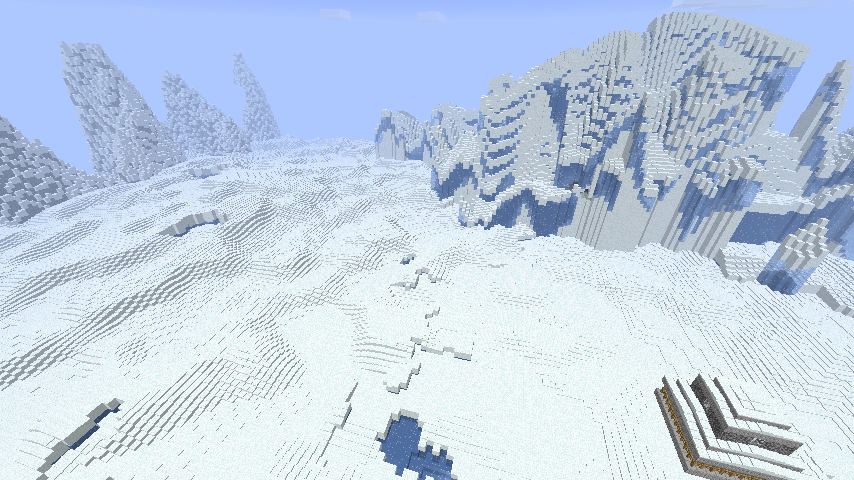
HothGenerator
This world generator creates a real ice world that isn't just normal land covered with snow.
The plugin can actually generate more world types from the star wars movies (Tatooine, Dagobah and Mustafar worlds) but those are not described in detail here. You are left to explore and find all their secrets on your own.
Server for play testing: colonies-playground.com
Other pages
- World lore (Contains spoilers)
- Commands
- Custom schematics
- Custom loot lists
- Custom ore list
- Configuration
- Permissions
- How to create different world types
- How to process lava on Mustafar
- Videos
This generator produces an icy world with a thick ice and snow layer and the occasional snow covered mountain. Hidden below you might find tiny caves where life that once inhabited the surface still survives and perhaps you'll find strange structures left over from some ancient civilization.

It also applies some extra rules to the world:
- Ice block, packed ice blocks and snow blocks drops as blocks
- Water placed in open air or above a certain level instantly freezes
- Lava placed in open air or above a certain level is turned into stone
- snow and ice does not melt
- No rain falls, only snow
- Plants doesn't grow if exposed to the sky
- Grass and mycelium dies under open sky if it can't spread into safety
- Slime does not spawn naturally above the stone layer
- Stay out at night and you will take damage from the cold
All rules are fully optional by editing the advanced options section in the configuration file.
Players can don an environment suit to protect themselves from the environment.
- Simply wear full armour with each piece with a name starting with
Environment
Commands to create a world:
STEP 1: You must add a new world to the HothGenerator configuration. This is done using the /hothaddworld command.
/hothaddworld worldname type
Where "worldname" is the name of your world and "type" is one of hoth, tatooine, dagobah or mustafar.
STEP 2: Create the actual world.
If you are using the excellent MultiWorld plugin you can create a new world like this:
/mw create worldname plugin:HothGenerator
/mw load worldname
Do note that you should use the nether for the mustafar world. Use plugin_nether above.
And for Multiverse:
/mv create worldname normal -g HothGenerator
or for a mustafar world:
/mv create worldname nether -g HothGenerator
Comments


-

Forge_User_07138819 Owner
-

dreamzhehe Author
-
View User Profile
-
Send Message
Posted Mar 19, 2013Hi, First, nice generator! I love snow maps! :) Second, can you add a way to insert in chests enchanted books? I want my players to explore the map searching for the chests to get special rewards. And thirth, will you update this plugin to 1.5?
Thank you!!
-
View User Profile
-
Send Message
Posted Mar 14, 2013@N1T3SLAY3R
Yes, you do. Even if you have already made the world with this plugin, the world needs this plugin to continue generating chunks with the ice and snow. If you remove this plugin, the world would generate like normal, with trees and such, and none of the "extra rules" would work on the server.
-
View User Profile
-
Send Message
Posted Mar 12, 2013hey do i need a a world gen plugin on the server after i have the hoth world created?
-
View User Profile
-
Send Message
Posted Mar 8, 2013@jptagman
snowshoes ? o,O
-
View User Profile
-
Send Message
Posted Mar 3, 2013make it so we need snow shoes or we will fall through the thick snow blocks!!!
-
View User Profile
-
Send Message
Posted Feb 27, 2013How do I set permissions so only admin can use the hoth commands?
Edit: Nevermind, I just realized it's because I'm an OP that the commands showed up. It doesn't show up for non-OP.
-
View User Profile
-
Send Message
Posted Feb 27, 2013what about a nether type version to go with the normal world? :p like nether type being that its still frozen over just have have netherrack and brick and still have nether fortress to keep people from living in nether to stay warm.
great idea tho love it
-
View User Profile
-
Send Message
Posted Feb 26, 2013@pknull
Yes, it may not be as advanced as the storm plugin but it gives damage when exposed to the cold at night or to a storm. It is turned off in the default config though, and you must not be in creative.
-
View User Profile
-
Send Message
Posted Feb 26, 2013This is such a great idea. I'm doing a "Hunger Games"/Survival Island style event with my players on our private server this weekend using this world. I'll be curious to see how they react to the changed water/lava effects. I see in the config something about player damage, is this like the Storm plugin blizzard effect? I can't seem to give myself damage in the world from exposure which I thought was being implied by the configuration.
-
View User Profile
-
Send Message
Posted Feb 24, 2013Ok i tried rename as you say but doesn't work. I install multiworld and alway doesn't generate hoth world as world default.
But with command, i gen a news world with hoth, then that world :D
Thanks for you support !
-
View User Profile
-
Send Message
Posted Feb 24, 2013@Aesran
I've never tried it without a multiworld manager. Try using "HothGenerator" and not hoth. If it doesn't work, install MultiWorld.
-
View User Profile
-
Send Message
Posted Feb 24, 2013Thanks for you support, now i have no error when i start the server but the world are not like hoth .. I have try three time and i have : jungle, winter ...
In my server.propertie i writed "hoth" as name for the world generator, but i never the world like hoth :\
And i have no error.
Server.propertie : http://pastebin.com/M2z72nBm config.yml hoth : http://pastebin.com/JKCbGbjW
-
View User Profile
-
Send Message
Posted Feb 24, 2013@Dunbaratu
@aesran
Download this version:
http://dev.bukkit.org/server-mods/hothgenerator/files/15-hoth-generator_1-11/
-
View User Profile
-
Send Message
Posted Feb 23, 2013Hi, for first : thank for you work this mod may great and i love it.
But i have a problem, i follow all instruction for install the plugins, i have NO other plugins and when i launch my server i have this error : http://pastebin.com/bXF30GVe
I don't understand why, i try to download again the mod and craftbukkit but that no change.
Thank's for support :(
-
View User Profile
-
Send Message
Posted Feb 22, 2013@Dunbaratu
Hmm it shouldn't need that, only use it if available. I'll see if I can get rid of the error message.
-
View User Profile
-
Send Message
Posted Feb 22, 2013how do i get it foe mincraft pe
-
View User Profile
-
Send Message
Posted Feb 22, 2013It looks as if this plugin requires another plugin called Worldguard, at least that's what it seems like from the error message I get when I try to start the server. But this fact isn't advertised on the description page above.
-
View User Profile
-
Send Message
Posted Feb 21, 2013@Cbla
Oki , thanks for testing. I'll release a proper version in the next few days.
-
View User Profile
-
Send Message
Posted Feb 21, 2013Thank you verry much, you are amazing!
everything is working fine (tested every scenario).
-
View User Profile
-
Send Message
Posted Feb 20, 2013@Cbla
Try this one:
Link removed
It has two changes. It takes better care of if it should remove the block the user is trying to destroy, plus it checks if essentials is installed and whether the player has these permissions:
essentials.build.break.*
or
essentials.build.break.79
essentials.build.break.80
If essentials is detected and those permissions are false then the hothgenerator does nothing to the block. (Ie. it is disabled for that event)
Play around with your settings and see what results you get. And turn on debug logging in hothgenerator's config and you'll get some extra messages related to the essentials checking.