HothGenerator
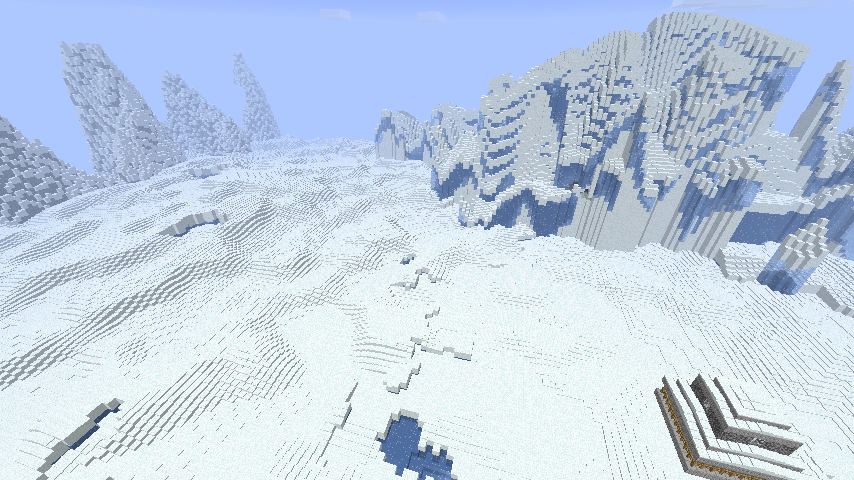
This world generator creates a real ice world that isn't just normal land covered with snow.
The plugin can actually generate more world types from the star wars movies (Tatooine, Dagobah and Mustafar worlds) but those are not described in detail here. You are left to explore and find all their secrets on your own.
Server for play testing: colonies-playground.com
Other pages
- World lore (Contains spoilers)
- Commands
- Custom schematics
- Custom loot lists
- Custom ore list
- Configuration
- Permissions
- How to create different world types
- How to process lava on Mustafar
- Videos
This generator produces an icy world with a thick ice and snow layer and the occasional snow covered mountain. Hidden below you might find tiny caves where life that once inhabited the surface still survives and perhaps you'll find strange structures left over from some ancient civilization.

It also applies some extra rules to the world:
- Ice block, packed ice blocks and snow blocks drops as blocks
- Water placed in open air or above a certain level instantly freezes
- Lava placed in open air or above a certain level is turned into stone
- snow and ice does not melt
- No rain falls, only snow
- Plants doesn't grow if exposed to the sky
- Grass and mycelium dies under open sky if it can't spread into safety
- Slime does not spawn naturally above the stone layer
- Stay out at night and you will take damage from the cold
All rules are fully optional by editing the advanced options section in the configuration file.
Players can don an environment suit to protect themselves from the environment.
- Simply wear full armour with each piece with a name starting with
Environment
Commands to create a world:
STEP 1: You must add a new world to the HothGenerator configuration. This is done using the /hothaddworld command.
/hothaddworld worldname type
Where "worldname" is the name of your world and "type" is one of hoth, tatooine, dagobah or mustafar.
STEP 2: Create the actual world.
If you are using the excellent MultiWorld plugin you can create a new world like this:
/mw create worldname plugin:HothGenerator
/mw load worldname
Do note that you should use the nether for the mustafar world. Use plugin_nether above.
And for Multiverse:
/mv create worldname normal -g HothGenerator
or for a mustafar world:
/mv create worldname nether -g HothGenerator
Comments


-

Forge_User_07138819 Owner
-

dreamzhehe Author
-
View User Profile
-
Send Message
Posted Jun 25, 2013@capricorne888
Might be another plugin that takes over before hothgenerator can get to the block break events.
-
View User Profile
-
Send Message
Posted Jun 23, 2013i dont know if im the only one with this problem but, when ppl destroy ice in the hoth world the hole were the ice was become water and it spread around..... no block drop. even if set to true in config, it only work for me (the owner, also OP) i did try to reinstall the plugin & even delete the world and create another one and still the same... if some1 could help it would be REALLY appreciated, ppl like this plugin idea on my server but cant make it work propely...
Thanks!
-
View User Profile
-
Send Message
Posted Jun 21, 2013@orgin_org
No worried its fixed, theirs some areas where you'll find a little patch of rain, but other then that everything works fine now, I just meant that it wasn't changing the biom correctly and in some areas it wouldn't snow all together and in other areas it would rain, but its fixed now, thanks so much ;) absolutely love this plugin! you sir should make more like it....
-
View User Profile
-
Send Message
Posted Jun 21, 2013@Whitemanwii
If you mean that it renders the hoth terrain but it still reports the wrong biome then it's a bukkit/minecraft issue. Changing the biome is not always propagated to the clients properly and the chunks need to be reloaded for the client to get the correct biome data. Try teleporting away and then back again to reload the chunks. This behavior can be replicated by changing biome with world edit for example.
On the other hand, if you mean that non hoth terrain is generating then you have a problem on your server that is not related to the hothgenerator plugin.
-
View User Profile
-
Send Message
Posted Jun 21, 2013Uhh dunno if I'm missing something, or what ever... but I created the world using Multiverse and needless to say, it created the Hoth world however, its pretty obvious what isn't snow biom and whats desert, because it doesn't snow in the desert and it rains in some areas lol.... fix?
-
View User Profile
-
Send Message
Posted Jun 20, 2013@ECRONCraft
Igloos does not fit the theme but you can add any structure you want by using your own custom schematics.
If you have worldedit installed you can even export one you've build and add that as a random structure that generates naturally by the plugin.
Read more here: http://dev.bukkit.org/server-mods/hothgenerator/pages/custom-schematics/
-
View User Profile
-
Send Message
Posted Jun 20, 2013I've got a sugguestion! Add Snow Igloos
-
View User Profile
-
Send Message
Posted Jun 5, 2013@kilianl111111
I can confirm this is working on my CB 1.5.2-R0.1 server w/ MultiVerse.
-
View User Profile
-
Send Message
Posted Jun 3, 2013doesnt work anymore any thoughts on updating it?
Greetz, Kilian
-
View User Profile
-
Send Message
Posted May 24, 2013It does work, but make sure your CB version is not a dev build.
-
View User Profile
-
Send Message
Posted May 24, 2013Can anyone confirm whether this is working with 1.5.2 before I go an update everything? Thanks.
-
View User Profile
-
Send Message
Posted May 5, 2013We're pretty reliant on multiverse and a lot of its features for our server. Its one of the few plugins that offer functionality and features, if only those devs would update it more often..
-
View User Profile
-
Send Message
Posted May 5, 2013@Gixbit
Okey, I use it with multiworld with no problems.
-
View User Profile
-
Send Message
Posted May 5, 2013We also use multiverse. This may or may not be a huge factor. Multiverse errors to shit when walking out far enough to generate new chunks in our hothgenerator world.
Edit: But, it does seem to blame the errors on hothgenerator.
-
View User Profile
-
Send Message
Posted May 5, 2013okay, If you walk too far on the map after you've had a world for a while, when it tries to generate new chunks it will error. When you walk too far, you end up getting internal server error and disconnecting. At that point you are stuck, you cannot login or move ingame cause everytime you connect you get internal server error. My problem is when you start generating new chunks.
-
View User Profile
-
Send Message
Posted May 5, 2013@Ranetha
Ok thanks for testing. Just updated my own server, generated a lot of new chunks and get no errors.
-
View User Profile
-
Send Message
Posted May 5, 2013version 1.12 running on bukkit beta build #2771 (1.5.2). Not encountered any problems - alongside 100+ other plugins.
@Gixbit encountering problems, can you please let me know what you were doing when the errors occurred, I'll see if I can replicate. but just running around the world... loading chunks NP at a..
-
View User Profile
-
Send Message
Posted May 4, 2013@orgin_org
Thanks for assuring me you intend to continue your work. That is all I needed.
-
View User Profile
-
Send Message
Posted May 3, 2013@orgin_org
Beta build out now! http://dl.bukkit.org/downloads/craftbukkit/view/02110_1.5.2-R0.1/
-
View User Profile
-
Send Message
Posted May 3, 2013@Gixbit
There isn't even a beta for craftbukkit 1.5.2 yet. I won't create a 1.5.2 version until there's atleast a bukkit beta to test against.
Bukkit dev builds comes with no guarantee.