GlobalMarket
GlobalMarket is a global market system. It allows players to buy and sell items via a convenient in-game interface. It's similar WoW's Auction House or Runescape's Grand Exchange. I created this plugin awhile ago (back in the days of WebAuction, it's what inspired me) for private use, but I've decided to release it to the public. This plugin requires Vault and ProtocolLib, other than that, just drop it in plugins (make sure you have Vault plus a supported economy plugin installed) and start trading!
Features
- Players can put any item up for sale using a dead simple in-game GUI system (see below)
- Uses ProtocolLib for proper item serialization that supports Bukkit, Spigot, and Cauldron
- Real time interface, all trades show up immediately without having to 'refresh' or close the GUI
- No maintenance or admin interaction required
Mailbox system that allows you to set up market areas or auction houses(not currently in 2.0.0)A built in price guide that compiles average prices from previous transactions(not currently in 2.0.0)
Latest Dev Build
Development builds of this project can be acquired at the following continuous integration server.
These builds have not been approved by the BukkitDev staff. Use them at your own risk.
http://build.survivorserver.com/job/GlobalMarket%202.0.0/
Changelog
Usage
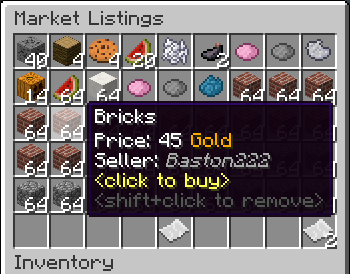
- The Interface
- This is a display of all current listings, you click an item to buy it. You can shift+click to remove a listing if you own it, or if you have the "globalmarket.listingsadmin" permission. Listings automatically expire after 1 week (configurable). You can use
/marketto access the menu.

- Stock
- When you purchase an item it will be sent to your stock. Stock is an entirely optional system but is suggested to be enabled, as disabling it will disable certain other features like
/market send. The stock system can hold a configurable amount of stacks of items in a configurable amount of slots. Once you place an item in your stock, you can list it to be sold to other players. Players can also send items to other players' stock via/market sendif they have the "globalmarket.command.send" permission.

- Server Listings
- You can create 'infinite listings' that do not expire and can't be bought out. Create them with
/market createinf <price> <[amount]>. There's a dedicated section to server listings in the Market menu. You'll need the "globalmarket.command.createserverlisting" permission to do this. Or you can disable this system all-together in the config.
Commands
| Command | Description | Permission |
|---|---|---|
| /market | Opens the Market menu. | globalmarket.use |
| /market ? | Shows command help. | <no permission> |
| /market send <player> <[amount]> | Sends the item you're holding to <player>'s stock. Amount is optional. | globalmarket.command.send |
| /market createinf <price> <[amount]> | Creates a server listing. Amount is optional. | globalmarket.command.createserverlisting |
| /market reload | Reloads config.yml | globalmarket.command.reload |
Permissions
- globalmarket.use - base permission, required to use /market
- globalmarket.listingsadmin - ability to remove all listings
- globalmarket.command.send - ability to use /market send
- globalmarket.command.createserverlisting - ability to use /market createinf
- globalmarket.command.reload - ability to use /market reload
Config
All config values have comments that explain what they do in config.yml, how convenient for me!
If you wish to blacklist items from being used on the Market, there is blacklist.json. You can add material values with meta values:
- APPLE:0 - blacklist apples
- INK_SAC:-1 - blacklist all dies
If you're running Cauldron, you can do things like:
- oredict:ingotSteel - blacklist any item with an OreDictionary value matching ingotSteel
- extracells:storage.component:-1 - blacklist all ExtraCells storage cells
Locale
Virtually every string in the plugin is editable via the "en_US.json" file, inside the plugin's JAR. It's pretty straightforward to edit. Don't replace or edit the %s or %1$s's, these are variables. For example, "Item sold: %s" would appear as "Item sold: Cobblestone" in-game. You can add/edit colors by typing & plus a color code. So light green (the color code is a) would be &a. You can find color codes here: http://ess.khhq.net/mc/
You can also create an entirely different language set, name it something like ch_CN.json, stick it in the server's JAR, and change the appropriate config value in config.yml to use it.
Source
https://github.com/Dasfaust/GlobalMarket
That's all for now. Sorry if things are unclear, I'll be updating this page with more information periodically. If you're stuck just add a reply and I'll do my best to help!
Comments


-

xdasfaust Owner
-
View User Profile
-
Send Message
Posted Dec 12, 2013@ElectroBot4
I thought minecraft stored like special id's or something that let you keep updating it over and over. So once you enchant a book you can just keep updating that same book forever. Apparently this was a feature a while ago.
LOL I hate this testing :P
-
View User Profile
-
Send Message
Posted Dec 12, 2013Hi,
Would it be possible to have the transaction log have the config option to use 1 book (even if it doesn't update your copy, but does require you to "spawn" a new book) instead of 1 per transaction?
Thanks, ElectroBot
-
View User Profile
-
Send Message
Posted Dec 12, 2013@xdasfaust
Oh no I think I found a a real bug haha :)
I think I might be cursed!
-
View User Profile
-
Send Message
Posted Dec 12, 2013@xdasfaust
Ahh I'm an idiot. I was doing this at like 7am when I should been sleeping :)
BTW the amount feature listing items is it possible to actually read higher then the 1 inventory? so if I have say stack of stone and I type in like /market create 100 1000 it will list all them onto the market at once... Though I guess if they don't use full stacks might break the listings idk how you have the new stacking code :)
Thanks and sorry for my derp!
-
View User Profile
-
Send Message
Posted Dec 12, 2013@Kane_Hart
Ah yep, the cut has to be in the tenths place, like 25% is 0.25, 100% is 1.0, 5% is 0.05, etc. That should fix it.
-
View User Profile
-
Send Message
Posted Dec 12, 2013@xdasfaust
I do and it's 25% and 15% here is my config: http://pastebin.com/KmXinhka
-
View User Profile
-
Send Message
Posted Dec 12, 2013@Kane_Hart
Hmm what is your cut set at? And do you have automatic payments enabled in the config?
-
View User Profile
-
Send Message
Posted Dec 12, 2013Yeah here is the bug I guess with essentials: [23:41:12 ERROR]: [GlobalMarket] Recieved failed economy response from Essentials Economy: Cannot desposit negative funds [23:41:20 ERROR]: [GlobalMarket] Recieved failed economy response from Essentials Economy: Cannot desposit negative funds [23:41:29 ERROR]: [GlobalMarket] Recieved failed economy response from Essentials Economy: Cannot desposit negative funds
Odd thing is everyone were testing with including me the buyer has like 10k+ Credits for testing on the test server.
-
View User Profile
-
Send Message
Posted Dec 12, 2013@Kane_Hart
I use a custom one, it's not very special, but I've used Fe for testing and it seems to work great. Try this new build, it should (should) log some output in the console if the buy transaction fails. Let me know how it goes.
-
View User Profile
-
Send Message
Posted Dec 12, 2013@xdasfaust
Vault 1.2.27 and Essentials right now. I swear was all working since the last update. I might be going crazy though. Any econ plugins you recommend? Mysql one perhaps?
-
View User Profile
-
Send Message
Posted Dec 12, 2013@Equindar
The issue with that is some people like to read the log and find out what they sold, etc. You can turn off the announcements in the config.
@Kane_Hart
Hmm odd, what Vault version and economy plugin are you using? And yeah, there was a history book in earlier versions but the book only updated when you got a new one with the command.
-
View User Profile
-
Send Message
Posted Dec 12, 2013Seems to be a bug after we updated. I ended up wiping database/configs too just to do them fresh but this seems to be the issue:
There is no console errors :(
No one can buy each other items period.
-
View User Profile
-
Send Message
Posted Dec 12, 2013@Equindar
I thought it might been this plugin but maybe not. Been nice rather to just have the same book and it get updated over time more and more. Not sure though if there is some kind of max limit of a book size.
-
View User Profile
-
Send Message
Posted Dec 12, 2013[suggestion] hey yeah, it would be great to have a simple delete click option on the transaction logs. left click = earn ur cash right click = wish to delete another right click = bye bye, transaction log.
Anyways, good plugin :) may i ask u for a plugin work together in the same style just with auctions, cuz every published auction plugin spams the chat right now :) (according to ur nick, u r german, im too :]) Equindar
-
View User Profile
-
Send Message
Posted Dec 12, 2013@xdasfaust
Thanks ;) Everyone has you as their fav dev this month on Teamspeak. It reminds us of the old days of Plugin Dev, when all the devs were just eager to hear from server owners and such for ideas :)
-
View User Profile
-
Send Message
Posted Dec 12, 2013@Kane_Hart
Haha, nice find, thanks! Fixed that in the latest build. Also added the stall radius suggestion and a mailbox radius to go with it. However I realized I wasn't saving the world with stall and mailbox locations so with this update you will have to remake them, sorry. There's more info in the new config guide. Can't ignore good suggestions ;)
-
View User Profile
-
Send Message
Posted Dec 11, 2013I think I found a typo for the permission node for using the /market mail command: https://github.com/Dasfaust/GlobalMarket/blob/master/src/main/java/com/survivorserver/GlobalMarket/Command/MailCommand.java#L33
I assume it's suppose to be globalmarket.quickmail and not globalmarket.quicklist :)
-
View User Profile
-
Send Message
Posted Dec 11, 2013@xdasfaust
Thanks you been really good to us. We are launching on the 20th on our server :) One thing I like to try to get on is the listing of items required to actually go to a market stall or at least the option hopefully before then.
we are making so only 4 markets exist on the world and want to force our players to visit these locations.
Another suggestion from a couple my players is they like to see who bought your item in the transaction logs if that is possible. That would be kind of cool they tend to do that in MMORPG's like World of Warcraft!
Thanks, Kane
-
View User Profile
-
Send Message
Posted Dec 11, 2013@Rulerish
In Notepad+ + up at the top there's a tab called "Encoding", select it and hit "Convert to UTF8", then save the file.
@UltrafaceGuy
You could not give "globalmarket.quicklist"/"globalmarket.quickmail" to players, that way they can only access the interface with stalls and mailboxes.
@BuildItMovies
Getting any errors in the console?
@Kane_Hart
A config option sounds nice. Improvements to the create command will come soon.
@Fugner9
The only hurtle about that is making two categories be easily select-able in the interface.
-
View User Profile
-
Send Message
Posted Dec 10, 2013@xdasfaust
That was quick, Thanks a lot man. The sorting feature is nice and simple. It really makes buying things a little easier. The only thing i would change is the ability to sort for both quantity and price at the same time. This would help finding the cheapest possible stack of items. Just a personal thing though. thanks again :)