GlobalMarket
GlobalMarket is a global market system. It allows players to buy and sell items via a convenient in-game interface. It's similar WoW's Auction House or Runescape's Grand Exchange. I created this plugin awhile ago (back in the days of WebAuction, it's what inspired me) for private use, but I've decided to release it to the public. This plugin requires Vault and ProtocolLib, other than that, just drop it in plugins (make sure you have Vault plus a supported economy plugin installed) and start trading!
Features
- Players can put any item up for sale using a dead simple in-game GUI system (see below)
- Uses ProtocolLib for proper item serialization that supports Bukkit, Spigot, and Cauldron
- Real time interface, all trades show up immediately without having to 'refresh' or close the GUI
- No maintenance or admin interaction required
Mailbox system that allows you to set up market areas or auction houses(not currently in 2.0.0)A built in price guide that compiles average prices from previous transactions(not currently in 2.0.0)
Latest Dev Build
Development builds of this project can be acquired at the following continuous integration server.
These builds have not been approved by the BukkitDev staff. Use them at your own risk.
http://build.survivorserver.com/job/GlobalMarket%202.0.0/
Changelog
Usage
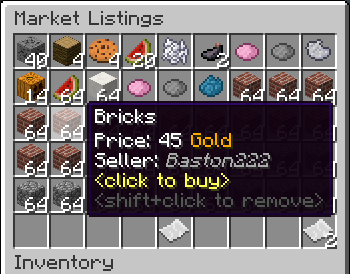
- The Interface
- This is a display of all current listings, you click an item to buy it. You can shift+click to remove a listing if you own it, or if you have the "globalmarket.listingsadmin" permission. Listings automatically expire after 1 week (configurable). You can use
/marketto access the menu.

- Stock
- When you purchase an item it will be sent to your stock. Stock is an entirely optional system but is suggested to be enabled, as disabling it will disable certain other features like
/market send. The stock system can hold a configurable amount of stacks of items in a configurable amount of slots. Once you place an item in your stock, you can list it to be sold to other players. Players can also send items to other players' stock via/market sendif they have the "globalmarket.command.send" permission.

- Server Listings
- You can create 'infinite listings' that do not expire and can't be bought out. Create them with
/market createinf <price> <[amount]>. There's a dedicated section to server listings in the Market menu. You'll need the "globalmarket.command.createserverlisting" permission to do this. Or you can disable this system all-together in the config.
Commands
| Command | Description | Permission |
|---|---|---|
| /market | Opens the Market menu. | globalmarket.use |
| /market ? | Shows command help. | <no permission> |
| /market send <player> <[amount]> | Sends the item you're holding to <player>'s stock. Amount is optional. | globalmarket.command.send |
| /market createinf <price> <[amount]> | Creates a server listing. Amount is optional. | globalmarket.command.createserverlisting |
| /market reload | Reloads config.yml | globalmarket.command.reload |
Permissions
- globalmarket.use - base permission, required to use /market
- globalmarket.listingsadmin - ability to remove all listings
- globalmarket.command.send - ability to use /market send
- globalmarket.command.createserverlisting - ability to use /market createinf
- globalmarket.command.reload - ability to use /market reload
Config
All config values have comments that explain what they do in config.yml, how convenient for me!
If you wish to blacklist items from being used on the Market, there is blacklist.json. You can add material values with meta values:
- APPLE:0 - blacklist apples
- INK_SAC:-1 - blacklist all dies
If you're running Cauldron, you can do things like:
- oredict:ingotSteel - blacklist any item with an OreDictionary value matching ingotSteel
- extracells:storage.component:-1 - blacklist all ExtraCells storage cells
Locale
Virtually every string in the plugin is editable via the "en_US.json" file, inside the plugin's JAR. It's pretty straightforward to edit. Don't replace or edit the %s or %1$s's, these are variables. For example, "Item sold: %s" would appear as "Item sold: Cobblestone" in-game. You can add/edit colors by typing & plus a color code. So light green (the color code is a) would be &a. You can find color codes here: http://ess.khhq.net/mc/
You can also create an entirely different language set, name it something like ch_CN.json, stick it in the server's JAR, and change the appropriate config value in config.yml to use it.
Source
https://github.com/Dasfaust/GlobalMarket
That's all for now. Sorry if things are unclear, I'll be updating this page with more information periodically. If you're stuck just add a reply and I'll do my best to help!
Comments


-

xdasfaust Owner
-
View User Profile
-
Send Message
Posted Dec 10, 2013@xdasfaust
Wow thanks! You been really busy! Tested the sorting and seems to work really well. Maybe in the future a small config option for the default sorting option.
The stacking also seems to work great. Though I can't seem to do /market create 1000 512 or 8 stacks of something yet but that might not be in yet so I still have to scroll to each item in my hot bar and list it.
The auction house cut now works so when we set to 25% and sell $1000 item the player gets 750 and the gov gets 250 so perfect.
Now this plugin is really starting to become sexy as hell haha. I can't wait
-
View User Profile
-
Send Message
Posted Dec 10, 2013Hello, when you try to add something to the market this is given in console: http://pastebin.com/t9vpxp3s Using build #94 with MySQL backend
-
View User Profile
-
Send Message
Posted Dec 9, 2013Anyone know why >:
-
View User Profile
-
Send Message
Posted Dec 9, 2013@xdasfaust When I buy something from a player it doesnt take any money from my account or give him any But when i buy from him it takes his money and gives it to me..?! How come it works for me and not him?!
I have vaults, essentials installed
-
View User Profile
-
Send Message
Posted Dec 9, 2013@xdasfaust
That market viewing only when next to a stall thing would actually be perfect for what I'm trying to do as well. Thank you for considering it ;D
-
View User Profile
-
Send Message
Posted Dec 8, 2013@xdasfaust
And can you explain how I can convert their encoding to UTF8 ? Cuz I have no idea what UTF8 Means
-
View User Profile
-
Send Message
Posted Dec 8, 2013@Kane_Hart
Sorting is in the latest build. It's basic but it works.
@Marcoral
Thanks.
-
View User Profile
-
Send Message
Posted Dec 8, 2013@xdasfaust
Thanks for your fast reply, I wrote to the ChestCommands author too, I hope, that someone will help me. Anyway I enjoy this briliant plugin - a big round of applause for you :)
-
View User Profile
-
Send Message
Posted Dec 8, 2013@Marcoral
Unfortunately in this case GlobalMarket is heavily intertwined with Vault. To add support for a standalone plugin I'll have to refactor a lot of code. I'll try to do it, no promises though. I've got to finish quite a few other things first.
-
View User Profile
-
Send Message
Posted Dec 8, 2013Hi, I was searching plugin like this for veeery long time and now I found one! But there is my question: could you add PlayerPoints support? My server already uses Vault cash to ChestCommand's admin shop so I'm looking for solution :) I mean to add new line in config (like used-vault: [default, playerpoints]), which players will receive for selling items and pay to buy some. (I hope that you understand me and my poor english... :D). Thanks, it's really great plugin ;)
-
View User Profile
-
Send Message
Posted Dec 8, 2013@xdasfaust
Sweet! I can't wait!
-
View User Profile
-
Send Message
Posted Dec 7, 2013@xdasfaust
Thanks man!
-
View User Profile
-
Send Message
Posted Dec 7, 2013@Fugner9
That's hopefully one the next things I can do.
@Kane_Hart
Stacking listings done! And I'll add that to my to-do list.
-
View User Profile
-
Send Message
Posted Dec 7, 2013@Fugner9
I really wanted this at least sort by cheapest price first. This will make it 1000 times easier LOL..
REQUEST! /market create should also have an option to only use it when near a stall like say 5 blocks!
-
View User Profile
-
Send Message
Posted Dec 7, 2013@Fugner9
This would be nice!
-
View User Profile
-
Send Message
Posted Dec 7, 2013I was talking with some friends and we decided it would be cool if you could add a feature that makes it so that the plugin can sort by price and quantity. This would make buying items much easier because it allows you to sort items by their price and quantity
-
View User Profile
-
Send Message
Posted Dec 6, 2013@KeithSt0ne
Nope, but be warned the interface doesn't work correctly on any clients before snapshot 13w49a. I don't think there's any duplication glitches on those versions, so in theory it should be safe to use. The problem is making sure everyone's on the latest snapshot or the 1.7.3 pre-release.
-
View User Profile
-
Send Message
Posted Dec 6, 2013@xdasfaust
Is there something we need to do for the click issues?
-
View User Profile
-
Send Message
Posted Dec 5, 2013Just a heads up, looks like snapshot 13w49a has fixed the click issues with 1.7.2. So the problem was client side.
@Kane_Hart
Hah, thanks.
@rugbyman717
It's the same as before, "globalmarket.quicklist"
@Rulerish
Try opening listings.yml, mail.yml, queue.yml, and history.yml in Notepad+ + when the server is offline and convert their encoding to UTF8, then save them and start the server.
-
View User Profile
-
Send Message
Posted Dec 5, 2013Hi,
All my items from the Market get cleared rdmly .. Here is the errors I get on the console
http://pastebin.com/6jt9FqQj
Using this plugin mostly to sell some custom items made with Diablo Drops. Maybe there is a problem in those items ? They have a new name/ Lore and Better enchants then Vanilla MC