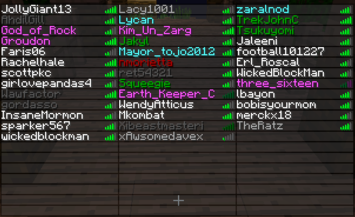
ColoredTablist
Very Simple Plugin to color your Playerlist!
Support my Work and visit my Homepage!
French translation 
ColoredTablist for Sponge
FAQ Click me before you ask something!
How it works:
- Install Vault
- Install the Plugin. (Drop the coloredtablist.jar file into your /plugins folder)
- Choose a Permissions Node named by the color.
Example: 'coloredtablist.blue' stands for blue :)
OR set 'UserPermissions' to false in the config and choose a color-code !scroll down! - Give a User (or a Group) the specifc Permissions Node.
OR give a Group the specific Color Code in the Config
Now when the User joins he automatically gets colored in the Playerlist (press Tab).
Commands:
You can use /ctl instead of /coloredtablist
- /coloredtablist help = Shows a help Page with available Commands.
- /coloredtablist reload = Reloads Config and Playerlist
- /coloredtablist colors = View List of Color-Codes.
- /coloredtablist nick <nickname> = Changes your Name in the Tablist until you reconnect or the Server reloads.
Config Commands:
- /coloredtablist set usepermissions <true/false>
- /coloredtablist set usechatnames <true/false>
- /coloredtablist set prefix<1> <colors>
- /coloredtablist set groups <group> <prefix/suffix> <value>
Configuration:
Version: 2.1.0
#Whether or not Permissions should be used instead of Groups:
UsePermissions: true

#Whether or not Displaynames should be used
UseChatNames: false

#If it should update a player name every 15 seconds
UpdateEvery15Seconds: true

#Write the Groups in, like here. Use "" as Prefix to dont have one. You can use Colors in Prefix using & so &4 would be red.
Groups:
    Member:
           prefix: '&e'
           suffix: '[M]'
    Admin:
           prefix: '&a'
           suffix: '[A]'
#Set text for coloredtablist.prefix1 here:
prefix1: '&b'
#Set text for coloredtablist.prefix2 here:
prefix2: exp
#Set text for coloredtablist.prefix3 here:
prefix3: mod
#Set text for coloredtablist.prefix4 here:
prefix4: admin
#Set text for coloredtablist.prefix5 here:
prefix5: boss
#Set text for coloredtablist.prefix6 here:
prefix6: idk
Permissions:
Color Codes:
Use them in Config with "&" instead of "#" and as Fullname in Permissions

| Symbol | Effect/Name |
|---|---|
| k | Magic/Random |
| l | Bold |
| m | |
| n | Underlined |
| o | Italic |
Videos:
English
German
French
Known Bugs:
- Max 14 Characters are shown in the Tablist, longer Names are shortened to 14 (Otherwise it would show an Error because 16 Characters is max. (and we are using Colors so its 16 -2 = 14 O.o)
Dont forget to Subscribe for File Updates!
Visit my Homepage!
This Plugin collects anonymous datas about your Server for mcstats.org
Comments


-

SendNoodlesYo Owner
-
View User Profile
-
Send Message
Posted Aug 12, 2013http://pastebin.com/TSS12L7M
-
View User Profile
-
Send Message
Posted Aug 12, 2013@deleted_9158468
okay could you post your coloredtablist config on www.pastebin.com or something similar and send me the link?
-
View User Profile
-
Send Message
Posted Aug 12, 2013His full username is Ralfjeh
-
View User Profile
-
Send Message
Posted Aug 12, 2013@deleted_9158468
Is the full player name of your admin "Ral"? If it is the plugin works as it should you must keep in mind that one color takes up 2 Character spaces and there are only 16.
-
View User Profile
-
Send Message
Posted Aug 12, 2013-
View User Profile
-
Send Message
Posted Aug 9, 2013@mcheaven Thanks, I figured out that BungeeCord's tab list options were preventing the colors.
-
View User Profile
-
Send Message
Posted Aug 9, 2013@princessboss
are you sure you are using the latest version? I don't have that problem..
@mkw9991
coloredtablist doesn't care if online-mode is on true or false. To test names with more or less characters i'm running my test server offline too. You should check if the plugin is even loading (check your server log)
-
View User Profile
-
Send Message
Posted Aug 8, 2013Whenever my server is in Online-Mode False, ColoredTabList just doesn't display the colors in the tab list. Also, /ctl doesn't work too. The reason I have online mode false is becuase I run BungeeCord, and I need the server in Online Mode False.
-
View User Profile
-
Send Message
Posted Aug 8, 2013Can you please fix the 15 character long bug? every time a player with 15 characters or longer joins the color doesnt show! D:
-
View User Profile
-
Send Message
Posted Aug 7, 2013@dotapurex1
don't know what you mean with that but I'm sry I can't test the plugin using multicraft. Beside that it's using Bukkit API which didnt change so it doesnt need an update.
-
View User Profile
-
Send Message
Posted Aug 7, 2013Update this plugin? And also why does this plugin make it so that it adds players to the Multicraft even though there isn't the actual player on? Like it conflicts with the player count.
-
View User Profile
-
Send Message
Posted Aug 3, 2013@Camaflicks
That means it's not related to your plugin. Try removing other plugins one at a time until the names come back.
-
View User Profile
-
Send Message
Posted Aug 2, 2013When I press tab I can't see my name or anyone elses name. I tried uninstalling the plugin but I still can't see my name! Help
-
View User Profile
-
Send Message
Posted Jul 28, 2013@SystemDisc
Just updated to 1.9.3 you need to wait for approval :) "/coloredtablist reload" should work with that version from console
@KelvinKam
nice to hear you could solve your problem :)
-
View User Profile
-
Send Message
Posted Jul 27, 2013@SystemDisc
Thank you very much, but the mcheaven's solution looks easier :)
-
View User Profile
-
Send Message
Posted Jul 27, 2013@mcheaven
Thank you very much, problem solved :D
Nice plugin, keep going~
-
View User Profile
-
Send Message
Posted Jul 27, 2013@KelvinKam
You can do this on people who are OPed:
Then, remove the negation on what you DO want to have. Example:
if you want OPs to have dark_red names
-
View User Profile
-
Send Message
Posted Jul 27, 2013Could you make the command `coloredtablist reload` work from console?
-
View User Profile
-
Send Message
Posted Jul 26, 2013@KelvinKam
thats because u've got every permission (the '*' in permissionsEx) but you can't have every color in your name.. just one is possible. Click here http://dev.bukkit.org/bukkit-plugins/coloredtablist/pages/faq/ to see how to configurate it probably.
-
View User Profile
-
Send Message
Posted Jul 26, 2013How can these stop spam my console? Account is OP, but I also want to use permission
2013-07-27 04:14:45 [WARNING] [ColoredTablist] XXXX has every Permission. Set UsePermissions to false and add your Groups, instead of using Permission-Nodes!