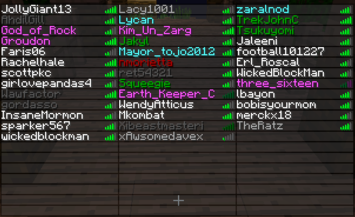
ColoredTablist
Very Simple Plugin to color your Playerlist!
Support my Work and visit my Homepage!
French translation 
ColoredTablist for Sponge
FAQ Click me before you ask something!
How it works:
- Install Vault
- Install the Plugin. (Drop the coloredtablist.jar file into your /plugins folder)
- Choose a Permissions Node named by the color.
Example: 'coloredtablist.blue' stands for blue :)
OR set 'UserPermissions' to false in the config and choose a color-code !scroll down! - Give a User (or a Group) the specifc Permissions Node.
OR give a Group the specific Color Code in the Config
Now when the User joins he automatically gets colored in the Playerlist (press Tab).
Commands:
You can use /ctl instead of /coloredtablist
- /coloredtablist help = Shows a help Page with available Commands.
- /coloredtablist reload = Reloads Config and Playerlist
- /coloredtablist colors = View List of Color-Codes.
- /coloredtablist nick <nickname> = Changes your Name in the Tablist until you reconnect or the Server reloads.
Config Commands:
- /coloredtablist set usepermissions <true/false>
- /coloredtablist set usechatnames <true/false>
- /coloredtablist set prefix<1> <colors>
- /coloredtablist set groups <group> <prefix/suffix> <value>
Configuration:
Version: 2.1.0
#Whether or not Permissions should be used instead of Groups:
UsePermissions: true

#Whether or not Displaynames should be used
UseChatNames: false

#If it should update a player name every 15 seconds
UpdateEvery15Seconds: true

#Write the Groups in, like here. Use "" as Prefix to dont have one. You can use Colors in Prefix using & so &4 would be red.
Groups:
    Member:
           prefix: '&e'
           suffix: '[M]'
    Admin:
           prefix: '&a'
           suffix: '[A]'
#Set text for coloredtablist.prefix1 here:
prefix1: '&b'
#Set text for coloredtablist.prefix2 here:
prefix2: exp
#Set text for coloredtablist.prefix3 here:
prefix3: mod
#Set text for coloredtablist.prefix4 here:
prefix4: admin
#Set text for coloredtablist.prefix5 here:
prefix5: boss
#Set text for coloredtablist.prefix6 here:
prefix6: idk
Permissions:
Color Codes:
Use them in Config with "&" instead of "#" and as Fullname in Permissions

| Symbol | Effect/Name |
|---|---|
| k | Magic/Random |
| l | Bold |
| m | |
| n | Underlined |
| o | Italic |
Videos:
English
German
French
Known Bugs:
- Max 14 Characters are shown in the Tablist, longer Names are shortened to 14 (Otherwise it would show an Error because 16 Characters is max. (and we are using Colors so its 16 -2 = 14 O.o)
Dont forget to Subscribe for File Updates!
Visit my Homepage!
This Plugin collects anonymous datas about your Server for mcstats.org
Comments


-

SendNoodlesYo Owner
-
View User Profile
-
Send Message
Posted Aug 29, 2013Can you add support to check if the name exceeds 16 characters after you add the prefix... Then just remove some letters of their name
-
View User Profile
-
Send Message
Posted Aug 29, 2013@Cr0_Phantom
your name is idkBOSSadmin.. because you are using something like '*' in your permissions plugin, so you got every permission. check the faq to learn how to setup permissions. the config file normally resets it self because you arent using the correct .yml format (google it :) )
-
View User Profile
-
Send Message
Posted Aug 29, 2013Hello I want to work in group mode but the config file just rewrites default and my nick is always idkBOSSadmin...
-
View User Profile
-
Send Message
Posted Aug 22, 2013@TooNervey
why did you remove half of the config file? Never remove stuff before the ":" it should look like this: http://pastebin.com/u0ewwhae If you don't want to use a multi or prefix permission just don't set it up in your permissions config. If you are using a '*' node or something similar that gives you every permission see point 1 here: http://dev.bukkit.org/bukkit-plugins/coloredtablist/pages/faq/
-
View User Profile
-
Send Message
Posted Aug 22, 2013@mcheaven
here http://pastebin.com/CP7ZLzR6 i only have those 3 in because when i join the game and i set my rank to either one of them the color stays to the owner color the rest are setup using the permissions nodes
-
View User Profile
-
Send Message
Posted Aug 22, 2013@TooNervey
okay good that saves me a lot of time I would need to reproduce :) Seems like your config isn't set up well. Send me your coloredtablist config please :)
-
View User Profile
-
Send Message
Posted Aug 22, 2013@mcheaven
i got an error now http://pastebin.com/GChqDKT1
-
View User Profile
-
Send Message
Posted Aug 22, 2013@dotapurex1
Seems like Multicraft isn't compatible with coloredtablist. But I don't have multicraft so I'm not able to test it sry.
-
View User Profile
-
Send Message
Posted Aug 22, 2013@mcheaven no erros even stop and started the server and its all fine my plugins list is here http://imgur.com/ilk32lq
-
View User Profile
-
Send Message
Posted Aug 22, 2013Why does this plugin make it so that multicraft have false number player counts?
-
View User Profile
-
Send Message
Posted Aug 21, 2013@TooNervey
What plugins beside coloredtablist are you using? Any Errors in Console?
-
View User Profile
-
Send Message
Posted Aug 20, 2013why does the name duplicate in the tab i see other people's name's in one color and again in white ? please fix
-
View User Profile
-
Send Message
Posted Aug 19, 2013Great plugin, thanks :)
-
View User Profile
-
Send Message
Posted Aug 16, 2013@ThisUsernameIsMine
Thanks for the bug report fixed in 1.9.5 :) Well I think a plugin called coloredtablist shouldn't change overhead names.. you'll have to use TagAPI it's not officially supported but it should work like every other plugin together with coloredtablist.
@mobilephone2003
I'll look into this.
-
View User Profile
-
Send Message
Posted Aug 16, 2013This happens when issueing /ctl from in-game or console:
- http://dev.bukkit.org/paste/8353/
Also: is it possible to add support for colored overhead names, or do i have to use TagAPI for that (if supported)?
Thanks for the awesome mod/plugin/updates! ;-) +1
-
View User Profile
-
Send Message
Posted Aug 14, 2013Probably a big ask but if you could add bungeecord support it would be awesome
-
View User Profile
-
Send Message
Posted Aug 13, 2013Thanks for all the support.
-
View User Profile
-
Send Message
Posted Aug 12, 2013@deleted_9158468
No there isn't and in my opinion 2 different colors look better :) I will think about it but it will probably just make the config even more difficult than it already is for many users :/
-
View User Profile
-
Send Message
Posted Aug 12, 2013Is there anyway I can make the prefix and the username one solid color with one color code and not two separate color codes?
-
View User Profile
-
Send Message
Posted Aug 12, 2013@deleted_9158468
instead of setting the color to white (which it is already without color code) insert '' I fixed it for you here is the link http://pastebin.com/tFBcXPxW
oh and btw your Headstaff prefix is 19 characters long only 16 will be showed.. don't make that long prefixes :)