BuildingPlanner
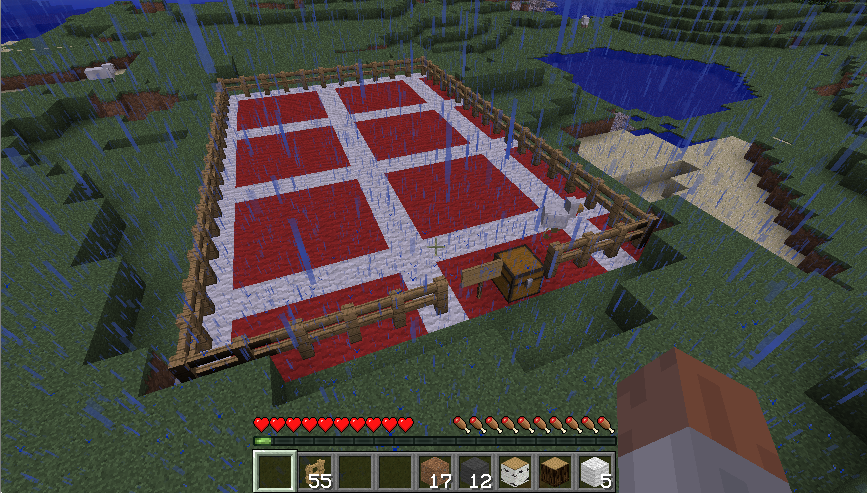
Ever want to plan your building or structure before actually gathering the materials for it? BuildingPlanner lets you designate a planning zone where you have infinite resources while inside that zone, then you can commit the plan, add the materials to the supply chest and watch your plan take shape.
Not only does it let you place infinite blocks, but when you make mistakes, a single punch will clear a block instantly inside the planning zone.
New in 0.6.0
- In plan list and reports, include world name.
- Make water & lava not flow in planning areas.
- Added blacklisting/whitelisting of blocks for planning area (whitelisting overrides blacklisting)
- Disable placing sand and gravel in planning areas (no way of properly handling them in plans currently)
- FIX: Chest dup issue when creating and destroying plans.
- FIX: Issue with default height not calculating quite correctly.
- FIX: When things pop off from their attached locations, plan updates accordingly.
- FIX: Attachables in the plan makes sure their attached things are built before attempting placement.
- Improved the way committing/uncommitting works. Now much slower and server friendly.
- Added buildingplanner.*, buildingplanner.architect and buildingplanner.planner permission groups
- FIX: Attachables didn't get removed properly when committing/uncommitting
- FIX: Always one fence in supply chest, regardless whether any were actually lifted.
- FIX: Destroying a sign destroyed the area but left the sign due to lock.
- Disable use of planned chests, beds, crafting tables and furnaces.
- Preliminary (read: buggy) support for switching to creative mode - switch the useCreativeMode config option.
- FIX: concurrency problem with destroying areas
- Made the floor switching slower, hopefully to help server load when committing/uncommitting.
- FIX: Problem when specified height is exactly the world height.
- FIX: Write new save to temp file first, if server dies, it won't entirely corrupt the area
Issues & Suggestions
Please log issues and suggestions at The BuildingPlanner GitHub project
Include as much detail as you can
- For bugs - include server logs, plugin lists and explain exactly how to reproduce the issue.
- For suggestions - include as much nitty gritty detail as you can think of. The more your idea is fleshed out, the better I can implement it.
Download
Current released files: Download files here
Dev builds: Latest Dev Builds Here
How to use
Mentioum wrote a great article on how to use the BuildingPlanner here :
BuildingPlanner Instructions - LPMinecraft Wiki
Also, be sure to check out the pictures if you want to just have a quick idea of what it looks like:
Permissions
- buildingplanner.create: Allows player to define a building area
- buildingplanner.destroy: Allows player to cancel a building area (by breaking the sign)
- buildingplanner.use: Allows player to build or destroy blocks in planning areas
- buildingplanner.commit: Allows player to commit planning areas
- buildingplanner.uncommit: Allows player to uncommit planning areas
- buildingplanner.list: Allow a player to list all areas
- buildingplanner.report: Allow a player to report on area building materials with /plan report command
- buildingplanner.send: Allow a player to send a report on area building materials with /plan send command
- buildingplanner.invite: Allow a player to invite collaborators to their plan
- buildingplanner.give: Allow a player to give away their plan areas.
Upcoming Feature Ideas
These are some places I'd like to take this plugin - please give me loads of feedback. I need to know what you'd like.
Permissions(Done in v0.2.0)- Configuration
- Externalize all language into configuration
Pop fence straight into chest on creation of plan areaOptional flight mode while inside plan areaSpecify area size from just the sign, no fences required- Scaffolding
- Save plans as 'blueprints' and reuse them as many times as you like
- Undo/redo support via Spoutcraft interface
- Plan sharing (uploading)
- Automatic plan downloading and populating highest ranking into world generation
Comments


-

_ForgeUser7446144 Owner
-
View User Profile
-
Send Message
Posted Oct 5, 2011Me again! Quick question. Is there anyway to expand the area of the planning grid? On the sign I did 40x70x30 and I found out the design I am doing needs to be bigger. Is there a command I can do or a file I can change some numbers in to make it bigger?
-
View User Profile
-
Send Message
Posted Oct 5, 2011@Galzek
There is a link to the GitHub page just above.
-
View User Profile
-
Send Message
Posted Oct 5, 2011Is there anyway I can test out the dev builds?
-
View User Profile
-
Send Message
Posted Oct 1, 2011@Mentioum
Sure, I'll tweet about it on my normal feed with a hashtag :)
Hmm, i haven't tested when two areas overlap.. not sure how I should handle that - do you think it should just make an error on the sign saying 'overlaps with other area' or something if you try create an area that overlaps with another?
Currently, if you don't set a specific height, it'll take the middle values between the width and length and add the column area to it (so a 4x6x2 fence area will have a height of 5+2).
I've just noticed an error in the math where it would incorrectly set the maxY to a nonsense amount if you set the defaultHeight configuration option - I'm fixing that for the next release..
From the next release, if you set the defaultHeight to 1, it'll use whatever height the fence is (or that you've specified on the sign)
-
View User Profile
-
Send Message
Posted Oct 1, 2011@Mentioum
Does the column of fences technique still work as well? I think it was a good method to keep in as well as it allowed you to build plan areas very accurately and carefully.
Also what happens if two areas overlap 0_0' - have you put in a catch for that yet?
-
View User Profile
-
Send Message
Posted Oct 1, 2011@CmdrDats
Nice - good news will update now.
Any chance you could set up a build tweet? I.e tweet on new downloadable version.
-
View User Profile
-
Send Message
Posted Sep 30, 2011@Mentioum
Thanks :) I've just released a new dev version on github, most notably, I've made it slightly more server friendly in that it does the switching in a background thread. It also locks the plans while it's busy setting up.
You can specify size on the 3rd line now, like 32x32x32. Maximum sizes are configurable since i found that larger than 128 start wreaking havoc on the server.
Another significant config option I've added is protection from falling in plans :)
-
View User Profile
-
Send Message
Posted Sep 30, 2011Updated guide for 4.1 dev version
-
View User Profile
-
Send Message
Posted Sep 30, 2011@CmdrDats
Most plugins which require regular updates dont use the download links on this site. :)
-
View User Profile
-
Send Message
Posted Sep 30, 2011I've included a link to github for the latest dev builds on the project page (or Latest dev builds)
I'll try upload this almost every time I get a bug fixed or new feature added. This gets updated faster than the bukkit dev file list... It's been 11 hours since I've uploaded the last file and it still hasn't been approved...
-
View User Profile
-
Send Message
Posted Sep 29, 2011@Mentioum
Cool, I've signed up as CmdrDats :) Ye, I am on twitter - @CmdrDats
-
View User Profile
-
Send Message
Posted Sep 29, 2011@CmdrDats
np man. We are all fellow devs... though my plugin is grossly simpler than yours haha!
Feel free to sign up to the wiki and just let me know the username you choose so if you want to edit anything on there you can.
You on Twitter?
-
View User Profile
-
Send Message
Posted Sep 29, 2011@Mentioum
That's fantastic! I'll be sure to link it as it takes a load off of me having to write up and maintain instructions :) So I can concentrate on making the plugin better :)
Huge thanks for this.
-
View User Profile
-
Send Message
Posted Sep 29, 2011I wrote a quick guide for my server here,you are welcome to link it if you think people would find it helpful. I will keep it up to date and be adding screenshots and a video in the near future.
BuildingPlanner Instructions - LPMinecraft Wiki
-
View User Profile
-
Send Message
Posted Sep 29, 2011@caidcurse
I think i'll push the externalization out and just get another version released sooner
@TTlabambaTT
I don't think I can switch directly into creative mode, and I think it may be a bit dangerous even if I could. Enabling flying is on my todo list though, so will look into that.
@rtatum
I'll look into double slabs - The plugin definitely will handle them, but I can imagine it would be buggy in the current version. Have you tested this? If you have and it's a problem, please log it in the github issue tracker (click 'tickets' at the top) with as much detail as you can.
The more detail you give me, the faster I can sort out bugs like that :)
-
View User Profile
-
Send Message
Posted Sep 29, 2011Question: Is this plugin going to be able to handle me building some stuff with stone double slabs?
Edit: Answer: Apparently not!
-
View User Profile
-
Send Message
Posted Sep 29, 2011Could this make use of the creative mode with just the infinite inventory and ability to use flight just in the building area. It would be a cool addon if it is at all possible. Just a suggestion
-
View User Profile
-
Send Message
Posted Sep 29, 2011Hi, I would just like to say this looks absolutly amazing im at school right now but as soon as i get home im downloading this. Just a quick question. If you made a house using 50 blocks of cobble and then you put 25 cobble in the chest does it create half of it. And does it instantly create it or can you see the blocks slowly appear?
EDIT: *Facepalm* just looked at your screenshots that answers both my questions and the answers were what i was hoping to get from them questions one of the neatest plugins i have ever seen. GOOD JOB :)
-
View User Profile
-
Send Message
Posted Sep 29, 2011I'm also looking forward to an update. previous version was functional, this one's got good ideas, but that bug is crippling. Such is progress, though ;)
-
View User Profile
-
Send Message
Posted Sep 29, 2011@rtatum
It depends when I get time to do it, it may be today or it may be tomorrow morning. The only thing I need to do for that release is to externalize all the language to the config file, which shouldn't take long.. Unless other critical bugs crop up, but so far it's been pretty good - so, soon :)