Ancient Gates
Introduction
This plugin can allow those with permission, to create gates. These gates will teleport any player, entity (incl. passenger) or vehicle (incl. passenger) that enters that gate to the designated location and/or execute a command. This is a very easy to use, easy to maintain transportation plugin! As a bonus, the gates can look any way you like (vertical or horizontal), with a selection of portal materials.
To get started, try the in game command: /gate
Commands & Permissions
AncientGates commands and permission nodes are simple and intuitive.
Click here for commands and permission nodes...
Configuration Settings
AncientGates configuration options are fairly extensive.
Click here for configuration (/gate setconf) settings...
BungeeCord Support
AncientGates fully supports BungeeCord server-server player, entity and vehicle teleportation.
Click here for further information and full setup instructions...
FAQ
AncientGates has seen a fair few questions in its time. Here are some of the more frequent ones.
Click here for Frequently Asked Questions...
Featured Video
I recently came across this video, showcasing the latest features. It has been put together by Vikaar1.
I've seen several Youtube videos since taking over maintenance of this plugin.
Click here to see more, including translations...
Development Builds
Go to the AncientGates Jenkins build server
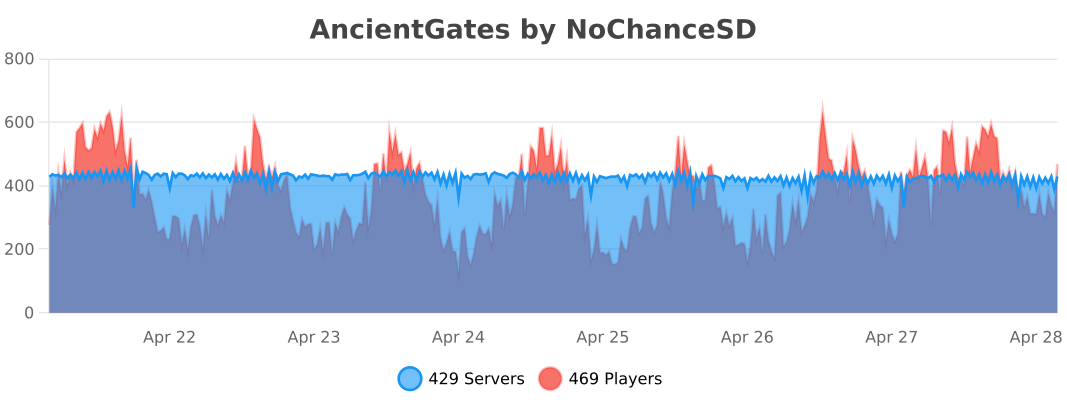
Metrics
You can (globally) opt out the stat collection via /plugins/bStats/config.yml if you wish.
Comments


-

ChanceSD Owner
-

_ForgeUser8600817 Former Author
-
View User Profile
-
Send Message
Posted Aug 8, 2013@ccattell There is currently no way to add an "Owner" permission, but I am looking into supporting "user" gates in the future.
To disallow access to a gate you should be able to set "ancientgates.use.*" and "-ancientgates.use.[disallowedgateid]". I shall double-check that this is supported. If not I shall release an update.
@dqtreats
Thank-you very much for this video, I shall add it to the BungeeCord setup page.
@WauloK
Horizontal gates are supported for all materials except PORTAL. This is because the Minecraft client still displays the PORTAL material vertically dispite the fact that the gate is horizontal. This is like-wise for the ENDPORTAL material, it does not display vertically.
I'm not sure why the "/gate setmaterial" command is not working for you, it definitely works in 1.7.1.
@yiyoek
Unfortunately if you place stationary water in an Ice Plains biome, it will immediately begin to freeze and form ice blocks. To prevent AncientGates becoming too resource intensive and prevent gates freezing on shutdown/startup (i.e. while AncientGates is loading or ending), the portal block(s) biome is changed when using WATER as a portal material.
-
View User Profile
-
Send Message
Posted Aug 8, 2013Is there any way to stop people from throwing items through the gates across the entire network?
-
View User Profile
-
Send Message
Posted Aug 8, 2013@peewi96
Please help me linking my portals through servers i followed the page but i can't do it please really help me this is my skype: tm.morgan its Thomas (TM)
-
View User Profile
-
Send Message
Posted Aug 8, 2013@BiweGas
Can you help me please i'm really lost I can't link the portals with others in other servers please help me I followed the instruction page
add me on skype please: tm.morgan Thomas (TM)
-
View User Profile
-
Send Message
Posted Aug 7, 2013working perfect with bungee cords :)
-
View User Profile
-
Send Message
Posted Aug 6, 2013Hey peewi, I have looked through the comments but haven't seen anything to help. This was working fine...GREAT actually until I did a backup and restart on server. Now non of the gate commands are recognized and all gates go to the nether.
Any help would be great. Many Many gates to redo...well, that is if I can get the commands to work again.
-
View User Profile
-
Send Message
Posted Aug 5, 2013Hi guys,
I have been on my holidays. I shall answer all your questions tomorrow once I've caught up on my sleep.
Please hang on in there
-
View User Profile
-
Send Message
Posted Aug 5, 2013@Sir_Everard
That was rather rude... if you read my question i asked if there could be a permission to DISALLOW use of a specific gate while still allowing the wildcard * on the use permission
I tried using ancientgates.use.[gateid]: false and it didnt work
-
View User Profile
-
Send Message
Posted Aug 5, 2013@ccattell Are you high? Read the documentation ancientgates.use.[gateid]
-
View User Profile
-
Send Message
Posted Aug 4, 2013Could there be an option added to disallow access to a specific gate, but still allow access to all others?
ancientgates.nouse.[gate id]
-
View User Profile
-
Send Message
Posted Aug 3, 2013@yiyoek
Yup
Unknown gate command "setmaterial". Try /gate help
-
View User Profile
-
Send Message
Posted Aug 3, 2013@WauloK
you used: /gate setmaterial [gatename] [material]
?
-
View User Profile
-
Send Message
Posted Aug 3, 2013I downloaded the latest version from here and it says setmaterial is not a valid command?
-
View User Profile
-
Send Message
Posted Aug 3, 2013I have a issue, when I create a gate, this change the biome in the coords: This happens if I close and then reopen the server after creating the gate.
Is there any way to fix it?
-
View User Profile
-
Send Message
Posted Aug 3, 2013Could you fix it where people can't throw things through portals? :3 I tried setting entities to false but it didnt work
-
View User Profile
-
Send Message
Posted Aug 3, 2013It would be cool if we could make horizontal gates in the future :) At the moment it makes a gate only to The End.
-
View User Profile
-
Send Message
Posted Aug 1, 2013Oh my god, I want to thank you sooooo much! It took me forever to learn how to cross servers with this, but I finally learned how! :D So amazing!
those who dont know how::
You need the AncientGates.jar in all of your servers.
You need to open the config.json
You want to enable BungeeSupport AND Socketcomms by putting "true"
Then change the port numbers of the Socketcomms to any unused ports, but they ALL have to be different.
Use any password you want, they can all be the same.
Now restart go any one of your servers and do the following command
/gate addserver <YOURSERVERNAME> 127.0.0.1:SOCKETCOMMSPORT <SOCKETCOMMSPASSWORD>
Do the following commands on that server, and then go into that servers plugins/AncientGates folder.
You will now have a server.json file.
COPY that file, and paste it in all of your server/plugin/AncientGates folders
restart your servers
Now create a portal like you normally would
And when setting where the portal goes, go to your other server and type this
/gate setto <gatename> <YOURSERVERNAME>
It should say "The location for gate "<gatename>" on server "<servername> is now where you are standing."
Hope this helped anyone!
http://www.youtube.com/watch?v=9SfWJ1Q5xd8&feature=youtu.be
For my video tutorial
-
View User Profile
-
Send Message
Posted Jul 30, 2013Did you even read my question? There is no permission currently to set a player to owner modify only, I was asking if it could be added. If I allow someone delete perms, they could delete any gate on the server, not just the ones they created
It would also be nice if it could be added to exclude gates instead of just include perm would look something like ancientgates.nouse.[gate id]
-
View User Profile
-
Send Message
Posted Jul 30, 2013Is there any way you could add an "Owner" permission to the plugin, so that a player can only add, modify or delete gates that they created, and cant do anything but "Use" other gates?
Also is there a way to allow access to all gates, EXCEPT [GateID]?
-
View User Profile
-
Send Message
Posted Jul 28, 2013@benneht
Yay, I can finally help someone without being helped.
/gate setmaterial [id] [portal/water/lava/web/sugarcane] - Set the portal material of the gate.