main/Buttons
Buttons
Buttons are used to execute one or more commands when clicked, to link to another screen, or as a spacer to add an empty row.
label="the_text_to_appear_on_the_button"
- Don't use if the button should be a spacer.
command="/command_to_run_or_chat_message"
- More than one command be be set to one button. Use a semi-colon between commands.
command="/do_something;/do_something_else;Done!"
- This would execute two commands and then put 'Done' in the chatbox.
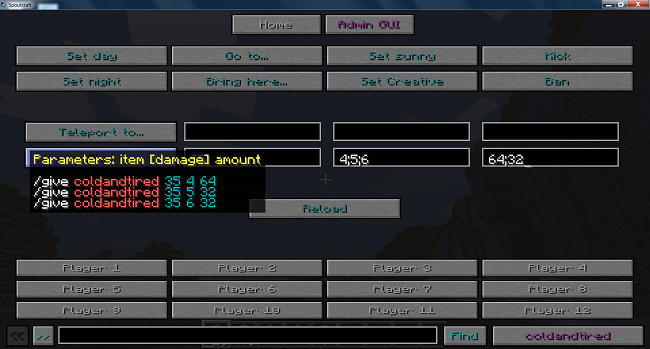
info="text_to appear_in_the_tooltip"
- This allows each button to have a description of what it does (and what the parameters should be, etc.) appear when the mouse hovers over the button.
target="label_attribute_of_another_screen"
- Will make a link button.
new_row="true"
- Will force the button onto a new line. Use this with no label attribute to make a spacer.
stay_open="true"
- Usually, after a button is clicked the GUI will close. Setting this attribute keeps the GUI open.
permission="can.user.do.this.action"
- If the user doesn't have permission for any of the buttons the whole screen will be hidden.
Example
<button label="Give" command="/give %player% %param% %param% %param%" info="Parameters: item [damage] amount"/>
