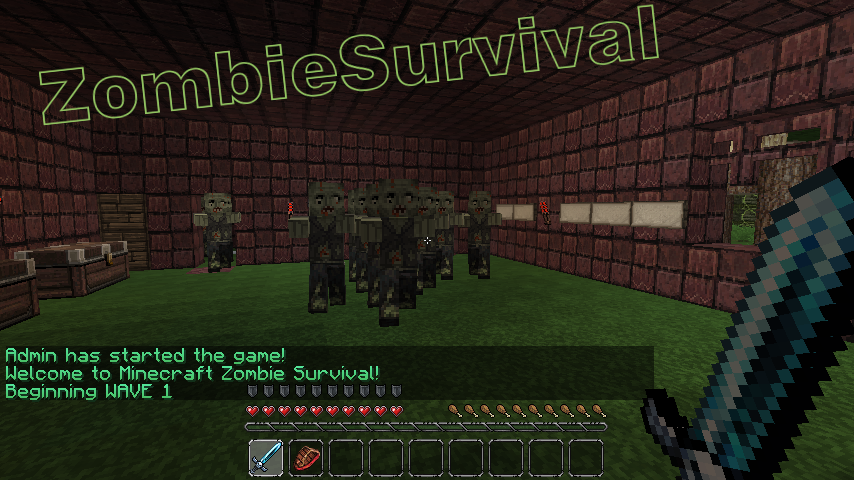
ZombieSurvival

Survive endless waves of zombie attacks!
Based on the COD gamemode Nazi-Zombies
Official Website: www.bjornke.com
Donate
Information:
Now you can play Call Of Duty® style Nazi Zombies in Minecraft! Includes all of the familiar features of the gamemode and more! These zombies can sniff you out from over a mile away and run faster (or slower) then you with our custom AI! Barricades, doors, mystery boxes, wolf waves, and more! Play with your friends or by yourself, it's easy to setup and easy to use!
Features:
- Multiple Games Per World (as many different games as you like in a single world file)
- Multi-World Support (Can have games in any world/nether)
- Custom Zombie AI (Zombies have infinite find/aggro radius, limited only by how many chunks loaded)
- Runner Zombies (Faster than normal)
- Zombie Spawns (set by using operator, spawns are enabled when wave number is reached)
- Zombie Difficulty Multiplier ( defined in config, controls how much health zombies get per wave)
- Zombie Damage Multiplier (defined in config, controls how much damage zombies deal per wave)
- Revive (A sign will appear where a dead comrade has fallen! Break the sign to revive him! You have 30 seconds)
- Random Skelly Waves (can be configured or disabled in config. Default 1/5 chance)
- Perks (Godmode, Instant Kill, and Fire. All last for 60 seconds)
- Random BITE Effect (Random potions applied to player on zombie attack, chance defined in config)
- Stat/Join Signs (Signs that can display player count / zombie count and if RIGHT clicked, allow player to join via sign click)
- Purchase Door Signs (can buy doors with points/economy t open)
- Death Waiting Lobbies (players go here once dead if spectating is turned off)
- Custom Limits (min/max players, max zombies at one time, max waves, allowed break/place of specific blocks during game)
- Inventory Save (Inventory is saved and replaced after a game)
- Automatically Start Game (When enough players have joined the game with /join command, start-player-count definable in config)
- Doors (set by operator, doors open once wave number is reached)
- Door to Spawn Link (Link spawns to doors so they activate when the door is purchased regardless of wave)
- Signs (can either give you item for expense of point, or heal you)
- Point System (10 points for every zombie killed)
- Economy Support (uses vault to link to most economy systems)
- Death Tax (% of bank, defined in config)
- Money per Kill (added to player account after kill, defined in config)
- Game Over or /leave Account Zeroing (defined in config)
- Spectate System (dead players can spectate the game)
- Friendly Fire Deductions (Players who strike or fire upon other players are deducted points)
- Friendly Fire Alerts (Sound is played on client side when player strikes or fire upon other players)
- Player Death Alerts (Sound is played at death location of player, white wool block flashes) Note this feature experimental
- Internal Anti-grief (if automated server, use this feature to prevent blocks from being broken)
- Items on Join (When a player joins a game, they receive items defined in the config)
- Optional Automation Feature (Defined in config, includes cooldown time between new game starts, in seconds)
- Included /vote feature (gets 2 random maps of all maps and puts them up for vote)
- Custom Zombie Drops (defined in config, includes chance for drop)
- 10th round Fire (Netherrack set on fire every 10th round, use /zsa-fire <name>)
- Version Checking (Displays in console and alerts ops that are in-game if out of date, also include /zs-version command)
- Special Action Blocks (Must be added to game with command /zsa-special)
- Yellow Wool: Double Player Velocity
- Blue Wool: Super Jump
- Light Blue Wool: Super+ Jump (Higher jump than Blue Wool)
- Orange Wool: Light's player on fire for 10 seconds
- Black Wool: Kills player
- Light Gray Wool: Sets player invisible
- Gray Wool: Invisible players back to visible
- Green Wool: Slows player slightly
Useful Pages For Admins
Video Tutorials
- Terms and Backend Configuration: http://youtu.be/U8RmAO9wqzc
- Spawn Point and Sign Config: http://youtu.be/4W0r5iJ5rGo
- Classes: http://youtu.be/JtzjfNmAVHE
Credit: stadvert
Permissions:
You do not need to define permissions for this plugin to work.
- zs.start
- zs.end
- zs.create
- zs.edit
- zs.remove
- zs.reload
- zs.version
- zs.tp
- zs.stats
- zs.help
- zs.join
- zs.leave
- zs.whisper
- zs.signs
Metrics
This plugin utilises Hidendra's plugin metrics system, which means that the following information is collected and sent to mcstats.org: A unique identifier, the server's version of Java, whether the server is in offline or online mode, the plugin's version, the server's version, the OS version/name and architecture, the core count for the CPU, the number of players online, the Metrics version,
Opting out of this service can be done by editing plugins/Plugin Metrics/config.yml and changing opt-out to true.
Read before posting comments
Completely new and rewritten version will come out as soon as possible, I am already working on it.
Donations:
If this plugin helps you please feel free to donate and keep this project updated. I am coding this plugin in my free time.

Click here to donate.
Comments

-

_ForgeUser7052630 Owner
-
Forge_User_74967307 Author
-
View User Profile
-
Send Message
Posted Aug 11, 2012hi, I am using this plugin in conjunction with some other plugins and was wondering if there is any way to allow chests and crafting benches to be used. I have added chests to the list of allow break items and allow place items, I still cannot use them however. Thanks!
-
View User Profile
-
Send Message
Posted Aug 9, 2012Does this plugin support sub-id's? And if it does, how can you configure it?
-
View User Profile
-
Send Message
Posted Aug 7, 2012@McBloodbrothers28
1. You didn't add any zombie spawns, so zombies will default to spawning at the creation location. use /zsa-spawn <name> <wave number to begin spawning>
Example: /zsa-spawn example_Map 2
2. /zsa-door <name> <wave number>
Example: /zsa-door example_Map 2
Also, you MUST click BOTH blocks of the door (A door in minecraft is actualy two blocks)
3. signs now require an amount:
zombie
<description>
<cost>
<item:amount>
Example:
zombie
lava
100
11:1
-
View User Profile
-
Send Message
Posted Aug 7, 2012@Bjornke
Not sure if I've said this, but awesome plugin. I look forward to the 2.0 release with multi-world support :-)
-
View User Profile
-
Send Message
Posted Aug 6, 2012I have 3 problems. I made a game and i had the map made and everything Then i did /zs-create Trial 20 2 2 But when I set the door with /zsa-door 2 The door drops and they pick it up and they use it, then the top part of the door stays.
My second problem is the spawning, whenever my friend and i do /join Trial, the zombies spawn where we spawn, at the exact same time and block I did the command, /zs-create Trial 20 2 5
My third problem is the buying sign. i did it in the format below: zombie Stone Sword 5 272
It says the sign is misconfigured when i right click it in /join
-
View User Profile
-
Send Message
Posted Aug 5, 2012@erickingsr
Hello eric,
Thanks so much for your support. Currently the plugin only works in the main world. And the inventory does not get saved and replaced. These will be fixed for R2.0 which will be released when the first Bukkit RB for 1.3.1 is released. Hope that helps Thanks so much!
-
View User Profile
-
Send Message
Posted Aug 4, 2012Hi Bjornke!
Great work thus far on the plugin! Huge Fan! Any change you can make it compatible with the Multiverse Plugin?
If I create an arena in the 'world' it works 100% as intended. If I create an arena in any other 'worldnamedsomethingelse' and start the arena it spams the console with [WARNING] Task of 'ZombieSurvival' generated an exception.java.lang.IllegalArgumentException: Cannot measure distance between Zombie and world
In addition, I'm not sure how to solve this.... but if a player has items in their inventory and /join an arena.... the items will be removed upon end of the arena.
Thanks, Eric
-
View User Profile
-
Send Message
Posted Aug 4, 2012I like this the most out of the zombie plugins but one simple question. How do I disable it from using Vault? I already use for hooking my other economy plugins. I want to separate money earned in zombie survival from the player's regular money.
-
View User Profile
-
Send Message
Posted Aug 3, 2012All, this is not 1.3.1 compatible yet. I am on vacation and cannot update it till Sunday. Second, I will compile on java 6 to increase compatibility with those experiencing loading problems because they're not on java 7. Third I will create a video and a text document on how to setup the game. Thanks for the support guys.
-
View User Profile
-
Send Message
Posted Aug 3, 2012I have not started compatability testing for 2281 yet. This will start tomorrow.
-
View User Profile
-
Send Message
Posted Jul 31, 2012@enilsss
ahh ok
-
View User Profile
-
Send Message
Posted Jul 31, 2012@drumming102
They craft with those blocks that drop. 2 planks + 2 cobble = sword.
The map isn't perfect, I'll admit that lol
-
View User Profile
-
Send Message
Posted Jul 30, 2012First off i love this plugin. But anywho lets begin. Ok so i'm having problems loading up the new release jar file so i have to use the beta for the plugin to work. I have the latest java so i don't believe it is that.
Also i wanted to ask. How do i place potions in the signs to sell things? i tried using the item number like this: 373/16389. Which is for a splash potion i believe.
Edit: Fixed the loading issue ^_^ But i still want to know how to place potions to sell with signs
-
View User Profile
-
Send Message
Posted Jul 30, 2012Having a huge problem. All my zombies are speed zombies and I have the speed zombie stat set at 0.
-
View User Profile
-
Send Message
Posted Jul 30, 2012I don't see how we set this up, there are no guides on it :S I bought a host that I want to dedicate to a zombie survival server with 30-76 players, definitely will be full but need to find a plugin that's fun and this looks great to use. Just need a guide :S
-
View User Profile
-
Send Message
Posted Jul 30, 2012@enilsss
hmm there are lots of places on your maps that people can glitch on and keep from getting hit by zombies. I hung out on your crafting table afk for 10 min
EDIT: and you have zombies dropping blocks you can't place?
-
View User Profile
-
Send Message
Posted Jul 30, 2012@drumming102
Yes, I am just using one arena in one world. No multiverse. I have as few plugins as needed; I have essentials to prevent fire/water/explosions and to prevent all spawning but zombies, and worldedit.
Config:
Games:
You're also welcome to come in and check it out! It's purely zombie survival.
50.31.24.139:25567
-
View User Profile
-
Send Message
Posted Jul 30, 2012@enilsss
You need to disable monsters spawning in the world your self. that would mean the plugin is controlling world things like a multiverse type thing.
I assume that you ARE running multiverse and if so you can disable mob spawns. If not it must be a stand alone server and then it's as simple as in the server properties "spawn-monsters=false"
As for the zombie box that is still VERY MUCH beta and not fully tested yet. I suggest leaving it out untill it is more stable.
I have yet to see a problem with instakill but then again once again the world I am using to test this has PVP off...... you can do that in multiverse or any world management plugin worth 2 cents :-p Is pvp enabled in the world your doing this in?
EDIT: I just realized you might be using this to set up just 1 arena in your main world..... How do you have this set up?
-
View User Profile
-
Send Message
Posted Jul 30, 2012@drumming102
Thanks for the response. Don't get me wrong, you have a very amazing plugin here. I get excited just thinking up of possible maps and obstacles to put for players to duke it out in.
As for the map and config, I posted when, after setting all the points and game settings, spectators spawned inside the ground, skeletons and creepers from outside the arena kept spawning because of the darkness, a host of other issues were plaguing me, and no amount of deleting, reloading, and reconfiguring the arena would fix anything.
I suppose a youtube video for how to do this would be better than a map..!
Loving this plugin and so are the players on my server. I suggest updating the signs page with the info u just told me about, and perhaps look into instant kill killing the players. It's killed our high waves many times :( . Also, the zombie box sign does not seem to work, and now I have just a diamond pick on the list of items! Following the zombie box sign exactly.
-
View User Profile
-
Send Message
Posted Jul 29, 2012@enilsss
the Number after the : is the Amount they get.
and so your wanting someone to make the entire server plugin AND map for you?