Yu-Gi-Oh! [FM]
This plugin is in no way affiliated with Konami(R) or the Yu-Gi-Oh! Trading Card Game
YU-GI-OH! [FM]
You can download extra sets from the forum. http://dev.bukkit.org/bukkit-plugins/yu-gi-oh-duel-monsters/forum/63719-official-card-fusion-sets/#p1
This plugin adds the Duel Monsters game (aka Yu-Gi-Oh!) to Minecraft! It uses Konami(R)'s prototype version of the rules used in the game Yu-Gi-Oh! Forbidden Memories.
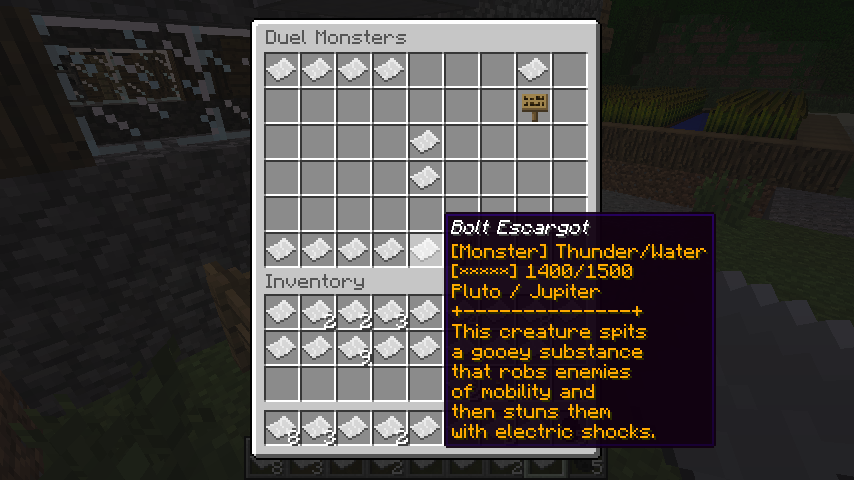
Screenshot

Video
http://www.youtube.com/watch?v=ew8hfFSXLg0
Thanks to SpookyPirate for the video!
Features
- Yu-Gi-Oh! Forbidden Memories rules.
- 722 stock cards with as many as 212 stock fusions allow for flexibility in a deck.
- Deck editor.
- Full-featured duel interface. (This isn't mentioned anywhere, but right click cards in hand to start fusion chain)
- Cards are physical items in the plugin.
- Villagers play duels with players as computer players.
- Players can obtain cards by dueling villagers to improve their decks!
- Players can face off against each other to see who's the best!
- Card forging through anvils can put cards a player physically owns into the game!
- Communication fusions lets you get the most powerful cards with the trust of a friend!
- Expand the game with additional card sets.
Gameplay
Players start off with no deck. A player must find a villager that does not play anymore to get the starter deck. After getting the starter deck, the player is free to duel villagers and other players. Players can duel villagers and other players by going into "Duelist Mode" (see "Commands") and interact (right-click) who he/she wishes to duel. If it is a villager, the request is automatically accepted and the computer player will play against the requester. If it is a player, that player will get a request if he/she is accepting requests.
Installation
Un-zip the archive and put yugioh.jar and the yugioh folder inside the plugins folder of your Bukkit server. Make sure to include the yugioh folder as it contains card, fusion, and effect/script data.
Configuration
hard_mode: false   # AI plays their deck's more powerful cards more often
allow_commu_fusion: true   # Enable/Disable Communication Fusion
monster_effects: false   # Enable/Disable Effect Monster Cards
allow_tournaments: false   # Enable/Disable Tournament Play (/ygo tournament)
all_obtainable: false # If true, all cards will be marked obtainable regardless of configuration
Card Forging
Card forging is performed by putting the password on a PAPER item using an anvil. The password is the 8 digit number on the lower left corner of real Yu-Gi-Oh! cards. The card is converted into an unusable card. The card can be purchased for dueling by holding the card in hand and using the command '/ygo convert'. You will need to have enough starchips to activate the card. The cost of a card password can be checked with '/ygo check [password]'. Some cards cannot be redeemed in this manner.
Card Communication Fusion
A new feature in Beta 0.3.0. This lets you fuse 3 or 4 cards together to create a new one. You will need another player to help you out with this. When you are close to the other player, type '/ygo commu [other player's name]'. A small inventory will come up asking for 3 or 4 cards. Select the cards you want to fuse from your inventory. Then click the far right paper to initiate the fusion. The fusion materials will be lost, and the resulting card will be sent to the other player. Manipulating the communication fusion is up to the player's experimentation.
HINT: Fusing similarly powerful cards can potentially give you better and more powerful cards. Also try mixing magic and traps in and see what they do.
Card Obtaining
You can obtain cards by dueling villagers. Dueling and winning against villagers will earn you cards and starchips. The card normally rewarded for victory is determined by opponent cards you have defeated using your cards. You will also get a rank and some amount of starchips after defeating a villager. The rank effects the amount of starchips you earn, as well as the card reward.
Commands
Player (ygo.player)
/ygo help - Brings up the help menu
/ygo deck - Deck editor
/ygo duel - Toggle "Duelist Mode"
/ygo spec [player] - Spectate a player's duel (if the player is within a 16 block radius)
/ygo accept - Accept a duel request (if any)
/ygo decline - Decline a duel request (if any)
/ygo ignore - Ignore duel requests
/ygo starchips - Check starchip count
/ygo convert - Convert PAPER to a Duel Monsters card (see "Card Forging")
/ygo check [password] - Check card password cost/name.
/ygo commu [player name] - Start a communication fusion with another player, considering the other player is close to you.
Admin (ygo.admin)
/ygoadmin help - Admin help menu
/ygoadmin get [password] - Get a card by its password
/ygoadmin give [player] [password] - Give a player a card by its password
/ygoadmin givesc [player] [amount] - Give a player (amount) of starchips
/ygoadmin deck - Toggle Admin Deck Editor (can edit other player/villager decks, takes priority over duelist mode)
/ygoadmin generate [entity_type] - Generate a duelist with given entity type (Minecart duelists!)
/ygoadmin clean - Clean up any unused NPC decks from the save file (automatically happens when plugin is enabled as well)
Permissions
ygo.player: true - Permission to use '/ygo' commands (everyone has this permission by default)
ygo.admin: false - Permission to use '/ygoadmin' commands (no one has this permission by default)
Tips / Tricks
For the player
- Use the guardian stars! Each star has a superior and inferior star. When attacking a monster with an inferior star, your monster gains 500 ATK/DEF for the battle! The guardian stars are as follows (star > inferior star):
- Sun > Moon > Venus > Mercury > Sun
- Jupiter > Saturn > Uranus > Pluto > Neptune > Mars > Jupiter
- Learn the fusions! Fusing for powerful cards is a great way to improve your strategy. It will also help you on your way to defeating tougher duelists, netting you some more powerful cards! You can also learn fusions by watching the villagers fuse. Look in the graveyard after they have fused a monster to see its fusion materials. Remember this: One fusion card can have countless ways to fuse it, so look out for the types and attributes of the fusion materials as well.
- Keep playing against different villagers. Weaker villagers can help teach you the fusions by observing (and net you those fusion material cards). Villagers that play themed decks can help you build your own themed deck or get specific types of monsters. Defeating stronger villagers will get you more powerful cards.
For the server owner
- There is not much stock information about the plugin, so make sure to inform your players.
- If you would like your players to start with a deck without needing to find a villager that doesn't play, you can keep spawning trapped villagers until you get one that "Doesn't play" (check by right-clicking in Duelist Mode). This way a player can immediately right-click that villager to get their starting deck.
- You can create a computer/AI dueling area by spawning many trapped villagers. This is good if you want a server revolving around this plugin.
- Since Beta 0.3.0, "Hard Mode" is available for use and it can be configured in config.yml. The AI villagers will play their most powerful cards more often when Hard Mode is enabled.
Source
The source can be found on GitHub, which is open to the public.
PLEASE ENJOY THIS PLUGIN! And yes, there is Exodia...
Comments


-

_ForgeUser8976848 Owner
-
View User Profile
-
Send Message
Posted Aug 9, 2013@SpookyPirate
Quite possibly a plugin conflict? Did you try a vanilla bukkit server with no plugins except this one?
-
View User Profile
-
Send Message
Posted Aug 9, 2013It's seems like the plugin is loaded and I can do all commands but I can't duel and no cards show up. The plugin says 0 cards loaded in the console before giving the error that I posted earlier. You just drop the yugioh folder that is in the yugiohplugin folder that is in the zip into your plugins folder along with the yugioh.jar? I really don't know what I could be doing wrong on my end and I have no other plugin errors. I made the mistake of announcing that I was going to install this on the server before I tested it out and I got all my players anxious now. I can't wait to finally try this out. : )
-
View User Profile
-
Send Message
Posted Aug 9, 2013@robotnikthingy
if it says that, then you already have a starter deck. Type '/ygo deck'
-
View User Profile
-
Send Message
Posted Aug 9, 2013All of the villagers seem to say "Doesnt't play" when my players or i click on them. So how do you get a starter deck?
-
View User Profile
-
Send Message
Posted Aug 9, 2013I am currently running the beta build an I have unzipped the folder and added the yugioh file and the jar file to my plugins directory and bukkit is running under admin privileges. I still have no luck. Is there anything that I could provide you with to help you in finding this problem?
-
View User Profile
-
Send Message
Posted Aug 9, 2013@SpookyPirate
It uses the 1.6.2 Beta build.
Make sure you have the yugioh folder and its contents in your plugins folder. Also make sure Bukkit is running under admin privileges.
-
View User Profile
-
Send Message
Posted Aug 9, 2013Tried the new version and my error still persists : ( Any idea what would be causing this? What is the recommended craftbukkit build?
-
View User Profile
-
Send Message
Posted Aug 9, 2013Hello. Everyone on my server is excited to try this out but it isn't loading the cards and i keep getting a lot of severe errors. For those of you who have this working what version of craft bukkit are you using? i have tried the beta as well as the lastest dev build. Here Is A Pastebin Of The Error I Am Getting
-
View User Profile
-
Send Message
Posted Aug 8, 2013good job! I will play it!
-
View User Profile
-
Send Message
Posted Aug 8, 2013@Ramirez57
Well, perhaps make it an option, maybe? Regardless of whichever route you go for, this will be amazing in the end :P
-
View User Profile
-
Send Message
Posted Aug 7, 2013Looks nice!
-
View User Profile
-
Send Message
Posted Aug 7, 2013This needs a Video... can someone make one please.
-
View User Profile
-
Send Message
Posted Aug 7, 2013There is an error in the Umi card effect. To fix it quick, open plugins/yugioh/cards/cards.yml. Search "Umi" (CTRL+F, without quotes). Change "favors: [Aqua, Thunder]" To "favors: [Aqua, Thunder, SeaSerpent, Fish]" The next update will include this fix, but for now you can do it yourself.
-
View User Profile
-
Send Message
Posted Aug 7, 2013@Seaboiii
that would be awesome... have the maps show like, the card "image"?
-
View User Profile
-
Send Message
Posted Aug 7, 2013I love this mod, Yu-gi-oh!!!!
-
View User Profile
-
Send Message
Posted Aug 7, 2013Hey Ramirez... I am not too sure but maybe add the cards using maps? So we can actually see what card is it? Rather than just the Lore change
-
View User Profile
-
Send Message
Posted Aug 7, 2013@Lildirt
I never post a mod on devbukkit without finishing the mod first, and I didn't want to harm the landscape in any way, so inventory duels are performed, same with deck editing.
-
View User Profile
-
Send Message
Posted Aug 7, 2013All approved. Have fun. Spent hours and hours of work on this.
-
View User Profile
-
Send Message
Posted Aug 6, 2013this sounds awesome, and hilarious, can't wait to see how this ends up!
-
View User Profile
-
Send Message
Posted Aug 6, 2013Very interesting. Haven't seen someone attempt this before, but I do wish that the current gameplay would be a little more seamless. What about having a dueling board like they have in the actual everything of YuGiOh? Could have their hand be the first five slots of their hotbar and maybe right-clicking with it would give more information on the card, somewhat eliminating the inventory aspects of the game. There are two plugins that I know of that utilize "far-punching" as I like to call it, essentially allows you to punch a structure from many blocks away (whatever block is at your crosshair) and sends a message to the plugin. ChessCraft and Checkers utilizes this function if you are interested.
Hope you get some ideas from this. I've subscribed to the post here and am definitely looking forward into progress.