
XPKeeper

XPKeeper lets you save and retrieve your current XP level by clicking on a sign.
Yes, I know there are quite a few XP bank type plugins out there, but I wanted one without any other plugin dependencies, and one that was simple to use without any economy features - I just want to save my XP, so I don't lose it - no need for anything else.
Quote from eccentric_nz:Still alive! Get builds here: http://tardisjenkins.duckdns.org:8080/job/XPKeeper/
How does it work?
XPKeeper is sign based, you place a sign post or wall sign and put [XPKeeper] on the first line. The text between the square brackets can be changed by editing the config file and is case-insensitive.
- To save your XP (both LEVEL and EXPERIENCE), LEFT-click the sign with nothing (AIR) in your hand. Your XP will be transferred to the sign and will disappear from the HUD.
- If you gain more experience, just LEFT-click the sign again to add the current amount to the existing saved XP.
- To withdraw some XP, RIGHT-click the sign with nothing (AIR) in your hand. The amount you withdraw is set in the config file (5 levels by default). To withdraw all your XP, RIGHT-click the sign while SNEAKING.
NOTE You can configure the plugin so that you don't have to click with your fist, but it saves mistakenly placing a block :)
Videos
Removing an XPKeeper sign
XPKeeper signs cannot be removed by breaking them. You must use a command instead. Type:
/xpkremove
And then click on the sign you want to remove. You must have nothing (AIR) in your hand.
You can only remove your own signs.
Other features
- You may have one XPKeeper sign per server world
- XPKeeper signs are protected from explosions and griefing
Configuration
There are some configuration options:
firstline: XPKeeper
This determines what must be inside the square brackets on the first line of the sign, you could change this to 'Bank' for instance.
must_use_fist: [true|false]
This determines whether you must use your fist to click the sign.
set_limits: [true|false]
This determines whether the deposit limit feature is enabled.
limits:
  - 30
  - 50
  - 100
If set_limits is true, set the limits used by the xpkeeper.limit.[amount] permission nodes here.
withdraw: [amount]
Set the amount of XP levels you will withdraw when you right-click the sign. Set to 0 to use the old behaviour of withdrawing all your XP.
messages:
    deposit: You deposited %d XP and have reached level %d :)
    withdraw_all: You withdrew all your XP!
    withdraw_some: You withdrew %d XP Levels!
    [...]
Use this to localise the player messages in game. Some message strings contain the symbols %s and %d these must not be removed as they are replaced in game with values calculated in real time. You can move them to any position that makes sense with the message.
A French translation courtesy of DragonSlayer875 can be found here
Permissions
There are some:
xpkeeper.use - allow players to make XPKeeper signs, default: TRUE
xpkeeper.fist - allow players to use the /xpkfist command, default: OP
xpkeeper.pay - allow players to use the /xpkpay command, default: OP
xpkeeper.force - allow players to use the /xpkforceremove command, default: OP
xpkeeper.admin - allow players to use the /xpkgive, /xpkset and /xpkwithdraw commands, default: OP
xpkeeper.editsign - allow players to edit signs, default: OP
xpkeeper.limit - allow players to use the /xpklimit command, default: OP
xpkeeper.limit.[amount] - limit the amount of level a player a player can deposit up to, [amount] must match one of the limit options in the config
xpkeeper.limit.bypass - allow players to by pass deposit limits, default: OP
Commands
There are seven:
| Command | Description | Alias | Permission |
|---|---|---|---|
/xpkremove |
Use to remove your XPKeeper sign, see Removing an XPKeeper sign above |
/xpkr |
- |
/xpkfist |
Toggle the must_use_fist config optionbetween true and false or vice versa |
/xpkf |
xpkeeper.fist |
/xpklimit |
Toggle the set_limits config optionbetween true and false or vice versa |
/xpkl |
xpkeeper.limit |
/xpkwithdraw [amount] |
Set the withdraw config optionto the amount of levels specified |
/xpkw |
xpkeeper.admin |
/xpkreload |
Reload changes to the config | /xpkrl |
xpkeeper.admin |
/xpkgive [player] [amount] |
Add XP to a player | /xpkg |
xpkeeper.admin |
/xpkset [player] [amount] |
Set a player's total XP amount | /xpks |
xpkeeper.admin |
/xpkpay [player] [amount] |
Pay a player some XP | /xpkp |
xpkeeper.use |
/xpkforceremove [player] |
Use to remove all XPKeeper data for the specified player from the database. When using the command from the console, you must specify a player name, otherwise it runs using the player that types the command. USE WITH CARE! |
/xpkfr |
xpkeeper.force |
To do
- Link signs between worlds?
- Add config option to limit signs per player
Stats
Basic statistics are collected by this plugin using MCStats / Plugin Metrics , such as:
- Java Version
- Operating System
- System Arch
- Global Statistics - player and server counts
- Server Locations
- Game Version the game version - or Minecraft Version - servers are on
- Server Software - the server software - such as CraftBukkit - servers are running
You can opt out at any time by setting opt-out: true in plugins/PluginMetrics/config.yml
Change log
Get new builds here: http://tardisjenkins.duckdns.org:8080/job/XPKeeper/
v1.4
- Requires CraftBukkit 1.7.5 or higher
- [In preparation for Minecraft/CraftBukkit 1.7.6/7/8] we have switched to using player UUIDs instead of names when storing and retrieving XP
- The plugin will automatically backup and update the XPKeeper database
- When the updating takes place the plugin will connect to api.mojang.com to lookup player UUIDs - this make take some time if you have a large number of users
- The server must be in online mode!
v1.3.10
- Fixed a bug with setting XP limits and PermissionsEx
v1.3.9
- Added the ability to colour the first line of the sign - set
firstline_colourto a colour code (&2, &c etc) in the config, or use the commandxpkc [colour code]Note colour will only apply to newly created signs.
v1.3.8
- Fixed startup errors with CraftBukkit 1.7.2-R0.3 #2978 and higher
v1.3.7
- Fixed a String format error when using the
/xpkpaycommand
v1.3.6
- Signs (and the blocks they may be attached to) can no longer be destroyed by pistons
v1.3.5
- Added
/xpkreloadcommand to reload changes made to the config file
v1.3.4
- Fixed
firstlineconfig option not being set when the plugin is run for the first time - Added configurable deposit limits
- Enable the feature with
set_limits: true- command is/xpklimitto toggle true|false - Set a range of maximum level limits in the config, then give players/ranks the permission
xpkeeper.limit.[one of the configured amounts] - Bypass the limit setting (if enabled) with the permission:
xpkeeper.limit.bypass(default OP) - If a player's currently held XP would boost the XPKeeper XP over the limit, then the plugin deposits as much as it can (up to the level limit) and leaves the rest with the player
- Enable the feature with
v1.3.3
- Added configurable strings to the config so you can change the language used to message players
v1.3.2
- Fixed a problem with player names that don't fit on a sign (> 15 characters)
v1.3.1
- Changed all SQL to use prepared statements so that world names can have apostrophes in them
v1.3
- Added configurable withdrawal amount.
- Set the amount (in levels) in the config with
withdraw: [amount] - To keep the old behaviour of withdrawing all your XP, set
withdraw: 0 - To withdraw all your XP regardless of the
withdrawamount, right-click the XPKeeper sign while sneaking
- Set the amount (in levels) in the config with
- Added command
/xpkwithdraw [amount]to set the withdrawal amount in the config. - Added some feedback messages.
- Fixed - when removing an XPKeeper sign with
/xpkremoveyou now get all your XP back and the sign drops naturally. - Fixed - only the player whose name is on the sign can interact with it.
- Updated to Bukkit 1.4.6-R0.4-SNAPSHOT
v1.2.3
- Added
/xpkpay [player] [amount]to pay a player some XP
v1.2.2
- Added command
/xpkgive [player] [amount]to add XP to a player - Added command
/xpkset [player] [amount]to set a player's total XP amount
v1.2.1
- Added permission
xpkeeper.forcefor the command/xpkforceremove
v1.2
- Built with Bukkit 1.4.5-R0.3-SNAPSHOT
- Added command
/xpkforceremoveto delete all player data from the database USE WITH CARE When using the command from the console, you must specify a player name, otherwise it runs using the player that types the command. - Added plugin metrics
- Correctly nested permissions, so that the plugin is not clearing the first line of signs
v1.0.2
- Built with Bukkit 1.4.5-R0.1-SNAPSHOT
- When making an XPKeeper sign, the first line is case-insensitive so
[XpKeEpeR]and[xpkeeper]are now both valid - Improved sign grief prevention
- Added config option so that you can use anything to click the sign (bit of a pain when you right-click the sign with a placeable block, but at least you now have the option) - set
must_use_fisttofalseto click with anything - Added permission
xpkeeper.useThe default is OP. You must have this permission in order to create an XPKeeper sign
v1.1
Includes all the v1.0.2 changes as well as:
- Changed the formula for storing and retrieving XP, the sign now respects the fact that higher levels require more XP
- Added command
/xpkfistto toggle the config optionmust_use_fisttrue or false - Added permission
xpkeeper.fistThe default is OP. You must have this permission to use the/xpkfistcommand
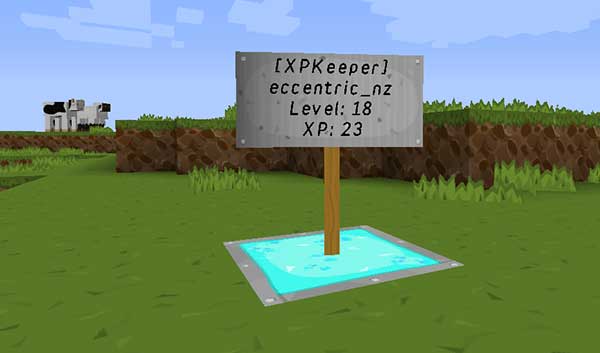
What it looks like
Source code
Comments

-

eccentric_devotion Owner
-
View User Profile
-
Send Message
Posted Sep 3, 2014@Squawkers13
Cannot reproduce, going to need more info...
-
View User Profile
-
Send Message
Posted Sep 3, 2014I've found that if a player clicks on another player's XPKeeper sign, it immediately turns into the first player's sign, complete with accurate values...
-
View User Profile
-
Send Message
Posted Jul 30, 2014@orangebuddy
You'll need to edit the database, https://addons.mozilla.org/en-US/firefox/addon/sqlite-manager/
You did get the "[XPKeeper] All database entries for [player] were removed." message right?
-
View User Profile
-
Send Message
Posted Jul 30, 2014yeah, it removed it all, but i still couldn't make a new sign
-
View User Profile
-
Send Message
Posted Jul 30, 2014@orangebuddy
Have you tried using the /xpkforceremove command?
-
View User Profile
-
Send Message
Posted Jul 30, 2014I destroyed my sign without first removing it, and it wont let me make another one. Is there a way to fix it or am i screwed?
-
View User Profile
-
Send Message
Posted Apr 14, 2014@eccentricnz
sorry for my ignorance, thank you for the quick assist.
-
View User Profile
-
Send Message
Posted Apr 13, 2014@marubal21
Looking bit further down the page will get you an answer: http://dev.bukkit.org/bukkit-plugins/xpkeeper/?comment=97
It's only the update that needs to have the server in online mode, if you have a fresh install, you should be able to use it in offline mode, but if a player changes their name, they'll lose access to their XPKeeper sign...
-
View User Profile
-
Send Message
Posted Apr 13, 2014will this work with bungeecord setups where the spigot servers are set to offline mode, but the bungeecord proxy is set to online mode?
-
View User Profile
-
Send Message
Posted Apr 13, 2014@UnderscoreZero
-
View User Profile
-
Send Message
Posted Apr 13, 2014Me and my players try to punch the signs but it never saves the XP on the sign.
-
View User Profile
-
Send Message
Posted Apr 11, 2014@spazmonkey777
This might help? http://www.spigotmc.org/threads/getting-uuids.13654/
Maybe set the
online-mode:true, update and then, revert back toonline-mode:false, XPKeeper will backup your database before conversion, so you can always revert to the backup if it doesn't work-
View User Profile
-
Send Message
Posted Apr 11, 2014@eccentricnz
So I updated to version 1.4, and here is the error I get on my Spigot servers: http://pastebin.com/L6qB3WVL
Since we are running on Bungeecord/Spigot, all our servers are in offline mode, so I had to revert to an older version for now.
-
View User Profile
-
Send Message
Posted Apr 6, 2014@spazmonkey777
I have no idea, I only know that online servers return a different UUID than offline ones...
EDIT: just read this: "As far as I know, Bungeecord forwards the UUID's to Spigot, this was added about a week ago."
-
View User Profile
-
Send Message
Posted Apr 6, 2014Question: With your v1.4, you say the server needs to be Online-mode for it to update, etc when UUID's are in place. How will this work with servers using a Bungee setup? The bungee proxy is online-mode, but the servers themselves are run in offline-mode. Will it still work fine?
-
View User Profile
-
Send Message
Posted Feb 16, 2014XPKeeper v1.3.10 has been uploaded and is awaiting Bukkit approval...
It fixes a bug with setting XP limits when using PermissionsEx
-
View User Profile
-
Send Message
Posted Feb 16, 2014@nicquehen
Have PMed you.
-
View User Profile
-
Send Message
Posted Feb 15, 2014yeah good idea. fix.
-
View User Profile
-
Send Message
Posted Feb 15, 2014@nicquehen
You need to make the video public...
-
View User Profile
-
Send Message
Posted Feb 15, 2014Please find the video with the bug (test on local with only pex and the plugin)
http://www.youtube.com/watch?v=49QIZQ9UWJs&feature=youtu.be
If you see something maybe...
In a mean time i'll find another solution :p