WebAuction
WebAuction - Website based item market [1597]
Requires: An economy plugin (iConomy 4,5,6, BOSEconomy 6 & 7, EssentialsEcon, 3Co, MultiCurrency, MineConomy, eWallet, EconXP)
Requires: Vault
Requires: Web server running PHP 5.2+
Download Latest .jar:
WebAuction.jar v0.6.4 - last change 20th Jan 2012
Download Latest Web Folder:
WebInterface.zip v0.6.4 - last change 22th Jan 2012
Download Latest Development .jar:
WebAuction.jar - last change 9th Feb 2012
Download Latest Development Web Folder:
WebInterface.zip - last change 9th Feb 2012
Development Server
If you want to see a demonstration of a working (mostly) development version of this plugin, I am currently running a small server with it (not 24/7). However the website is pretty sluggish because it is not hosted on the same server as minecraft, but it should still work.
- IP: twm.servegame.com
- Website: webauction.threewisemeh.com
Source (GitHub)
WebAuction (jar) - http://bit.ly/o8vpPq
WebInterface (web files) - http://bit.ly/nPubR1
Description
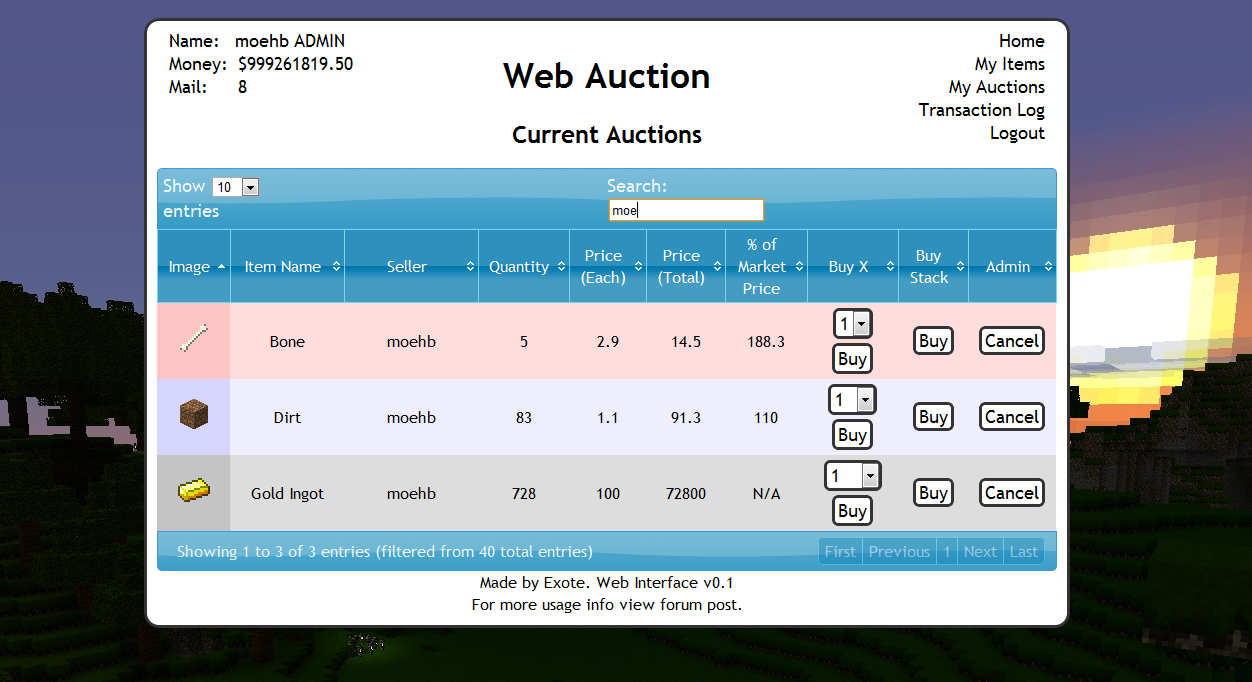
Ok, so I know there are loads of shop plugins that all do slightly different things. But because of the UI restrictions in game, I chose to make a shop plugin that links in with a website via a MySQL database to make trade easier, and even allow people to check on how their items are doing without being logged into the game. (mobile device?).
Basic idea is that admins (or players with right permissions etc) set up auction houses around the world. Players can then go there and deposit items, when they do this the items disappear from the world and get logged into the players online account. They they put money in the online account by clicking signs. Once this is done and they have set a password, they can log into the website and see all the auctions that are going on.
Using the money in the online account they can buy items, and they will be sent to the mailbox in game (a sign) and they can set up their own auctions for the items they have stored online.
One of the main features is that the website will look at all the sales and calculate a moving average for the market price of that item. Which should help players when setting a price, or buyers to see if they are getting a good deal.
Notes:
- Just added a how to edit section for info and new designs to help change the look of the website
- Works best with iConomy stored in the same MySQL database as the WebAuction tables (direct money link from game to website)
Features:
- Only members of your server can get an account
- Change password from in game
- Deposit items to be sold by right-clicking a mailbox deposit sign while holding it
- Change online balance with signs
- Get items from a sign mail box
- Moving average market price calculations
- Can link directly to the iConomy database
Overview Video:
NEW VIDEO :D
Screenshots:
will take more soon, when we have spent a while using it so that the market prices are properly calculated.


Setup:
Basics:
- Download the WebAuction.zip and extract it
- Put the WebAuction.jar in the plugins folder on your minecraft server
- Put the WebAuctionInterface folder (you can rename) on your website
- Restart server
- Look in plugins/WebAuction to find the config file add your MySQL database details
- In the interface folders on website, find the scripts/config.php file and add MySQL details again
- Be careful with mysql passwords, special characters such as {}[]() may cause the file to be incorrectly read by the yml parser.
- Make everyone create a password, make sure its different to ones they use elsewhere etc.
- Make a sign for the withdraw mail box (see screenshot) First list: "[WebAuction]" Second line: "MailBox"
- Make a sign for the deposit mail box (see screenshot) First list: "[WebAuction]" Second line: "MailBox" Third line: "Deposit"
- If you have iConomy data stored in the same database as the WebAuction data, use the web config file to point to the right table, and ignore the stuff about withdraw and deposit signs.
- Make some withdraw and deposit signs for money (again in screenshot) First line "[WebAuction]" Second: "Withdraw" or "Deposit" Third: the amount of money, or for the withdraw sign you can put "All" on the third line
- You can also make recent auction signs, to show a live feed of the new auctions: First line "[WebAuction]" Second: "Recent" Third: a number for the offset, so for the most recent auction put "1", second most recent "2" etc.
- Log into the website and start selling
Important Signs
Mailbox:
Used to deposit items and withdraw items that are in your mail
Line 1: [WebAuction]
Line 2: MailBox
Line 3: Withdraw (not actually needed but makes it neater with the other deposit sign :P)
Line 1: [WebAuction]
Line 2: MailBox
Line 3: Deposit
Deposit Money:
Used to send money to the website to be used on the WebAuction (not needed if using iconomy databases) Line 3 can be any number (100, 0.01, 55.7 etc.)
Line 1: [WebAuction]
Line 2: Deposit
Line 3: 100
Withdraw Money:
Used to get money from the website to be used on the WebAuction (not needed if using iconomy databases) Line 3 can be any number (100, 0.01, 55.7 etc.) Line 3 can also be "All".
Line 1: [WebAuction]
Line 2: Withdraw
Line 3: All
Recent Auction Feed
Used to see recent auctions people have made, you can set up as many signs as you want each looking for subsequent auctions. For example in your auction house you could have one sign to show each of the five most recent auctions. For line 3 enter the number for the offset from the most recent auction ("1" for the most recent, "2" for the second most recent... etc.)
These signs will update automatically when new auctions are made, and will display the item name, the quantity and the price.
Line 1: [WebAuction]
Line 2: Recent
Line 3: 1
There is now also another way of displaying recent auctions. If you have the SignLink plugin on your server you can display values about the auctions however you like on signs using various bits of data as variables. So far I have just got:
- Auction Name (%WAName1%)
- Auction Price (%WAPrice1%)
- Auction Quantity (%WAQuant1%)
Where you can change the number (1) for any other in the same way as in the previous auction signs, except I think 0 is actually the most recent auction.
I will soon be adding other information such as the sellers name and maybe the market price etc.
New Auction Shouting
A sign that is given a radius, when a new auction is created it will shout in it's radius about it to anyone nearby, line 3 is the radius in blocks.
Line 1: [WebAuction]
Line 2: Shout
Line 3: 10
Twitter feed
If you want to send information of new auctions and sales to a twitter account. Open up the config.php file (in the scripts folder).
Go to: https:dev.twitter.com/apps/new Input all your information. It doesnt really matter what you put for the name and things on the first page. (and you don't need to add anything for the callback)
When you have created your new app, open the settings tab, and set the application type access to "read and write". Save everything. Go back to main app info page. On that page should be the consumer key and consumer secret. Add these two values to the config file.
Near the bottom of the page is a button that says "create access token", makes sure you have set the permissions to read and write then click this button and copy the two values it gives you into the config folder.
Done (hopefully)
More Setup Information
To get more info on how to set up the plugin, along with common problems, take a look at the How to Install page
Changing the Design
To see how to change the design, or select one someone else has made: How to Edit
Commands:
- /wa password [pass] (sets your password)
Permissions:
- wa.use.withdraw.items (use mail box)
- wa.use.withdraw.money (use withdraw sign)
- wa.use.deposit.items (use deposit sign)
- wa.use.deposit.money (use deposit sign)
- wa.canbuy (can buy from auction)
- wa.cansell (can sell to the auction)
- wa.create.sign.deposit (create deposit sign)
- wa.create.sign.withdraw (create withdraw sign)
- wa.create.sign.mailbox.withdraw (create mailbox sign)
- wa.create.sign.mailbox.deposit (create mailbox sign)
- wa.create.sign.shout (create a new auction shout sign)
- wa.create.sign.recent (create a recent auction sign)
- wa.webadmin (user account is admin on the website)
- wa.remove (remove WA signs)
Donations:
Hope you guys like the plugin, keep telling me things you think would be cool to add and I will do my best. And a donation is always nice :P

Comments


-

_ForgeUser4509640 Owner
-
View User Profile
-
Send Message
Posted Jan 14, 2012Warning: mysql_connect() [function.mysql-connect]: Access denied for user /www/zxq.net/r/e/m/remnantshop/htdocs/Auction/scripts/config.php on line 59 Unable to connect to databaseAccess denied for user
How do I fix this got the rest working just can't connect all my took out private information but the settings are correct for mysql my server has also stopped working... I guess I can't run this, the page can't connect to the data base and the server starts crashing with the plugin installed. However I have not updated my server to 1.1 still on 1.0 using all the RBuilds for this plugin So I really have no idea why it's using so much resources over 1GB of my server ram causing it to crash. If I do get it to work do I put 'username' or username for the replacement.
-
View User Profile
-
Send Message
Posted Jan 14, 2012As of yesterday (the 1.1 minecraft update, I believe), the server started becoming unresponsive. Ping times started spiking to 4000+ and after updating the server, no one was able to log into the server. I also noticed that the "initializing sql database" was taking much longer than usual.
After a while of being unable to log into the server, I renamed webauction.jar to webauction.bak just to see if it had anything to do with the new server issues. Sure enough, the server became responsive again.
Is there an issue with webauction and the latest update? Is it possible the sql server has become corrupted? Is this a known issue? Any feedback is very much appreciated. And, of course, if I seem panicked, it's only because this is one of the sweetest plugins I've ever seen. I wish only to see it running on my server, as usual.
Keep up the meaningful work.
-Caid.
-
View User Profile
-
Send Message
Posted Jan 14, 2012@ledhead900
Thank you for the help I bought the site through Wordpress.com so we will see if there's a way for me to get to that via FTP or some other method I sent a support ticket to them. I really like this plugin I hope I can use it.
-
View User Profile
-
Send Message
Posted Jan 14, 2012Is there a way to make this plugin useable without a own homepage? I tink of the way Dynmap handles this where you simply use the IP of the server + port. I have no own homepage and I even don't know wtf MySQL is so I'm completely unable to use this plugin. XD
-
View User Profile
-
Send Message
Posted Jan 14, 2012@Bowarrow51
Check out my site and u will see mindcalfonline.sytes.net
Its quite simple
All you do is drop the web stuff in a folder on your sites root directory where wordpress is installed
just drop it in as an extra folder called Auctionhouse or something, then in wordpress simply make a new menu item that points a permanent URL see for me its http://mindcalfonline.sytes.net/auctionhouse
since the web files for this are in the wordpress root directory it will then load the web auction page. It's basic web hosting really any number of sites that are separated by folders in the ROOT of the main site will function normally once u directly input the location in your browser so it would be just your sites DNS/webauctionstufffoldername
all you do to make it accessible is like I said make a new menu item one of those side bar items or use the proper menu system to create a new PAGE then give the page a name in this case WebAuction, ignore the text area as the page will serve as a link only so no text is needed just scroll down to where it says, "Page links To, Point to this URL"
Enter the URL as I said above that points to the new folder you made with the auction web files in it that should be in the web servers root directory into the the link box beside the quoted text a paragraph up.
Feel free to tick open in new window if you wish.
I hope this made relative sense.
@Exote Yea 6.4 has an issue with permissions even if you have them some users cannot buy and sell existing auctions.
-
View User Profile
-
Send Message
Posted Jan 14, 2012@Exote
First of all, thank you for a very nice plugin! Got a few questions:
-
View User Profile
-
Send Message
Posted Jan 13, 2012Darn went with Wordpress for my site because it's easy to handle but now I have no idea how to use something like this with Wordpress can any point me in the direction of a useful tutorial or give me a play by play? Or is it even possible?
-
View User Profile
-
Send Message
Posted Jan 13, 2012@modtv1337
Logged into your server, and your website auction site, not sure what errors I am supposed to be looking at.
-
View User Profile
-
Send Message
Posted Jan 12, 2012for the past few weeks i have been trying to resolve the issue with this plugging :( i miss it alot i <3 this pluggin so does the members of the server but i just cant figure out how to get it working i keep getting errors let and right! is there anyway you could have a one on one to finally squash the issues im having :(
http://72.218.113.141:81/WebInterface/
-
View User Profile
-
Send Message
Posted Jan 11, 2012@gv1222
Hmm, maybe more checks are needed to test if the auction is still there when buying.
@RayPenbar
Well do you have any website hosting? Does your minecraft server have a web hosting directory you can use? Are you running a WAMP (MAMP or any other local server hosting) server for a website/database?
If you have a live website somewhere, just but the php files all into a directory on some sort of website hosting, and then change the config file.
-
View User Profile
-
Send Message
Posted Jan 11, 2012what's mean "Put the WebAuctionInterface folder (you can rename) on your website"
especially "on your website"
plz...help me..
-
View User Profile
-
Send Message
Posted Jan 10, 2012If you managed to make this item based instead of using economy plugins that would be awesome.
-
View User Profile
-
Send Message
Posted Jan 10, 2012@Exote
i think i may have found out how the problem with buying air is happening, Because the website cannot respond instantly and it takes a moment to load, a player can spam click the "buy" button and it will send air to them.
-
View User Profile
-
Send Message
Posted Jan 10, 2012Hi, there is the same problem of days ago: http://i.imgur.com/5A8D3.png the user can't buy (and the another one can!)... (he has "wa.*" permission, he is an admin)
-
View User Profile
-
Send Message
Posted Jan 10, 2012a nice to have will be the fee add to a bank account. When the Server has a Bank account that then it will fills with the fee's.(See same thing at LWC) and i get a error on the info.php
otice: Undefined variable: auctionRow in /var/www/vhosts/serverfrog.de/httpdocs/shop/classes/Market.php on line 21 Notice: Trying to get property of non-object in /var/www/vhosts/serverfrog.de/httpdocs/shop/classes/Market.php on line 21 Notice: Undefined variable: auctionRow in /var/www/vhosts/serverfrog.de/httpdocs/shop/classes/Market.php on line 22 Notice: Trying to get property of non-object in /var/www/vhosts/serverfrog.de/httpdocs/shop/classes/Market.php on line 22 Notice: Undefined variable: auctionRow in /var/www/vhosts/serverfrog.de/httpdocs/shop/classes/Market.php on line 21 Notice: Trying to get property of non-object in /var/www/vhosts/serverfrog.de/httpdocs/shop/classes/Market.php on line 21 Notice: Undefined variable: auctionRow in /var/www/vhosts/serverfrog.de/httpdocs/shop/classes/Market.php on line 22 Notice: Trying to get property of non-object in /var/www/vhosts/serverfrog.de/httpdocs/shop/classes/Market.php on line 22 Notice: Undefined variable: auctionRow in /var/www/vhosts/serverfrog.de/httpdocs/shop/classes/Market.php on line 21 Notice: Trying to get property of non-object in /var/www/vhosts/serverfrog.de/httpdocs/shop/classes/Market.php on line 21 Notice: Undefined variable: auctionRow in /var/www/vhosts/serverfrog.de/httpdocs/shop/classes/Market.php on line 22 Notice: Trying to get property of non-object in /var/www/vhosts/serverfrog.de/httpdocs/shop/classes/Market.php on line 22 Notice: Undefined variable: auctionRow in /var/www/vhosts/serverfrog.de/httpdocs/shop/classes/Market.php on line 21 Notice: Trying to get property of non-object in /var/www/vhosts/serverfrog.de/httpdocs/shop/classes/Market.php on line 21 Notice: Undefined variable: auctionRow in /var/www/vhosts/serverfrog.de/httpdocs/shop/classes/Market.php on line 22 Notice: Trying to get property of non-object in /var/www/vhosts/serverfrog.de/httpdocs/shop/classes/Market.php on line 22 Notice: Undefined variable: auctionRow in /var/www/vhosts/serverfrog.de/httpdocs/shop/classes/Market.php on line 21 Notice: Trying to get property of non-object in /var/www/vhosts/serverfrog.de/httpdocs/shop/classes/Market.php on line 21 Notice: Undefined variable: auctionRow in /var/www/vhosts/serverfrog.de/httpdocs/shop/classes/Market.php on line 22 Notice: Trying to get property of non-object in /var/www/vhosts/serverfrog.de/httpdocs/shop/classes/Market.php on line 22 Notice: Undefined variable: auctionRow in /var/www/vhosts/serverfrog.de/httpdocs/shop/classes/Market.php on line 21 Notice: Trying to get property of non-object in /var/www/vhosts/serverfrog.de/httpdocs/shop/classes/Market.php on line 21 Notice: Undefined variable: auctionRow in /var/www/vhosts/serverfrog.de/httpdocs/shop/classes/Market.php on line 22 Notice: Trying to get property of non-object in /var/www/vhosts/serverfrog.de/httpdocs/shop/classes/Market.php on line 22 Notice: Undefined variable: auctionRow in /var/www/vhosts/serverfrog.de/httpdocs/shop/classes/Market.php on line 21 Notice: Trying to get property of non-object in /var/www/vhosts/serverfrog.de/httpdocs/shop/classes/Market.php on line 21 Notice: Undefined variable: auctionRow in /var/www/vhosts/serverfrog.de/httpdocs/shop/classes/Market.php on line 22 Notice: Trying to get property of non-object in /var/www/vhosts/serverfrog.de/httpdocs/shop/classes/Market.php on line 22 Notice: Undefined variable: auctionRow in /var/www/vhosts/serverfrog.de/httpdocs/shop/classes/Market.php on line 21 Notice: Trying to get property of non-object in /var/www/vhosts/serverfrog.de/httpdocs/shop/classes/Market.php on line 21 Notice: Undefined variable: auctionRow in /var/www/vhosts/serverfrog.de/httpdocs/shop/classes/Market.php on line 22 Notice: Trying to get property of non-object in /var/www/vhosts/serverfrog.de/httpdocs/shop/classes/Market.php on line 22-
View User Profile
-
Send Message
Posted Jan 9, 2012Our users request that the fee is taken after purchase, that way they can relist things without losing the initial fee etc. (if they cancel now, they dont get any fee-refund)
Ultimately we want both fee's, one to keep people from spamming items to the market, and one that is taken upon sale. xD
Perhaps a refund-fee toggle is better, up to you :-)
-
View User Profile
-
Send Message
Posted Jan 9, 2012@user_91836
Surely this already happens? How is a fee after it sells different to one when it it put up for sale?
I'm sure I am just being dense here, but feel free to try and explain what I am missing :P
-
View User Profile
-
Send Message
Posted Jan 9, 2012Hi Exote, nice plugin, our community loves it! =)
With that said, you have itemFee for posting new auctions. We would like to see purchasedFee or "tax", calculated from soldprice and taken from the sellers profit.
Example: The tax is set to 0.05 (5%) A man buys something worth 100c from man2. Man2 recieves 95c and 5c is lost.
It's fine if those 5c are lost to the void, but if you feel up for it, the option to give them to a bankaccount/player would be super-awesome.
-
View User Profile
-
Send Message
Posted Jan 9, 2012@Cwbh10
Don't give normal users the admin permission.
@mumblerit
I will change this when I get a chance, in the mean time you could have a look at the iteminfo.php script and add 373 to the list of items returning a max stack of 1.
@AndrewsPanda
Have a look in the WA_Mail table to see if anything has the item name of 0. Still have yet to be able to reproduce the whole air thing. Still looking.
@klesk44
If you are talking about the in game signs, I have made progress when it comes to the recent auction signs at least will try improve the others soon, if you are talking about the website, the new version (which may take a little while) is being written with a framework that will make changing text/language easier.
-
View User Profile
-
Send Message
Posted Jan 9, 2012DUPLICATION BUG FOUND!!!!!
Sorry about the caps but this is extremely important that I get it fixed on my server, I'll be looking at the web source as it has to do with the web interface...
How to repeat. Get a user to put any item up for auction with a quantity of 0 and a price of 1. then any other user can buy unlimited of that item!!!! E.G. 100000 diamonds for online 1mill dollars (my default currency :3)
Anyways it is extremely important that you get this fixed @Exote as this is a very big bug!
Thanks for the plugins and I hope all the best, Cwbh10 (Clem on Bukkit)