WebAuction
WebAuction - Website based item market [1597]
Requires: An economy plugin (iConomy 4,5,6, BOSEconomy 6 & 7, EssentialsEcon, 3Co, MultiCurrency, MineConomy, eWallet, EconXP)
Requires: Vault
Requires: Web server running PHP 5.2+
Download Latest .jar:
WebAuction.jar v0.6.4 - last change 20th Jan 2012
Download Latest Web Folder:
WebInterface.zip v0.6.4 - last change 22th Jan 2012
Download Latest Development .jar:
WebAuction.jar - last change 9th Feb 2012
Download Latest Development Web Folder:
WebInterface.zip - last change 9th Feb 2012
Development Server
If you want to see a demonstration of a working (mostly) development version of this plugin, I am currently running a small server with it (not 24/7). However the website is pretty sluggish because it is not hosted on the same server as minecraft, but it should still work.
- IP: twm.servegame.com
- Website: webauction.threewisemeh.com
Source (GitHub)
WebAuction (jar) - http://bit.ly/o8vpPq
WebInterface (web files) - http://bit.ly/nPubR1
Description
Ok, so I know there are loads of shop plugins that all do slightly different things. But because of the UI restrictions in game, I chose to make a shop plugin that links in with a website via a MySQL database to make trade easier, and even allow people to check on how their items are doing without being logged into the game. (mobile device?).
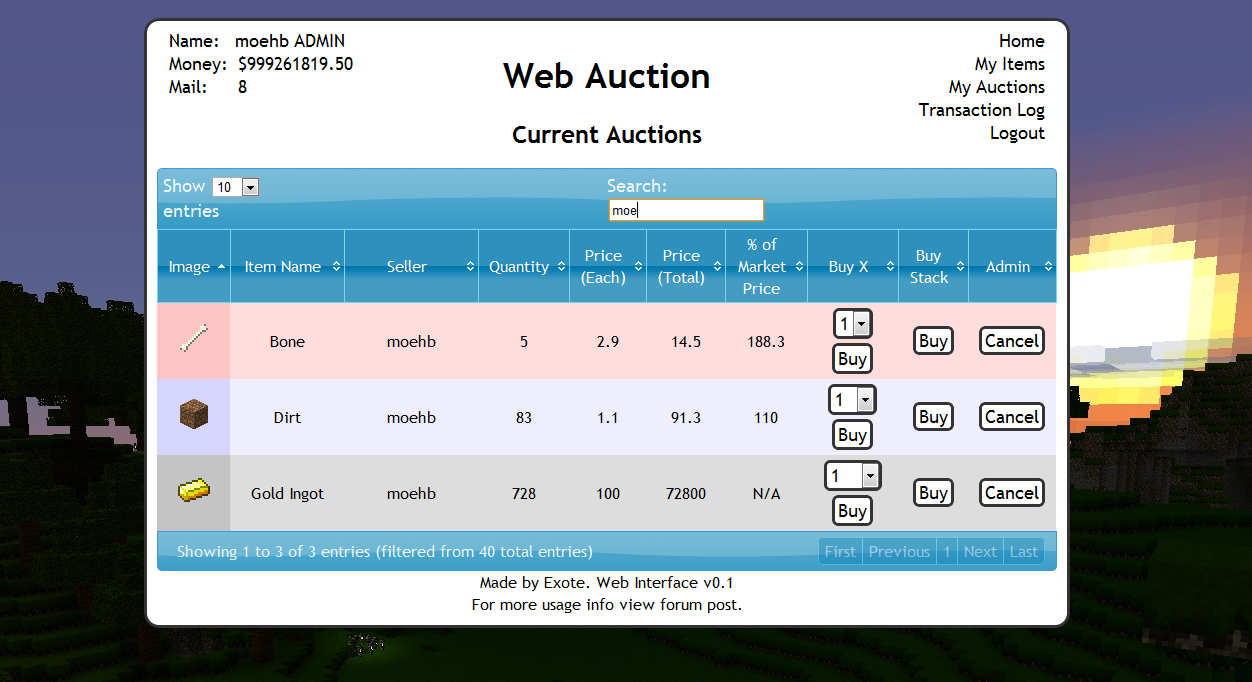
Basic idea is that admins (or players with right permissions etc) set up auction houses around the world. Players can then go there and deposit items, when they do this the items disappear from the world and get logged into the players online account. They they put money in the online account by clicking signs. Once this is done and they have set a password, they can log into the website and see all the auctions that are going on.
Using the money in the online account they can buy items, and they will be sent to the mailbox in game (a sign) and they can set up their own auctions for the items they have stored online.
One of the main features is that the website will look at all the sales and calculate a moving average for the market price of that item. Which should help players when setting a price, or buyers to see if they are getting a good deal.
Notes:
- Just added a how to edit section for info and new designs to help change the look of the website
- Works best with iConomy stored in the same MySQL database as the WebAuction tables (direct money link from game to website)
Features:
- Only members of your server can get an account
- Change password from in game
- Deposit items to be sold by right-clicking a mailbox deposit sign while holding it
- Change online balance with signs
- Get items from a sign mail box
- Moving average market price calculations
- Can link directly to the iConomy database
Overview Video:
NEW VIDEO :D
Screenshots:
will take more soon, when we have spent a while using it so that the market prices are properly calculated.


Setup:
Basics:
- Download the WebAuction.zip and extract it
- Put the WebAuction.jar in the plugins folder on your minecraft server
- Put the WebAuctionInterface folder (you can rename) on your website
- Restart server
- Look in plugins/WebAuction to find the config file add your MySQL database details
- In the interface folders on website, find the scripts/config.php file and add MySQL details again
- Be careful with mysql passwords, special characters such as {}[]() may cause the file to be incorrectly read by the yml parser.
- Make everyone create a password, make sure its different to ones they use elsewhere etc.
- Make a sign for the withdraw mail box (see screenshot) First list: "[WebAuction]" Second line: "MailBox"
- Make a sign for the deposit mail box (see screenshot) First list: "[WebAuction]" Second line: "MailBox" Third line: "Deposit"
- If you have iConomy data stored in the same database as the WebAuction data, use the web config file to point to the right table, and ignore the stuff about withdraw and deposit signs.
- Make some withdraw and deposit signs for money (again in screenshot) First line "[WebAuction]" Second: "Withdraw" or "Deposit" Third: the amount of money, or for the withdraw sign you can put "All" on the third line
- You can also make recent auction signs, to show a live feed of the new auctions: First line "[WebAuction]" Second: "Recent" Third: a number for the offset, so for the most recent auction put "1", second most recent "2" etc.
- Log into the website and start selling
Important Signs
Mailbox:
Used to deposit items and withdraw items that are in your mail
Line 1: [WebAuction]
Line 2: MailBox
Line 3: Withdraw (not actually needed but makes it neater with the other deposit sign :P)
Line 1: [WebAuction]
Line 2: MailBox
Line 3: Deposit
Deposit Money:
Used to send money to the website to be used on the WebAuction (not needed if using iconomy databases) Line 3 can be any number (100, 0.01, 55.7 etc.)
Line 1: [WebAuction]
Line 2: Deposit
Line 3: 100
Withdraw Money:
Used to get money from the website to be used on the WebAuction (not needed if using iconomy databases) Line 3 can be any number (100, 0.01, 55.7 etc.) Line 3 can also be "All".
Line 1: [WebAuction]
Line 2: Withdraw
Line 3: All
Recent Auction Feed
Used to see recent auctions people have made, you can set up as many signs as you want each looking for subsequent auctions. For example in your auction house you could have one sign to show each of the five most recent auctions. For line 3 enter the number for the offset from the most recent auction ("1" for the most recent, "2" for the second most recent... etc.)
These signs will update automatically when new auctions are made, and will display the item name, the quantity and the price.
Line 1: [WebAuction]
Line 2: Recent
Line 3: 1
There is now also another way of displaying recent auctions. If you have the SignLink plugin on your server you can display values about the auctions however you like on signs using various bits of data as variables. So far I have just got:
- Auction Name (%WAName1%)
- Auction Price (%WAPrice1%)
- Auction Quantity (%WAQuant1%)
Where you can change the number (1) for any other in the same way as in the previous auction signs, except I think 0 is actually the most recent auction.
I will soon be adding other information such as the sellers name and maybe the market price etc.
New Auction Shouting
A sign that is given a radius, when a new auction is created it will shout in it's radius about it to anyone nearby, line 3 is the radius in blocks.
Line 1: [WebAuction]
Line 2: Shout
Line 3: 10
Twitter feed
If you want to send information of new auctions and sales to a twitter account. Open up the config.php file (in the scripts folder).
Go to: https:dev.twitter.com/apps/new Input all your information. It doesnt really matter what you put for the name and things on the first page. (and you don't need to add anything for the callback)
When you have created your new app, open the settings tab, and set the application type access to "read and write". Save everything. Go back to main app info page. On that page should be the consumer key and consumer secret. Add these two values to the config file.
Near the bottom of the page is a button that says "create access token", makes sure you have set the permissions to read and write then click this button and copy the two values it gives you into the config folder.
Done (hopefully)
More Setup Information
To get more info on how to set up the plugin, along with common problems, take a look at the How to Install page
Changing the Design
To see how to change the design, or select one someone else has made: How to Edit
Commands:
- /wa password [pass] (sets your password)
Permissions:
- wa.use.withdraw.items (use mail box)
- wa.use.withdraw.money (use withdraw sign)
- wa.use.deposit.items (use deposit sign)
- wa.use.deposit.money (use deposit sign)
- wa.canbuy (can buy from auction)
- wa.cansell (can sell to the auction)
- wa.create.sign.deposit (create deposit sign)
- wa.create.sign.withdraw (create withdraw sign)
- wa.create.sign.mailbox.withdraw (create mailbox sign)
- wa.create.sign.mailbox.deposit (create mailbox sign)
- wa.create.sign.shout (create a new auction shout sign)
- wa.create.sign.recent (create a recent auction sign)
- wa.webadmin (user account is admin on the website)
- wa.remove (remove WA signs)
Donations:
Hope you guys like the plugin, keep telling me things you think would be cool to add and I will do my best. And a donation is always nice :P

Comments


-

_ForgeUser4509640 Owner
-
View User Profile
-
Send Message
Posted Jan 9, 2012would you be able to make it so purchased potions are only withdrawn from the Mailbox one at a time, players are using the mailboxes on a pvp server to stack their potions and allow them to carry more.
-
View User Profile
-
Send Message
Posted Jan 9, 2012@Exote
Well it seemed one guy was buying an item when someone else just bought it. The result was he received 1244 items of air.
The other guy who received 2222222222222222 air. I'm not sure how he ended up with that.
I also don't know how to cancel the items being sent to the player in the database.
EDIT: is it possible to block air using the same thing to block beds http://pastie.org/3153720
-
View User Profile
-
Send Message
Posted Jan 8, 2012Hi, I asked you in the past. My question was : Is there a way to translate into other languagues (French for this question) because my players are not English friendly.
You said : Yes it's planed in the next release.
Is it always up to date ? Thank you.
-
View User Profile
-
Send Message
Posted Jan 8, 2012@Exote
I'm having a problem with purchasing items, after updating to the newest version I am getting a major problem. I can send items to the web auction and it goes to my items ect, putting it up for auctions works fine. But if I buy anything it does not get sent to the sign or "my items" I have tried just about everything and just can't it to work
-
View User Profile
-
Send Message
Posted Jan 8, 2012@neero82
@CZorg
Check the plugin config, there are a few options in there about recent signs.
-
View User Profile
-
Send Message
Posted Jan 8, 2012@CZorg
Same thing here. If I remove and set the sign again, it will update. But it doesn't update automaticly. I only changed the setting SignDelay from 1000 to 2000 (+the sql thing) in the config.
-
View User Profile
-
Send Message
Posted Jan 8, 2012@Exote
Before downloading and installing the plugin I watched the overview video so I would know how to make everything work.
I currently have 2 auctions for testing and 3 signs ranging from 1 to 3, and all of them says Not Available.
The only things I've changed in the config is the MySQL settings, everything else is set to default
-
View User Profile
-
Send Message
Posted Jan 8, 2012@CZorg
Do you have any auctions? What number did you give the sign?
-
View User Profile
-
Send Message
Posted Jan 8, 2012For some reason the Recent signs do not show the recent auctions, they just say "Not availabe". Everything else is working as intended. Any ideas?
-
View User Profile
-
Send Message
Posted Jan 8, 2012@AndrewsPanda
Any idea how they got the air in the first place?
You can just go to the database and remove the air from the mail. But that doesn't help find out what is causing it in the first place.
-
View User Profile
-
Send Message
Posted Jan 8, 2012@neero82
PEx does work, I use it on my server. When you add the permissions to the file you have to do /pex reload, then it should apply the permissions
-
View User Profile
-
Send Message
Posted Jan 8, 2012I am having a major issue with a bug I havent experienced yet. I have had no issues with WebAuction prior to this.
However now all of a sudden there seems to be a bug where players are receiving Air. If they accidently send this item to themselves it crashes the minecraft every time they try to receive it.
One player received 1280 air. He mailed it to himself. He would withdraw 64 at a time. Meaning he would crash his minecraft 20 times. Then it was all gone and it was fixed.
Another player has sent himself 2222222222222 air. What now?
https://bukkit.atlassian.net/browse/BUKKIT-435 It is a known issue of bukkit. However I don't know how it is appearing on WebAuction
-
View User Profile
-
Send Message
Posted Jan 8, 2012@Exote
o_o today I logged again with the user's account and today he can buy... lol (hovewer yes, he has got wa.canbuy perms)
-
View User Profile
-
Send Message
Posted Jan 7, 2012@Exote
Okay, cool. Thanks :)
I downloaded the .jar, works like a charm now! :D I think you have an old version in the zip file? The file sizes are different.
Also, you can remove the infinite stacks for admins in your to do list ^^
-
View User Profile
-
Send Message
Posted Jan 7, 2012@neero82
Not quite sure how buying exp orbs would work, but I will have a look into it.
Not sure if PeX works, but Vault handles all permission and economy plugins, so make sure you have that installed and that Vault supports pex.
-
View User Profile
-
Send Message
Posted Jan 7, 2012@Exote
I mean to be able to buy experience orbs.
Btw, is PeX supported btw? I have wa.webadmin, but it doesn't say ADMIN after my name. And wa.cansell/canbuy doesn't seem to work. I don't get the dropdown list in "My auctions". I have items in "My items".
-
View User Profile
-
Send Message
Posted Jan 7, 2012@ledhead900
Yeah, havn't touched the actual design at all really yet, just copied the old css file. Been working on getting it all using the new framework.
Design was never my highest priority, but when I have stopped moving things around and am happy with the structure I will design it properly. Don't worry it is not going to look like that when released :P
@Kaosvf
Do they have the 'wa.canbuy' permission?
@neero82
Infinite stacks are available for admins to create, not quite sure what you mean by the enchanting thing.
-
View User Profile
-
Send Message
Posted Jan 7, 2012Great mod! :D
It would be cool to be able to add default items that are always for sale (not player bound), and the possibility to buy exp for enchanting :)
-
View User Profile
-
Send Message
Posted Jan 7, 2012@Exote Think you could setup the buttons styles like in Hawkeye ?
Like how they have transparent edges and glow when moused over ?. New sites looks ok but I feel the main auction window is a little cramped and squashed for my taste, I like it how the site looks currently it just needs to improve on placement of text and add proper colored buttons for the categories like my auctions and my items.
Otherwise its fine the way it is imo. The new layout looks interesting tho but if the borders are pretty yucky, How easy it it to learn to make a theme for the new system I mean I am pretty good with gfx design and have not a too bad sense of style I suppose I could probably color your interface borders for you. As that black and white outline around the main working windows is horrid the buttons so far are horrid.
-
View User Profile
-
Send Message
Posted Jan 7, 2012Hi, why the player can't buy? http://i.imgur.com/zMO9P.png Regards