WebAuction
WebAuction - Website based item market [1597]
Requires: An economy plugin (iConomy 4,5,6, BOSEconomy 6 & 7, EssentialsEcon, 3Co, MultiCurrency, MineConomy, eWallet, EconXP)
Requires: Vault
Requires: Web server running PHP 5.2+
Download Latest .jar:
WebAuction.jar v0.6.4 - last change 20th Jan 2012
Download Latest Web Folder:
WebInterface.zip v0.6.4 - last change 22th Jan 2012
Download Latest Development .jar:
WebAuction.jar - last change 9th Feb 2012
Download Latest Development Web Folder:
WebInterface.zip - last change 9th Feb 2012
Development Server
If you want to see a demonstration of a working (mostly) development version of this plugin, I am currently running a small server with it (not 24/7). However the website is pretty sluggish because it is not hosted on the same server as minecraft, but it should still work.
- IP: twm.servegame.com
- Website: webauction.threewisemeh.com
Source (GitHub)
WebAuction (jar) - http://bit.ly/o8vpPq
WebInterface (web files) - http://bit.ly/nPubR1
Description
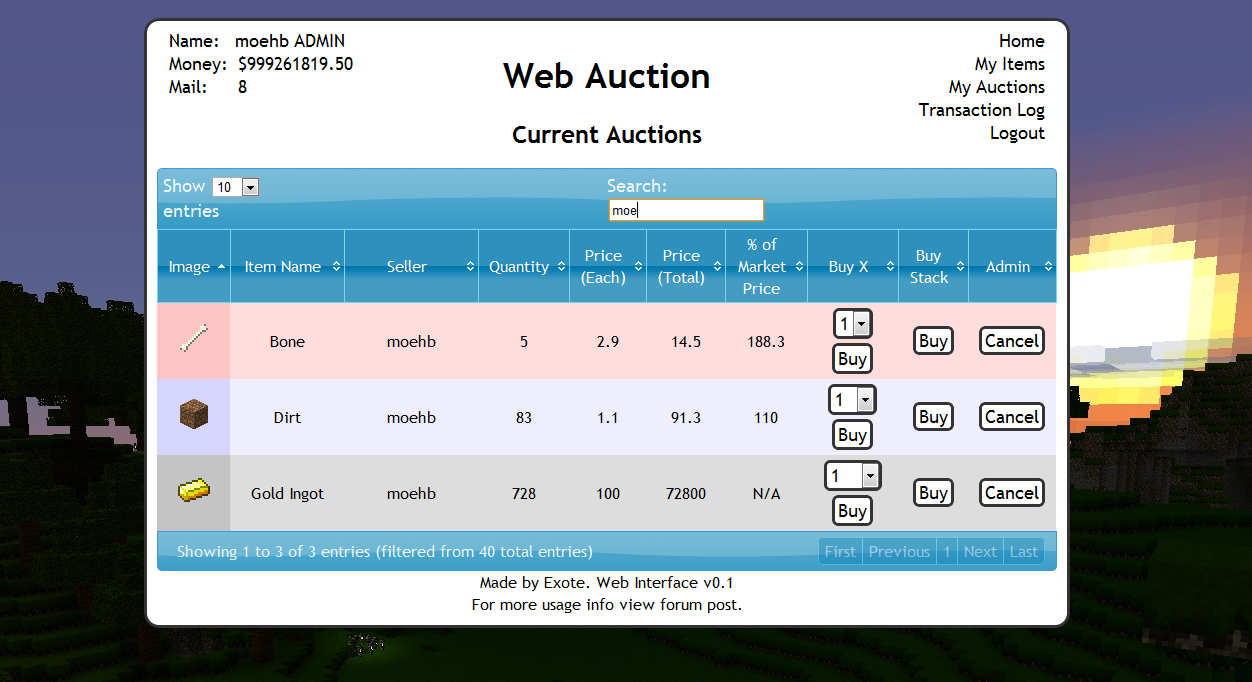
Ok, so I know there are loads of shop plugins that all do slightly different things. But because of the UI restrictions in game, I chose to make a shop plugin that links in with a website via a MySQL database to make trade easier, and even allow people to check on how their items are doing without being logged into the game. (mobile device?).
Basic idea is that admins (or players with right permissions etc) set up auction houses around the world. Players can then go there and deposit items, when they do this the items disappear from the world and get logged into the players online account. They they put money in the online account by clicking signs. Once this is done and they have set a password, they can log into the website and see all the auctions that are going on.
Using the money in the online account they can buy items, and they will be sent to the mailbox in game (a sign) and they can set up their own auctions for the items they have stored online.
One of the main features is that the website will look at all the sales and calculate a moving average for the market price of that item. Which should help players when setting a price, or buyers to see if they are getting a good deal.
Notes:
- Just added a how to edit section for info and new designs to help change the look of the website
- Works best with iConomy stored in the same MySQL database as the WebAuction tables (direct money link from game to website)
Features:
- Only members of your server can get an account
- Change password from in game
- Deposit items to be sold by right-clicking a mailbox deposit sign while holding it
- Change online balance with signs
- Get items from a sign mail box
- Moving average market price calculations
- Can link directly to the iConomy database
Overview Video:
NEW VIDEO :D
Screenshots:
will take more soon, when we have spent a while using it so that the market prices are properly calculated.


Setup:
Basics:
- Download the WebAuction.zip and extract it
- Put the WebAuction.jar in the plugins folder on your minecraft server
- Put the WebAuctionInterface folder (you can rename) on your website
- Restart server
- Look in plugins/WebAuction to find the config file add your MySQL database details
- In the interface folders on website, find the scripts/config.php file and add MySQL details again
- Be careful with mysql passwords, special characters such as {}[]() may cause the file to be incorrectly read by the yml parser.
- Make everyone create a password, make sure its different to ones they use elsewhere etc.
- Make a sign for the withdraw mail box (see screenshot) First list: "[WebAuction]" Second line: "MailBox"
- Make a sign for the deposit mail box (see screenshot) First list: "[WebAuction]" Second line: "MailBox" Third line: "Deposit"
- If you have iConomy data stored in the same database as the WebAuction data, use the web config file to point to the right table, and ignore the stuff about withdraw and deposit signs.
- Make some withdraw and deposit signs for money (again in screenshot) First line "[WebAuction]" Second: "Withdraw" or "Deposit" Third: the amount of money, or for the withdraw sign you can put "All" on the third line
- You can also make recent auction signs, to show a live feed of the new auctions: First line "[WebAuction]" Second: "Recent" Third: a number for the offset, so for the most recent auction put "1", second most recent "2" etc.
- Log into the website and start selling
Important Signs
Mailbox:
Used to deposit items and withdraw items that are in your mail
Line 1: [WebAuction]
Line 2: MailBox
Line 3: Withdraw (not actually needed but makes it neater with the other deposit sign :P)
Line 1: [WebAuction]
Line 2: MailBox
Line 3: Deposit
Deposit Money:
Used to send money to the website to be used on the WebAuction (not needed if using iconomy databases) Line 3 can be any number (100, 0.01, 55.7 etc.)
Line 1: [WebAuction]
Line 2: Deposit
Line 3: 100
Withdraw Money:
Used to get money from the website to be used on the WebAuction (not needed if using iconomy databases) Line 3 can be any number (100, 0.01, 55.7 etc.) Line 3 can also be "All".
Line 1: [WebAuction]
Line 2: Withdraw
Line 3: All
Recent Auction Feed
Used to see recent auctions people have made, you can set up as many signs as you want each looking for subsequent auctions. For example in your auction house you could have one sign to show each of the five most recent auctions. For line 3 enter the number for the offset from the most recent auction ("1" for the most recent, "2" for the second most recent... etc.)
These signs will update automatically when new auctions are made, and will display the item name, the quantity and the price.
Line 1: [WebAuction]
Line 2: Recent
Line 3: 1
There is now also another way of displaying recent auctions. If you have the SignLink plugin on your server you can display values about the auctions however you like on signs using various bits of data as variables. So far I have just got:
- Auction Name (%WAName1%)
- Auction Price (%WAPrice1%)
- Auction Quantity (%WAQuant1%)
Where you can change the number (1) for any other in the same way as in the previous auction signs, except I think 0 is actually the most recent auction.
I will soon be adding other information such as the sellers name and maybe the market price etc.
New Auction Shouting
A sign that is given a radius, when a new auction is created it will shout in it's radius about it to anyone nearby, line 3 is the radius in blocks.
Line 1: [WebAuction]
Line 2: Shout
Line 3: 10
Twitter feed
If you want to send information of new auctions and sales to a twitter account. Open up the config.php file (in the scripts folder).
Go to: https:dev.twitter.com/apps/new Input all your information. It doesnt really matter what you put for the name and things on the first page. (and you don't need to add anything for the callback)
When you have created your new app, open the settings tab, and set the application type access to "read and write". Save everything. Go back to main app info page. On that page should be the consumer key and consumer secret. Add these two values to the config file.
Near the bottom of the page is a button that says "create access token", makes sure you have set the permissions to read and write then click this button and copy the two values it gives you into the config folder.
Done (hopefully)
More Setup Information
To get more info on how to set up the plugin, along with common problems, take a look at the How to Install page
Changing the Design
To see how to change the design, or select one someone else has made: How to Edit
Commands:
- /wa password [pass] (sets your password)
Permissions:
- wa.use.withdraw.items (use mail box)
- wa.use.withdraw.money (use withdraw sign)
- wa.use.deposit.items (use deposit sign)
- wa.use.deposit.money (use deposit sign)
- wa.canbuy (can buy from auction)
- wa.cansell (can sell to the auction)
- wa.create.sign.deposit (create deposit sign)
- wa.create.sign.withdraw (create withdraw sign)
- wa.create.sign.mailbox.withdraw (create mailbox sign)
- wa.create.sign.mailbox.deposit (create mailbox sign)
- wa.create.sign.shout (create a new auction shout sign)
- wa.create.sign.recent (create a recent auction sign)
- wa.webadmin (user account is admin on the website)
- wa.remove (remove WA signs)
Donations:
Hope you guys like the plugin, keep telling me things you think would be cool to add and I will do my best. And a donation is always nice :P

Comments


-

_ForgeUser4509640 Owner
-
View User Profile
-
Send Message
Posted Oct 8, 2011@Exote
Ah yes I see I managed to find the .css stuff before but left it alone as it was left to my best educated guess as to what each was for, but that annotated copy shines light on it thank you.
When I manage to get a couple of good looking designs for the main.css I will send them your way Might become useful I can't promise anything tho.
Edit:
Will the font accept any font installed on the system ?, How would I change the background to use a .png file hosted in the theme directory ? do I just change the color to the .png name ?
-
View User Profile
-
Send Message
Posted Oct 8, 2011@ledhead900
Right, only the tables use the theme thing, to change that white background you have to look in css file.
/css/main.css
You are looking for #holder id, you can change loads of design options there, but what you want is the top line (line 22) background-color, change the hexadecimal (#FFF) to something else.
For more info on how to edit the design with the css file have a look at my annotated copy: http:dev.bukkit.org/server-mods/webauction/pages/css/
-
View User Profile
-
Send Message
Posted Oct 8, 2011@Exote
Alright, Also while I have your attention how does one go about changing the background color from white to something else maybe even a .png ? I went and made a custom Dark-Hive theme from the website found in the config.php tho I noticed it was ALL black in the theme but when applied to the webauction and set as the theme it looks exactly the same as the Dark-Hive you included.
Only instead of Dark Grey it was a glossy black in my theme but the white background remained so did the colors of the fonts and things. I'm trying to mod the theme so its using a png background for all pages and change the text color to sky blue. Its probably all there I am just missing the code for it.
-
View User Profile
-
Send Message
Posted Oct 8, 2011@ledhead900
well if you are worried just add <br/> a few times above the title to move it down a few lines.
-
View User Profile
-
Send Message
Posted Oct 8, 2011@Exote
AH no worry's then. No probably they wont but I made the title a bit longer changing it to
The MindCalf Server - Auction House
So I was just a bit worried it might overlap due the extended length in the title.
-
View User Profile
-
Send Message
Posted Oct 8, 2011@ledhead900
Your users are going to have 20+ digits for their money?
Plus all that stuff is in its own div of width 300px, so if it gets too long it will carry onto the next line rather than overlap.
-
View User Profile
-
Send Message
Posted Oct 8, 2011@Exote
I noticed in the index.php that the <title>WebAuction</title> was added with some code above that that I presume told it to find what was in topbox.php, I think all topbox needs is the variable and it should work after that.
Also you might want to move the title down a bit more so it displays under all of the currency stuff that appears in top left, My concern is that when the users currency has enough digits in it when linked to iconomy that the page title will not indent to make room for the extra digits. That is fine for small titles but if u add a couple extra words to the title it will easily overlap with the currency, I simply would like to request that it be moved down or some form of smart indent code be added to compensate for this, Just in case it happens.
-
View User Profile
-
Send Message
Posted Oct 8, 2011@ceddy3000
Could you be any clearer as to what causes this to happen? opening and closing quickly? disconnecting while using? walking away some how?
-
View User Profile
-
Send Message
Posted Oct 8, 2011@ledhead900
Didn't add the title in the top box (should have), afraid you will have to change that on each page :(
Will try to update images.
-
View User Profile
-
Send Message
Posted Oct 8, 2011Constantly get Chest already in use.
Bukkit 1185
-
View User Profile
-
Send Message
Posted Oct 8, 2011@Exote 1. I don't see what I am ment to change in topboxes.php to change the <title>WebAuction</title> text on each page, Footer.php lets me change the footer but I never modified it to begin with I left credits to you.
2 - Non transparent Image backgrounds 39 40 260 296 297 319 320 322 335 344 349 350
3 - Misc No Item Images that could be useful for some servers
Item 62 and 61 both have furnace images ? 62 should be lit furnace Item 79 has no item image, should be ICE Item 90 has no item image, should be Portal Item 97 has no item image, should be silverfish stone Item 99 has no item image, should be Brown Mushroom Cap Item 100 has no item image, should be Red Mushroom Cap
@Exote
-
View User Profile
-
Send Message
Posted Oct 8, 2011@Exote: is it possible to make a paste-able html code or some such similar thing for the website? I can't access some of necessary things on my website to make this plugin work as it is now and its an awesome plugin!
-
View User Profile
-
Send Message
Posted Oct 8, 2011Just added new pages to the website with more item information.
And graphs for the market price over time.
Also a newer way of calculating market value, which will mean you will lose the market prices you have stored already.
-
View User Profile
-
Send Message
Posted Oct 7, 2011What a cool idea. This would be amazing on a big server.
-
View User Profile
-
Send Message
Posted Oct 7, 2011@modtv1337
No. Will ONLY work if spout IS installed.
-
View User Profile
-
Send Message
Posted Oct 7, 2011@Exote
So if we have spout installed this pluggin wont work?
-
View User Profile
-
Send Message
Posted Oct 6, 2011@Exote
Thanks :)
-
View User Profile
-
Send Message
Posted Oct 6, 2011@Soorena6 It's www.<yourwebsite>.com/<filename>
Ie, I changed the zipped file name to webauction, so on my site it's www.wildhuntmc.com/webauction
This plugin causes tons of lag on my server, real shame it looked great.
-
View User Profile
-
Send Message
Posted Oct 6, 2011Sorry if I sound like a noob, but how do you access the website online? Is there an IP for it or do I have to set something up?
-
View User Profile
-
Send Message
Posted Oct 6, 2011@aelus
Yes. Well deduced :P Stupid typo by me. Download the jar on this page again for a fixed version (still called V0.2.8)