WebAuction
WebAuction - Website based item market [1597]
Requires: An economy plugin (iConomy 4,5,6, BOSEconomy 6 & 7, EssentialsEcon, 3Co, MultiCurrency, MineConomy, eWallet, EconXP)
Requires: Vault
Requires: Web server running PHP 5.2+
Download Latest .jar:
WebAuction.jar v0.6.4 - last change 20th Jan 2012
Download Latest Web Folder:
WebInterface.zip v0.6.4 - last change 22th Jan 2012
Download Latest Development .jar:
WebAuction.jar - last change 9th Feb 2012
Download Latest Development Web Folder:
WebInterface.zip - last change 9th Feb 2012
Development Server
If you want to see a demonstration of a working (mostly) development version of this plugin, I am currently running a small server with it (not 24/7). However the website is pretty sluggish because it is not hosted on the same server as minecraft, but it should still work.
- IP: twm.servegame.com
- Website: webauction.threewisemeh.com
Source (GitHub)
WebAuction (jar) - http://bit.ly/o8vpPq
WebInterface (web files) - http://bit.ly/nPubR1
Description
Ok, so I know there are loads of shop plugins that all do slightly different things. But because of the UI restrictions in game, I chose to make a shop plugin that links in with a website via a MySQL database to make trade easier, and even allow people to check on how their items are doing without being logged into the game. (mobile device?).
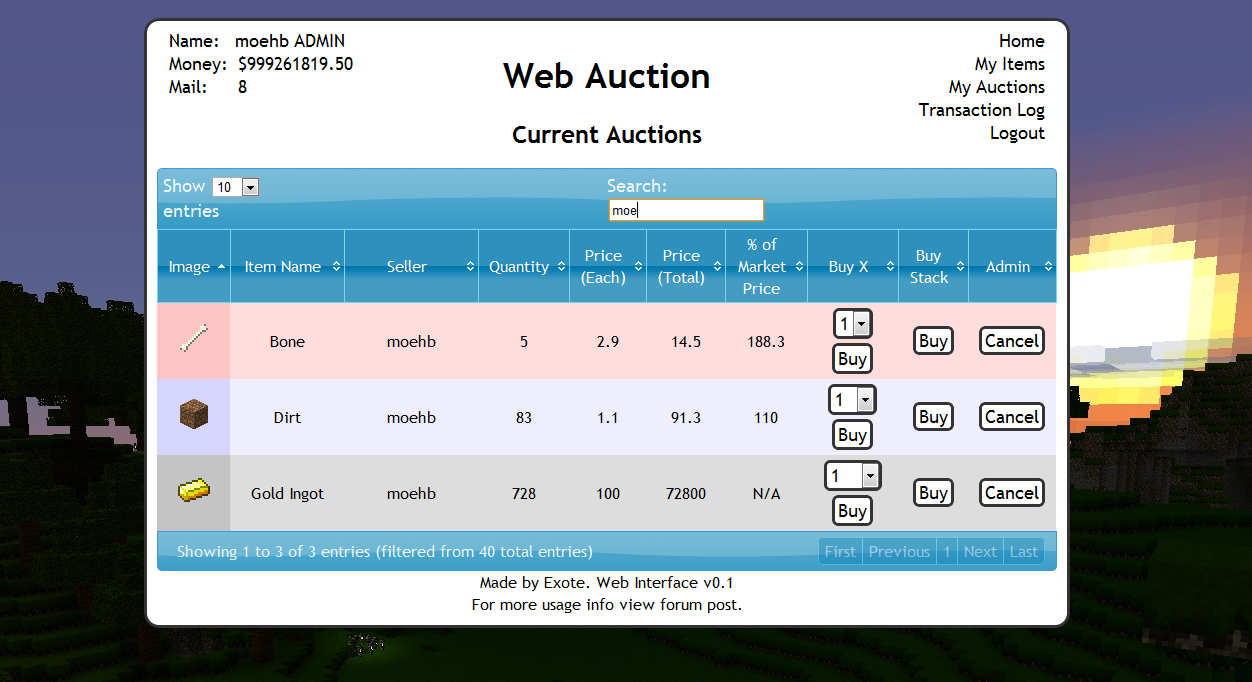
Basic idea is that admins (or players with right permissions etc) set up auction houses around the world. Players can then go there and deposit items, when they do this the items disappear from the world and get logged into the players online account. They they put money in the online account by clicking signs. Once this is done and they have set a password, they can log into the website and see all the auctions that are going on.
Using the money in the online account they can buy items, and they will be sent to the mailbox in game (a sign) and they can set up their own auctions for the items they have stored online.
One of the main features is that the website will look at all the sales and calculate a moving average for the market price of that item. Which should help players when setting a price, or buyers to see if they are getting a good deal.
Notes:
- Just added a how to edit section for info and new designs to help change the look of the website
- Works best with iConomy stored in the same MySQL database as the WebAuction tables (direct money link from game to website)
Features:
- Only members of your server can get an account
- Change password from in game
- Deposit items to be sold by right-clicking a mailbox deposit sign while holding it
- Change online balance with signs
- Get items from a sign mail box
- Moving average market price calculations
- Can link directly to the iConomy database
Overview Video:
NEW VIDEO :D
Screenshots:
will take more soon, when we have spent a while using it so that the market prices are properly calculated.


Setup:
Basics:
- Download the WebAuction.zip and extract it
- Put the WebAuction.jar in the plugins folder on your minecraft server
- Put the WebAuctionInterface folder (you can rename) on your website
- Restart server
- Look in plugins/WebAuction to find the config file add your MySQL database details
- In the interface folders on website, find the scripts/config.php file and add MySQL details again
- Be careful with mysql passwords, special characters such as {}[]() may cause the file to be incorrectly read by the yml parser.
- Make everyone create a password, make sure its different to ones they use elsewhere etc.
- Make a sign for the withdraw mail box (see screenshot) First list: "[WebAuction]" Second line: "MailBox"
- Make a sign for the deposit mail box (see screenshot) First list: "[WebAuction]" Second line: "MailBox" Third line: "Deposit"
- If you have iConomy data stored in the same database as the WebAuction data, use the web config file to point to the right table, and ignore the stuff about withdraw and deposit signs.
- Make some withdraw and deposit signs for money (again in screenshot) First line "[WebAuction]" Second: "Withdraw" or "Deposit" Third: the amount of money, or for the withdraw sign you can put "All" on the third line
- You can also make recent auction signs, to show a live feed of the new auctions: First line "[WebAuction]" Second: "Recent" Third: a number for the offset, so for the most recent auction put "1", second most recent "2" etc.
- Log into the website and start selling
Important Signs
Mailbox:
Used to deposit items and withdraw items that are in your mail
Line 1: [WebAuction]
Line 2: MailBox
Line 3: Withdraw (not actually needed but makes it neater with the other deposit sign :P)
Line 1: [WebAuction]
Line 2: MailBox
Line 3: Deposit
Deposit Money:
Used to send money to the website to be used on the WebAuction (not needed if using iconomy databases) Line 3 can be any number (100, 0.01, 55.7 etc.)
Line 1: [WebAuction]
Line 2: Deposit
Line 3: 100
Withdraw Money:
Used to get money from the website to be used on the WebAuction (not needed if using iconomy databases) Line 3 can be any number (100, 0.01, 55.7 etc.) Line 3 can also be "All".
Line 1: [WebAuction]
Line 2: Withdraw
Line 3: All
Recent Auction Feed
Used to see recent auctions people have made, you can set up as many signs as you want each looking for subsequent auctions. For example in your auction house you could have one sign to show each of the five most recent auctions. For line 3 enter the number for the offset from the most recent auction ("1" for the most recent, "2" for the second most recent... etc.)
These signs will update automatically when new auctions are made, and will display the item name, the quantity and the price.
Line 1: [WebAuction]
Line 2: Recent
Line 3: 1
There is now also another way of displaying recent auctions. If you have the SignLink plugin on your server you can display values about the auctions however you like on signs using various bits of data as variables. So far I have just got:
- Auction Name (%WAName1%)
- Auction Price (%WAPrice1%)
- Auction Quantity (%WAQuant1%)
Where you can change the number (1) for any other in the same way as in the previous auction signs, except I think 0 is actually the most recent auction.
I will soon be adding other information such as the sellers name and maybe the market price etc.
New Auction Shouting
A sign that is given a radius, when a new auction is created it will shout in it's radius about it to anyone nearby, line 3 is the radius in blocks.
Line 1: [WebAuction]
Line 2: Shout
Line 3: 10
Twitter feed
If you want to send information of new auctions and sales to a twitter account. Open up the config.php file (in the scripts folder).
Go to: https:dev.twitter.com/apps/new Input all your information. It doesnt really matter what you put for the name and things on the first page. (and you don't need to add anything for the callback)
When you have created your new app, open the settings tab, and set the application type access to "read and write". Save everything. Go back to main app info page. On that page should be the consumer key and consumer secret. Add these two values to the config file.
Near the bottom of the page is a button that says "create access token", makes sure you have set the permissions to read and write then click this button and copy the two values it gives you into the config folder.
Done (hopefully)
More Setup Information
To get more info on how to set up the plugin, along with common problems, take a look at the How to Install page
Changing the Design
To see how to change the design, or select one someone else has made: How to Edit
Commands:
- /wa password [pass] (sets your password)
Permissions:
- wa.use.withdraw.items (use mail box)
- wa.use.withdraw.money (use withdraw sign)
- wa.use.deposit.items (use deposit sign)
- wa.use.deposit.money (use deposit sign)
- wa.canbuy (can buy from auction)
- wa.cansell (can sell to the auction)
- wa.create.sign.deposit (create deposit sign)
- wa.create.sign.withdraw (create withdraw sign)
- wa.create.sign.mailbox.withdraw (create mailbox sign)
- wa.create.sign.mailbox.deposit (create mailbox sign)
- wa.create.sign.shout (create a new auction shout sign)
- wa.create.sign.recent (create a recent auction sign)
- wa.webadmin (user account is admin on the website)
- wa.remove (remove WA signs)
Donations:
Hope you guys like the plugin, keep telling me things you think would be cool to add and I will do my best. And a donation is always nice :P

Comments


-

_ForgeUser4509640 Owner
-
View User Profile
-
Send Message
Posted Sep 28, 2011@Exote
There's the thing called CPanel that has PHPMyAdmin in it.
As i said before it's hosted by 000webhost, not me, but i still can access all those.
-
View User Profile
-
Send Message
Posted Sep 28, 2011@Ermuu
How is your database setup/hosted? Do you have cpanel/phpmyadmin?
-
View User Profile
-
Send Message
Posted Sep 28, 2011@Exote
"No tables found in database."
-
View User Profile
-
Send Message
Posted Sep 28, 2011@Ermuu
I was just wondering if this database had been used successfully with a plugin before, if not it could be to do with the remote access settings. Do you have any way of checking to see if any data has been written to the database?
-
View User Profile
-
Send Message
Posted Sep 28, 2011@Exote
I think it should, i setted all the hostnames etc. on it, but the MySQL Table or so confused me so i didn't change it.
E: The database table.
E2: I think i could use other currency plugin, since i downloaded iConomy 6 only for this.
-
View User Profile
-
Send Message
Posted Sep 28, 2011@Ermuu
Communications link failure, just means it couldn't find the database, is iConomy currently working correctly on the dadabase?
-
View User Profile
-
Send Message
Posted Sep 28, 2011Hey!
So i tried to install this plugin today and i got some errors you can see below.
I setted the iConomy go to the same MySQL server as WebAuctions, the server is not in my house/PC or so.
EDIT: I use 000Webhost to host the shop website and i editted all the MySQL thingies for it. And for my previous expiriences 000webhost lags sometimes.
--------------------------13:34:46 [INFO] [iConomy - Celty] Enabled (19 ms)
13:34:46 [INFO] [WebAuction] WebAuction is initializing
13:34:46 [INFO] [WebAuction] MySQL Initializing
13:34:48 [SEVERE] [WebAuction] SQLException! Communications link failure
The last packet sent successfully to the server was 0 milliseconds ago. The driv
er has not received any packets from the server.
13:34:48 [INFO] [WebAuction] MySQL connection successful
13:34:50 [SEVERE] [WebAuction] SQLException! Communications link failure
The last packet sent successfully to the server was 0 milliseconds ago. The driv
er has not received any packets from the server.
13:34:50 [SEVERE] Error occurred while enabling WebAuction v0.2.4 (Is it up to d
ate?): null
java.lang.NullPointerException
at com.alta189.sqlLibrary.MySQL.DatabaseHandler.checkTable(DatabaseHandl
er.java:134)
at com.alta189.sqlLibrary.MySQL.mysqlCore.checkTable(mysqlCore.java:72)
at me.exote.webauction.WebAuction.onEnable(WebAuction.java:96)
at org.bukkit.plugin.java.JavaPlugin.setEnabled(JavaPlugin.java:126)
at org.bukkit.plugin.java.JavaPluginLoader.enablePlugin(JavaPluginLoader
.java:920)
at org.bukkit.plugin.SimplePluginManager.enablePlugin(SimplePluginManage
r.java:278)
at org.bukkit.craftbukkit.CraftServer.loadPlugin(CraftServer.java:173)
at org.bukkit.craftbukkit.CraftServer.enablePlugins(CraftServer.java:156
)
at net.minecraft.server.MinecraftServer.e(MinecraftServer.java:297)
at net.minecraft.server.MinecraftServer.a(MinecraftServer.java:284)
at net.minecraft.server.MinecraftServer.init(MinecraftServer.java:152)
at net.minecraft.server.MinecraftServer.run(MinecraftServer.java:348)
at net.minecraft.server.ThreadServerApplication.run(SourceFile:417)
---------------------------
View User Profile
-
Send Message
Posted Sep 28, 2011@darkcloud784
Make sure you have a new version, and all the files in the web interface are included (particularly scripts/mcfaces.php)
-
View User Profile
-
Send Message
Posted Sep 27, 2011None of the player images are showing up, is there something special you have to do in order to get them to show up?
-
View User Profile
-
Send Message
Posted Sep 27, 2011@nickf62
Whats the error?
-
View User Profile
-
Send Message
Posted Sep 27, 2011@Exote
yeah, I would done something like this, but that works too.
if ($timeAgo >= 60){ if($timeAgo == 60) { $val = "Minute ago"; } else { $val = "Minutes ago"; } $div = 60; }
but thats just me, your thing works too :D
-
View User Profile
-
Send Message
Posted Sep 27, 2011I am getting some weird iconomy error even though i have it installed i dont't think i am doing it right can u plz make a video tutorial on the install
-
View User Profile
-
Send Message
Posted Sep 27, 2011@Insidiea
Nah, I get what you mean by that code :)
My idea on the plural problem, bound to have problems :P What you think?:
-
View User Profile
-
Send Message
Posted Sep 27, 2011@Exote
haha, Yeah, If you want I'll just give you the whole transactionlog.php, I'm working on a version where it automatically determines between Hour and Hours, if you wanna wait for that.
-
View User Profile
-
Send Message
Posted Sep 27, 2011@Insidiea
Did you have this just on the transaction log page? I assume so :P
Cheers for code, will include in next version :) (with the credit :P)
-
View User Profile
-
Send Message
Posted Sep 27, 2011@Exote
Sure, here ya go:
$timeAgo = time() - $time;
would be cool if I could be mentioned in the credits/code :D
Also, to solve your sorting issue, mabye you could just make a seperate var that pulls it in seconds, and then it sorts from greatest to least, vice verca from that var
-
View User Profile
-
Send Message
Posted Sep 27, 2011@Insidiea
Hope you don't mind, used the idea of the people's faces in my latest web interface build. :) Download top of this page :P
-
View User Profile
-
Send Message
Posted Sep 27, 2011@Insidiea
Not really sure about that error, what version you using? Sounds a bit like a spout error I had a while ago...
But I love what you did to the web table! I was thinking about adding pictures, and your time method looks much less lazy than mine :P
Would you mind if I see the code / include it? Good work mate!
The one thing that is still annoying me about the tables still is getting the ordering to work properly. As you can see from your print screen it thinks 33 mins is longer than 23 hours. (because it is just using the alphabet so it just orders by the number).
Anyway, hope people can keep helping me improve things :D
-
View User Profile
-
Send Message
Posted Sep 26, 2011@Exote
Getting player interact error,
15:28:38 [SEVERE] Could not pass event PLAYER_INTERACT to WebAuction java.lang.NullPointerException at me.exote.webauction.WebAuctionPlayerListener.onPlayerInteract(WebAuctionPlayerListener.java:207) at org.bukkit.plugin.java.JavaPluginLoader$11.execute(JavaPluginLoader.java:314) at org.bukkit.plugin.RegisteredListener.callEvent(RegisteredListener.java:58) at org.bukkit.plugin.SimplePluginManager.callEvent(SimplePluginManager.java:338) at org.bukkit.craftbukkit.event.CraftEventFactory.callPlayerInteractEvent(CraftEventFactory.java:168) at net.minecraft.server.ItemInWorldManager.interact(ItemInWorldManager.java:259) at net.minecraft.server.NetServerHandler.a(NetServerHandler.java:592) at net.minecraft.server.Packet15Place.a(SourceFile:57) at net.minecraft.server.NetworkManager.b(NetworkManager.java:226) at net.minecraft.server.NetServerHandler.a(NetServerHandler.java:92) at org.getspout.spout.SpoutNetServerHandler.a(SpoutNetServerHandler.java:500)
Also, I'm not too much of a web developer, but I made enhancements to the site, if you wanna see:
-
View User Profile
-
Send Message
Posted Sep 26, 2011@aelus
Only think I can suggest is trying to run a small test server, with just the programs you think are conflicting to see if you can narrow down where the problem is.