WebAuction
WebAuction - Website based item market [1597]
Requires: An economy plugin (iConomy 4,5,6, BOSEconomy 6 & 7, EssentialsEcon, 3Co, MultiCurrency, MineConomy, eWallet, EconXP)
Requires: Vault
Requires: Web server running PHP 5.2+
Download Latest .jar:
WebAuction.jar v0.6.4 - last change 20th Jan 2012
Download Latest Web Folder:
WebInterface.zip v0.6.4 - last change 22th Jan 2012
Download Latest Development .jar:
WebAuction.jar - last change 9th Feb 2012
Download Latest Development Web Folder:
WebInterface.zip - last change 9th Feb 2012
Development Server
If you want to see a demonstration of a working (mostly) development version of this plugin, I am currently running a small server with it (not 24/7). However the website is pretty sluggish because it is not hosted on the same server as minecraft, but it should still work.
- IP: twm.servegame.com
- Website: webauction.threewisemeh.com
Source (GitHub)
WebAuction (jar) - http://bit.ly/o8vpPq
WebInterface (web files) - http://bit.ly/nPubR1
Description
Ok, so I know there are loads of shop plugins that all do slightly different things. But because of the UI restrictions in game, I chose to make a shop plugin that links in with a website via a MySQL database to make trade easier, and even allow people to check on how their items are doing without being logged into the game. (mobile device?).
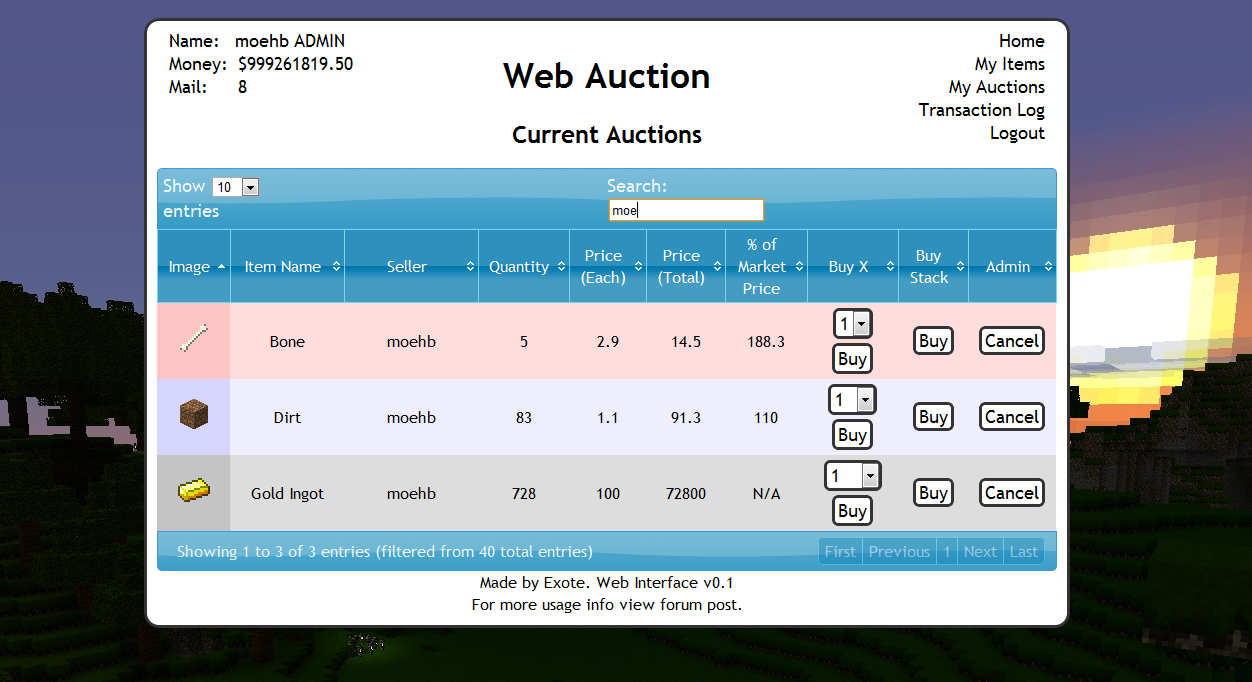
Basic idea is that admins (or players with right permissions etc) set up auction houses around the world. Players can then go there and deposit items, when they do this the items disappear from the world and get logged into the players online account. They they put money in the online account by clicking signs. Once this is done and they have set a password, they can log into the website and see all the auctions that are going on.
Using the money in the online account they can buy items, and they will be sent to the mailbox in game (a sign) and they can set up their own auctions for the items they have stored online.
One of the main features is that the website will look at all the sales and calculate a moving average for the market price of that item. Which should help players when setting a price, or buyers to see if they are getting a good deal.
Notes:
- Just added a how to edit section for info and new designs to help change the look of the website
- Works best with iConomy stored in the same MySQL database as the WebAuction tables (direct money link from game to website)
Features:
- Only members of your server can get an account
- Change password from in game
- Deposit items to be sold by right-clicking a mailbox deposit sign while holding it
- Change online balance with signs
- Get items from a sign mail box
- Moving average market price calculations
- Can link directly to the iConomy database
Overview Video:
NEW VIDEO :D
Screenshots:
will take more soon, when we have spent a while using it so that the market prices are properly calculated.


Setup:
Basics:
- Download the WebAuction.zip and extract it
- Put the WebAuction.jar in the plugins folder on your minecraft server
- Put the WebAuctionInterface folder (you can rename) on your website
- Restart server
- Look in plugins/WebAuction to find the config file add your MySQL database details
- In the interface folders on website, find the scripts/config.php file and add MySQL details again
- Be careful with mysql passwords, special characters such as {}[]() may cause the file to be incorrectly read by the yml parser.
- Make everyone create a password, make sure its different to ones they use elsewhere etc.
- Make a sign for the withdraw mail box (see screenshot) First list: "[WebAuction]" Second line: "MailBox"
- Make a sign for the deposit mail box (see screenshot) First list: "[WebAuction]" Second line: "MailBox" Third line: "Deposit"
- If you have iConomy data stored in the same database as the WebAuction data, use the web config file to point to the right table, and ignore the stuff about withdraw and deposit signs.
- Make some withdraw and deposit signs for money (again in screenshot) First line "[WebAuction]" Second: "Withdraw" or "Deposit" Third: the amount of money, or for the withdraw sign you can put "All" on the third line
- You can also make recent auction signs, to show a live feed of the new auctions: First line "[WebAuction]" Second: "Recent" Third: a number for the offset, so for the most recent auction put "1", second most recent "2" etc.
- Log into the website and start selling
Important Signs
Mailbox:
Used to deposit items and withdraw items that are in your mail
Line 1: [WebAuction]
Line 2: MailBox
Line 3: Withdraw (not actually needed but makes it neater with the other deposit sign :P)
Line 1: [WebAuction]
Line 2: MailBox
Line 3: Deposit
Deposit Money:
Used to send money to the website to be used on the WebAuction (not needed if using iconomy databases) Line 3 can be any number (100, 0.01, 55.7 etc.)
Line 1: [WebAuction]
Line 2: Deposit
Line 3: 100
Withdraw Money:
Used to get money from the website to be used on the WebAuction (not needed if using iconomy databases) Line 3 can be any number (100, 0.01, 55.7 etc.) Line 3 can also be "All".
Line 1: [WebAuction]
Line 2: Withdraw
Line 3: All
Recent Auction Feed
Used to see recent auctions people have made, you can set up as many signs as you want each looking for subsequent auctions. For example in your auction house you could have one sign to show each of the five most recent auctions. For line 3 enter the number for the offset from the most recent auction ("1" for the most recent, "2" for the second most recent... etc.)
These signs will update automatically when new auctions are made, and will display the item name, the quantity and the price.
Line 1: [WebAuction]
Line 2: Recent
Line 3: 1
There is now also another way of displaying recent auctions. If you have the SignLink plugin on your server you can display values about the auctions however you like on signs using various bits of data as variables. So far I have just got:
- Auction Name (%WAName1%)
- Auction Price (%WAPrice1%)
- Auction Quantity (%WAQuant1%)
Where you can change the number (1) for any other in the same way as in the previous auction signs, except I think 0 is actually the most recent auction.
I will soon be adding other information such as the sellers name and maybe the market price etc.
New Auction Shouting
A sign that is given a radius, when a new auction is created it will shout in it's radius about it to anyone nearby, line 3 is the radius in blocks.
Line 1: [WebAuction]
Line 2: Shout
Line 3: 10
Twitter feed
If you want to send information of new auctions and sales to a twitter account. Open up the config.php file (in the scripts folder).
Go to: https:dev.twitter.com/apps/new Input all your information. It doesnt really matter what you put for the name and things on the first page. (and you don't need to add anything for the callback)
When you have created your new app, open the settings tab, and set the application type access to "read and write". Save everything. Go back to main app info page. On that page should be the consumer key and consumer secret. Add these two values to the config file.
Near the bottom of the page is a button that says "create access token", makes sure you have set the permissions to read and write then click this button and copy the two values it gives you into the config folder.
Done (hopefully)
More Setup Information
To get more info on how to set up the plugin, along with common problems, take a look at the How to Install page
Changing the Design
To see how to change the design, or select one someone else has made: How to Edit
Commands:
- /wa password [pass] (sets your password)
Permissions:
- wa.use.withdraw.items (use mail box)
- wa.use.withdraw.money (use withdraw sign)
- wa.use.deposit.items (use deposit sign)
- wa.use.deposit.money (use deposit sign)
- wa.canbuy (can buy from auction)
- wa.cansell (can sell to the auction)
- wa.create.sign.deposit (create deposit sign)
- wa.create.sign.withdraw (create withdraw sign)
- wa.create.sign.mailbox.withdraw (create mailbox sign)
- wa.create.sign.mailbox.deposit (create mailbox sign)
- wa.create.sign.shout (create a new auction shout sign)
- wa.create.sign.recent (create a recent auction sign)
- wa.webadmin (user account is admin on the website)
- wa.remove (remove WA signs)
Donations:
Hope you guys like the plugin, keep telling me things you think would be cool to add and I will do my best. And a donation is always nice :P

Comments


-

_ForgeUser4509640 Owner
-
View User Profile
-
Send Message
Posted Feb 22, 2012Suggestion to the authors: Could you add all settings for MySQL to the config?
because it would be really nice if i could use the database of WordPress (CMS) for example.
I know how to edit it but i dont know how to compile the MySQLDataQueries.java to MySQLDataQueries.class (error: symbol not found) (i found nothing to fix that on google)
Would be really nice if you could do that or say me how to compile the file ;)
Thank you very much
-
View User Profile
-
Send Message
Posted Feb 22, 2012i think i had the same error i just restarted the server a few times and it worked
-
View User Profile
-
Send Message
Posted Feb 22, 2012I tryed WebAuction v0.6.4
need try older version? v0.6.3 ?
-
View User Profile
-
Send Message
Posted Feb 22, 2012now tryed add permissions but now work. The server log send messages with:
2012-02-22 03:03:12 [SEVERE] Error occurred while enabling WebAuction v0.6.4 (Is it up to date?): null java.lang.NullPointerException at me.exote.webauction.MySQLDataQueries.tableExists(MySQLDataQueries.java:81) at me.exote.webauction.MySQLDataQueries.initTables(MySQLDataQueries.java:113) at me.exote.webauction.WebAuction.onEnable(WebAuction.java:85) at org.bukkit.plugin.java.JavaPlugin.setEnabled(JavaPlugin.java:230) at org.bukkit.plugin.java.JavaPluginLoader.enablePlugin(JavaPluginLoader.java:1057) at org.bukkit.plugin.SimplePluginManager.enablePlugin(SimplePluginManager.java:380) at org.bukkit.craftbukkit.CraftServer.loadPlugin(CraftServer.java:199) at org.bukkit.craftbukkit.CraftServer.enablePlugins(CraftServer.java:182) at net.minecraft.server.MinecraftServer.t(MinecraftServer.java:357) at net.minecraft.server.MinecraftServer.a(MinecraftServer.java:344) at net.minecraft.server.MinecraftServer.init(MinecraftServer.java:175) at net.minecraft.server.MinecraftServer.run(MinecraftServer.java:408) at net.minecraft.server.ThreadServerApplication.run(SourceFile:465)
I think this is the plugin version problem :S but i saw that plugin on 1.1 servers :S so i cant understand
-
View User Profile
-
Send Message
Posted Feb 22, 2012My server host say that: This plugin not work on bukkit 1.1 version. :S but i try with permissions
-
View User Profile
-
Send Message
Posted Feb 21, 2012@EszesBence92
You need to configure the config with your Mysql database and that should fix the error I think.
@Kasushi
You need to add the permission for Buy and Sell , check the documentation for the permissions required , OP and "*" don't need permissions but your users will.
-
View User Profile
-
Send Message
Posted Feb 21, 2012This is the mysql error message on server log:
2012-02-22 03:03:12 [SEVERE] Error occurred while enabling WebAuction v0.6.4 (Is it up to date?): null java.lang.NullPointerException at me.exote.webauction.MySQLDataQueries.tableExists(MySQLDataQueries.java:81) at me.exote.webauction.MySQLDataQueries.initTables(MySQLDataQueries.java:113) at me.exote.webauction.WebAuction.onEnable(WebAuction.java:85) at org.bukkit.plugin.java.JavaPlugin.setEnabled(JavaPlugin.java:230) at org.bukkit.plugin.java.JavaPluginLoader.enablePlugin(JavaPluginLoader.java:1057) at org.bukkit.plugin.SimplePluginManager.enablePlugin(SimplePluginManager.java:380) at org.bukkit.craftbukkit.CraftServer.loadPlugin(CraftServer.java:199) at org.bukkit.craftbukkit.CraftServer.enablePlugins(CraftServer.java:182) at net.minecraft.server.MinecraftServer.t(MinecraftServer.java:357) at net.minecraft.server.MinecraftServer.a(MinecraftServer.java:344) at net.minecraft.server.MinecraftServer.init(MinecraftServer.java:175) at net.minecraft.server.MinecraftServer.run(MinecraftServer.java:408) at net.minecraft.server.ThreadServerApplication.run(SourceFile:465)
-
View User Profile
-
Send Message
Posted Feb 21, 2012@EszesBence92
I dont know the exact problem same as you but thank you for your attention. One thing that I know about this problem is space that should appear buy , this space did not appear buy it appears can't buy but after some time pass it appear buy again and after another time pass it change to can't buy again. And I saw, http://bedrockminers.cubehost.hu/webface/index.php/login and be greatly surprised because its good and nice can you share this one to me ? if you can share this to me then mail me to kasushi@naver.com.
-
View User Profile
-
Send Message
Posted Feb 21, 2012@Kasushi
dont know what is the JSON data formatting error ?:S
-
View User Profile
-
Send Message
Posted Feb 21, 2012Is it possible to "cheat" money with cheatengine & crome?
-
View User Profile
-
Send Message
Posted Feb 20, 2012@AndrewsPanda
Needs to be.
-
View User Profile
-
Send Message
Posted Feb 20, 2012Does this plugin need to be/or has it been updated to the new bukkit events system?
-
View User Profile
-
Send Message
Posted Feb 19, 2012I have question about this plugin often. Some players can not buy items from this plugin But they can buy or sell by time passing. And if they don't have commission when they are trying to sell items then their items are all dissipate ( disappear ) Do you have any solution about this problem ?
--------- can't buy-
View User Profile
-
Send Message
Posted Feb 19, 2012When is this gana work :(
-
View User Profile
-
Send Message
Posted Feb 17, 2012But development build no have that JSON data error, but 404 error have... :S When im in http://bedrockminers.cubehost.hu/webface/index.php/login
or register or my auctions... :S Not so good pls help me anybody.
-
View User Profile
-
Send Message
Posted Feb 17, 2012@Exote
Me to get that message, can tell me how can it coorect ? :S Thanks...
-
View User Profile
-
Send Message
Posted Feb 17, 2012I get an error message with that:
Data Tables warning: JSON data from server could not be parsed. This is caused by a JSON formatting error
Pls Help me.
-
View User Profile
-
Send Message
Posted Feb 17, 2012Don't know if anyone can help?
I'm using the development builds and I can manage to post items to the site and they are visible, however I cannot seem to deposit any money, it's saying "No webauction account found, try logging off and back on again" .
Any ideas?
-
View User Profile
-
Send Message
Posted Feb 16, 2012any possibility adding an option to limit the players they store on WebAuction or maybe permissions or atleast to customize
-
View User Profile
-
Send Message
Posted Feb 15, 2012update your github