VG Scoreboard Ping
VG Scoreboard Ping
Overview
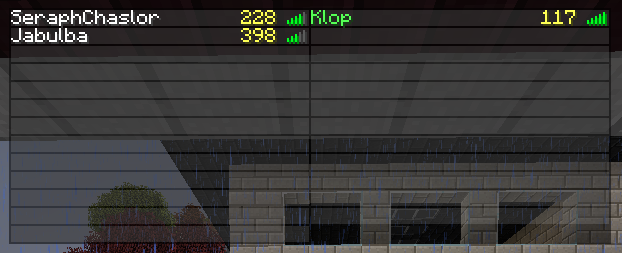
Display online players ping on the tab list scoreboard, supports custom names and coloured names!
Supports all newer versions of Bukkit, From 1.5.1 to 1.7.2 and MCPC!
(note that early 1.5.1 builds did not have scoreboards and are not supported)
Suggestions
If you would like to suggest or request a feature by all means! But please do open a ticket for that, just click the Tickets button to open the tracker page!
Installation
Drag the .jar to the plugins folder and reload or restart the server.
Configuration
The config.yml file:
period: 100
compatibility-mode: false
fallback-field: lastPing
metrics-opt-out: false (coming in 1.0.4!)
- period
- is how long in ticks to update the scoreboard, 1 seconds contains 20 ticks.
- compatibility-mode
- if the plugin should try to use another plugins scoreboard. Use this if you have another plugin that uses the scoreboard, this doesn't always work! It depends on the other plugin as well!
- fallback-field
- should normally not be changed, it should be the name of the field with the ping value on the NMS class representing the player. This was added to increase the compatibility and should only be changed if you get the error "Unable to determine ping field. Can't continue!". For more information how-it-works
- metrics-opt-out
- disable sendind usage statistics to mcstats.org. This allows you to opt-out for this plugin only! You can globally opt-out for all plugins by editing "plugins/PluginMetrics/config.yml" and changing opt-out to true. But if you don't mind please leave it enabled! It helps a ton! You can view the statistics page at http://mcstats.org/plugin/VGScoreboardPing (coming in 1.0.4!)
Permissions
- vg.scoreboardping.admin
- Allows the use of /sbp <period/pause/resume/compmode/disable> commands
Commands
<required> [optional]
- /sbp <period/pause/resume/compmode/disable>
- period <integer> - change the period in ticks that the scoreboard is updated.
pause - Stop updating and clear the scoreboard.
resume - Resume updating the scoreboard.
compmode - enable or disable compatibility mode.
disable - disables the plugin.
It uses Metrics!
- This plugin utilises Hidendra's plugin metrics system, which means that the following information is collected and sent to mcstats.org
- A unique identifier
The server's version of Java
Whether the server is in offline or online mode
The plugin's version
The server's version
The OS version/name and architecture
The core count for the CPU
The number of players online
The Metrics version
Opting out of this service can be done by setting "metrics-opt-out" to true(coming in 1.0.4!) or globally opt-out by editing "plugins/PluginMetrics/config.yml" and changing opt-out to true.
Comments

-

Jabulba Owner
-
View User Profile
-
Send Message
Posted Aug 7, 2016Hey Jabulba, Do you know how put ping on a side scoreboard? Please help me, I am really bad at scripting on scoreboards
-
View User Profile
-
Send Message
Posted Jan 22, 2014I tried to add compatibility with Info board but it seems to reset the scoreboard constantly. It displays the ping but constantly gets reset to 0. Sadly this will only change if Info board dev changes his code.
-
View User Profile
-
Send Message
Posted Jan 22, 2014@Jabulba
Nope, there is no error in console. I'm using Info board plugin.
-
View User Profile
-
Send Message
Posted Jan 20, 2014@DmNova
Do you get any error on the console?
If there are no errors it's likely an incompatibility with a plugin that also uses the scoreboard. Do you mind telling me the one you use if any? The plugin will give preference to the main scoreboard as long as it's set, even if it's empty.
-
View User Profile
-
Send Message
Posted Jan 20, 2014nothing :c