Variables
Variables
This plugin is made mainly for, but not limited to, obtaining statistics. The plugin will let you define your own variables and use a command for setting the value of a variable, for a certain player. You can use a third-party plugin to execute the command each time you want to, for instance, add 1 to the variable.
- MySQL support
- UUID support
- Define how many variables you want, per player
- Modify a variable value by executing a command
- Send a message to the player once a variable is modified (optional)
Default configuration:
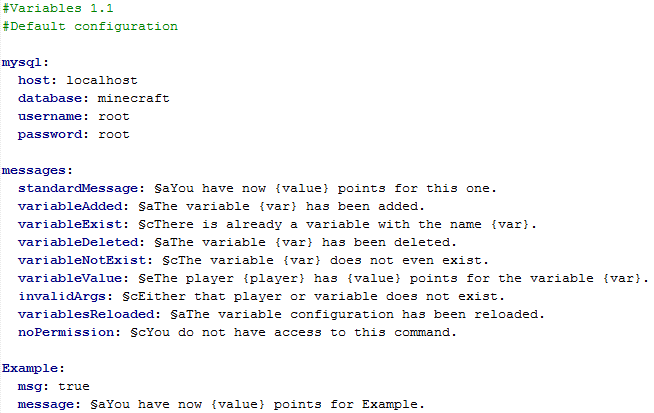
Installation:
Load the plugin once, then modify the generated configuration file. The database must exist already, or the plugin will not function properly. Once the configuration is updated, reload the plugin configuration with /variables reload (needs the variables.reload permission). When this is done, you can start using the plugin.
To modify the text sent to the player when executing a command, you have to modify it in the configuration file.
Commands:
/variables [player] [variable] [value] - Modify a players' variables with this main command.
/var [player] [variable] [value] - Short command for /variables.
/addvar [variable] - Add a variable to the database.
/delvar [variable] - Delete a variable from the database.
/checkvar [player] [variable] - Check a player's value for a certain variable.
/variables reload - Reloads the variable configuration.
Permissions:
variables.use - Permission to use /variables and /var
variables.add - Permission to add a variable with /addvar.
variables.delete - Permission to delete a variable with /deletevar.
variables.check - Permission to check a player's value for a variable with /checkvar.
variables.reload - Permission to reload the variable configuration (also need variables.use permission).
To-do:
Any suggestions? Please let me know!
Comments


-

_ForgeUser21522911 Owner
-
View User Profile
-
Send Message
Posted Dec 2, 2015This is exactly what I've been looking for!
The only thing is that for this to be more versatile it really, really needs to be usable from command blocks, like being able to do in a command block: /var @p My_Var 1
If you can add this, that'd be fantastic! And certainly all I would need personally.
However, an epic implementation of this idea would be to not only support command block input, but actually command-block redstone output when doing the /checkvar command. Like either 0 or 1 for any positive value, in terms of redstone strength output.
Of course, if it actually produced specific positive redstone output strength values (like +2 to +15) this would be a truly beyond amazing plugin for redstone gurus.
But again, just getting it to support something like /var @p My_Var 1 from a command block would be enough for me :)
-
View User Profile
-
Send Message
Posted Sep 25, 2015Do here any global variables?