Treasure Chests

Overview
This plugin allows you to spawn treasure chests randomly in a specific area with custom randomized items.
- Easy to set up
- Treasure Chests are configurable
- Can put custom items (even ones with custom itemMeta) into Treasure Chests
- Treasure Chests are toggeable
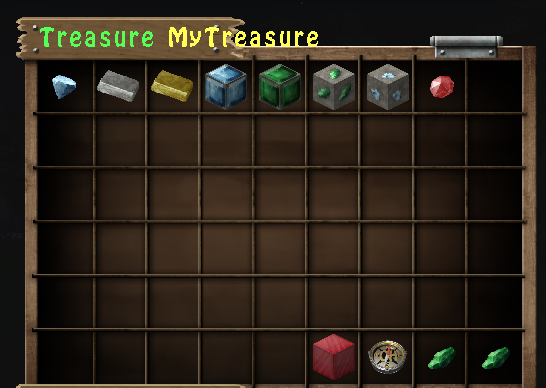
- Treasure Chest GUI for viewing loot and settings
- Easy to define and redefine Treasure regions
- Unlimited Treasure regions
- Rebooting server will not delete data
- Maximum of 27 items per chest
Commands
- /tc wand - Gives user wand for setting regions
- /tc set <name> - Defines the region
- /tc reset <name> - Used to redefine a region
- /tc remove <name> - Removes the region for treasure
- /tc time <name> <seconds> - Defines respawn rate for treasure in seconds
- /tc enable <name> - Enables the region to drop treasure
- /tc disable <name> - Disables the region to drop treasure
- /tc list - lists all treasure regions
- /tc addItem <itemname> <region> - Adds item from your hand to the region's treasure loot
- /tc removeItem <itemname> <region> - Removes item name from the region's treasure loot
- /tc setMinItem <itemname> <region> <number> - Sets the minimum amount of the item that the region's treasure loot will spawn
- /tc setMaxItem <itemname> <region> <number> - Sets the maximum amount of the item that the region's treasure loot will spawn
- /tc getTreasure <region> - Opens Treasure GUI of the region's treasure loot
- /tc setMinTreasure <region> <number> - Sets the minimum number of items a region will spawn per treasure chest
- /tc setMaxTreasure <region> <number> - Sets the maximum number of items a region will spawn per treasure chest
- /tc onlyAir <region> <true/false> - Allow/deny treasure chests to only replace air blocks in a region
- /tc reload - Reloads the plugin's configuration file
- /tc version - Provides author and version of plugin
Note
- You cannot make minimum values greater than maximum values
- The maximum number of an item is 64 and the minimum is 1
- The minimum number of loot is 0 and maximum is 27.
- When you do a command and nothing happens, either you don't have permission or didn't type the command right.
- The default number of loot that spawn when you define a treasure region is 0
- The default number of a item that will spawn in a treasure region's loot is 1
- Item names will not change the actual name of the item. It is used for identification purposes in this plugin.
- Item names cannot be identical in a region.
- If there is no treasure in a region and/or the max and min loot is 0, the treasure chests will be spawned empty
- You can add items and remove items while the treasure region is enabled (you can also change time and quantity).
- Do not use negative numbers
- If an internal error happens, please file a ticket or contact me through Bukkit
Warning: Manually configuring config.yml may break treasure regions and the plugin. Modify at your own risk
Permissions
- TreasureChests.wand - Allows players to use wand and define regions
- TreasureChests.region - Allows players to delete, modify, and look at regions
- Treasurechests.item - Allows players to add items and modify them
How to set up
- Drag and drop this plugin to the folder "plugins" on your server
- Ingame, do the command /tc wand. In your inventory, you will recieve an item called "Treasure Wand". Left-Click a block to set Position 1 and Right-Click a block to set Position 2.
- After you define your area with your "Treasure Wand", do the command /tc set <name you want>. Now you have a region called <name you want> (If you don't like the area of your region, you can use the wand to define another area and use the command /tc reset <name you want>)
- Now define the time in which you want treasure chests to spawn. Do the command /tc time <region> <seconds>. Now your region <region> will spawn treasure chests every <seconds>.
- Now it's time to add items. Take the item you want to add and put it in your hand. Do the command /tc addItem <name you want> <region>. Now you have added the item in your hand with the name <name you want> for <region>. Now repeat this process for every item you want with different <name you want>. If you want to remove the item from the region, do /tc removeItem <name you want> <region>.
- Now it's time to set how many treasure items the region should drop on each time interval. Do the command /tc setMaxTreasure <region> <max number>. Then do the command /tc setMinTreasure <region> <min number>. Now the region will drop a number of items in the inverval from <min number> to <max number>. The max number cannot exceed the number of treasures the region has.
- To set how much of a particular item should drop on each time inverval, do /tc setMaxItem <itemname> <region> <max number> and /tc setMinItem <itemname> <region> <min number>. Now if the region decides to drop this item as a treasure, the amount of this item will be a number in the interval from <min number> to <max number>. Repeat this process for each item you want.
- Now you have finished your region. do /tc enable <region>. The region will now work and you should start seeing the area spawn treasure chests every <seconds>. If you want the region to stop spawning chests, do /tc disable <region>.
Comments


-

_ForgeUser11733626 Owner
-
View User Profile
-
Send Message
Posted Nov 4, 2021what resourcepack did you use to capture?
-
View User Profile
-
Send Message
Posted Feb 11, 20191.12.2 please ;-) i lov you
-
View User Profile
-
Send Message
Posted Nov 25, 20171.9.4 update plz
-
View User Profile
-
Send Message
Posted Sep 4, 2015getting some serieus error spams everytime the chests respawn. also how do i set a min of 25 chest per region and a max of 50 per region ?
ERROR:
[00:15:14] [Server thread/WARN]: [TreasureChests] Task #16866 for TreasureChests v1.1 generated an exception java.lang.IndexOutOfBoundsException: Index: 1, Size: 1 at java.util.ArrayList.rangeCheck(Unknown Source) [?:1.8.0_60] at java.util.ArrayList.get(Unknown Source) [?:1.8.0_60] at me.Firegred.Treasures.DropChest.addItems(DropChest.java:189) [?:?] at me.Firegred.Treasures.DropChest.setChestLocation(DropChest.java:134) [?:?] at me.Firegred.Treasures.DropChest.access$0(DropChest.java:73) [?:?] at me.Firegred.Treasures.DropChest$1.run(DropChest.java:63) [?:?] at org.bukkit.craftbukkit.v1_8_R3.scheduler.CraftTask.run(CraftTask.java:71) [spigot.jar:git-Spigot-fdc1440-53fac9f] at org.bukkit.craftbukkit.v1_8_R3.scheduler.CraftScheduler.mainThreadHeartbeat(CraftScheduler.java:350) [spigot.jar:git-Spigot-fdc1440-53fac9f] at net.minecraft.server.v1_8_R3.MinecraftServer.B(MinecraftServer.java:722) [spigot.jar:git-Spigot-fdc1440-53fac9f] at net.minecraft.server.v1_8_R3.DedicatedServer.B(DedicatedServer.java:374) [spigot.jar:git-Spigot-fdc1440-53fac9f] at net.minecraft.server.v1_8_R3.MinecraftServer.A(MinecraftServer.java:653) [spigot.jar:git-Spigot-fdc1440-53fac9f] at net.minecraft.server.v1_8_R3.MinecraftServer.run(MinecraftServer.java:556) [spigot.jar:git-Spigot-fdc1440-53fac9f] at java.lang.Thread.run(Unknown Source) [?:1.8.0_60] below is my config:
Settings: enable: true Loot: test: x1: 5 y1: 82 z1: 3 x2: 2 y2: 82 z2: 4 world: MyZ_world time: 10 enabled: true minLoot: 25 maxLoot: 40 onlyAir: true Treasure: axe: item:
: org.bukkit.inventory.ItemStack
type: STONE_AXE meta:
: ItemMeta
meta-type: UNSPECIFIC display-name: "Treasure Wand" lore: - "Use this to set treasure regions" min: 1 max: 5
-
View User Profile
-
Send Message
Posted Aug 31, 2015Do the chests despawn? I'm making a pirate ship building server and need to have random chest appear to give them some materials every few minutes but i need them to despawn or they'll clog up spawn.
-
View User Profile
-
Send Message
Posted Aug 7, 2015Oh also the amount of treasure able to be applied to an area needs to expanded
-
View User Profile
-
Send Message
Posted Aug 7, 2015im having a problem, treasure chest are spawning all over the air, how can I fix it?
-
View User Profile
-
Send Message
Posted Jul 29, 2015Does this broadcast that a chest has been spawned?
-
View User Profile
-
Send Message
Posted May 31, 2015Is it possible to put a Max on the amount of treasurechests the region may have?,
Example:
If there are 5 chests that arent looted yet. The plugin will not spawn any new ones.
If 1 chest gets looted, then another random new chest will be spawned somewhere in the region.
-
View User Profile
-
Send Message
Posted May 4, 2015Can this also randomize chest contents of chest that are pre-placed within a region?
-
View User Profile
-
Send Message
Posted Apr 3, 2015Hi! I have problem with the plugin. So if add items the plugin says it's corrrect but when I enable the region and the chests spawn nothing in their inventory. The second problem is the chests aren't disapear when they're looted so the region will be full with chest and it's not really good. (Sorry for grammar)
-
View User Profile
-
Send Message
Posted Mar 29, 2015@Firegred
New feature works great, thanks alot. Only feature I am missing is limit aftech wich chests wont spawn. Its a pitty souce isnt open.
-
View User Profile
-
Send Message
Posted Mar 27, 2015@rysroma
@rysroma This feature has been added in the newest update of the plugin. The command is /tc onlyAir <region> <true/false>
-
View User Profile
-
Send Message
Posted Mar 23, 2015I could do that, but I need source code…
-
View User Profile
-
Send Message
Posted Mar 22, 2015I agree with @rysroma. If you have GriefPrevention plugin, I believe it will repect the protected area, but yeah, a feature that will place chests in empty air blocks would be nice. Awesome plugin! Thanks.
-
View User Profile
-
Send Message
Posted Mar 15, 2015Wery nice plugin, but it can destroy the whole area by overchesting it. Can you please add feature that will place chests only in empty air blocks? Thanks!
-
View User Profile
-
Send Message
Posted Mar 10, 2015@FlamePotatoGamer
Yes
-
View User Profile
-
Send Message
Posted Feb 28, 2015It works with 1.8?
-
View User Profile
-
Send Message
Posted Feb 18, 2015good plugin
-
View User Profile
-
Send Message
Posted Feb 16, 2015Can you please make it so when players either left or right click on the chest it can run a commnd or give them an item as their reward and also if its an item the item will go straight into their inventory instead of dropping onto the floor and then the chest will dissapear (without them having to break it) oh and last thing when a player right clicks on the chest it doesn't come up with a gui