Timer
Timer
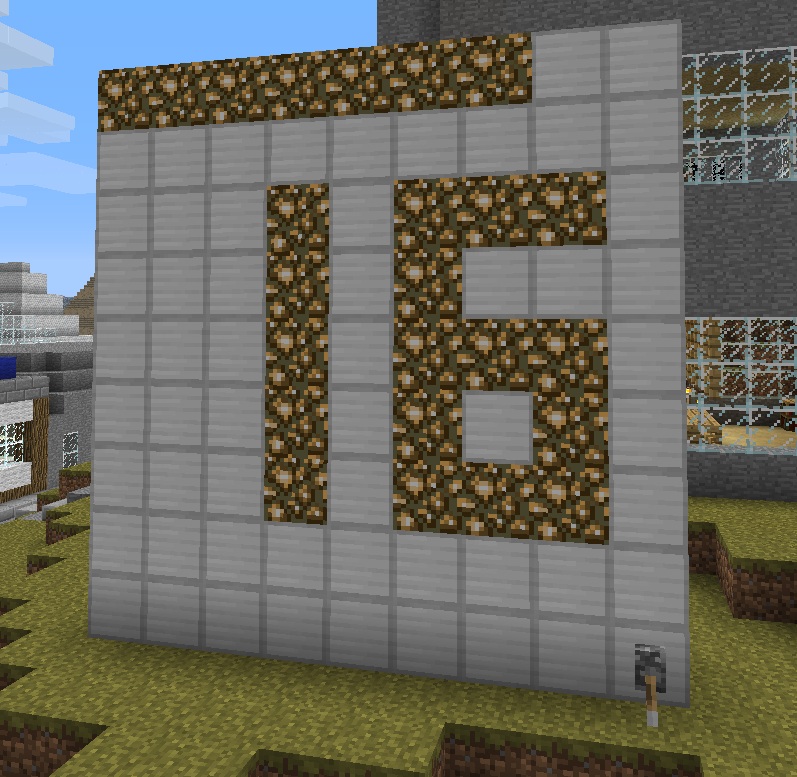
Timer allows you to define a clock giving the local world time. (Multiple worlds supported since v0.3)
Version:
- 0.3
How to use:
- To define a clock, just place a vertical square of 9x9 blocks of the predefined material and place a lever on the extreem right lower block.
- Once the square is recognized by the plugin as a clock, the server warns you with the message "Timer created".
- To start or stop the clock, just use the lever, the following messages will be warned : "Timer started" or "Timer stopped".
- To remove a clock, just break the lever and the server will warn you with the message "Timer deleted".
Commands:
- None, just create a 9x9 blocks square and place the lever
Permissions:
- If you're not using the Permissions plugin, Timer use the built-in op.non-op system for permissions. Only ops will be able to create a clock.
- Otherwise, the Permissions node is: timer.create
Configuration file:
- This config.yml file contains only 3 lines which define the material ID and Data of the clock's blocks (Default is 42 but blocks like 35:5 are now available too), the material ID and Data of the blocks used for showing time and the 12/24 format.
Installation:
- Just put timer.jar in your server's plugin directory, then restart or reload the server.
- You can then modify the configuration file if needed.
- Add the Permission node if you use Permissions.
Video:
Comments


-

_ForgeUser8609831 Owner
-
View User Profile
-
Send Message
Posted Feb 12, 2013Why is there a delay of time?
On my dynmap clock on the website it's 2 hours after the time on the clock from your mod
-
View User Profile
-
Send Message
Posted Jan 15, 2013update please
-
View User Profile
-
Send Message
Posted Nov 23, 2012Heres a Nice Suggestions When it Hits 12 a'clock You should Make some NoteBlocks Play!
-
View User Profile
-
Send Message
Posted Nov 8, 2012Hi, It is not right, Version v0.3 is uploaded but still waiting for approval of Bukkit Dev Team. Please be patient..
-
View User Profile
-
Send Message
Posted Nov 8, 2012Hi,
Downloaded plugin, Bukkit says 'Timer v0.3 Updated 11/08/2012 12:42 am',
server console shows 'Timer v0.1'
Is this right?
-
View User Profile
-
Send Message
Posted Nov 7, 2012New version 0.3 waiting for approval.. Multiple worlds now supported. ;)
-
View User Profile
-
Send Message
Posted Oct 30, 2012Please update
-
View User Profile
-
Send Message
Posted Jul 29, 2012My server has multiple worlds, and for some reason when I have this clock in a secondary world, it still shows the time of the default world. Once this is fixed it'll awesomely suit my Survival Games map!
-
View User Profile
-
Send Message
Posted Jun 17, 2012Edit: Nevermind i got it to work i'm using essentials to change the time and i have multiple worlds but when i use "/time day" it changes the time in the world I'm in but the clock doesn't change, the clock only changes when i do "/time day all" which sets all the worlds to 06:00 or 6:00AM or 0ticks, as i am working on building a giant spawn city, many of my players complain because the where killing monsters to get xp. Just a report. Jelliton.
-
View User Profile
-
Send Message
Posted Jun 17, 2012what plugin are you using to change the time? Jelliton
-
View User Profile
-
Send Message
Posted Jun 15, 2012@jelliton
I'm surprised because the clock changes to 6:00 when I use the "/time day" on my server. Are you sure that the clock is started?
-
View User Profile
-
Send Message
Posted Jun 12, 2012only one complaint. when i use '/time day' when the clock says its 18 it stays on 18 i expected it to change time automatically but it doesn't and it stays on the wrong time until i reboot or restart my server, any way to fix instead of rebooting? Otherwise, Great plugin dude. Jelliton.
-
View User Profile
-
Send Message
Posted Jun 1, 2012@Ypsilon71
sweet an update! i was just looking into this.... I dont see the v0.2 just the 0.1 version tho =(
Edit: F5 is my friend =D
-
View User Profile
-
Send Message
Posted May 31, 2012New version V0.2 for CB 1.2.5-R3.0 available.
Thank you for your support, Phil.
-
View User Profile
-
Send Message
Posted Apr 26, 2012So is there a place where I can submit an image of it in action? I really like this and it makes even putting out a public clock in Showcase obsolete!
Also, suggestion in the config: a way to choose between 12-hour and 24-hour notation (12-hour's AM could be represented by turning on the leftmost 4 blocks on the bottom row, the PM could be represented by the other 4 blocks on the bottom not occupied by the lever.)
-
View User Profile
-
Send Message
Posted Mar 29, 2012Nice simple plugin.
Can you use datavalues in addition to block IDs? So that one could use colored wool.
Another interesting thing would be setting the ID:DataValue for each hour, so you could have mobspawners differentiate hourly for some fun times =D. ( but that's just a thought )
But Colored Wool is something I'd really need for fine tuning the clock.
-
View User Profile
-
Send Message
Posted Mar 25, 2012@jessewinny It's the link : http://www.curse.com/server-mods/minecraft/timer/581889#
-
View User Profile
-
Send Message
Posted Mar 25, 2012i think i like it but i can't download it
-
View User Profile
-
Send Message
Posted Mar 22, 2012@Newux
Thank you for your help Newux. ;-)
-
View User Profile
-
Send Message
Posted Mar 22, 2012@RemyPas
I made a tutorial for this plugin, we can see how he works : http://www.youtube.com/watch?v=1xXjrTJiR70&feature=youtu.be