TeslaCoil
TeslaCoil - Tesla Coil mob control:
Version: v2.6.5
Usage: the player must construct a tower of no less than 3 iron(configurable) blocks, and connect this directly to a redstone current. While the current is active, targetted mobs and players within a configurable radius, above or below ground, will be fried. The towers ping every second by default, so mobs chasing you will quickly regret it :p Feedback/constructive criticism is welcome.
Features:
- Tower of 3> configurable blocks will continually zap mobs in a proportionate radius
- Lightning striking mobs on sand turns the sand into glass
- Configuration for radius, vertical radius, sand-to-glass, toggleable targets, and ping time
- Sign-based mob filtering, and player targeting.
- Option to hit all mobs but those specified.
- To avoid being hit as a targeted player, pumpkin helmets have been added as a safe item.
- Command /teslareload allows ops to reload config without reloading all plugins.
- Only users with the permission 'teslacoil.use' can activate coils, and 'teslacoil.reload' for the config.
- Users can be limited with 'teslacoil.limit.#' as well as 'teslacoil.use.mobs' and 'teslacoil.use.players'. shoutout to Chaznuts thanks buddy!
- Towers may have a general cap set, or be limited per group/user.
- Can warn users if they are approaching dangerously close to a coil.
- The towers can be built to shoot fireballs, wither skulls, or simply ignite targets.
- Towers can construct an iron-fence shell.
Configuration:
Permission:
teslacoil.use | Activate coils
teslacoil.use.mobs | Ability to target mobs
teslacoil.use.players | Ability to target players
teslacoil.reload | Use /teslarelaod
teslacoil.nolimit | Bypass coil restriction
teslacoil.limit.# | # is the number of coils that should be restricted per user/group
Configuration Properties
coillimit: 3 #How many coils users without teslacoil.nolimit can activate, max
sandtoglass: true #If false, sand will not turn into glass if a mob is standing on it
vradius: 2 #Sets veritcal radius to scan for mobs
setping: 1 #Sets seconds the towers wait to ping the area around them
blocktype: 42 #Type of block for tower
teslaradius: 8 #Can be 0(based on tower height) or a number to set a constant radius.
deathblocktype: 49 #Type of block that should be present at the top of the tower for wither mode.
radiusmultiplier: 1 #Used only if teslaradius is 0; for each block, the radius is this much bigger.
safelightning: false #Safe lightning will only hit the target and not cause splash-damage.
fireblocktype: 89 #Type of block that should be present at the top of the tower for fireball mode.
buildcage: false #When a normal (not fire-type) coil is enabled, constructs an iron-fence cage around it.
warnthreshold: 10 #Can be 0(deactivated) or a number to designate, from the coil's usual effect radius, at what point an approaching player is warned.
igniteblocktype: 20 #Type of block that should be present at the top of the tower for ignite mode.
damage: 0 #Can be 0(no additional damage) or a number indicating how much additional damage will be applied to targets.
Signs:
Signs may be placed anywhere on the coil, above the block the power is running in through.
To Filter Players:
Same idea as below, place a sign on any side of the block above where the power is input, with the first line being [players] and the subsequent lines containing a player name per line. You can have as many of these signs as there are places on the coil to put them.
To Filter Mobs:
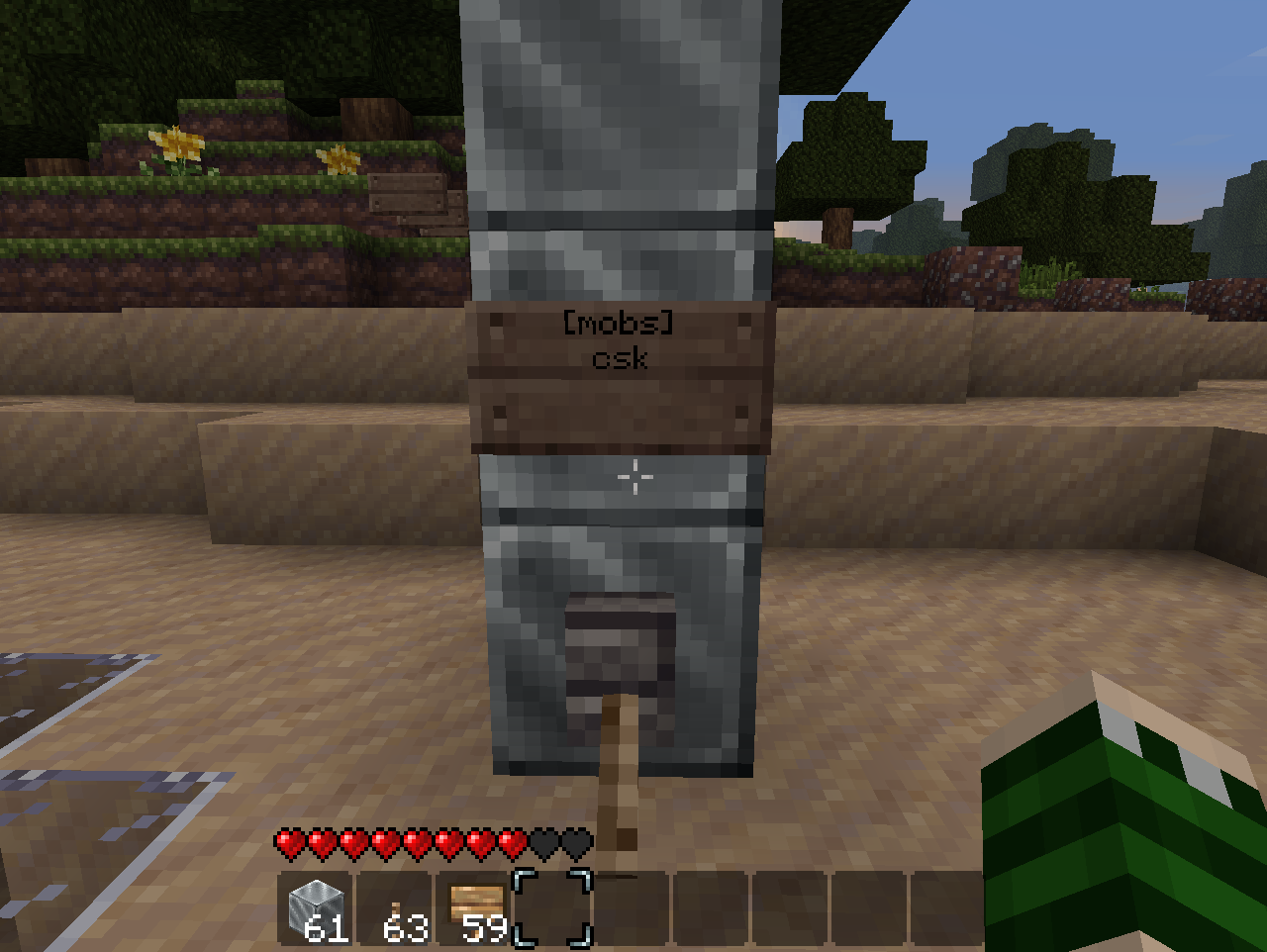
Place a sign above the block where the power is input (doesn't matter which direction it faces), where the first line is [mobs] and the second line contains a list of all mobs that should be targeted by the coil. Alternatively, by including 'ex' on the top of any sign (like [players]ex) will put the coil in Exclusion mode, avoided the specified mobs and hitting all others. The characters are as follows:
c - Creeper
s - Spider
k - Skeleton
z - Zombie
h - Chicken
o - Cow
e - Sheep
w - Angry wolf
p - Cave Spider
b - Blaze
m - Magma Cube
v - Villager
d - Ender Dragon
i - Pig Zombie
n - Enderman
q - Ocelot
r - Wither
t - Witch
l - Slime


Videos of a coil in action:
Comments


-

_ForgeUser7442136 Owner
-
_ForgeUser8493006 Ticket Manager
-
View User Profile
-
Send Message
Posted Feb 28, 2012@funk1983
You replied to the wrong post and notified me, lol.
-
View User Profile
-
Send Message
Posted Feb 28, 2012@Yandols
Place the jar in the plugins folder and then run the server, it will then create another folder within the plugins one for teslacoil
-
View User Profile
-
Send Message
Posted Feb 26, 2012It would be cool if there was an option of the default operating mode in the absence of any signs, as webname suggested.
-
View User Profile
-
Send Message
Posted Feb 26, 2012Hi! New to adding plugins to my servers. How do I add this one? I tried by placing the .jar file into the plugins folder of the server but I couldnt seem to edit/configure it.
-
View User Profile
-
Send Message
Posted Feb 26, 2012Any possibility of adding an option to the config defining a default operating mode in the absence of any sign ?.
Thanks for reply.
-
View User Profile
-
Send Message
Posted Feb 26, 2012@webname
Yes you need to have target signs in order for it to function properly.
-
View User Profile
-
Send Message
Posted Feb 26, 2012Is a sign required to make it work, i flick the switch and get the thunderclap but it just sits there poked around with the sign and killed myself :). ?? using 2.5.4
-
View User Profile
-
Send Message
Posted Feb 25, 2012AWESOME plugin man! Good job :D
-
View User Profile
-
Send Message
Posted Feb 23, 2012@Darklusst
Awesome, I'll give this a try. Maybe it will not have the issue that I was having before (Could have been the plugin causing server lag via all the lightning strikes.)
Thanks a ton!
-
View User Profile
-
Send Message
Posted Feb 23, 2012@Spiritwind51
New update. The property igniteblocktype: in the configuration sets the type of block to ignite targets, by default it's glass.
-
View User Profile
-
Send Message
Posted Feb 23, 2012@Darklusst
It'd be awesome if you could add that!
The problem happened suddenly after about 5 days of using Tesla in my spawn to keep mobs from entering the area. It was directly caused by this plugin because the error stopped whenever I had this plugin disabled, and would start as soon as I re-enabled it. I do not know what caused this issue though, as it gave no error feed from the plugin in the logs.
-
View User Profile
-
Send Message
Posted Feb 21, 2012@Darklusst
Sorry, my bad. I must have been as op at the time of testing
-
View User Profile
-
Send Message
Posted Feb 21, 2012@Darklusst
I've made SpoutCraft optional but players would be crazy not to use it :) that would be awesome.
-
View User Profile
-
Send Message
Posted Feb 21, 2012@Spiritwind51
I can add the fire feature. I cannot replicate your issue on my 2-core personal server, or 6-core public server.
-
View User Profile
-
Send Message
Posted Feb 21, 2012For some reason this was causing a high amount of lag on my 4gb (8 core cpu) server.
It was causing the server to get the "Warning, Can't Keep up. Did the system time change or is the server overloaded?" Error message which resulted in a huge amount of lag.
Hope you get this fixed as I really loved your plugin!
-
View User Profile
-
Send Message
Posted Feb 21, 2012@Darklusst
Would it be possible to add the fire feature then? That would create a way of killing the mobs instead of a loud noise or a fireball that is effected by walls and moving targets.
-
View User Profile
-
Send Message
Posted Feb 21, 2012@BobbySoSlo
I've had this suggestion before, unfortunately entity sound is handled client side with the default minecraft client, and therefore can't be changed with bukkit. If all of your users wish to use the spoutcraft client however I believe I can add a way to mute the lightning.
-
View User Profile
-
Send Message
Posted Feb 20, 2012@Spiritwind51
Came here to request exactly the two things SpiritWin51 said. This mod has done incredible to make my spawn safe (no one is rich enough to build their own yet).
We don't absolutely hate the thunder sound yet, we keep joking about the bug-zapper doing it's job, but I can imagine it's going to get old fast.
P.S. I'm glad it doesn't instant kill anything because the supercharged creepers are a great incentive to refrain from using the spawn zapper to farm mobs. It might be nice if there was a way to prevent mobs killed by the lightning from dropping anything though.
Edit: Within 5 minutes of leaving this comment and enderman teleported in front of me at my spawn holding a dirt block with his biggest troll face on, this is the result: http://i.imgur.com/fHGC4.png
-
View User Profile
-
Send Message
Posted Feb 19, 2012Request1: Is there anyway you can make it so that it strikes lightning but dosent do the lightning sound?
Request2: Put a Glass block on it and instead of throwing a fireball or striking lightning it just simply lights them on fire.
I am currently using this plugin on my server to keep Zombies out of Spawn (They break blocks on my server), and would greatly appreciate it if you could add either request1 or 2 and the fireball is ineffective and lightning is very troublesome when it goes off every 10 seconds.
-
View User Profile
-
Send Message
Posted Feb 19, 2012@funk1983
Any permissions plugin that uses the Bukkit permission system is supported. Only if they have teslacoil.use will they be able to activate them, so I would just not put the permission in those groups at all.