
Satire Store
Latest Version: BETA 1.21.11
Find the full release on our Patreon
Checkout our discord server.
SatireStore


A simple, yet very powerful system for making physical shops using signs and chests.
It's never been that easy to create shops! With features like shop protection and anti-lag protection, you won't have to worry about your server's economy anymore!
"Just works"! PixelShop supports almost all economy plugins by using Vault!
(Versions above 3.9.2 also support economy plugins using the Reserve API)
Some known compatible and incompatible economy plugins.
Please check if there are newer development builds before reporting issues!
If you are upgrading from a previous version of Satire Store please make sure to always read the warnings in the file's changelog!
The plugin by default submits anonymous stats about your server (player count, plugin/server version and type) to a public statistics websites (mcstats.org and bstats.org) in order to provide the developers with usage information. If you wish to opt out, you can do so in the PluginMetrics/config.yml and bstats/config.yml files. It also features an auto-update feature, which can be turned off in the config.
Using shops
It's easy! Just right-click the sign to buy, left-click to sell. (You can configure the buttons in the config file!)
How to create a shop
Player shop
| Place a chest on the ground | |
| Place a sign 1 block away from the chest (for example, above it) | |
| On the sign, write: | 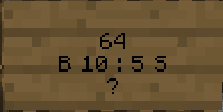 |
| Leave the first line empty. It will be automatically filled with your name by the plugin (if you have the permission PixelShop.admin then you can create shops with the names of other players) | |
| Second line is the amount of items to buy or sell | |
|
Third line is a combination of buy and sell prices. You need to have a price indicator (like 'B' - price that will apply to items BOUGHT by PLAYERS - or 'S' - the SELL price) near the price - the prices are separated by a colon (:) |
Some of the possible price combinations: "B 5:5 S", "B 5", "S free" |
|
The forth line will hold the id/name of the item. Write ? on the sign and the item will be autofilled with the one from the chest or you can click on the sign with the item afterwards. Optionally you can put the actual name on it. You can find out the name of the item you're holding by doing /iteminfo |
|
| Resulting Shop | 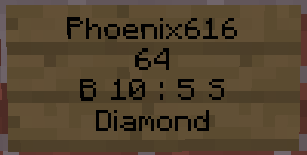 |
| A person can buy 64 diamonds for 10 dollars and sell them back for 5 dollars from Phoenix616 |
If you want you can also take a look at this video tutorial.
Admin Shop - shop with unlimited items
Firstly, you've got to be sure that you've the PixelShop.admin permission or that you are an OP. To make an Admin Shop, simply put "Admin Shop" (configurable in config.yml) on the first line of the sign when creating the shop. Admin Shops do not require a chest!
Translations
- /iteminfo - Get information about the item in your hand
- /iteminfo <id/name> - Get information about the item with the given id or name
- /shopinfo - Get information about the looked-at shop
- /csgive <itemcode> [<amount>] [<player>] - Give item with a unique PixelShop code to a player
- /cstoggle - Toggle buy and sell notificiation messages
- /chestshop version - Display the PixelShop version
- /chestshop reload - Reload the PixelShop config and translation messages. (This might not reload some features)
- /csaccess - Toggles ability to buy/sell on shops while having admin/access permissions and normally being ignored
Permission nodes
| Description | |
|---|---|
| ChestShop.shop.* | SATIRE SHOP PERMISSIONS INCLUDE: |
| ChestShop.create.* | SHOP CREATION |
| ChestShop.shop.buy | SHOP BUYING |
| ChestShop.shop.sell | SHOP SELLING |
| ChestShop.mod | SHOP-MODS TO OPEN N' CLOSE SHOPS |
| ChestShop.admin | SHOP-ADMIN TO OPEN N' CLOSE N' DELETE N' BREAK N' FIX N' RAISE PRICE N' MORE! |
A full list of permission nodes
Configurations
Useful tips by players
| How not to get bankrupt | A customisable price table |
| Alternative price table |
Compatibility
PixelShop directly hooks into the following plugins to provide additional functionality:
- AuthMe (and forks like AuthMe Reloaded)
- WorldEdit
- WorldGuard
- Residence
- LWC (and forks like LWCX and Modern-LWC)
- Lockette
- LockettePro
- Deadbolt
- SimpleChestLock
- OddItem
- Heroes
- ShowItem
Metrics
This resource sends metrics data to McStats and bStats. You can opt-out of metrics for all plugins on your server by changing the settings in the PluginMetrics/config.yml and the bStats/config.yml file if you don't want any data to be send.
If you just need general help feel free to ask in the comments!


-

miserykr Owner
Comments