Staff Notifications
Staff Notifications
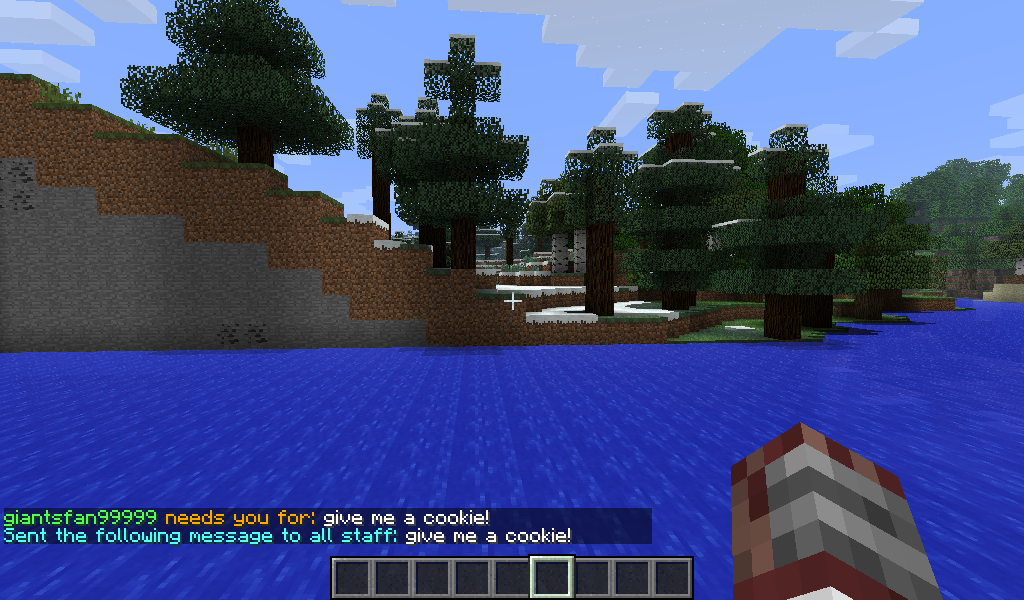
Ever want to send a simple notification to all online staff members easily or set tasks for them to complete? Then this plugin is for you!
With one simple command you can send a message to every online staff member and set tasks for them to complete!

To see more pics of the plugin in action, click here: http://dev.bukkit.org/bukkit-plugins/staff-notifications/images/
Commands
1. /notify <message>
Sends a message to online staff. Supports chat colors (ex. &4, &9, etc.). Defaults to white if a chat color isn't chosen.
2. /task <message>
Creates a task for staff members to complete. Only supports one task at a time right now. Will be changed in the future.
3. /viewtask
View the current task.
4. /cleartask
Delete the current task.
5. /completed
Marks the current task as completed and removes it.
6. /completer
View who completed the previous task
7. /notifications reload
Reload the plugin's config
8. /notifications help
View the plugin's help page
Permissions
1. notifications.staff
Adds you to the staff list so you can be detected when someone sends a notification.
2. notifications.notify
Allows you to use the /notify command.
3. notifications.task
Allows you to create a task.
4. notifications.task.view
Allows you to use the /viewtask command
5. notifications.task.clear
Allows you to use the /cleartask command
6. notifications.task.complete
Allows you to use the /completed and /completer commands
7. notifications.task.login
Allows you to get notified if there is a new task available when you login to the server.
8. notifications.update
Allows you to receive update notifications about newer versions of the plugin in-game
9. notifications.notifications
Allows you to use the /notifications reload and /notifications help commands.
Config File Example
# Staff Notifications Configuration File
#
# Modify the settings to your liking
#
# NOTE that with this version the config file is used to store task info
#
# and will appear blank until tasks are created
#
# This file will contain more in later versions
#
auto-update: true  <-- Used for update checking. Will check for new versions of the plugin if set to true. If set to false, plugin will not check for newer versions

Task:     <-- Current task stored here

Task Completer:       <-- Task completer is stored here
To Do
- Add the ability to have more than one task at a time
- Add player-specific tasks (About 75% done. Then need to do some testing before releasing)
- Add the ability to view all staff members currently online (maybe also see who is offline).
- Anything else you guys suggest!
Suggestions or Bugs?
If you have any suggestions or want to report a bug feel free to submit a ticket :)
Donations
I have never asked anyone for a donation and never plan to. I put my work out here for free for everyone to enjoy. If you do want to contribute some money to help support my efforts I will give you that option. Below is my paypal email that you can send money to if you choose to. There is also a donation button that says "Donate" at the top of the page. In return for your kindness, I will give you early access to my plugins :)
PayPal email: eagledan96@yahoo.com
Comments


-

_ForgeUser9895567 Owner
-
View User Profile
-
Send Message
Posted Feb 21, 2014I have decided to postpone further development of this plugin until further notice. I just haven't had the time, nor the desire to do so. I WILL return to it in the near future, just not right now.
-
View User Profile
-
Send Message
Posted Sep 30, 2013I am going to be doing a whole recode of the plugin and develop a simple API for it that will make things a bit easier. I might release the API later on and will include other functionalities to it so it might be somewhat useful to other people.
-
View User Profile
-
Send Message
Posted Sep 12, 2013@Carisus
That'd be a neat idea. The update might come out in mid-october. I'm busy with college related stuff right now.
-
View User Profile
-
Send Message
Posted Sep 10, 2013Would be neat if we could give the completer of a task a configurable prize. Waiting for the ability to have more than one task at a time. Great Job.
-
View User Profile
-
Send Message
Posted Aug 23, 2013@TheFlannelBeard
Your ideas have been implemented. Waiting for approval now :) Thanks for the suggestions :)
-
View User Profile
-
Send Message
Posted Aug 22, 2013@TheGamingGrunts
thanks! my reasoning for this would be:
1. To notify staff on login 2. To notify them of the message even when theyre offline (see #1) 3. Lets me know who completed what task, and that the task is done.
Itd be a feature to add, but a WONDERFUL one!!
-
View User Profile
-
Send Message
Posted Aug 22, 2013@TheFlannelBeard
Not at the moment, but that would be a nice feature to add. I'll add it to the to do list :). There's a built in update checker, so you'll know when a new version is available :)
-
View User Profile
-
Send Message
Posted Aug 22, 2013I like it! Will it show them tasks needing to be done on login?
What about adding a /task # done, so they can mark a task complete
then /tasks, to see tasks and who completed them? Thatd be the way to take this. :)
-
View User Profile
-
Send Message
Posted Aug 22, 2013Awaiting approval on the plugin :)