InfoGuide
InfoGuide
Version: 2.4
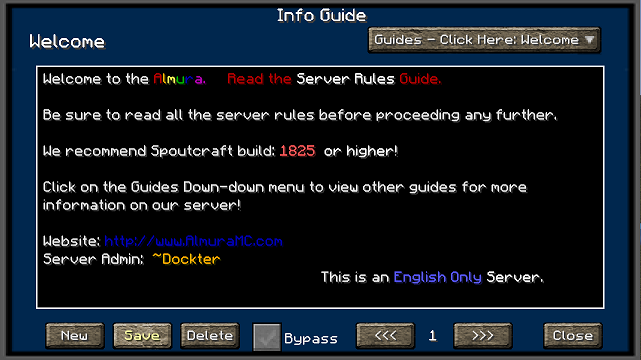
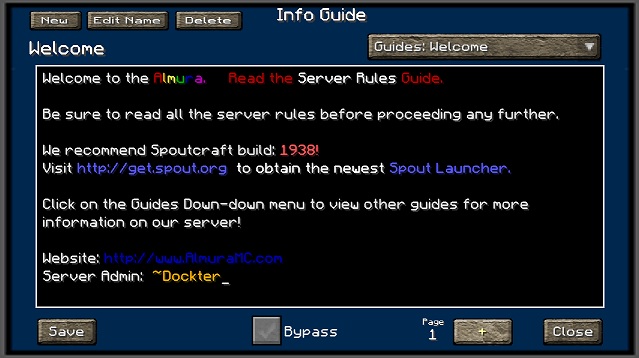
If you would like to see this in action, logon to our Minecraft server at: minesrv.almuramc.com
Overview
InfoGuide is designed to be a resource for players to go to find information about about the particular server that they are playing on. Instead of having to go back and forth between the website or looking at the Wiki's for plugin command line information, Server Administrators can use this plugin and post that crucial information into Guides that players can look at when ever they need information.
This plug allows an administrator to Add/Edit/Delete guides in real-time without having to stop/start the server to push new information out to all of your users. Server Administrators also have the ability to cut and copy information directly in the .yml files that this plugin creates for its guides.
Spoutcraft & SpoutPlugin

Get Spoutcraft & Spoutplugin Now! >> Get Spout!
How to Use?
Currently once you install the InfoGuide plugin into your servers plugin directory it will automatically appear when a user logs in. If they close it and wish to see it later you can press F12 to view the guides. This option is configurable in the Spoutcraft/client Controls > Keybind section.
Now With Color Support!!. You can use the color codes in the text fields by using #4 Red. It will accept all the possible color & formatting codes.
Commands:
With the release of version 2.4 we added the ability to call up a specific guide via a command. Example:
/InfoGuide Starter Guide for Newbies
This will open up the infoguide interface with the "Starter Guide for Newbies" being automatically loaded.
Text Formatting:
- BLACK = #0
- DARK_BLUE = #1
- DARK_GREEN = #2
- DARK_AQUA = #3
- DARK_RED = #4
- DARK_PURPLE = #5
- GOLD = #6
- GRAY = #7
- DARK_GRAY = #8
- BLUE = #9
- GREEN = #a
- AQUA = #b
- RED = #c
- LIGHT_PURPLE = #d
- YELLOW = #e
- WHITE = #f
- MAGIC Random Code = #k
- BOLD = #l
- STRIKETHROUGH = #m
- UNDERLINE = #n
- ITALIC = #o
- RESET to Default = #r
Configuration
File: config.yml Options:
- PromptTitle: (Name of your Server?)
- TitleX: (numeric value used to help center your title in the guide window)
- DisplayOnLogin: (Enable or Disable Display on Login Feature)
- Hot_Key: (Configurable Default HotKey to assign to InfoGuide, is changeable client side afterwards in Controls.)
- GUITexture: Set your Custom Texture here or use my default.
- DefaultGuide: (Specify the name of the guide you would like to load first)
- GuestGuide: Specific Guide based on InfoGuide.GuestGuide permission
- MemberGuide: Specific Guide based on InfoGuide.MemberGuide permission
- SuperMemberGuide: Specific Guide based on InfoGuide.SuperMemberGuide permission
- ModeratorGuide: Specific Guide based on InfoGuide.ModeratorGuide permission
File: users.yml
- This is the configuration file we use when you allow users to bypass the InfoGuide screen when they login. Look down further for information regarding permissions nodes.
File: guides.yml (filename is dynamic based on Guide Title) Options:
- Name: (Name Displayed in Title & Drop Down Menu)
- Date: (Date Stamp the last time the guide was modified)
- Nr1: (stores guide information, now with unlimited number of pages)
Permissions
Here's a list of specific permissions nodes for this plugin and what each does.
- infoguide.bypass = Allows the users to set the option to bypass the InfoGuide when they login.
- infoguide.bypassall = Allow admins to force users or groups to bypass the InfoGuide at Login.
- infoguide.edit = Allows the user to make changes to a guide.
- infoguide.create = Allows the user to create new guides.
- infoguide.delete = Allows the user to delete current guides.
- infoguide.admin = Allows a users to do all of the above, also overrides any InfoGuide.hide permission..
- infoguide.view = Allows users to view all guides [Can View All Guides]
- infoguide.view.[guidenamehere] = Allows User to specifically see this guide, also overrides a InfoGuide.hide permission.
- infoguide.hide.[guidenamehere] = Hides this specific guide from specific groups/users.
- infoguide.guestguide = Pre-sets the config.yml default guide.
- infoguide.memberguide = Pre-sets the config.yml default guide.
- infoguide.supermemberguide = Pre-sets the config.yml default guide.
- infoguide.moderatorguide = Pre-sets the config.yml default guide.
Support
Support for this and all other AlmuraDev plugins can be found by joining our chat channel here:
Dependencies
Comments


-

Almura_Dockter Owner
-
View User Profile
-
Send Message
Posted Sep 21, 2012@yurikoma
You should be able to use the permissions by group permissions to manage what guides are visible.
MT
•infoguide.guestguide = Pre-sets the config.yml default guide.
•infoguide.memberguide = Pre-sets the config.yml default guide.
•infoguide.supermemberguide = Pre-sets the config.yml default guide.
•infoguide.moderatorguide = Pre-sets the config.yml default guide.
-
View User Profile
-
Send Message
Posted Sep 21, 2012would love the ability to hide guides from people without a certain permission, so i could have some pages some people can see, and some they can't.
-
View User Profile
-
Send Message
Posted Sep 20, 2012Something new for 1.3.2?
-
View User Profile
-
Send Message
Posted Sep 15, 2012My bad Dockter. I reloaded the new Spout plugin and now it works.
Sorry to bother you.
-
View User Profile
-
Send Message
Posted Sep 15, 2012Howdy Dockter. If I press F12 I get the following on my server.
Internal exception:java.IOException:Bad Packet id 74
on the server it says...
[INFO] mtebrinke lost connection: disconnect.endOfStream
I have added infoguide.view to the permissions.
Thanks, Michael
-
View User Profile
-
Send Message
Posted Sep 12, 2012hey, with the permissions how would i stop some users from viewing some of the guides, but let them see others?
Great plugin btw, only thing i could think of adding would be an auto save while editing and changing pages. (i was working on a section, and forgot to save the first page, so when i went to page 2 and continue writing the section, it wiped out everything i had done, which kind of sucked, i know it's not a big issue, but would be great addition
-
View User Profile
-
Send Message
Posted Sep 11, 2012A conflict between Spoutcraft and InfoGuide has been discovered that is leading to some users getting kicked if the InfoGuide is set to displayonLogin.
If your users are experiencing this please get me a log from the client PC affected. I have had several people report this but Ive been unable to duplicate it.
-
View User Profile
-
Send Message
Posted Aug 28, 2012updating my friends server dockter and was wondering if your going to update this anytime soon or going to update at all when you update almura (awsome server btw)!
-
View User Profile
-
Send Message
Posted Aug 15, 2012Awesome updates to the plugin dockter. I'll be testing shortly for use on our server.
-
View User Profile
-
Send Message
Posted Jul 27, 2012<<reply 834757="">>
Whoops, I'll fix that tonight....
-
View User Profile
-
Send Message
Posted Jul 27, 2012Umm.. when i hit save it says updated by Dockter.. lol did i miss something?
-
View User Profile
-
Send Message
Posted Jul 24, 2012Also have a fix coming to allow for Italics, Underlining, Bold and Strike through font coding when used in combination with colors.
-
View User Profile
-
Send Message
Posted Jul 24, 2012<<reply 822480="">>
Ive been told that the API needed to add photos to its sucks at the moment. I have someone looking into that possibilty.
-
View User Profile
-
Send Message
Posted Jul 24, 2012<<reply 788354="">>
I believe I have a fix for this issue. Version 2.0 is due out soon that addresses some of the multiple pages issues.
Ive also added the ability to have unlimited pages in a guide.
-
View User Profile
-
Send Message
Posted Jul 24, 2012@ 0Deminth0
since answers aren't said.... ;.)
my tecnichian have solved the player not reading problem, you have to write 12 rows only nothing more if you write more than 12 rows the page to other players will be black when the owner will still read it
-
View User Profile
-
Send Message
Posted Jul 23, 2012I have the same problem of 0Deminth0 . May you answer to this question?
-
View User Profile
-
Send Message
Posted Jul 20, 2012is there any plans to add possibility to put images ?
-
View User Profile
-
Send Message
Posted Jul 17, 2012Thank you for making such a great plugin! The spout users on my server love it!
-
View User Profile
-
Send Message
Posted Jul 3, 2012<<reply 782426="">>
This issue has been fixed in build 1545 of Spoutcraft. It was a client side issue not InfoGuide.
-
View User Profile
-
Send Message
Posted Jul 1, 2012I have a problem!
I have written about 4 pages on InfoGuide, i see all that i have written, also i see the pages in the config files. But my players only see pages 1 and 4!