InfoGuide
InfoGuide
Version: 2.4
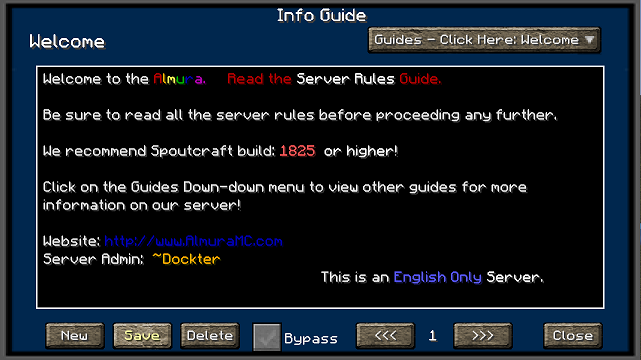
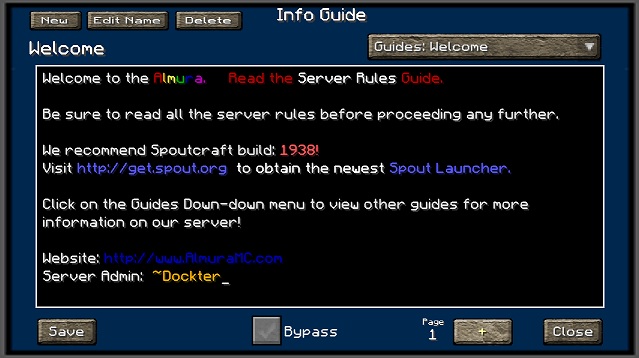
If you would like to see this in action, logon to our Minecraft server at: minesrv.almuramc.com
Overview
InfoGuide is designed to be a resource for players to go to find information about about the particular server that they are playing on. Instead of having to go back and forth between the website or looking at the Wiki's for plugin command line information, Server Administrators can use this plugin and post that crucial information into Guides that players can look at when ever they need information.
This plug allows an administrator to Add/Edit/Delete guides in real-time without having to stop/start the server to push new information out to all of your users. Server Administrators also have the ability to cut and copy information directly in the .yml files that this plugin creates for its guides.
Spoutcraft & SpoutPlugin

Get Spoutcraft & Spoutplugin Now! >> Get Spout!
How to Use?
Currently once you install the InfoGuide plugin into your servers plugin directory it will automatically appear when a user logs in. If they close it and wish to see it later you can press F12 to view the guides. This option is configurable in the Spoutcraft/client Controls > Keybind section.
Now With Color Support!!. You can use the color codes in the text fields by using #4 Red. It will accept all the possible color & formatting codes.
Commands:
With the release of version 2.4 we added the ability to call up a specific guide via a command. Example:
/InfoGuide Starter Guide for Newbies
This will open up the infoguide interface with the "Starter Guide for Newbies" being automatically loaded.
Text Formatting:
- BLACK = #0
- DARK_BLUE = #1
- DARK_GREEN = #2
- DARK_AQUA = #3
- DARK_RED = #4
- DARK_PURPLE = #5
- GOLD = #6
- GRAY = #7
- DARK_GRAY = #8
- BLUE = #9
- GREEN = #a
- AQUA = #b
- RED = #c
- LIGHT_PURPLE = #d
- YELLOW = #e
- WHITE = #f
- MAGIC Random Code = #k
- BOLD = #l
- STRIKETHROUGH = #m
- UNDERLINE = #n
- ITALIC = #o
- RESET to Default = #r
Configuration
File: config.yml Options:
- PromptTitle: (Name of your Server?)
- TitleX: (numeric value used to help center your title in the guide window)
- DisplayOnLogin: (Enable or Disable Display on Login Feature)
- Hot_Key: (Configurable Default HotKey to assign to InfoGuide, is changeable client side afterwards in Controls.)
- GUITexture: Set your Custom Texture here or use my default.
- DefaultGuide: (Specify the name of the guide you would like to load first)
- GuestGuide: Specific Guide based on InfoGuide.GuestGuide permission
- MemberGuide: Specific Guide based on InfoGuide.MemberGuide permission
- SuperMemberGuide: Specific Guide based on InfoGuide.SuperMemberGuide permission
- ModeratorGuide: Specific Guide based on InfoGuide.ModeratorGuide permission
File: users.yml
- This is the configuration file we use when you allow users to bypass the InfoGuide screen when they login. Look down further for information regarding permissions nodes.
File: guides.yml (filename is dynamic based on Guide Title) Options:
- Name: (Name Displayed in Title & Drop Down Menu)
- Date: (Date Stamp the last time the guide was modified)
- Nr1: (stores guide information, now with unlimited number of pages)
Permissions
Here's a list of specific permissions nodes for this plugin and what each does.
- infoguide.bypass = Allows the users to set the option to bypass the InfoGuide when they login.
- infoguide.bypassall = Allow admins to force users or groups to bypass the InfoGuide at Login.
- infoguide.edit = Allows the user to make changes to a guide.
- infoguide.create = Allows the user to create new guides.
- infoguide.delete = Allows the user to delete current guides.
- infoguide.admin = Allows a users to do all of the above, also overrides any InfoGuide.hide permission..
- infoguide.view = Allows users to view all guides [Can View All Guides]
- infoguide.view.[guidenamehere] = Allows User to specifically see this guide, also overrides a InfoGuide.hide permission.
- infoguide.hide.[guidenamehere] = Hides this specific guide from specific groups/users.
- infoguide.guestguide = Pre-sets the config.yml default guide.
- infoguide.memberguide = Pre-sets the config.yml default guide.
- infoguide.supermemberguide = Pre-sets the config.yml default guide.
- infoguide.moderatorguide = Pre-sets the config.yml default guide.
Support
Support for this and all other AlmuraDev plugins can be found by joining our chat channel here:
Dependencies
Comments


-

Almura_Dockter Owner
-
View User Profile
-
Send Message
Posted May 2, 2012Really great plugin, please add color support and perhaps multiple fonts and/or bold text !
-
View User Profile
-
Send Message
Posted May 1, 2012The auto-show on login feature can be convenient, and with a option in config file, admins can choice if it's enable or disable, following their server config and their ideas.
In this case, can you create an option in config file for this feature?
Also, you may can auto-show after Authme login (or any plugins like that), if it's possible.
-
View User Profile
-
Send Message
Posted May 1, 2012I can add an update to disable the auto-show on login.
-
View User Profile
-
Send Message
Posted May 1, 2012is there a way to disable the auto show login event?
Because I am using Authme and often the players are getting kicked, because they are reading the guisde and don't login and time out then. Is there a way to set the auto show function off? That they only can see the guide with f12?
-
View User Profile
-
Send Message
Posted Apr 30, 2012@cwingrav
Also, my client works just fine on Almura.
-
View User Profile
-
Send Message
Posted Apr 30, 2012Hmm... getting a error with InfoGuide that crashes Spoutcraft. Occurs whenever I type "/infoguide". Interestingly, I found a 'null.yml' guide, shutdown the server, removed it and restarted. Still getting this error. Running on linux server (case issue?).
-
View User Profile
-
Send Message
Posted Apr 30, 2012@dockter
When I click on any button or combobox of InfoGuide.
But buttons and combobox work.
-
View User Profile
-
Send Message
Posted Apr 30, 2012@Vorahk
When are you getting unknown command item in chat?
The Permissions per guide already exists I just need to explain it better. Colors would be nice, not sure if its possible yet.
-
View User Profile
-
Send Message
Posted Apr 30, 2012@_Celty_
Your doing something wrong then because Im online and so are other folks
-
View User Profile
-
Send Message
Posted Apr 30, 2012Can't join your serv minesrv.almuramc.com with spout !
-
View User Profile
-
Send Message
Posted Apr 29, 20121.2 tested, it works fine, but a "unknown command" message is written in chat.
Some ideas to enhance InfoGuide:
- add colors
- add permissions per guide (read only & read write)
- add a notification system (when new guide was created)to warn online players, with some urgency level, if possible
__
Vorahk
-
View User Profile
-
Send Message
Posted Apr 27, 2012With the "infoguide.view" node, all work!
Thanks dockter!
__
Vorahk
-
View User Profile
-
Send Message
Posted Apr 27, 2012@BioBG
This will be fixed in 1.2
-
View User Profile
-
Send Message
Posted Apr 27, 2012@Vorahk
The permissions issue your having is your missing infoguide.view.
Im going to make that a default permission in 1.2
-
View User Profile
-
Send Message
Posted Apr 26, 2012same bug here, can read only default guide
-
View User Profile
-
Send Message
Posted Apr 23, 2012Hi,
Same issue than BioBG, if an player is not a OP, he can read the default guide only. Also, guide deletion generate an error and kick the player with the message "Internal servor error":
If the player which delete a guide is OP, it's work fine, like the guide selection ComboBox.
OS: Win 7 Ultimate x64
Java: 7u3 x64 (also tested with 7u3 x86, 6u31 x86 and 6u31 x64, same behavior)
Bukkit: 1.2.5-R1.0 (jnks2149)
SpoutPlugin: 1110
PermissionsBukkit: 1.6
_
Vorahk
_______________
Salut,
Je rencontre la même erreur que BioBG, si un joueur n'est pas OP, il ne peut lire que le guide par défaut. De plus, la suppression d'un guide génère une erreur et éjecte le joueur avec le message "Internal server error":
Si le joueur qui supprime un guide est OP, il n'ya aucun problème, comme pour la ComboBox qui permet de sélectionner un guide.
OS: Win 7 Ultimate x64
Java: 7u3 x64 (aussi testé avec 7u3 x86, 6u31 x86 et 6u31 x64, même comportement)
Bukkit: 1.2.5-R1.0 (jnks2149)
SpoutPlugin: 1110
PermissionsBukkit: 1.6
_
Vorahk
-
View User Profile
-
Send Message
Posted Apr 19, 2012hi i want to report a issue.
on linux the plugin creates 2 directories "infoguide" "InfoGuide" in plugin folder.
in infoguide store the guides info
in InfoGuide store the user and config settings
other do not start on startup have to manualy to press F12 ......
is it possible to add option to autostart and to startup key change ?
Have to be OP to read all menus in the guide ..... if is not OP you can read the defaut guide only ! pls fix that
-
View User Profile
-
Send Message
Posted Apr 19, 2012@Schlumpf9
Read: ToDo :)
-
View User Profile
-
Send Message
Posted Apr 19, 2012Tested it with the new Spout Recommend Build ;)
This Plugin is awesome, exactly what I searched :p Very nice!
Is there a way to add scrollbars, if the message gets bigger? :D
-
View User Profile
-
Send Message
Posted Apr 19, 2012@dockter
Yes, editing it ingame works correctly, but editing the yml on the server gives me errors