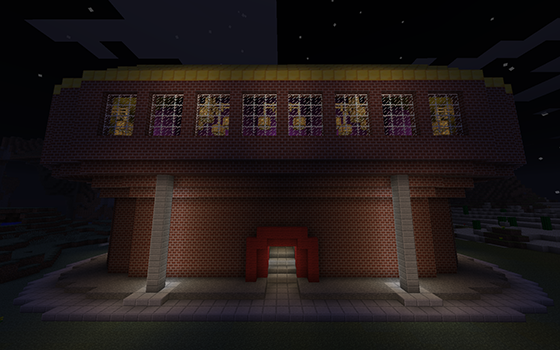
Spleef Hippodrome
This plugin and the map it is used for have not yet been released.
Spleef Hippodrome
This plugin accompanies the Spleef Hippodrome custom map. Its purpose is to maintain and facilitate playing of the map, but it is completely optional.
Features
- Automatically refills chests with unbreakable, enchanted gold picks for players to use
- Automatically refills dispensers that shoot random splash potions at the game floor
- Automatically refills storage chests with additional picks and potions
- Prevents players from cheating (using prohibited items) when they are playing, unless they are in creative mode
- Destroying the game floor will not yield any drops
- Keeps players' food levels full when they are playing
- Prevents mobs from spawning within the Spleef Hippodrome
- Provides start and stop commands that interact with the map
- Automatically locates the Spleef Hippodrome, whether the server is running the provided map or the .schematic in another world, in any orientation
- Completely plug-and-play; no set up required
- Does not interfere with anything on the server except the Spleef Hippodrome itself
| Command | Description |
|---|---|
| /spleef start | Starts a new game |
| /spleef stop | Stops the game |
Aliases for /spleef: /spleefhippodrome, /sh, or /game
Only server ops may execute the commands. Permissions can be implemented if requested, but the commands are completely optional and rather harmless.
If you have a request or suggestion, please do not hesitate to create a ticket, and I will likely implement it.
Instructions
If you are familiar with installing Bukkit plugins, this should be obvious information.
- Download the latest recommended build of Craftbukkit.
- Place the .jar into your server directory, where minecraft.jar is located.
- Run the .jar as if you were running minecraft.jar.
- Stop the server, and look back at your server directory.
- Download the latest version of SpleefHippodrome.jar -Not yet released.
- Place SpleefHippodrome.jar into the newly created plugins/ directory.
- You can now run the Craftbukkit server and enjoy the added features of the Spleef Hippodrome!


Comments


-

_ForgeUser6936188 Owner
-
View User Profile
-
Send Message
Posted Jan 10, 2012@flamedaces
Thanks for the offer, but making the video is the funnest part! ;) I admire your desire to help out though. Send me a PM if you're interested in playing it with us (for the video) and/or helping to build some of the interior food stands and shops, but don't feel obligated by any means.
-
View User Profile
-
Send Message
Posted Jan 10, 2012@pinacoladaxb
I'll make a video if you want...if you still need one. just give me some instructions and i'll get on it ASAP. Computer specs are really good, so if you want far and fancy you got it (_^)
-
View User Profile
-
Send Message
Posted Jan 7, 2012@voltboyy @astinax
When I posted this page I wasn't expecting people to see it until I actually released the map. The plugin is done, and the map is technically finished. I just need to get some people together to help decorate the interior halls and make a video to show it off. Then everything'll come out at once. Thanks for the encouragement, though! It only helps! :)
-
View User Profile
-
Send Message
Posted Jan 7, 2012@astinax
Jesus man read the description: -Not yet released.
-
View User Profile
-
Send Message
Posted Jan 7, 2012It looks like a nice plugin, I hope the release comes soon! ;-)
-
View User Profile
-
Send Message
Posted Jan 7, 2012Where is the download for Spleef hippodrome custom map ?