Speedwalks
Speedwalks
Speedwalks allows you to create expresways.
Version:
- 0.1
How to use:
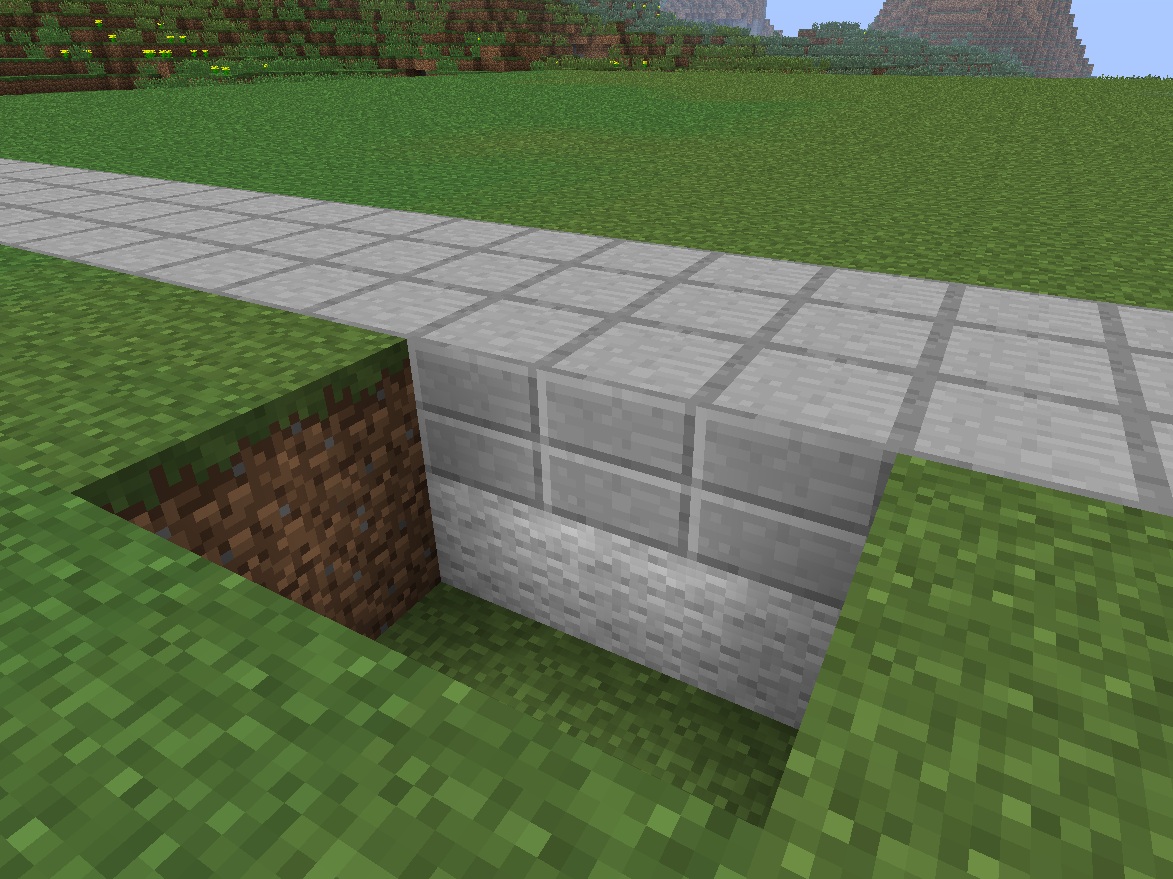
- To define an expressway, just built a road composed of 2 different layers.
- By default, the first layer must be made of wool (35) and the upper layer must be made of stone slabs (43 or and 44).
Commands:
- None, just built your expressways and they are ready to use.
Permissions:
- None
Configuration file:
- This config.yml contains 3 lines which define the material IDs of the lower and upper layer (35 for the first and 43, 44 for the upper) and the speed.
Installation:
- Just put speedwalks.jar in your server's plugin directory, then restart or reload the server.
- You can then modify the configuration file if needed.
Video:
Comments


-

_ForgeUser8609831 Owner
-
View User Profile
-
Send Message
Posted Mar 26, 2014Hey!
Love this plugin to death! Very simple and effective. Players will be loading chunks more rapidly and take up more bandwidth when they use it but thats fine. I will be upgrading my upload speed soon anyway ;)
I have a question however, is there a way to distinguish between different types of materials that share the same id? i.e. 44:0 as opposed to 44:7 Right now when I try to use ":" it gives an error that it doesn't recognise the syntax. Thus any slab will create a speedway on top of the base layer.
-
View User Profile
-
Send Message
Posted Aug 30, 2013@mccrafter2242
This plugin works just fine and has less ram ussage then that highway plugin. I recoment people to just use this untill it stops functioning cus it works perfect.
-
View User Profile
-
Send Message
Posted Aug 27, 2013Hey guys :)
Because of the issue that this nice plugin is outdated i post you an other plugin that will speed you up with "highways".
I have used it since release and i think it would do something similar :)
Hope that i could help some people :)
http://dev.bukkit.org/bukkit-plugins/highway/
Hope that it would be ok to post this link if not please delete this comment! Regards
-
View User Profile
-
Send Message
Posted Mar 29, 2013@Toxxicjtag
Late reply, but for the reference, create a region around your speedwalk (world edit + worldguard) and set "region flag (region name) feed-amount 5" and "/region flag (region name) feed-delay 1"
this solves the problem. The plugin itself does not have a mean of preventing hunger draining.
-
View User Profile
-
Send Message
Posted Nov 1, 2012Drains your health/hunger bar.
Anyway to fix/stop this from happening?
-
View User Profile
-
Send Message
Posted Aug 7, 2012Whenever I change the config file and reload the plugin, the config goes back to the default one again. I prefer stonebrick on top of wool rather than stone slabs.
EDIT: I even tried changing the file and setting it as read-only. Now the plugin doesn't change the file, but it doesn't work either. This could be a case sensitivity problem (Linux is case sensitive, Windows is not, remember that)
-
View User Profile
-
Send Message
Posted Jul 19, 2012Could you do multiple settings? So different "roads"/expressways have different speed multipliers? I would also like permissions, but it's not really necessary ;) I love what is in the plugin so far, but that would really make it BAWS :D
-
View User Profile
-
Send Message
Posted Jun 21, 2012works for R4? :D
-
View User Profile
-
Send Message
Posted Mar 31, 2012@Ypsilon71
You really should add an actual description of what the mod does and how it goes about that then. ;)
-
View User Profile
-
Send Message
Posted Mar 31, 2012@LunariusHaberdash
Hi, I plan to make some modifications on this plugin this evening and I will check the speed system. What I think is to allow several second layers material types to give the possibility to have several speeds available on different expressways in the same world. Concerning the special remark of Stoperror, yes, the expressway moves a player until he is no longer on it and it's intentional.
-
View User Profile
-
Send Message
Posted Mar 31, 2012@stoperror
I was just about to post on this very issue. Loving the plug-in, but it does need some fine tuning.
-
View User Profile
-
Send Message
Posted Mar 30, 2012It seems like the SPEED: option isn't working correctly. If I use a fraction (.5), I do move at half speed. If I use 1 or anything higher, I seem to move at an insane speed regardless of the value.
I would really like to see this toned down, as the default is entirely too fast to be able to make turns, etc.
Also, it appears that once you start walking, the expressway takes over and moves a player until he/she is no longer on the expressway. Is this intentional?
-
View User Profile
-
Send Message
Posted Mar 28, 2012@Ypsilon71
Sorry i just had a config messed up i got it fixed and workin now
-
View User Profile
-
Send Message
Posted Mar 28, 2012Nice plugin. I made the bottom layer iron bars instead. Slightly more expensive to make so it will cut down on usage and it looks great.
pic: http://i.imgur.com/2ersy.png
-
View User Profile
-
Send Message
Posted Mar 27, 2012What I'd love to see is an expansion of this that actually requires a specific configuration, including side walls.
xooox
xxxxx
Where x = Cobblestone and o = gravel.
Also, multiple options with varying speed improvements.
xooox where x = cobblestone and o = gravel
xxxxx
15% increase
yoooy where y = Bricks and o = gravel
yyyyy
50% increase
zoooz where z = obsidian and o = gravel
zzzzz
100% increase
for example.
-
View User Profile
-
Send Message
Posted Mar 24, 2012hi i really like this plugin but could you make a 2layer or 1 layer option? thanks!
-
View User Profile
-
Send Message
Posted Mar 22, 2012Very nice plugin for players!
-
View User Profile
-
Send Message
Posted Mar 22, 2012@turtledude01
Speedwalks does not interact with permissions at all. Please check your server configuration and let me know.
-
View User Profile
-
Send Message
Posted Mar 22, 2012I use bPermissions and bPermissions chatmanager. When i use SpeedWalk it messes up the chat configuration can you please fix this?
-
View User Profile
-
Send Message
Posted Mar 22, 2012@hawkfalcon The speed is adjustable. The default one is very fast, which can send you 'flying'. Btw I want to request a 2 different speeds feature, or more maybe. The point is that I want to use a slow one for roads in town, and a fast one for highway. For example, we can make it so that if it's material A above material B then the speed is 2, and if it is material C over material D then the speed is 4. I really like this plugin and its multiple blocks feature :D keep up the good work