SkyWriter
SkyWriter
Now with font selection!
Version: v1.1
Tested On: 1.3.1-R2.0
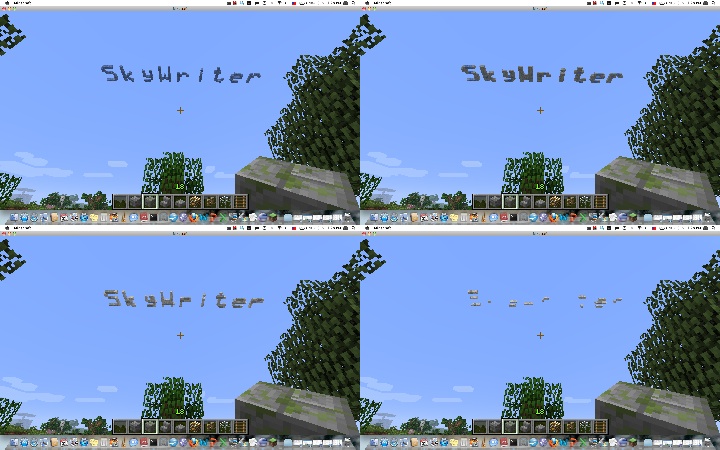
The SkyWriter plugin allows you to write a message in the sky! Initially, the cloud message appears crisp and blue, but as time passes the cloud disperses and changes color until it finally disappears completely.
There is one... well, now there are (sort of) two commands to use Skywriter. Additional features are enabled by adding switches to the command line, unix style.
To write a message, use:
/skywrite [-speed n] [-block b] [-loc x,z] [-upright] [-perm] [-world world] message...
Switch descriptions:
- n is scaling for the speed of dispersing (i.e. 2 = 2x slower, etc)
- b is the name or id of the material for the cloud
- x,z are the x and z coordinates to be drawn at
- world is the world in which the message is to be drawn (only for console use)
- -upright draws the message banner style, perpendicular to the ground
- -perm makes the message permanent (it won't go away when the plugin is stopped)
All the switches can be abbreviated with a single letter, i.e. you can use -s for -speed, etc.
To change the font you are writing with, use:
/skywrite -f fontname
Initially, Skywriter will use its default, built-in (and, some would say, ugly) font. You can change this by setting the font to any of the fonts available on the server system. Note that the font name can, and often does, contain spaces. If you enter a font name that is not available, Skywriter will list the fonts available that start with the same letter.
By default, the start of the words appear where you are looking in the sky, just below the actual Minecraft cloud level. Note that you must be looking up to where you want the message to appear.
The command can also be used from the console, as long as the x,z location of the message is specified.
By default, the cloud messages are formed of different colors of wool. SkyWriter will only replace empty space with a cloud message block, and will erase the cloud message blocks over time until they completely disappear.
Permissions:
- skywriter.use: Allows you to use the skywrite command
- skywriter.location: Allows the message to be placed at a specified x,z location
- skywriter.speed: Allows the speed of message dispersal to be changed
- skywriter.permanent: Allows the message to be permanent (not disperse)
- skywriter.material: Allows the block type of the message to be specified
Any suggestions on features are welcome and encouraged!
Source code is on Github

Comments


-

_ForgeUser8772298 Owner
-
View User Profile
-
Send Message
Posted Apr 28, 2015Works fine on 1.7.10 cauldron feed the beast v1.2.1 THANKYOU SO MUCH!!!! Exactly what i was looking for
-
View User Profile
-
Send Message
Posted Aug 6, 2013Just downloaded. Works for me with 1.6.2.
-
View User Profile
-
Send Message
Posted May 5, 2013Confirmed still working with 1.5.1
-
View User Profile
-
Send Message
Posted Jan 16, 2013Where can i get the beta version? IS this plugin currently working for 1.4.6-7 ?
Thanks
-
View User Profile
-
Send Message
Posted Dec 26, 2012Error using 1.4.6 Beta Build - http://pastebin.com/reXTFa09
-
View User Profile
-
Send Message
Posted Oct 5, 2012One problem I am having, the skywrite text is not at all protected and can easily be destroyed, meaning an infinite source of wool if you have the write permission which I plan to give to my users. Could you add some sort of protection until the text finishes decaying? Just to avoid the text being destroyed by things like enderman, tnt, people. In fact I'm not too concerned about the text being destroyed, as long as there are no drops.
-
View User Profile
-
Send Message
Posted Sep 15, 2012@CaptainJohnnyBlu - Wow, this is one of those rare occurrences when what you are asking for is already in the new version of the plugin! I didn't get a chance to update the documentation until now - see the new command "/skywrite -f fontname" to set the font. Thanks for your support!
@Japven - Now, when you set the font to one of the fonts supported by the server, you'll have access to all of the characters, not just the limited set in the built-in font. ... I didn't understand what you meant by "image from the url" - can you describe in more detail what you are looking for? Thanks!
-
View User Profile
-
Send Message
Posted Sep 15, 2012Font kerning! The spaces between letters can differ greatly and look ugly.
How about alternate fonts too? Perhaps the plugin could use bitmap font files stored in plugins/SkyWriter/fonts?
That would be an awesome addition to a pretty awesome plugin. ;D
-
View User Profile
-
Send Message
Posted Sep 15, 2012@challenger1p
Can you add image from the url in the sky? And new characters for text, e.g. "_" "-" "."
-
View User Profile
-
Send Message
Posted Sep 6, 20121.3 Update?
-
View User Profile
-
Send Message
Posted Jun 2, 2012@challenger1p
[-perm]
THX!
-
View User Profile
-
Send Message
Posted May 25, 2012Thanks for the kind comments - sorry for the delay, I should have a new version up soon, with most of the features people have asked for.
-
View User Profile
-
Send Message
Posted May 17, 2012todo
/skywrite temp [text]
/skywrite t [text]
/skywrite perm [text]
/skywrite p [text]
?
-
View User Profile
-
Send Message
Posted May 16, 2012I hadn't signed up to Bukkit yet despite it being awesome, but had been dabbling around in my server. A friend of mine said, in paraphrase, "I want to ask username to marry me, but I wanna do it in minecraft."
I signed up just to say: If he goes through with it. You'll be getting screenshots. This is an awesome plugin even without the potential for matrimonial attributes xD.
Thank you!
-
View User Profile
-
Send Message
Posted May 4, 2012Nice plugin ever, i think your potencial is more than all authors i know, you just need more experience , then i think you will become a famous author ^^
-
View User Profile
-
Send Message
Posted May 1, 2012Thanks for all the suggestions - I'll incorporate them into the next release!
-
View User Profile
-
Send Message
Posted May 1, 2012That is a cool idea! Like it!
-
View User Profile
-
Send Message
Posted May 1, 2012Specific coordinate should mean you can also do it from console.. which interests me.
-
View User Profile
-
Send Message
Posted Apr 30, 2012Could you add the ability to use specific blocks (eg. glowstone) and the ability to "write" at specific x,z coordinates.
-
View User Profile
-
Send Message
Posted Apr 30, 2012SURRENDER DOROTHY