SkyPlus
1/15 Due to personal issues, SkyPlus is currently on hold until I can find the time to continue updating it. If anyone else would like to take up the project, you have my permission. Please credit me if you do.
Latest version: 1.2.3
Last known compatible Bukkit build: 1060
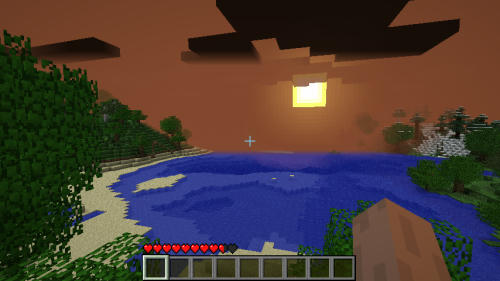
Ever wanted to change the atmosphere of your world? Maybe some dark, stormy clouds. Or an eerie green sky over an alien terrain. Well, now you can!
This is my first plugin, so please leave some feedback if it was useful to you.
Features:
- Change sky, fog, and cloud color!
- Set sunny and raining/storm colors!
- Multiworld support!
- Config included (doesn't auto-create, so use it to change the colors). A simple, online RGB color wheel can be found at http://www.colorspire.com/rgb-color-wheel/
Instructions:
- Download from the link to the right or below
- Extract SkyPlus.jar and SkyPlus folder into the server plugins folder
- Edit config.yml to setup each of your worlds
Alternate Download:
Required:
- Spout plugin for server - (tested and recommended with Spout 1.0.5.227)
- Spoutcraft client - (tested and recommended with Spoutcraft 1.0.5.262)
Known issues:
Clouds don't fade at night, resulting in strangely glowing clouds.I've included a temporary fix in v1.2. In the config, set useCloudColors: false to reset the clouds to default Minecraft colors, which includes fading at night. Unfortunately, this means you cannot have colored clouds while using this setting. This does not affect the fog color, though, so you can still have a colored sky.- Certain Spout dev builds seem incompatible with SkyPlus. View the Required section above for best builds.
Pictures:

Changelog:
v.1.2.3 - Re-added sky color settings to config, cleaned up code a bit
v1.2.2 - Fixed packet error for non-Spoutcraft users
v1.2.1 - Changed config to use standard RGB color range (0-255)
v1.2 - Temporary fix for glowing night clouds, removed useless sky color settings from config, useDefaultColors now actually resets colors to Minecraft defaults
v1.1 - Added multiworld support, rain/storm colors
v1.0 - Initial release
Comments

-

_ForgeUser6978344 Owner
-
View User Profile
-
Send Message
Posted Mar 13, 2017I'm quite sure it's not possible to replicate what this plugin did just by looking at the age of it (minecraft most likely changed).
If you still need to modify your sky I have written a plugin that can do that. Compatible with Bukkit 1.8-1.11. You can check it out on Dev Bukkit.
-
View User Profile
-
Send Message
Posted May 22, 2013Please update!!!
-
View User Profile
-
Send Message
Posted Apr 11, 2013I want update of this. :(
-
View User Profile
-
Send Message
Posted May 14, 2012@yasemonkey
there is already a solution intergre him in the game even precisely in seting video
-
View User Profile
-
Send Message
Posted Dec 31, 2011Seems to be functioning fine on 101R1 - however it will spam the console if any player steps foot in an end portal block.
-
View User Profile
-
Send Message
Posted Nov 13, 2011Can't wait for this to be updated.
-
View User Profile
-
Send Message
Posted Sep 27, 2011it would be nice to add some kind of examples of colors
-
View User Profile
-
Send Message
Posted Sep 13, 2011@BluXDragon
You would probably want to first setRenderDistance, followed with setMaximumRenderDistance and setMinimumRenderDistance to make sure the player can't change it. I haven't tested it myself, but I suspect that would be the way to go.
-
View User Profile
-
Send Message
Posted Sep 6, 2011Would it be possible to create a force-view-distance function?
I've seen plugins that set peoples viewdistances, but they can just change it back.
-
View User Profile
-
Send Message
Posted Sep 1, 2011Lol.... -_-
-
View User Profile
-
Send Message
Posted Aug 30, 2011@yasemonkey
Use SpoutCloudRemove
Or, use SpoutEssentials and raise the clouds above the build limit. ;)
-
View User Profile
-
Send Message
Posted Aug 28, 2011Is there any way you can remove clouds or make them invisble? That'd be awesome for my skycity! Great mod btw
-
View User Profile
-
Send Message
Posted Aug 28, 2011looks good!