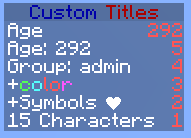
SideBar
~ This plugin aims to give you complete control of the scoreboard/sidebar.


- More than 100 variables
- Color and UTF-8 symbol support: ❤
(see here to convert UTF-8 to ascii for yml)
- Dynamically updating sidebar
- Set a sidebar to appear in certain worlds
- Have per group sidebars
- Optionally allow users to choose what sidebar to use
- Use commands to manage a player's sidebar
- Use in-built scripting to change user's sidebar or add new variables
- Group Specific Sidebar Permissions. Add & remove permissions for certain sidebars at your command
- No database required
Click here for a list of {variables}

The installation process is easy. Simply put this plugin, as well as Vault into your plugin directory and restart your server.
Dependencies
This plugin requires Vault - Click here to download it if you don't already have it.

Several files/folders are created upon installation.
config.yml
| Setting | Description | Default Value |
|---|---|---|
| version | The plugin version (do not change) | version dependent |
| scripting.directory | The location to use for custom scripts | scripts |
| scripting.sidebar-directory | The location of the sidebar files | scoreboards |
| multiworld.<world>.sidebar | The sidebar to use for that world (set to false for no scoreboard) | default |
| sidebar.autoupdate.whitelist | A list of placeholders which should update (add your own here) | some big list |
| sidebar.auto-update.enabled | Whether the scoreboards should update, or simply be static | true |
| sidebar.interval-ticks | How often to update a scoreboard (20ticks=1s) | 20 |
| sidebar.async | Do not mess with this unless you know what you are doing | false |
| language | What yml file to use for the language messages | english |
| compatability-mode | Whether other scoreboard plugins should be allowed to disable this scoreboard | true |
english.yml
- Not implemented yet :(
scripts folder
You will find two scripts already here.
To use the script "example.yml" simply put "{example}" in your scoreboard file
To use the script "test.js" simply put "{js:test.js}" in your scoreboard file
To add your own script, create a new .yml or .js file in the scripts directory
For outdated information on scripting, click here.
Click here for a list of {variables}
scoreboards folder
| Setting | Description | Examples |
|---|---|---|
| title | The title (appearance) of the scoreboard | e.g. "Ranks" |
| permission | The permission node required to use this scoreboard | e.g. sidebar.use.ranks |
| description | A short description of the scoreboard | e.g. "Cost of different game ranks" |
| keys | Keys are the values on the left of the scoreboard They can be anything less than 16 characters You can have placeholders in a key | e.g. Money: ${money} or just "Money:" |
| values | This is the right side of the scoreboard Scoreboard elements are automatically sorted in descending order If you want something on top, it needs a large value You can only put numbers here or something that resolves to a number | e.g. 5 {money} |
Adding your first scoreboard:
1. Navigate to the scoreboards folder
When the plugin loads for the first time, it will create a folder (in your plugins directory) called SideBar
- Within here you will find the scoreboards folder (as well as the config.yml)
2. Create a new yml file
An example scoreboard (example.yml) should also be present.
It is recommended that you copy this file and base your new scoreboard off this.
Here is the example scoreboard file opened in NP++:

3. Changing the title
Set the title key to whatever you want the label to be for the scoreboard.
- e.g. title: "Stats:"
4. Add a permission node
Set the permission key to the permission node required for a user to use that scoreboard.
- e.g. permission: sidebar.use.myfirstscoreboard
5. Add a description
Set the description key to a brief explanation of the purpose of the scoreboard so that players will know what each scoreboard does.
(Useful if you want to allow users to set their own scoreboard using commands)
6. Add scores
The scores which will be visible on the scoreboard are under keys and values
Some things to note about scoreboard behavior:
- Each score is comprised of a String (some text) and an Integer (a whole number)
- Currently the length of the String cannot resolve to be longer than 15 characters.
- Scores are automatically sorted in descending order (client side)
(The score with the highest Integer value will always be on top)
Things you can use for "keys":
- Plain text e.g. Hello
- Color codes e.g. &6Hello
- Variables e.g. Hello {player}
- Unicode symbols e.g. \u2764 (ASCII equivilent of ❤)
See here for a list of variables
See here to convert UNICODE symbols to ASCII
Things you can use for "values":
- Whole numbers e.g. 6
- Variables e.g. {age}
- Expressions e.g. 15*6+4
(You may have variables within an expression)
(The result must evaluate to a whole number however)
6. Add the scoreboard to the config
Open the config.yml
For each map there will be a sidebar option.
- Set the sidebar/scoreboard for each world using this option.
- Set sidebar to the name (not including .yml) of the scoreboard file.
- e.g. If your scoreboard file is called custom.yml you may have sidebar: custom
7. Add your own dynamic variables
See here for help on creating your own variables

| Command | Description | Permission |
|---|---|---|
| /sidebar help | Shows a list of commands | none |
| /sidebar set <sidebar> | Set your sidebar | sidebar.set +node for specific scoreboard |
| /sidebar set <sidebar> <player> | Set someone's sidebar | sidebar.set.other |
| /sidebar list | Shows a list of scoreboards | sidebar.list |
| /sidebar reload | Reloads the configuration | sidebar.reload |
[TODO]
Tell me if you want a feature added
- Sidebar setting for groups/permissions (Vault Required for Group Permissions, if vault is not found it will revert to bukkit based permissions)
- World grouping
- Command to hide sidebar
- Empty sidebar will not display
- Priority option for group/permission/world sidebars.
- Command to preview a sidebar (in chat)
- Command to browse placeholders
- Command to set variables
- Command to view a player's current sidebar
- Command to view a world's default sidebar
Latest build can be found here:
| Repository | Status | Extra Info |
|---|---|---|
| Subproject | Not Stable (Mostly alpha/beta builds) | |
| Masterproject | Stable (Stable Beta/Release builds) |
Comments

-

boydti Owner
-

Fang_Shadow Author
-
View User Profile
-
Send Message
Posted Sep 10, 2014Could you make a tutorial on this please? I'm very confused by all of this
-
View User Profile
-
Send Message
Posted Aug 25, 2014@Empire92
Thanks, work harder! :D
-
View User Profile
-
Send Message
Posted Aug 25, 2014@z65703071 Scoreboard Stats does some fancy protocol stuff to make it compatible, which I am not sure how to do at the moment. I could take a look at some point and see if I could apply it to this plugin, but it could be a while.
-
View User Profile
-
Send Message
Posted Aug 24, 2014Hey, dudes. Is it possible to set multi-private sidebar? I'm here to leave a suggestion, I got it from scoreboardstats and info-bard. Once I installed scoreboardstats while installed info-board. I found it that they didn't conflict with and also work together. When I use command /ib hide to hide info-board after another would display. Of course I can use /ss to hide scoreboardstats and that all just for individual. However, the main point is nothing author of scoreboard plugin has try to research it. So I hope you can think over it. :) That's awesome and never seen before.
-
View User Profile
-
Send Message
Posted Aug 16, 2014Don't you add a command with /sidebar hide? :D
-
View User Profile
-
Send Message
Posted Aug 15, 2014v0.1.0:
Adds ALL the placeholders
+ enjin
+ factions
+ essentials
+ vault
* Documentation coming soon!
Proper auto-updating
Multiworld support
Permissions
Commands
I apologise for the lack of documentation.
-
View User Profile
-
Send Message
Posted Aug 12, 2014@z65703071 I haven't quite finished, but here's a preview image:

Image link
-
View User Profile
-
Send Message
Posted Aug 12, 2014@z65703071 It looks like I will be able to upload something at the end of this week which will have the basics.
My last attempt at making this kinda fell flat and didn't achieve the level of control over the scoreboard that I wanted.
-
View User Profile
-
Send Message
Posted Jun 13, 2014Such a good plugin but no finish...... I wait so long time :( I really hope this plugin will work!
-
View User Profile
-
Send Message
Posted May 10, 2014It seem is a difficult job :( Expecting
-
View User Profile
-
Send Message
Posted May 6, 2014can you make {jobs} ?
greets Dave
-
View User Profile
-
Send Message
Posted Apr 20, 2014@z65703071 This plugin isn't fully functional yet. I told you that I was working on getting it to work properly with scoreboards.
-
View User Profile
-
Send Message
Posted Apr 20, 2014I looked but still don't know how to use this plugin.
I think that same useful with your other project. I'm expecting the tutorial. :)
(ps: installed inme,insign,inholo and this!)
-
View User Profile
-
Send Message
Posted Apr 4, 2014@madtomic
Yes, but the plugin doesn't really do much ATM
-
View User Profile
-
Send Message
Posted Apr 3, 2014Can it be use on cb1.7.2-r0.3?
-
View User Profile
-
Send Message
Posted Apr 2, 2014о да:)
-
View User Profile
-
Send Message
Posted Jan 21, 2014@server075
There's still a lot I need do for my other projects.
-
View User Profile
-
Send Message
Posted Jan 21, 2014anything new your looking to make next?
-
View User Profile
-
Send Message
Posted Jan 21, 2014@server075
Yeah, I've just lost interest in this project.
-
View User Profile
-
Send Message
Posted Jan 21, 2014This project has become inactive.
That's Fast,...