Shop
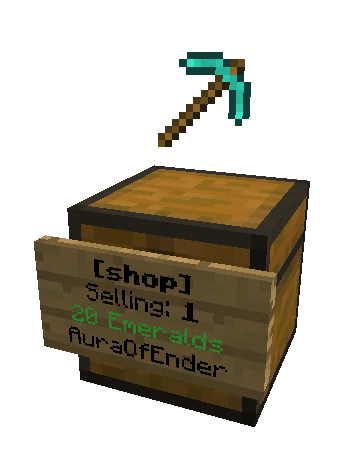
Shop allows users to quickly create shops to buy and sell items with little effort and no commands to type!
By simply placing a sign in front of a chest, players can create their own shops to buy or sell items!
IMPORTANT:
SHOP IS NO LONGER BEING UPDATED ON BUKKIT.
(You need to create an account on Spigot to view the link)
Features:
- No commands required.
- No permissions required. (But are supported)
- Shops visually display the item they are selling.
- Compatible with Tekkit.
- Plug and Play.
Have a question? Please read these first.
Optional Commands:
/shop list - displays how many shops exist on the server.
/shop refresh - refreshes the display items on all of the shops. (Requires operator permission)
Conflicting Plugins:
PersonalPickup
BlockPickup
Shop Permissions (optional)
shop.use - allows player to use shops
shop.create - allows player to create shops
shop.destroy - allows player to destroy shops
shop.operator - allows player to bypass shop restrictions and regulations
Shop is by far the easiest to use shop plugin to date and is also the most fun. People on your server will not be able to get enough!
This plugin uses an auto-update system which will detect if your plugin is out of date and automatically download the latest version of the plugin. Learn how to disable this service.
This plugin uses plugin metrics, which collects information and sends it to mcstats.org. You can disable this via /plugins/PluginMetrics/config.yml if you do not wish to participate in the data collection. Learn more about it here.
I have put many hours of work into this plugin and it is my hope than anyone who enjoys the features it brings to their server will donate.


Comments


-

_ForgeUser8285083 Owner
-
View User Profile
-
Send Message
Posted Jan 25, 2014@SireChicken
when do they duplicate?
-
View User Profile
-
Send Message
Posted Jan 25, 2014@SpyMaster356
The shop destroying now works, but the items still duplicate ^^
-
View User Profile
-
Send Message
Posted Jan 25, 2014@SpyMaster:
"That should work, could you post a line to a pastebin of your config file?"
I haven't even any idea what a pastebin is, but if you let me know I will make it happen.
By the way, am I the only one this is happening to? I haven't read anything about people not being able to change 'SHOP' currency.
Anyhow, here is my config file settings below.
AUTO-UPDATE: false
usePermissions: false
Economy:
useVault: false
itemCurrency (non-vault): LAPIS_BLOCK
displayName: Blue Dollar
currencyToStartWith: 0
maxDurabilityMargin: 5
-
View User Profile
-
Send Message
Posted Jan 25, 2014Fixed... again
Jar: https://github.com/SpyMaster356/Shop/blob/master/shop.jar?raw=true (v1.4.7.s2)
Git fork: https://github.com/SpyMaster356/Shop
DISCLAIMER: This is a modified version of the plugin. It will not be supported by SnowGears, It has not been checked by Bukkit Staff, use at own risk.
-
View User Profile
-
Send Message
Posted Jan 25, 2014Hello all,
@FingersMeller "Also, when I remove a shop sign the shop stays and I cannot destroy it. I downloaded and am using v1.7.4s1."
That is very strange... that was the original bug i fixed. i will go check that.
@FingersMeller "I am not sure what "Git fork" is so I skipped it."
A Git Fork is a copy of source code
@FingersMeller "Personally I am trying to get the shops to use Lapis blocks as currency, but nothing I seem to do makes a difference."
That should work, could you post a link to a pastebin of your config file?
@FingersMeller "Thanks man, I really do appreciate it. :)"
No problem.
@DarkEmpreror334512 "When I click a sign it says: 'This shop doesn't contain enough rupies.' "
Did you setup a Buying shop? if you did you need to put some currency in the chest.
-
View User Profile
-
Send Message
Posted Jan 25, 2014@DarkEmpreror334512
rupies is just how the currency is called, it's still payed for with emerelds unless you changed it. And I never seen the second error, but I guess depending on what shop you created, buy, sell or admin. You might have to put some items in the chest first if you want to buy something. Plus you have to have enough emeralds in your inventory.
-
View User Profile
-
Send Message
Posted Jan 25, 2014I need help somebody help me pls :( When i place a chest and i do shop 1 20 ist says 20 rupies,not emerlads.Whaen i click a sign it says:This shop doesnt contain enough rupies.Plssss help guys i can find a shop plugin give me one or help me with this pls :(
-
View User Profile
-
Send Message
Posted Jan 25, 2014@SpyMaster,
Wow, I can't believe how far you have brought this pluggin SpyMaster. Unfortunately, I am afraid that the problem with changing shop currency to anything other than Emeralds still persists.
Personally I am trying to get the shops to use Lapis blocks as currency, but nothing I seem to do makes a difference.
Also, when I remove a shop sign the shop stays and I cannot destroy it. I downloaded and am using v1.7.4s1. I am not sure what "Git fork" is so I skipped it.
I know you have taken on quite a bit here, but would greatly appreciate you looking into.
Thanks man, I really do appreciate it. :)
-
View User Profile
-
Send Message
Posted Jan 24, 2014I apologize for breaking the plugin.
Fixed Jar: https://github.com/SpyMaster356/Shop/blob/master/shop.jar?raw=true (v1.4.7.s2)
Git fork: https://github.com/SpyMaster356/Shop
DISCLAIMER: This is a modified version of the plugin. It will not be supported by SnowGears, It has not been checked by Bukkit Staff, use at own risk.
-
View User Profile
-
Send Message
Posted Jan 24, 2014@yanniclord
:D
-
View User Profile
-
Send Message
Posted Jan 24, 2014@yanniclord
Yes. I will have time to fix it tonight (around 6:30pm EST)
99 bugs in the source, 99 bugs in the source, take one out, patch it out,
107 bugs in the source, 107 bugs in...
-
View User Profile
-
Send Message
Posted Jan 24, 2014@SpyMaster356
So..... can you fix it?
-
View User Profile
-
Send Message
Posted Jan 24, 2014@yanniclord
Found out why the shops are not loading... I added some code that updates the shops.yml file on creation... and deletion...
PSA: My JAR is broken.
-
View User Profile
-
Send Message
Posted Jan 24, 2014@yanniclord
I thought i fixed that... :|
-
View User Profile
-
Send Message
Posted Jan 24, 2014Ahh SkyMaster356 is now a Contributor, nice, congrats :D Well then i hope you can rewrite the plugin, and fix the issues with loading at boot and items not being showed items, but actual items you can pickup :D
-
View User Profile
-
Send Message
Posted Jan 24, 2014Uhm SkyMaster356, little problem here, not only do the shops unload after reboot, but if they actually stay loaded, they showed items ontop, get to real items, that people can pickup. Its like a free test shop o_O Do you mind fixing that to, along with the unloading of shops? Thanks :D
-
View User Profile
-
Send Message
Posted Jan 23, 2014@UknoWHO123
you have to use Notepad to edit it. That was the fix for me anyhow.
-
View User Profile
-
Send Message
Posted Jan 23, 2014Hi there, I know to most of you this is a completely retarded question, which doesn't change the fact that I still don't really know how to use those Shop permission.
For example so that I am the only one able to create shops.
Thankful for any help or advice.
And I downloaded the latest Version from SkyMaster356 but those Items (the ones displaying above the chests) still keep duplicating at least for me.
-
View User Profile
-
Send Message
Posted Jan 23, 2014Thanks to snowgear for this marvelous plugin !
Thanks to Spymaster356 for his help !
I have a problem with last version, strange problem, just look at log :(
And config file :
What do you think about it ? (i use spigot, lockette and pluginmanager)
-
View User Profile
-
Send Message
Posted Jan 22, 2014I cannot express how amazing this plugin is! EVERY OTHER PLUGIN REQUIRES A CURRENCY SYSTEM. This is simply amazing. I love this!