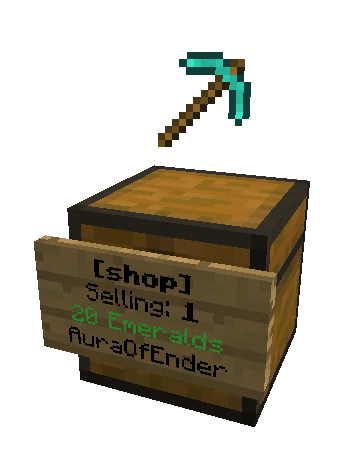
Shop
Shop allows users to quickly create shops to buy and sell items with little effort and no commands to type!
By simply placing a sign in front of a chest, players can create their own shops to buy or sell items!
IMPORTANT:
SHOP IS NO LONGER BEING UPDATED ON BUKKIT.
(You need to create an account on Spigot to view the link)
Features:
- No commands required.
- No permissions required. (But are supported)
- Shops visually display the item they are selling.
- Compatible with Tekkit.
- Plug and Play.
Have a question? Please read these first.
Optional Commands:
/shop list - displays how many shops exist on the server.
/shop refresh - refreshes the display items on all of the shops. (Requires operator permission)
Conflicting Plugins:
PersonalPickup
BlockPickup
Shop Permissions (optional)
shop.use - allows player to use shops
shop.create - allows player to create shops
shop.destroy - allows player to destroy shops
shop.operator - allows player to bypass shop restrictions and regulations
Shop is by far the easiest to use shop plugin to date and is also the most fun. People on your server will not be able to get enough!
This plugin uses an auto-update system which will detect if your plugin is out of date and automatically download the latest version of the plugin. Learn how to disable this service.
This plugin uses plugin metrics, which collects information and sends it to mcstats.org. You can disable this via /plugins/PluginMetrics/config.yml if you do not wish to participate in the data collection. Learn more about it here.
I have put many hours of work into this plugin and it is my hope than anyone who enjoys the features it brings to their server will donate.


Comments


-

_ForgeUser8285083 Owner
-
View User Profile
-
Send Message
Posted Jan 11, 2014@yanniclord
I have made pull request on SnowGear's git hub that fixes these issues. The custom jar is here: Link Removed: http://www.mediafire.com/download/pz20qpwkwdh3kgg/shop.jar , my Git fork is here, https://github.com/SpyMaster356/Shop, a random cat is here: http://thecatapi.com/
NOTE: My jar will not be supported by SnowGears, and use at own risk
-
View User Profile
-
Send Message
Posted Jan 10, 2014I can surely make a ticket. Not working is just the Chests that cant be removed after a shop has been made, and at server reboot, the shops dont work anymore.
-
View User Profile
-
Send Message
Posted Jan 9, 2014Hi
Can we have an update that fixes the inability to destroy Chests after destroying the shop sign.
Thanks OmniTitan
-
View User Profile
-
Send Message
Posted Jan 5, 2014Please make this work for trapped chest too!!!!
-
View User Profile
-
Send Message
Posted Jan 3, 2014Note to everyone: I am working on fixing bugs for the next update but it is hard to do this when nobody takes the time to create tickets. When I do bug fixes I go through the tickets and check them off as I fix each one. Commenting bugs will sometimes get my attention if I am already coding but it is hard to go through comments to fix bugs. If you want a bug fixed, please check the tickets to see if it has already been reported and if it has not, create a ticket for it and I will get to it as soon as possible. Thank you.
-
View User Profile
-
Send Message
Posted Jan 2, 2014Why is it that once i change a setting in the config file bukkit complains and fails to load the config. Can any body explain it please???
-
View User Profile
-
Send Message
Posted Jan 1, 2014My shops just completely reset for the 3rd time without me installing or changing anything in the past week. On top of display items duplicating and being picked up, and /shop conflicting with other plugins... I need to find a new plugin :(
Really sucks because this one is so easy for players to setup. Just need reliability ;(
-
View User Profile
-
Send Message
Posted Jan 1, 2014@nullschritt it must be incompatible with other plugins you have I guess, the current version works for me except for some minor bugs
-
View User Profile
-
Send Message
Posted Dec 31, 2013I can't ceate a shop ! when I do /shop list he say me ... 0 shop so the plugin is installed, but don't work correctly !
-
View User Profile
-
Send Message
Posted Dec 30, 2013Loved this plugin in previous versions! However... the latest version, produces an error in console when setting the shop item. "Cannot pass player interact event to shops"
Please fix this (:
-
View User Profile
-
Send Message
Posted Dec 29, 2013Have same issue as kiracookie below.
Also, the floating items above chests are duplicating for some reason, and when they duplicate everyone can actually pick them up... they have name "DisplayItemXXX"
-
View User Profile
-
Send Message
Posted Dec 29, 2013I also wanted to mention in the Shop v. 1.4.7, when you break the shop sign then try to remove the chest, the chest still says that you have to remove the sign even though it's already been broken.
The only work around to this problem I've discovered is reloading the whole server and then trying to break it.
-
View User Profile
-
Send Message
Posted Dec 29, 2013I'm just saying, the buying and selling things gets a little confusing. Usually when a player owns a sell shop, you would think the player's name on the bottom is selling you the item and when the player owns a buy shop, the name on the bottom is buying the item.
Do you think you could reverse that or something?
-
View User Profile
-
Send Message
Posted Dec 27, 2013je n'arrive pas a la configue pour utiliser en $ a la place de emerode quelque peux me faire un copier coller de son fichier texte Config merci
le mien :
Thanks for downloading Shop! # ——————————————————————————————# AUTO-UPDATE: true
usePermissions:
false
If you want to use virtual money, install the plugin Vault and set ‘useVault to true # For itemCurrency, see http://jd.bukkit.org/rb/apidocs/org/bukkit/Material.html #
Economy: useVault 'true # itemCurrency false : emerode displayName: Rupee
currencyToStartWith: 0
Allowable percent difference in durabilities of items in shops # maxDurabilityMargin: 5
-
View User Profile
-
Send Message
Posted Dec 27, 2013@SnowGears
Still no ETA for the update for trading items for items :) ?
-
View User Profile
-
Send Message
Posted Dec 25, 2013How exactly does the shopsBackup file work? Mine hasnt updated for 10 days. Also, please create an alias or something aside from /shop - it conflicts with BossShops... :(
-
View User Profile
-
Send Message
Posted Dec 24, 2013This will not work for me either.
No console errors. I can't do /shop But can do /shop list, this reads there are 0 shops.
-
View User Profile
-
Send Message
Posted Dec 23, 2013@MCJackJ
Any error-messages in your console?
-
View User Profile
-
Send Message
Posted Dec 23, 2013Doesn't seem to work for me. I followed the tutorial exactly. I tried an admin buy/sell shop and a normal player buy/sell shop, none of them work? When I put up the sign, it's just plain text. I've tried left/right clicking the sign, also while holding shift to sneak, nothing seems to work for me.
-
View User Profile
-
Send Message
Posted Dec 22, 2013The shops now work after I deleted the chests and replaced them.
but even though the signs dont go blank, the items multiply on the top and can be picked up. How to stop this? and says display7384908234092 numbers.