
Shopkeepers

Set up custom villager shopkeepers that sell exactly what you want them to sell and for what price. You can set up admin shops, which have infinite supply, and you can also set up player shops, which pull supply from a chest.
It will also prevent any other trades with non-shopkeeper villagers, if you want it to.
For those who are simply looking for a convenient way to modify the trades of vanilla villagers (as an alternative to using complex Minecraft commands), the plugin also includes a graphical editor for regular villagers and wandering traders.
Basic Features
- Easily create villager shopkeepers that trade the items you want them to trade.
- Admins shops with infinite supplies.
- Player shops which pull supplies from a chest.
- Different types of player shops: selling, buying, trading, and selling books.
- Various supported mob types to represent your shopkeeper, sign shops, and Citizens (NPC) shops.
- Editor for regular villagers and wandering traders.
- Many configuration options.
- Translatable messages.
- Open source (Source code on GitHub)
Supported server versions
Shopkeepers supports the latest versions of Bukkit / Spigot.
Note that this plugin is created to work with CraftBukkit (or alternatively Spigot). Bukkit does not have an API for some of the things necessary to make this plugin work. This means that other server software (Tekkit, Forge, Cauldron, etc.) will not work with this plugin.
Other CraftBukkit or Spigot derivatives/forks might work, but are not officially supported. So if you run into issues while using those, try to reproduce your issue on a fresh and up-to-date Spigot server first.
Getting started
All documentation can be found in the wiki:
- Downloads and changelogs for all files
- Installation
- Translations
- Configuration
- Permissions
- Creating shops
- Commands
- Frequently Asked Questions
Showcase
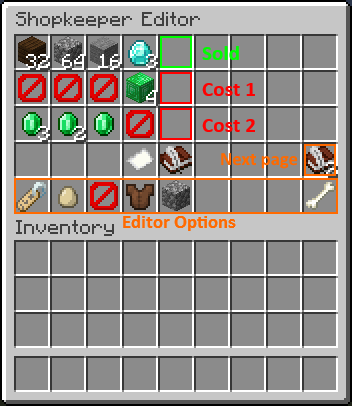
Admin shops:
Configure the trades via the in-game inventory menu:

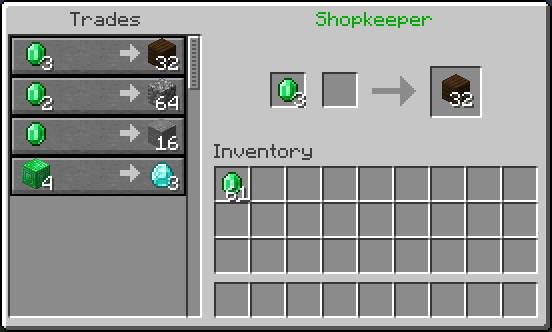
Resulting trading menu:

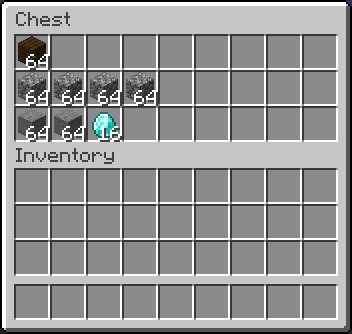
Player shops (ex. selling items):
Fill the shop chest with supplies:
Configure the trades via the in-game inventory menu:
Resulting trading menu:
Video Tutorials
More video tutorials can be found in the wiki: https://github.com/Shopkeepers/Shopkeepers-Wiki/wiki/Video-Tutorials
Tutorial by Donnie, explaining the setup of the different shop types:
Tutorial by Fan Staaff showing the setup of the different shop types in detail:
Tutorial by LastKing2X,showing the setup of the different shop types:
Spanish tutorial by Ajneb97, also mentioning placeholder items and various config options:
Statistics
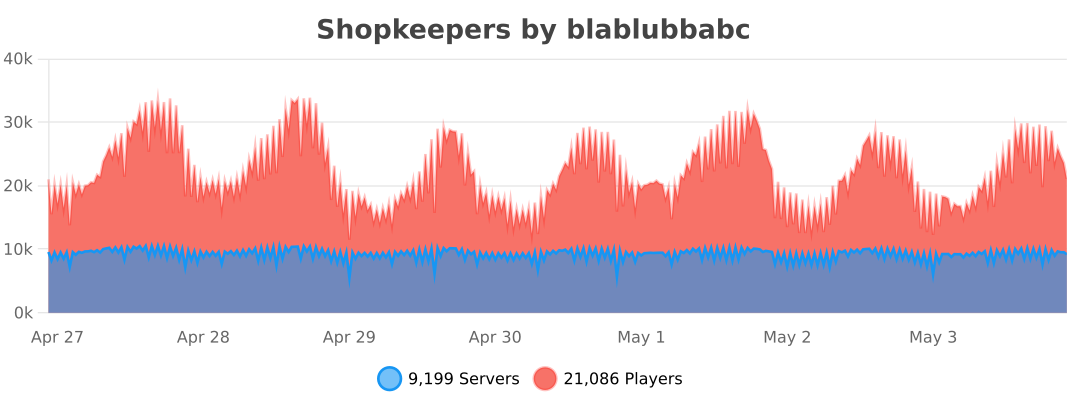
This plugin uses bStats to collect anonymous plugin usage statistics. This helps me to determine how many servers are using the plugin, which Minecraft versions it is used with the most, and to which degree the different features are used.
Here is a list of all currently tracked information:
- Common information: The number of servers using the plugin, the number of players on these servers, online mode, Minecraft version, plugin version, core count, system arch, operating system, server country, Java version.
- Shopkeepers specific information: Whether specific related plugins are used (Citizens, Towny, WorldGuard, Gringotts, other Vault economy plugins), number of shops, whether player shops are used, whether certain features are enabled in the config (ex. WorldGuard/Towny compatibility, Citizens shops, delayed saves, colored names, chest protection, removal of inactive shops, tax rate, strict item comparison, purchase logging, disabling of other villagers, ..), the number of worlds containing shops.
- All information can be publicly viewed here: https://bstats.org/plugin/bukkit/Shopkeepers/
If you want to disable bStats for all plugins on your server, edit the file plugins/bStats/config.yml, or alternatively disable it only for Shopkeepers by setting 'enable-metrics' to 'false' inside the Shopkeepers config.
Known potential issues
A list of known potential issues of the latest version of Shopkeepers can be found in the wiki: This documents differences between Minecraft/Spigot versions, and existing Minecraft/Spigot issues related to Shopkeepers.
If you run into an issue, check if this list already contains and maybe offers information on how to handle it.
Have issues or further questions?
If you have a pressing issue or simple question, you can join the discord server and ask other plugin users for help:

But submitting a ticket is the best way to get help or report a problem with the plugin.
Before submitting a ticket:
- Check if your question is already answered in:
- The documentation (wiki).
- The FAQ.
- The Known Issues.
- Check if there is already another ticket for your issue.
Before reporting an issue:
- Try to reproduce your issue when using:
- The latest versions of Spigot and Shopkeepers.
- No other plugins.
- No kinds of other server or client mods.
When reporting an issue:
- Provide the versions you are using of Minecraft, Spigot and Shopkeepers.
- Provide a detailed description of your problem and add as much information as possible which could help reproducing the issue.
- If possible, include step-by-step instructions on how to reproduce the issue on a fresh Spigot server.
Donations
If you like this plugin, consider supporting its developers by making a donation:
- To blablubbabc (current maintainer: Dec 2013 - today)
- To nisovin (former author: Aug 2012 - Dec 2013)
A big "thank you" to everybody who is keeping the motivation up through donations!
| Minecraft-Servers-Listing.com | TRS Game Servers | terminalserver.us |
| Minewind | mercurialmusic | timitimitimi |
| FatherWh0 (merchantvillages.com) | lukeeexd (tws-mc.com) | PapaJuan |
| EmeraldHaze (Ninjalette) | Espen | kbtalkin |
| Dimo (Beyond Vanilla) | RefugiaCraft | Frilioth |
| Tabletopcheese | Observant Minecraft Server | Ren B. |
| BadWolfMC | Michael M. | Alejandro A. |
| Michael B. |
Want to help?
Whether you are a programmer or not, there are many ways in which you can contribute! For example:
- Help users with issues and questions on Github, Discord, or the comment section.
- Create and update translations.
- Keep the documentation (the wiki) up-to-date with plugin updates.
- Write or maintain add-on plugins (see the open Github issues).
If you are interested or have other ideas on how you can contribute, feel free to contact me via PM.
Add-On Plugins
Sometimes, a feature is either to specific to include directly into the Shopkeepers plugin, or I did not yet have the time to add something similar myself. You can find a list of both official and third-party add-on plugins that extend the functionality of the Shopkeepers plugin in the wiki: https://github.com/Shopkeepers/Shopkeepers-Wiki/wiki/Add-On-Plugins
If you have also written an add-on plugin that you want to add to the list, let me know!
Comments


-

blablubb Owner
-

_ForgeUser8274522 Author
-
_ForgeUser9352339 Translator
-

nisovin Author
-
View User Profile
-
Send Message
Posted Mar 5, 2016Can you add 2 more options?
1. Shops will be deleted after x amount of time if a shop owner doenst do anything with his shop. Like adding times because the shop is empty.
2. The plugin sends a message x amount of times a week to the player that one of his/her shops is empty. Or everything he/she comes online on the server.
i didnt check the config/plugin if this option is already there :) Eating and thinking about things i like to have :)
-
View User Profile
-
Send Message
Posted Mar 5, 2016@Dutch_Boy
It will remove the player shopkeepers after the configured amount of days the player hasn't been online anymore.
-
View User Profile
-
Send Message
Posted Mar 5, 2016player-shopkeeper-inactive-days: 0
Does this option remove the shopkeeper after lets says 30 days?
-
View User Profile
-
Send Message
Posted Mar 5, 2016Notice about an issue related to MC 1.9
MC 1.9 has changed how the different spawn eggs are differentiated internally. All spawn eggs now have the data value 0 and there is no API in bukkit yet which would allow me to check which type of spawn egg a player is holding.
In order to get the shop creation via item working for now, you will have to either change the data value of the shop creation item to 0 (which will however let ALL types of spawn eggs act like the creation item), or you change the creation item type all together.
-
View User Profile
-
Send Message
Posted Mar 3, 2016lovely update!
-
View User Profile
-
Send Message
Posted Mar 1, 2016Ha your awesome! we love you!! Ty for the updates man! Greatly appreciated <3
-
View User Profile
-
Send Message
Posted Mar 1, 2016@blablubbabc
thanks for updating to 1.9 :)
-
View User Profile
-
Send Message
Posted Mar 1, 2016@Darunia18
If you subscribe to file updates, you should get the direct link right when I upload the file. For everybody else it will become visible once it has been approved by dbo staff.
-
View User Profile
-
Send Message
Posted Mar 1, 2016@blablubbabc
Is there a place we can download the jar before it's posted on here?
-
View User Profile
-
Send Message
Posted Mar 1, 2016@blablubbabc
As always, thanks for the very swift updates :D
-
View User Profile
-
Send Message
Posted Mar 1, 2016v1.69 for MC 1.9.x, 1.8.x, 1.7.10
@sleite
I will look into this.
-
View User Profile
-
Send Message
Posted Mar 1, 2016We all know what a great dev blablubbabc is, so I'm sure as soon as he has a chance he will fix the 'Spigot ate my server' issues :D
-
View User Profile
-
Send Message
Posted Feb 29, 2016Please update to 1.9
-
View User Profile
-
Send Message
Posted Feb 29, 2016Will you be updating for 1.9 .. this is one of my favorite plugins so simple/easy to use as an owner for the server shops! <3 I just updated our server but we miss our shops! Thanks love this plugin!
-
View User Profile
-
Send Message
Posted Feb 29, 2016@sleite
What would be even better is: /shopkeepers tp 5
Or some similar format for getting to a shop to administer it.
-
View User Profile
-
Send Message
Posted Feb 29, 2016Suggestion
When you type the command /shopkeepers list admin
It lists information with co-ordinates. Under object type is shows "Citizen". While nice, it's not terribly useful. What I'd like to see is "Citizen [5]". This way I can use the commands:
/npc sel 5 /npc tp
To quickly get to the shop.
Unless ... am I missing another approach to this?
Kind Regards,
-
View User Profile
-
Send Message
Posted Feb 28, 2016@frizzbee30
Maybe it uses some item which doesn't get displayed by minecraft anymore in newer versions. I think the default item was changed to 'bone' some time ago. You can manually change it to that to in the config.
-
View User Profile
-
Send Message
Posted Feb 28, 2016@blablubbabc
Thanks, strangely I only get the GUI for change name ad change shopkeeper for quite a few of the admin shops, hence it seems to be 'stuck' :)
edit ok sorted, menu option wasnt showing but was there, hence I had forgotten about it :D Thanks again
-
View User Profile
-
Send Message
Posted Feb 27, 2016@Telbaru
I might, in the future. I tried doing some things with sponge a bunch of weeks ago, but lots of things I tried to do weren't implemented yet, if I remember correctly. I will very likely look into it again, but not right now.
-
View User Profile
-
Send Message
Posted Feb 27, 2016Hey :) is it possible that you rewrite that plugin for sponge?